当前位置:网站首页>Comprehensive and detailed SQL learning guide (MySQL direction)
Comprehensive and detailed SQL learning guide (MySQL direction)
2022-07-29 10:10:00 【Super seed code】
List of articles
data type
Numeric type
Integer types
At the time of calculation ,mysql Use bigint As the type of underlying calculation .
| name | The number of digits |
|---|---|
| tinyint | 8 |
| smallint | 16 |
| mediumint | 24 |
| int | 32 |
| bigint | 64 |
Fixed point number type
At the time of calculation ,mysql With 65 Bit accuracy complete .
| name | The number of digits |
|---|---|
| decimal(M,N) | M+2 |
Floating point type
At the time of calculation ,mysql Use double As the type of underlying calculation .
| name | The number of digits |
|---|---|
| float | 32 |
| double | 64 |
Properties of numeric type
| attribute | explain |
|---|---|
| unsigned | Integer types can be changed to unsigned form using this property , To achieve the purpose of expanding the scope |
| auto_increment | This attribute can be used for integer types , But this attribute does not support negative values of columns . The column constrained by the self growing column must be a primary key column or a unique key column , If the auto increment column specifies 0 and null, It will automatically increase based on the current maximum ; If the auto increment column manually specifies a specific value , Direct assignment to a specific value . |
String type
String types must be represented by single quotation marks .
Character unit string type
| name | explain |
|---|---|
| char(M) | M Indicates the length of this type ,M For the range of 0~255,char Columns of type will truncate the trailing space of the value |
| varchar(M) | M Indicates the maximum length of this type ,M For the range of 0~65535 |
| tinytext | Maximum length is 255 |
| text | Maximum length is 65535 |
| mediumtext | Maximum length is 16,777,215 |
| longtext | Maximum length is 4,294,967,295 |
Byte unit string type
This kind of string mainly stores some binary data , For example, you can store pictures 、 Binary data such as audio and video . In practice , Often not in MySQL Large object data is stored in the database , Usually the picture 、 Audio and video files are stored on the disk of the server , And put the picture 、 The access paths of audio and video are stored in MySQL in .
| name | explain |
|---|---|
| binary(M) | M Indicates the length of this type ,M For the range of 0~255 |
| varbinary(M) | M Indicates the maximum length of this type ,M For the range of 0~65535 |
| tinyblob | Maximum length is 255 |
| blob | Maximum length is 65535 |
| mediumblob | Maximum length is 16,777,215 |
| longblob | Maximum length is 4,294,967,295 |
Time type
Data of time type must be represented by single quotation marks .
| name | Format | The number of digits |
|---|---|---|
| year | yyyy | 8 |
| time | hh:mm:ss | 24 |
| date | yyyy-mm-dd | 24 |
| datetime | yyyy-mm-dd hh:mm:ss | 64 |
| timestamp | yyyy-mm-dd hh:mm:ss | 32 |
Properties of time type
| attribute | explain | Whether it will be abandoned |
|---|---|---|
| on update < time > | datetime and timestamp Type can use this attribute , The value changes to time | no |
Default values for data types
Explicit default
default Used to explicitly specify the default value of the data type , If the default value is an expression , You need to put parentheses around it ,blob and text The default value of type must be enclosed in parentheses . Literals can be used in expressions 、 Built in functions and operators .
default <const>|(<expression>)
Implicit default
If no default value is explicitly specified ,MySQL The default value of the column will be determined through the following steps :
- If the column can accept null As value , Then use null As default .
- If the column is defined with
not null, that mysql Define this column as a column without a default value , When adding or modifying data, you must pass in the value of this column .
Operator
Arithmetic operator
Arithmetic operators are mainly used for mathematical operations , It can connect two values or expressions before and after the operator , Add... To a value or expression (+)、 reduce (-)、 ride (*)、 except (/) And modulus (%) operation .
- Add 、 Subtraction rules : An integer type and an integer addition and subtraction result is still an integer ; An integer type value adds and subtracts floating-point numbers , The result is a floating point number ; Adding only means adding values , If a non numeric type is encountered , First try to convert to a value , If the transfer fails , Just press the 0 Calculation .
- ride 、 Division Rules : A number times an integer 1 And divided by an integer 1 After that, you still get the original number ; A number times a floating point number 1 And divided by floating point numbers 1 Then it becomes a floating point number , The value is equal to the original number ; A number divided by an integer , Whether or not we can eliminate , The result is a floating point number ; Divide one number by another , When there is no end to it , The result is a floating point number , And keep it after the decimal point 4 position ; A number divided by 0 by NULL.
Relational operator
Relational operators are used to compare the operands on the left and on the right of an expression , If the comparison result is true, it returns 1, If the comparison result is false, it returns 0, Other cases return to NULL.
- Equal sign operation rule : If the values on both sides of the equal sign are strings MySQL Will compare by string ; If the values on both sides of the equal sign are integers MySQL Will compare by integer ; If the value on both sides of the equal sign is an integer , The other is the string , be MySQL Will convert strings to numbers for comparison ; If the values on both sides of the equal sign 、 One of the strings or expressions is NULL, The comparison result is NULL.
- Safe equal sign operation rule : The function of the safe equal sign operator is similar to that of the equal sign , The only difference The safety equals sign can be used to NULL Judge . In both operands are NULL when , Its return value is 1, When an operand is NULL when , Its return value is 0L.
| Operator | explain |
|---|---|
| >、>=、<、<=、=、<> | - |
| <=> | NULL Safety equal sign |
| between and | Whether a value is within a value range |
| is null | Null value test |
| is not null | Non null value test |
| like | Simple pattern matching |
| regexp | Regular expressions |
| in() | Whether a value is within a set of values |
like wildcard
| wildcard | explain |
|---|---|
| % | % Means any character appears any number of times , Although it seems % Wildcards can match anything , With one exception , namely NULL. Trailing spaces may interfere with wildcard matching . |
| _ | Match a single character |
Regular expressions
| Special symbols | explain |
|---|---|
| . | Match any character |
| | | Regular expressions or operation |
| [a,c,b] | matching a or b or c |
| [0-9] | matching 0-9 The characters in |
| \ | escape |
| * | 0 One or more matches |
| + | 1 One or more matches ( be equal to {1,}) |
| ? | 0 Or 1 A match ( be equal to {0,1}) |
| {n} | A specified number of matches |
| {n,} | No less than the specified number of matches |
| {n,m} | The range of the number of matches (m No more than 255) |
| ^ | Start of text |
| $ | End of text |
Logical operators
Logical operators are mainly used to judge whether an expression is true or false , stay MySQL in , The return result of the logical operator is 1、0 perhaps NULL.
| Operator | explain |
|---|---|
| and | And |
| not | Not |
| or | or |
| xor | Exclusive or |
function
Functions can be divided into single line functions and multi line functions according to parameters and return values :
One line function
Single line functions can be nested .
mathematics
| function | explain |
|---|---|
| ABS(x) | return x The absolute value of |
| POW(x,y) | return x Of y Power |
| EXP(X) | return e Of X Power |
| SQRT(x) | return x The square root of . When X When the value of is negative , return NULL |
| LN(X) | Return to e At the bottom of the X The logarithmic , When X <= 0 when , return NULL |
| LOG10(X) | Return to 10 At the bottom of the X The logarithmic , When X <= 0 when , return NULL |
| LOG2(X) | Return to 2 At the bottom of the X The logarithmic , When X <= 0 when , return NULL |
| PI() | Returns the value of the pi |
| MOD(x,y) | return X Divide Y Remainder after |
| RAND(x) | return 0~1 The random value , among x The value of is used as the seed value , same X Values produce the same random number |
| ROUND(x) | Returns a pair x After rounding the value of , Closest to X The integer of |
| ROUND(x,y) | Returns a pair x The value of is rounded to the nearest X Value , And keep it after the decimal point Y position |
| TRUNCATE(x,y) | Return to digital x Truncated to y The result of decimal places |
Max min
| function | explain |
|---|---|
| CEILING(x) | Returns the smallest integer greater than or equal to a value |
| FLOOR(x) | Returns the largest integer less than or equal to a value |
| LEAST(e1,e2,e3…) | Returns the minimum value in the list |
| GREATEST(e1,e2,e3…) | Returns the maximum value in the list |
Hexadecimal conversion
| function | explain |
|---|---|
| BIN(x) | return x Binary code of |
| HEX(x) | return x Hexadecimal encoding |
| OCT(x) | return x Octal encoding |
| CONV(x,f1,f2) | return f1 The base number becomes f2 Hexadecimal number |
character string
MySQL in , The position of the string is from 1 At the beginning .
| function | explain |
|---|---|
| CHAR_LENGTH(s) | Return string s The number of characters |
| LENGTH(s) | Return string s Bytes of , It's about character sets |
| CONCAT(s1,s2,…,sn) | Connect s1,s2,…,sn For a string |
| CONCAT_WS(x,s1,s2,…,sn) | ditto , But add... Between each string x |
| INSERT(str, idx, len,replacestr) | The string str From idx Position start ,len Substrings of characters long are replaced with strings replacestr |
| REPLACE(str, a, b) | Use string b Replace string str All the strings that appear in a |
| UPPER(s) | character string s All the letters of are converted to capital letters |
| LOWER(s) | The string s All the letters of are converted to lowercase letters |
| LEFT(str,n) | Return string str The leftmost n Characters |
| RIGHT(str,n) | Return string str Far right n Characters |
| LPAD(str, len, pad) | Use string pad Yes str Fill on the far left , until str The length of is len Characters |
| RPAD(str ,len, pad) | Use string pad Yes str Fill on the far right , until str The length of is len Characters |
| LTRIM(s) | Remove string s The space on the left |
| RTRIM(s) | Remove string s The space on the right |
| TRIM(s) | Remove string s Start and end spaces |
| TRIM(s1 FROM s) | Remove string s The beginning and the end s1 |
| TRIM(LEADING s1 FROM s) | Remove string s At the beginning s1 |
| TRIM(TRAILING s1 FROM s) | Remove string s At the end s1 |
| REPEAT(str, n) | return str repeat n Results of |
| SPACE(n) | return n A space |
| STRCMP(s1,s2) | Compare strings s1,s2 Of ASCII The size of the code value |
| ELT(m,s1,s2,…,sn) | Returns the string at the specified location , If m=1, Then return to s1, If m=2, Then return to s2, If m=n, Then return to sn |
| FIELD(s,s1,s2,…,sn) | Return string s The position of the first occurrence in the string list |
| FIND_IN_SET(s1,s2) | Return string s1 In string s2 Where in . among , character string s2 Is a comma separated string |
| REVERSE(s) | return s The inverted string |
| NULLIF(value1,value2) | Compare two strings , If value1 And value2 equal , Then return to NULL, Otherwise return to value1 |
Time and date
| function | explain |
|---|---|
| CURDATE() | Return current date |
| CURTIME() | Return current time |
| NOW() | Returns the current system date and time |
| UNIX_TIMESTAMP() | With UNIX Returns the current time in the form of a timestamp .SELECT UNIX_TIMESTAMP() ->1634348884 |
| UNIX_TIMESTAMP(date) | Time date With UNIX Return in the form of a timestamp . |
| FROM_UNIXTIME(timestamp) | take UNIX The time of the timestamp is converted to the time of the normal format |
| YEAR(date) / MONTH(date) / DAY(date) | Return the specific date value |
| HOUR(time) / MINUTE(time) /SECOND(time) | Return specific time value |
| MONTHNAME(date) | Return to the month :January,… |
| DAYNAME(date) | Day of the week :MONDAY,TUESDAY…SUNDAY |
| WEEKDAY(date) | What day of the week , Be careful , Zhou 1 yes 0, Zhou 2 yes 1,... Sunday is 6 |
| QUARTER(date) | Returns the quarter corresponding to the date , The scope is 1~4 |
| WEEKOFYEAR(date) | Go back to the week of the year |
| DAYOFYEAR(date) | The return date is the day of the year |
| DAYOFMONTH(date) | The return date is the day of the month |
| DAYOFWEEK(date) | What day of the week , Be careful : Sunday is 1, Monday is 2,... Saturday is 7 |
Process control
| function | explain |
|---|---|
| IF(value,value1,value2) | If value The value of is TRUE, return value1, Otherwise return to value2 |
| IFNULL(value1, value2) | If value1 Not for NULL, return value1, Otherwise return to value2 |
| CASE WHEN Conditions 1 THEN result 1 WHEN Conditions 2 THEN result 2… [ELSE resultn] END | amount to Java Of if…else if…else… |
| CASE expr WHEN Constant values 1 THEN value 1 WHEN Constant values 1 THEN value 1 … [ELSE value n] END | amount to Java Of switch…case… |
Aggregate functions
Aggregate functions cannot be nested , Without using group by In the case of clause , By default, the aggregate function treats the entire table as a group , Otherwise it would be group by The grouping of clauses is regarded as a group .
| function | explain |
|---|---|
| AVG() | Returns the average of a column |
| COUNT() | Returns the number of rows in a column |
| MAX() | Returns the maximum value of a column |
| MIN() | Returns the minimum value of a column |
| SUM( ) | Returns the sum of values in a column |
Window function
Window functions can group data , And sort the data in the group after grouping . Aggregate functions can also use the following syntax , This means aggregating for each group .
<funName> over(partition by <rowName> order by <rowName> asc|desc)
| function | explain |
|---|---|
| row_number() | The sequence number of each group of data is explicit |
| rank() | The sequence number of each group of data is explicit , The sequence number of repeated sorting lines is the same , And it will skip the repeated serial numbers . |
| dense_rank() | The sequence number of each group of data is explicit , The sequence number of repeated sorting lines is the same , Duplicate sequence numbers will not be skipped . |
DDL
MySQL8 Support DDL Atomization , namely DDL The operation either succeeds or rolls back .DDL Operation rollback log write to data dictionary Data dictionary table mysql.innodb_ddl_log( The table is a hidden table , adopt show tables Can't see ) in , For rollback operations . And in the MySQL5 in ,DDL Atomization is not supported , And cannot rollback after execution .
Database management
Query all databases
show databases;
View the database currently in use
select database()
View database creation information
show create database
Using a database
use <databaseName>;
Create database
create database [if not exists] <databaseName>
|character set <charsetName>
|collate <collateName>
|encryption <'Y'|'N'>
Delete database
drop database [if exists] <databaseName>
Modify the database structure
alter database <databaseName>
|character set <charsetName>
|collate <collateName>
|encryption <'Y'|'N'>
|read only <0|1>
Watch management
Query all tables
show tables;
View table structure
desc <tableName>
Create table
create table [if not exists] <tableName>
(
	<columnName> <columnType> <attribute>
	<constraintDefinition>
	<indexDefinition>
)[engine=engineName]
Delete table
drop table [if exists] <tableName>
Modify table structure
mysql Most operations to modify a table are to create a new table with a new structure , Find out all data from the old table and insert it into the new table , Then delete the old table .
alter table <tableName>
|add column <columnName> <columnDefinition> [first|after columnName] // Add columns
	 index <idnexName> // Add index
	 constraint <constraintDefinition>
|drop column <columnName> // Delete column
	  index <idnexName>// Delete index
	  constraint <constraintName>
|change column <oldColumnName> <newColumnName> <columnDefinition> [first|after columnName]// Change of name
|modify column <columnName> <columnDefinition>
rename table
rename table <oldTableName> to <newTableName>
Copy table
create table <tableName> like <tableName> # Replicated table structure
create table <tableName> select * from <databaseName.tableName> # Copy table structure and data
Clear the table
truncate table <tableName>
constraint
Constraints are used to restrict the fields in the table , So as to further determine the consistency and accuracy of the data .
Primary key constraint
- There can only be one primary key index in each table .
- A primary key index can consist of multiple columns , All of the columns are defined as
not null, And the combined value is not allowed to repeat . - MySQL The primary key name of is always primary, Even if you name the primary key constraint name, it's useless .
- When creating a primary key constraint , By default, the system will establish a corresponding primary key index on the column or column combination .
- If the primary key constraint is deleted , The index corresponding to the primary key constraint is automatically deleted .
- After deleting the primary key constraint , Non empty still exists .
constraint <primaryKeyName> primary key (columnNameList)
Foreign key constraints
- Foreign key constraints must refer to the primary key in the main table
- Foreign keys cannot reference the keys of other main tables across engines
- When creating a foreign key constraint , If you don't name the foreign key constraint , The default name is not a column name , Instead, it automatically generates a foreign key name .
- When the records of the master table are referenced from the slave table , Records in the main table will not be allowed to be deleted , If you want to delete data , You need to delete the data that depends on this record from the table first , Then you can delete the data of the main table .
- The foreign key column of the slave table and the column name of the main table can be different , But the data type must be the same , The logical meaning is consistent .
- When creating a foreign key constraint , By default, the system will establish the corresponding common index on the column .
- After deleting the foreign key constraint , Must be manual In addition to the corresponding index .
constraint <foreignKeyName> foreign key (columnName) references <foreignKeyTableName> (foreignKeyColumnNameList)
Unique constraint
- A unique constraint can be a unique value for a column , You can also combine multiple columns to have unique values .
- The uniqueness constraint allows column values to be empty .
- If you do not specify a name when creating a unique constraint , If it's a single column , The default is the same as the column name ; If it's a composite column , Then the default is the same as the first column name in parentheses .
- MySQL A unique index will be created by default for columns with unique constraints .
- The only way to delete a unique constraint is to delete the unique index .
constraint [uniqueName] unique (columnNameList)// Table level writing
check constraint
- The value of the restricted column is within the specified range
- check Constraints cannot reference a with Tauto_increment Column of property
constraint [checkName] check(expression)
Calculated column
Calculation column means that the value of a column can be calculated from other columns ,create table and alter table Both support adding calculation Columns :
generat always as(expression) vtriual
View
- Views are built on existing tables , The tables on which the view is built are called base tables , It's a virtual table , There is no data in itself , Takes up very little memory space .
- On the one hand, views can help us use some of the tables instead of all the tables , On the other hand, you can also make different query views for different users .
- The creation and deletion of views only affect the view itself , It does not affect the corresponding base table . But when the data in the view is added 、 When deleting and modifying operations , The data in the data table will change accordingly , vice versa .
- When defining the view, you specify
algorithm=temptable, View will not supportinsertanddeleteoperation . - The view does not contain all columns in the base table that are defined as non empty and do not specify a default value , View will not support
insertoperation - In defining the
selectUsed in the statementjoinThe joint query , View will not supportinsertanddeleteoperation . - In defining the SELECT The field list after the statement uses Mathematical expression or Subquery , View will not support INSERT, Nor does it support UPDATE Mathematical expressions are used 、 The field value of the subquery ;
- In defining the SELECT Statement is used in the field list after the DISTINCT 、 Aggregate functions 、GROUP BY 、 HAVING 、UNION etc. , View will not support INSERT、UPDATE、DELETE;
- In defining the SELECT Statement contains a subquery , The subquery refers to FROM The watch at the back , View will not support INSERT、UPDATE、DELETE;
- The view definition is based on a Non updatable view ;
- If the structure of the actual data table changes , We need to maintain the relevant views in time .
View view
show tables
View view structure
desc <viewName>
Create view
create view [algorithm=undefined|merge|temptable] <viewName>
as
<selectExpression>
[with [cascaded|local]check option]
Modify the view
alter view <viewName>
as
<selectExpression>
Delete view
drop view [fi exists] <viewName>
stored procedure
Stored procedures are for a series of SQL Encapsulation of statements . Stored procedures have three parameter types :
- in: The current parameter is the input parameter , The stored procedure just reads the value of this parameter .
- out: The current parameter is the output parameter , After the execution is complete , The client or application calling the stored procedure can read the value returned by this parameter .
- inout: The current parameter can be either an input parameter , It can also be an output parameter .
create procedure <procedureName> (in|out|inout <param> <type>,...)
[
	language sql # Note that the stored procedure execution body is composed of SQL The sentences make up , The languages supported by the current system are SQL.
	deterministic|not deterministic # Indicates whether the result of the stored procedure execution is determined .
	#contains sql Indicates that the subroutine of the current stored procedure contains SQL sentence , But it doesn't contain read-write data SQL sentence
	#no sql Indicates that the subroutine of the current stored procedure does not contain any SQL sentence
	#reads sql data Indicates that the subroutine of the current stored procedure contains read data SQL sentence
	#modifies sql data Indicates that the subroutine of the current stored procedure contains data to be written SQL sentence
	# By default , The system specifies as contains sql
	contains sql|no sql|reads sql data|modifies sql data
	#definer Indicates that only the creator or definer of the current stored procedure can execute the current stored procedure
	#invoker Indicates that a user with access to the current stored procedure can execute the current stored procedure
	# The default specified value is definer
	sql security [definer|invoker]
	comment <comment> # Annotation information
]
begin
	<SQL>
end
In a stored procedure SQL It ends with a semicolon , If you use MySQL There will be problems when the client program defines a stored program . Because by default ,MySQL Itself recognizes semicolons as statement separators , Therefore, you must use the following statement to temporarily redefine the delimiter , In order to make MySQL Pass the entire stored program definition to the server :
delimiter <identityDelimiter>
Stored functions are similar to stored procedures , Storage functions can be used in query statements , Stored procedures don't work . But stored procedures are more powerful , Including the ability to perform operations on tables and transactions . Storage functions are not recommended .
create function <functionName> (<param> <type>) returns <type>
[
	language sql
	deterministic|not deterministic
	contains sql|no sql|reads sql data|modifies sql data
	sql security [definer|invoker]
	comment <comment>
]
begin
	<SQL>
	return <expr>
end
Inquire about
show procedure status
|like <procedureName>
call
call <procedureName>(param)
Delete
drop procedure [if exists] <procedureName>
modify
alter procedure <procedureName>
[
	contains sql|no sql|reads sql data|modifies sql data
	sql security [definer|invoker]
	comment <comment>
]
User variables
User variables are user-defined variables , stay MySQL User variables in One @ start . User variables are divided into session user variables and local variables .
Session user variables
The session user variable acts on the current connection , And automatically clear when the connection is disconnected , And it will not appear again when connecting .
set @<varName>:=<value> # Statement
select <selectList> into @<varName> [from...] # assignment
select @<varName> # see
local variable
Local variables are only in stored procedures and stored functions begin and end Valid in statement block .
declare <varName> <type> [default <value>]  # Statement
set <varName>:=<value> # assignment
select <selectList> into <varName> [from...] # assignment
Process control
Process control statements can only be used in stored procedures .
if sentence
if (condition) then
	<something>
elseif (condition) then
	<something>
else
	<something>
end if;
case sentence
case <expr>
	when <value1> then <something>
	when <value2>  then <something>
    else <something>
end case;
loop sentence
[loopLabel:]loop
	<something>
end loop [loopLabel]
while sentence
[whileLebel:] while <condition> do
	<something>
end while [whileLabel];
repeat sentence
[repeatLabel:] repeat
	<something>
until <condition>;
end repeat [repeatLabel];
leave sentence
leave <labelName> # Be similar to break
iterate sentence
iterate <labelName> # Be similar to continue
Define conditions and handlers
The defining condition is to give MySQL Error code naming in , It associates an error name with the specified error condition .
declare <errorName> condition for <errorCode>
among errorCode It can be MySQL_error_code Value type error code or sqlstate_value The length is 5 String type error code , Both of them can mean MySQL Error of . The handler is used to handle SQL Some kind of error occurred during execution .
declare <handlerMode> handler for <errorType> <handlerExpr>
handlerMode There are three values :
- continue: Indicates that an error is encountered and will not be processed , Carry on .
- exit: Exit immediately in case of an error .
- undo: Indicates that the previous operation is withdrawn after an error is encountered ,MySQL This operation is not supported in the .
errorType There are the following values :
- errorName: Define the wrong name of the condition definition .
- sqlwarning: Match all to 01 At the beginning sqlstate Error code .
- not found: Match all to 02 At the beginning sqlstate Error code .
- sqlexception: Match all that have not been not found and sqlexception The captured sqlstate Error code .
handlerExpr: If appear errorType Conditions in , The corresponding processing method is adopted , And implement handlerExpr.handlerExpr It can be a simple statement or BEGIN ... END Write compound statements .
The cursor
A cursor is actually a mechanism that can extract one record at a time from a result set that contains multiple data records , Although the cursor can traverse all the rows in the result , But it only points to one line at a time . Cursors can be used in stored procedures and functions . Cursor declarations must appear before handler declarations and after variable and condition declarations .
Statement
declare <cursorName> cursor for <selectStatement>
open
open <cursorName>
Value
fetch <cursorName> into <varName>
close
close <cursorName>
trigger
Triggers can be generated by insert 、 update、 delete Event to trigger and automatically execute the corresponding operation .
create trigger <triggerName>
[before|after] [insert|update|delete] on <tableName>
for each row
<SQL># It can be a simple statement or `BEGIN ... END` Write compound statements
Check triggers
show triggers # See all triggers
show create trigger <triggerName> # View the definition of a trigger
Delete trigger
drop trigger [if exists] <triggerName>
Index management
View all indexes
show index from <tableName>
Create index
create [indexType] index <indexName> on <tableName>
|(<columnName> [asc|desc])
|(<columnName>(length) [asc|desc])
|(<columnName1> [asc|desc],<columnName2> [asc|desc])
Delete index
drop index <indexName> on <tableName>
DML
Database operation language , Used to add 、 Delete 、 Update and query database records , And check data integrity .
insert data
Insert into statement columnNames It can be omitted , But they must be set to be null Or there is a default value .columnValues The value in must be equal to columnNames Or column one-to-one correspondence .
insert into <tableName> (columnNames)
values (columnValues1),(columnValues2)
|select (columnNames>) from tableName # If the retrieved value is inserted, then columnNames Must be one to... With the column name of the inserted table , The order can be different .
Update data
update <tableName>
set <columnName>=<columnValue>,...
|where <condition>
|limit
Delete data
delete from <tableName>
|where <condition>
|limit
Basic query
//distinct It should be placed in front of all column names and it is right selectList Go from left to right
//as Alias for column name
select [distinct] <selectList> [as alias]
from <tableName>
|where <condition>
|group by <groupList> // stay SELECT All columns in the list that are not included in the aggregate function should be included in  group by clause , Included in group by Columns in Clause need not be included in SELECT  In the list .
|having <condition> // Filter after grouping
|order by <orderList> [asc|desc] // The sort list can be multiple fields , Only when the first field has duplicate values, other fields will work .asc Ascending , Default behavior .desc Descending . They only apply to fields directly in front of them .
|limit <startColumn>,<count> // Used to limit the number of results , Go back from startColumn The line count That's ok ,limit Must be in order by after .
|limit <count> // The returned result does not exceed count That's ok
Link query
The cartesian product
Cartesian product is a mathematical operation . Suppose I have two sets X and Y, that X and Y The Cartesian product of is X and Y All possible combinations of . stay SQL in , Cartesian product is also called cross connection , Its function is to connect any table , Even if the two tables are not related . To avoid Cartesian product , You need to add valid connection conditions when connecting , There must be at least n-1 Connection conditions .
Connection classification
Internal connection
Merging rows of more than two tables with the same column , There are no rows in the result set that do not match one table with another .
select <selectList>
from <tableName>
innor join <tableName>
on <condition>
External connection
In addition to the rows that meet the connection conditions, the two tables also return the rows that do not meet the conditions from the table , This connection is called outer connection . When there are no matching rows , From the table, the corresponding columns are NULL. If the table on the left in the connection condition is called the main table , The table on the right is called the slave table , Is the left outer connection .
select <selectList>
from <tableName>
left join <tableName>
on <condition>
If the table on the left in the connection condition is called the slave table , The table on the right is called the main table , Is the right outer connection .
select <selectList>
from <tableName>
right join <tableName>
on <condition>
If the table on the left and the table on the right in the connection condition are master-slave tables , It is full external connection .
select <selectList>
from <tableName>
full join <tableName>
on <condition>

Subquery
When another query is nested in a query statement , Nested query statements are called subqueries , According to the returned result set, sub queries can be classified as follows :
- Scalar subquery : Return a subquery with a single value
- Line sub query : Returns a subquery of a record
- Column query : A subquery that returns multiple column values
- Table sub query : Return the subquery of a table
According to the relationship with outer queries, sub queries can be classified as follows :
- Uncorrelated subqueries : Subqueries can be run separately , Do not rely on the value of the outer query
- Correlation subquery : The execution of the subquery depends on the value of the outer query .
There are the following restrictions when using subqueries :
- Subqueries must be enclosed in parentheses
- stay select The subquery in clause must be a scalar subquery
- about in、any and all For subqueries , Subquery cannot have limit Clause
- When you cannot add, delete, or modify records of a table in a statement , At the same time, sub query is also performed on the table .
select <selectList>
from <tableName>
where <operand> <opterator|in|any|all>|<exists>
(subSelect)
The joint query
When query results come from multiple tables , But there is no correlation between these tables , In this case, joint query should be used . The query list of query statements in a union query must be the same , Otherwise, it doesn't make sense . The results of the joint query will be automatically de duplicated , If you don't want to remove the weight, you can use it union all Joint query .
select <selectList>
from <tableName>
union [all]
select <selectList>
from <tableName>
The execution process of query statement
MySQL To perform a SQL The process is as follows :
- The client sends a SQL To server
- Server run SQL analysis 、 Preprocessing , Then the optimizer generates the corresponding execution plan .
- mysql According to the execution plan generated by the optimizer , To invoke the storage engine API To execute the query .
- Returns the result to the client .
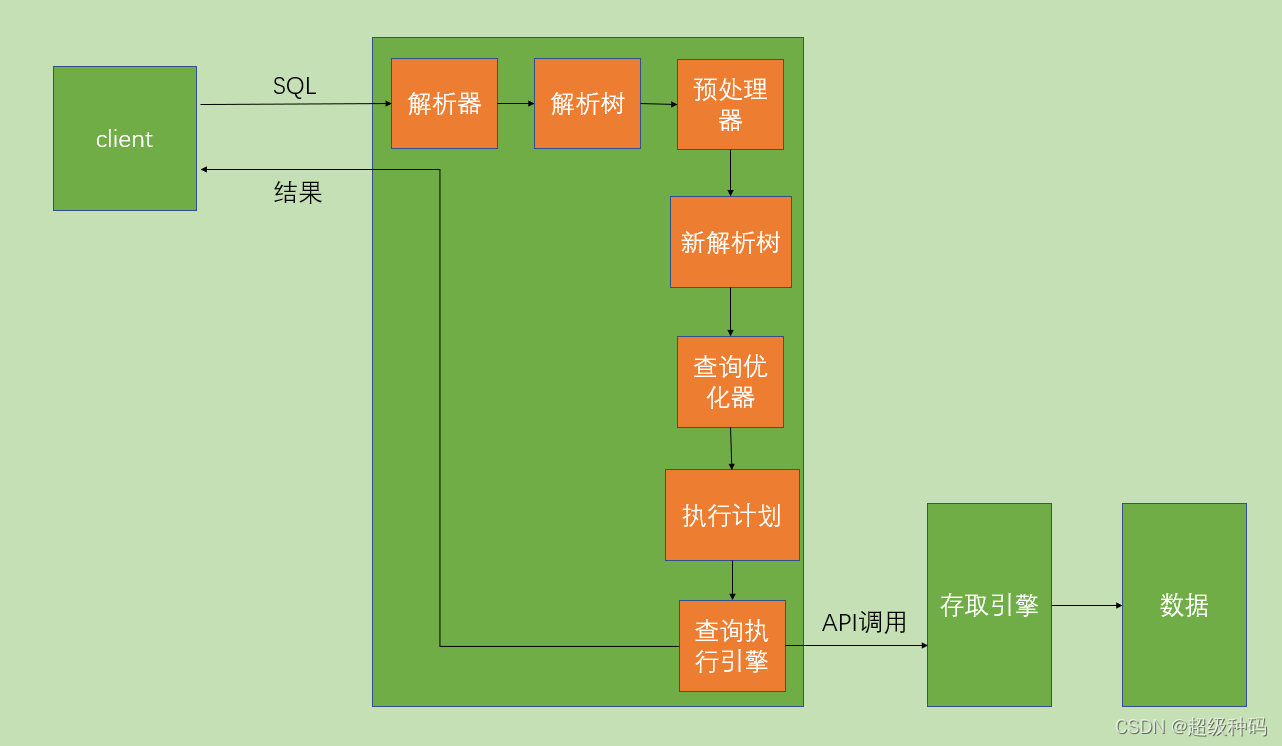
each SQL The execution order of clauses is as follows :
- from
- join
- on
- where
- group by
- having
- select
- distinct
- order by
- limit
The execution engine first from Stage . At this stage , If multiple tables are used for associated query , The following steps will be followed :
- First, find the Cartesian product through cross connection , Equivalent to getting a virtual table vt1-1.
- adopt
onScreening , In virtual tables vt1-1 On the basis of , Get the virtual table vt1-2. - Add external row . If we use the left connection 、 Right link or full link , It will involve external lines , That is, in the virtual table vt1-2 Add external rows based on , Get the virtual table vt1-3.
If we operate more than two tables , The above steps will be repeated , Until all tables are processed . This process yields our raw data . When we get the original data of the query data table , That is, the final virtual table vt1 , On this basis where Stage . At this stage , Will be based on vt1 Filter the results of the table , Get the virtual table vt2 . Then go to step 3 and step 4 , That is to say group and having Stage . At this stage , It's actually in the virtual table vt2 Group and group filtering based on , Get the middle virtual table vt3 and vt4 . When we have finished the condition screening section , You can filter the fields extracted from the table , That is to say, to enter select and distinct Stage . First, in the select The phase will extract the desired fields , And then in distinct Stage filters out duplicate rows , Get the middle virtual table vt5-1 and vt5-2 . After extracting the desired field data , You can sort according to the specified fields , That is to say group by Stage , Get the virtual table vt6 . Last in vt6 On the basis of , Take out the record of the specified line , That is to say limit Stage , Get the final result , The corresponding virtual table vt7 .
DCL
Data control language , Used to define the database 、 surface 、 Field 、 User's access rights and security level .
User management
MySQL User accounts and information are stored in a file called mysql In the database of . User defined as [email protected],host It is used to restrict which host light the user can use , If you don't specify a host name , The default host name is used %.
Query the user
select user from user
Create user
create user <userName>@<hostName> identified by <pwd>
rename
rename user <oldName>@<oldHost> to <newName>@<newHost>
Change Password
set password for userName='newPassword';
Delete user
drop user <userName>
Rights management
MySQL Store permission information in mysql In the following table of the database :
| surface | explain |
|---|---|
| user | Record user account and permission information |
| db | Record the user's operation authority on a database |
| tables_priv | Record the user's operation authority on a table |
| columns_priv | Record the user's operation permissions on a table and a column |
| procs_priv | Record the user's operation permissions for stored procedures and stored functions |
When a user tries to connect MySQL Server time , The server is based on user Table verifies the user's identity to determine whether to accept or reject the connection . Once the connection is established ,MySQL It will check what operation each request on this connection will perform 、 Whether there are enough permissions to execute it . When confirming permissions ,MySQL First Check user surface , If the specified permission is not in user Granted... In the table , that MySQL Will continue to check db surface ,db Table is the next level of security , The permissions are limited to the database level , At this level SELECT Permissions allow users to view data in all tables in a specified database ; If no qualified permission is found at this level , be MySQL continue Check tables_priv surface as well as columns_priv surface , If all permission tables are checked , But no permission operation was found ,MySQL take Return error message , The operation requested by the user cannot be performed , operation failed . Access control is mainly for security reasons , Therefore, we need to follow the following Experience principle :
- Only... Can be granted The minimum permissions required , Prevent users from doing bad things .
- When creating users Restrict the user's Login Host , Generally, it is limited to designated IP Or the Internet IP paragraph .
- For each user Set a password that meets the password complexity .
- Clean up unwanted users regularly , Reclaim permissions or delete users .
View all permissions
show privileges
View user permissions
show grants for <userName>@<hostName>
Give users permission
grant
<grantName>|all privileges on <dattaBaseName>.<tableName>
to <userName>@<hostName>
Revoke user privileges
revoke
<grantName>|all privileges on <dattaBaseName>.<tableName>
from <userName>@<hostName>
Role management
Roles are sets of permissions , Users can be assigned roles , It is also given the permissions contained in the role . It is convenient to manage users with the same permissions .
Create the role
create role <roleName>@<hostName>
Give the role permission
grant
|<grantName> on <dattaBaseName>.<tableName>  # Specify permissions
|all privileges # All permissions
to <roleName>@<hostName>
View role permissions
show grants for <roleName>@<hostName>
Revoke role permissions
revoke
|<grantName> on <dattaBaseName>.<tableName>  # Specify permissions
|all privileges # All permissions
from <roleName>@<hostName>
Delete the role
drop role <roleName>@<hostName>
Give users roles
grant role <roleName>@<hostName> to user <userName>@<hostName>
Remove the user's role
revoke role from <roleName>@<hostName>
Activate permissions
After creating a role, it is not activated by default , Only manually activated users can have the corresponding permissions of roles .
set default role all to <userName>@<hostName>
边栏推荐
- Div horizontal layout aligned on both sides
- Intel joins hands with datawhale to launch learning projects!
- Be tolerant and generous
- Leetcode question brushing - sorting
- 不堆概念、换个角度聊多线程并发编程
- 电竞入亚后,腾讯要做下一个“NBA赛事捕手”?
- 一文读懂Plato Farm的ePLATO,以及其高溢价缘由
- Sample is new and supported from API 8! Come and take it
- SiC Power Semiconductor Industry Summit Forum successfully held
- 我的问题解决记录1:类上使用了@Component注解,想要使用这个类中的方法,便不能直接new,而应该使用# @Autowired进行注入,否则会报错(如空指针异常等)
猜你喜欢

跟着田老师学实用英语语法(持续更新)

SAP Fiori @OData. Analysis of the working principle of publish annotation

高效能7个习惯学习笔记

This is an incomplete data competition Yearbook!

Shell notes (super complete)

On memory computing integrated chip technology
![[HFCTF 2021 Final]easyflask](/img/58/8113cafae8aeafcb1c9ad09eefd30f.jpg)
[HFCTF 2021 Final]easyflask

跟着武老师学高数——函数、极限和连续(持续更新)

Does neural network sound tall? Take you to train a network from scratch (based on MNIST)

Why does the system we developed have concurrent bugs? What is the root cause of concurrent bugs?
随机推荐
机器学习之线性回归(最小二乘法手写+sklearn实现)
[C language] minesweeping (recursive expansion + marking function)
Soft exam summary
What is Cartland number? What are the applications?
The purpose of DDD to divide domains, sub domains, core domains, and support domains
待人宽容大度
Implementation and verification logic of complex expression input component
Comprehensively design an oppe home page -- the bottom of the page
熊市下PLATO如何通过Elephant Swap,获得溢价收益?
Examples of specific usage of diagnostic instructions in s7-1200 and s7-1500 (led+devicestates+modulestates)
[configuration related]
函数——(C游记)
My problem solving record 1: the @component annotation is used on the class. If you want to use the methods in this class, you can't directly new, but should use @autowired for injection, otherwise an
Div horizontal arrangement
智慧解决问题
根据给定字符数和字符,打印输出“沙漏”和剩余数
英特尔联合Datawhale,发布学习项目!
Dynamics 365Online 如何自定义商机关闭窗体
【AAAI】用于交通流预测的基于注意力的时空图卷积网络
TCP failure model