当前位置:网站首页>PPT绘图之AI助力论文图
PPT绘图之AI助力论文图
2022-06-25 12:10:00 【燕策西】
前言
之前为了在边界的PPT里绘论文图,修改了office注册表,将导出分辨率设置为600dpi,但是该方法有一个缺点:需要提前将页面调整到合适大小,而且一次只能画一张幻灯片,然后选择保存为.jpg,这对于需要一次绘制多张图,而且绘制过程中图片大小不确定的磕盐狗来说是极其不舒服的。见PPT绘论文图之导出分辨率
所以这次,介绍一种自认为比较舒服的方法——PPT绘图导出PDF后,借助于Adobe Illustrator (AI) 编辑和保存。
一、工具准备
Office Power Point; AI
这里推荐一个软件资源获取和安装的地点,微信公众号【软件智库】,在下方软件库中可以找到AI CC的资源。

二、PPT绘图导出
1.绘制
绘制时,无需考虑最终绘制的图像的size大小,无需担心只能一张还是两张。这里以两页为例:
选择文件>>导出>>创建PDF,不建议选择另存为PDF,因为导出模式可以选择导出的范围,如果你只想导出某一张,就选择一张,导出全部就全选,比较自由。
2.AI助力后期处理
打开AI,基础知识这里不做介绍(本人也是小白),打开后新建一个文档如下:
选择文件>>置入,定位到所要导入的PDF文件,然后剪裁到媒体框(其他选择也可以试试,但在导入后要进行嵌入方能继续编辑)。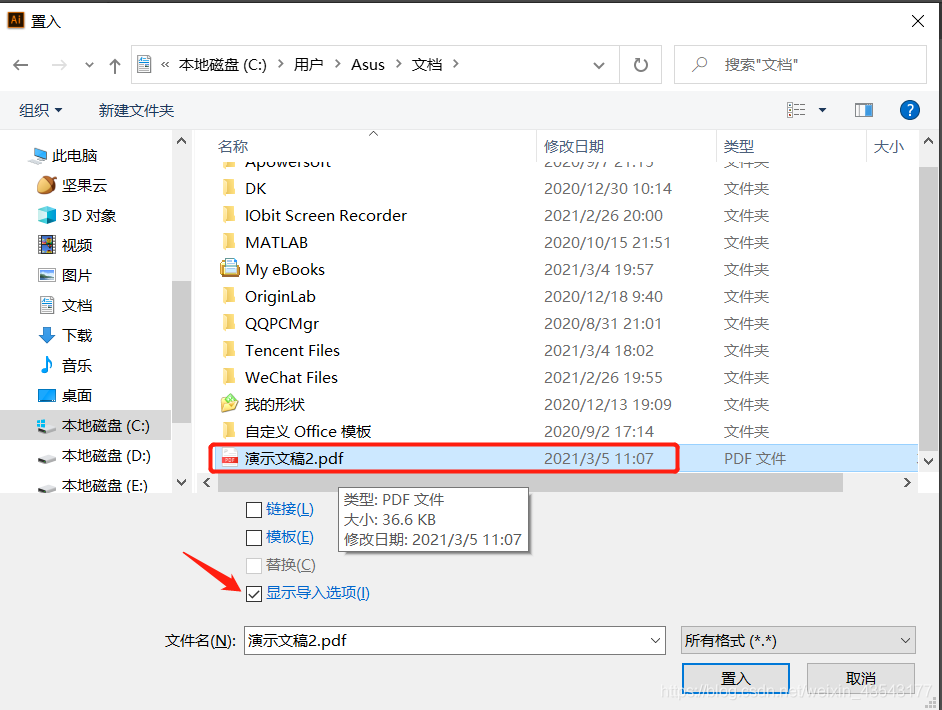

导入之后进行:释放蒙版>>取消编组>>释放蒙版>>等等,即可进行编辑。
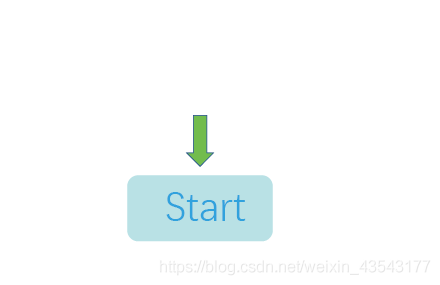
当然,大多数情况不会再次编辑,只是去除一些边框保证最小的图形区域是这样的即可。
而不是这样的,这样的话导出还可能有白边
选择导出为jpg,分辨率选择600dpi即可。需要注意的是,一般采用这种导入方式在置入点击确定之后,将图形放置在AI中时,直接点击鼠标,会按照1:1的比例放置,如果左键画框,则会按照所画的框的大小进行缩放。如果在PPT中绘制时,已经考虑了图形的大小,那么此时放置就按照1:1的比例。
如果按照文件>>打开>>PDF文件的方式导入,自然是1:1的比例,此时导入结果和上面一样。其他打开方式如果无法编辑,则要点击右侧快速操作中的嵌入后才可进行编辑。
总结
以上就是今天要记录的内容,本文仅仅简单介绍了PPT+AI的使用,不得不说AI功能着实强大,如果使用熟练可以抛开PPT直接AI绘图。
边栏推荐
- Circular exercises of JS
- Possible causes of wechat applet decryption failure
- JS picture switching (simple and practical)
- Polling and long polling
- JS SMS countdown implementation (simple code)
- 2022 Baidu collection batch automatic push assistant
- PHP numeric array sorting and associative array sorting
- STM32 stores float data in flash
- MySQL and excel tables importing database data (Excel for MySQL)
- C program linking SQLSERVER database: instance failed
猜你喜欢

Navicat premium view password scheme

三入职场!你可以从我身上学到这些(附毕业Vlog)

K8s, docker compose install MySQL 8.0.18
![Maximum number [abstract rules for abstract sorting]](/img/47/f6bafacc95f487854a3e304325f3f0.png)
Maximum number [abstract rules for abstract sorting]

Penetration tool environment -- use of cknife Chinese kitchen knife

Embedded software development written examination and interview notes (latest update: February 17, 2022)

(2) Pyqt5 tutorial -- > using qtdesigner to separate interface code
![Select randomly by weight [prefix and + dichotomy + random target]](/img/84/7f930f55f8006a4bf6e23ef05676ac.png)
Select randomly by weight [prefix and + dichotomy + random target]

Go novice exploration road 2

微信全文搜索技术优化
随机推荐
Micro engine generates QR code
STM32 stores float data in flash
Online blind box system development function introduction and some source code sharing
Guess Tongyuan B
Maximum number [abstract rules for abstract sorting]
Singleton mode in PHP to reduce memory consumption
PHP takes the difference set of two arrays
Methods of strings in JS charat(), charcodeat(), fromcharcode(), concat(), indexof(), split(), slice(), substring()
Spicy food advertising e-commerce system development function and spicy food advertising e-commerce app system development source code sharing
(6) Pyqt5--- > window jump (registration login function)
Wechat forbids sharing
K8s, docker compose install MySQL 8.0.18
Zhangxiaobai's way of penetration (V) -- detailed explanation of upload vulnerability and parsing vulnerability
浏览器的5种观察器
2022 Baidu collection batch automatic push assistant
Matlab simulation of m-sequence
Mysql database logs binlog save aging (expire\u logs\u days)
Render values to corresponding text
Zhangxiaobai's way of penetration (III) -- detailed explanation of SQL injection vulnerability principle (SQL Server)
Zhangxiaobai's way of penetration (VIII) - detailed operation steps of SQL injection - Boolean blind injection of blind injection