当前位置:网站首页>C language file operation
C language file operation
2022-07-24 07:30:00 【A Liang joy】
Catalog
2. Opening and closing of files
Sequential reading and writing of files
Random reading and writing of documents
Determination of the end of file reading
Why use files
Many programs are in the process of implementation , Depends on saving data to variables , Face changing stores data through memory cells , The processing of data is completely controlled by the program . When a program finishes running or terminates running , The values of all variables are no longer saved . in addition , General programs have data input and output , If the input and output data is not large , It can be solved by keyboard and display . When the input and output are large , It will be limited , Inconvenience .
Documents are an effective way to solve the above problems , It stores data in disk files , Can be preserved for a long time . When a large amount of data is entered , The file of input data can be established in advance through the editing tool , When the program runs, it will no longer enter... From the keyboard , And read from the specified file , Thus, data can be input at one time and used many times . Again , When there is a large amount of data output , You can output it to a specified file , Not limited by screen size , And you can view the result file at any time . The operation result of one program can also be used as the input of other programs , For further processing .
What is a document
The files on disk are files . But in programming , There are two kinds of documents we usually talk about : Program files 、 Data files ( Classified from the perspective of file function ).
1. Program files
Include source files ( The suffix is .c), Target file (windows Environment suffix is .obj), Executable program (windows Environment suffix is .exe).
2. Data files
The content of the file is not necessarily a program , It's the data that the program reads and writes when it runs , For example, the file from which the program needs to read data , Or output content file .
This blog is about data files . In previous blogs, the input and output of the data processed were all terminal oriented , That is, input data from the keyboard of the terminal , The operation results are displayed on the display . In fact, sometimes we output information to disk , When necessary, read the data from the disk to the memory for use , What we are dealing with here is the files on the disk .
3. file name
A file should have a unique file ID , So that users can identify and reference . The filename contains 3 part : File path + File name trunk + file extension , for example : c:\code\test.txt. For convenience , The file ID is often referred to as the file name .
Opening and closing of files
1. The file pointer
Buffer file system , The key concept is “ File type pointer ”, abbreviation “ The file pointer ”. Each used file has a corresponding file information area in memory , It is used to store information about files ( Such as the name of the document , File status and current file location, etc ). This information is stored in a structure variable . The struct type is declared by the system , The name FILE.
for example ,VS2013 The compiler environment provides stdio.h The header file has the following file type declaration :
struct _iobuf {
	char* _ptr;
	int  _cnt;
	char* _base;
	int  _flag;
	int  _file;
	int  _charbuf;
	int  _bufsiz;
	char* _tmpfname;
};
typedef struct _iobuf FILE;
Be careful : Different C Compiler FILE Types don't contain exactly the same content , But it's the same . Every time you open a file , The system will automatically create a FILE Structural variables , And fill in the information , Users don't have to care about details . It's usually through a FILE To maintain this FILE Structural variables , This is more convenient to use .
Now we can create a FILE* Pointer variable for :
FILE* pf;// File pointer variable Definition pf It's a point FILE Pointer variable of type data . You can make pf Point to the file information area of a file ( It's a structural variable ). Through the information in the file information area, you can access the file . in other words , Through the file pointer variable, you can find the file associated with it .

2. Opening and closing of files
The file should be opened before reading and writing , The file should be closed after use . Want to open the file , We have to understand one fopen Function , The function prototype is as follows :
FILE * fopen ( const char * filename, const char * mode );

fclose The function prototype is as follows :
int fclose ( FILE * stream );
Code example :
#include <stdio.h>
int main()
{
	FILE* pf = fopen("test.txt", "w");
	if (pf == NULL)
	{
		perror("fopen");
		return 1;
	}
	// Writing documents

	// Close file
	fclose(pf);
	pf = NULL;

}
Be careful : With "w" Open the file as , If the file doesn't exist , A new file will be created ; But if the file exists , The contents of the file will be emptied .
Code example :
#include <stdio.h>
int main()
{
	FILE* pf = fopen("test.txt", "r");
	if (pf == NULL)
	{
		perror("fopen");
		return 1;
	}
	// Writing documents

	// Close file
	fclose(pf);
	pf = NULL;

}
Output results :

Detailed opening method :

When the program and file are not in the same folder , If you still want to open this file , You need to open the file through the absolute path of the file .
Relative paths :
D:\bite\dont-sleep-until-you-learn\test_7_23\test.txtAbsolute path :
D:\\bite\\dont-sleep-until-you-learn\\test_7_23\\test.txtIt is worth noting that : We can't open the file by using relative path , Because some parts of the file path are parsed into escape characters , So we need to open the file through the absolute path .
Code example 1:
#include <stdio.h>
int main()
{
	FILE* pf = fopen("D:\bite\dont-sleep-until-you-learn\test_7_23\test.txt", "r");
	if (pf == NULL)
	{
		perror("fopen");
		return 1;
	}
	// Writing documents

	// Close file
	fclose(pf);
	pf = NULL;

}
Output results :

Code example 2:
#include <stdio.h>
int main()
{
	FILE* pf = fopen("D:\\bite\\dont-sleep-until-you-learn\\test_7_23\\test.txt", "r");
	if (pf == NULL)
	{
		perror("fopen");
		return 1;
	}
	// Writing documents

	// Close file
	fclose(pf);
	pf = NULL;

}
Output results :

Sequential reading and writing of files


fputc The prototype of the function is as follows :
int fputc ( int character, FILE * stream );
Code example 1:
#include <stdio.h>
int main()
{
	FILE* pf = fopen("test.txt", "w");
	if (pf == NULL)
	{
		perror("fopen");
		return 1;
	}
	// Writing documents
	fputc('z', pf);
	fputc('z', pf);
	fputc('h', pf);
	fputc('a', pf);
	fputc('n', pf);
	fputc('g', pf);
	fputc(' ', pf);
	fputc('j', pf);
	fputc('o', pf);
	fputc('y', pf);
	// Close file
	fclose(pf);
	pf = NULL;

	return 0;
}
Output results :

Code example 2:
#include <stdio.h>
int main()
{

	fputc('z', stdout);
	fputc('z', stdout);
	fputc('h', stdout);
	fputc('a', stdout);
	fputc('n', stdout);
	fputc('g', stdout);
	fputc(' ', stdout);
	fputc('j', stdout);
	fputc('o', stdout);
	fputc('y', stdout);
	return 0;
}
Output results :

fgetc The prototype of the function is as follows :
int fgetc ( FILE * stream );
Code example 1:
#include <stdio.h>
int main()
{
	FILE* pf = fopen("test.txt", "r");
	if (pf == NULL)
	{
		perror("fopen");
		return 1;
	}
	// Use fgetc Function to read data from a file
	int ch = 0;
	while ((ch = (fgetc(pf)))!=EOF)
	{
		printf("%c", ch);
	}
	// Close file
	fclose(pf);
	pf = NULL;

	return 0;
}
Output results :
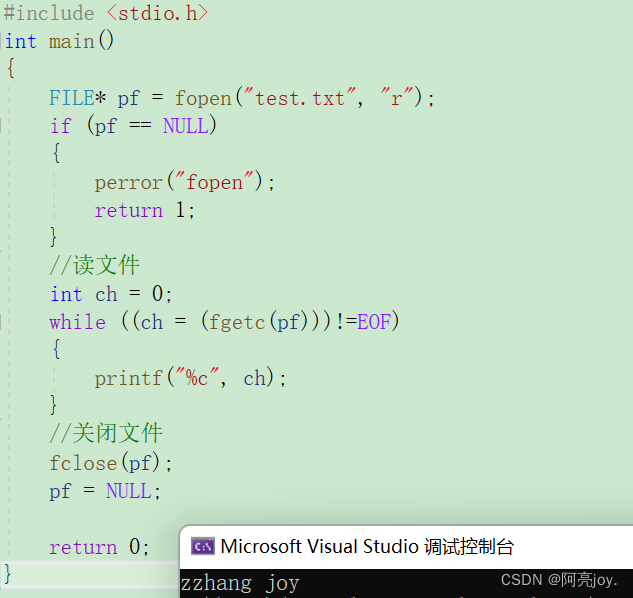
Code example 2:
#include <stdio.h>
int main()
{
	int ch = 0;
    // Use fgetc Function reads information from the standard input stream
	ch = fgetc(stdin);
	printf("%c\n", ch);
	ch = fgetc(stdin);
	printf("%c\n", ch);
	ch = fgetc(stdin);
	printf("%c\n", ch);

	return 0;
}
Output results :

fputs The prototype of the function is as follows :
int fputs ( const char * str, FILE * stream );
Code example :
#include <stdio.h>
int main()
{
	FILE* pf = fopen("test.txt", "w");
	if (pf == NULL)
	{
		ferror("fopen");
		return 1;
	}
	// Writing documents - Write in line
	fputs("zhangjoy\nzhangjoy\n", pf);

	// Close file
	fclose(pf);
	pf = NULL;
	return 0;
}
Output results :

fgets The prototype of the function is as follows :
char * fgets ( char * str, int num, FILE * stream );
Be careful : fgets Function encountered '\0' Will not continue to read down .
Code example :
#include <stdio.h>
int main()
{
	char arr[20] = { 0 };
	FILE* pf = fopen("test.txt", "r");
	if (pf == NULL)
	{
		ferror("fopen");
		return 1;
	}
	// Reading documents - Read by line
	fgets(arr, 7, pf);
	printf("%s\n", arr);
	fgets(arr, 9, pf);
	printf("%s\n", arr);

	// Close file
	fclose(pf);
	pf = NULL;
	return 0;
}
Output results :

fprintf The prototype of the function is as follows :
                                               // Variable parameters
int fprintf ( FILE * stream, const char * format, ... );
printf The function prototype of is as follows :
                                // Variable parameters
int printf ( const char * format, ... );
Code example :
#include <stdio.h>
struct S
{
	char arr[10];
	int num;
	float f;
};

int main()
{
	struct S s = { "zhangjoy",710,5.2f };
	// Write the formatted data to a file
	FILE* pf = fopen("test.txt", "w");
	if (pf == NULL)
	{
		perror("fopen");
		return 1;
	}
	// Writing documents
	fprintf(pf, "%s %d %f", s.arr, s.num, s.f);
	// Close file
	fclose(pf);
	pf = NULL;

	return 0;
}
Output results :

fscanf The prototype of the function is as follows :
int fscanf ( FILE * stream, const char * format, ... );
scanf The prototype of the function is as follows :
int scanf ( const char * format, ... );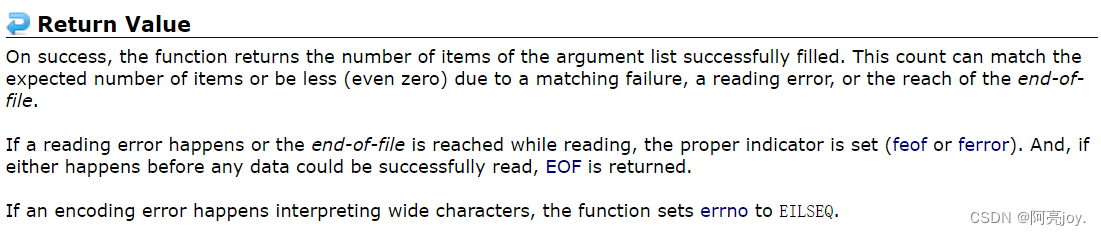
Code example :
#include <stdio.h>
struct S
{
	char arr[10];
	int num;
	float f;
};

int main()
{
	struct S s = { 0 };
	// Write the formatted data to a file
	FILE* pf = fopen("test.txt", "r");
	if (pf == NULL)
	{
		perror("fopen");
		return 1;
	}
	// Reading documents
	fscanf(pf, "%s %d %f", s.arr, &(s.num), &(s.f));
	// Print
	printf("%s %d %f", s.arr, s.num, s.f);
	// Close file
	fclose(pf);
	pf = NULL;

	return 0;
}
Output results :
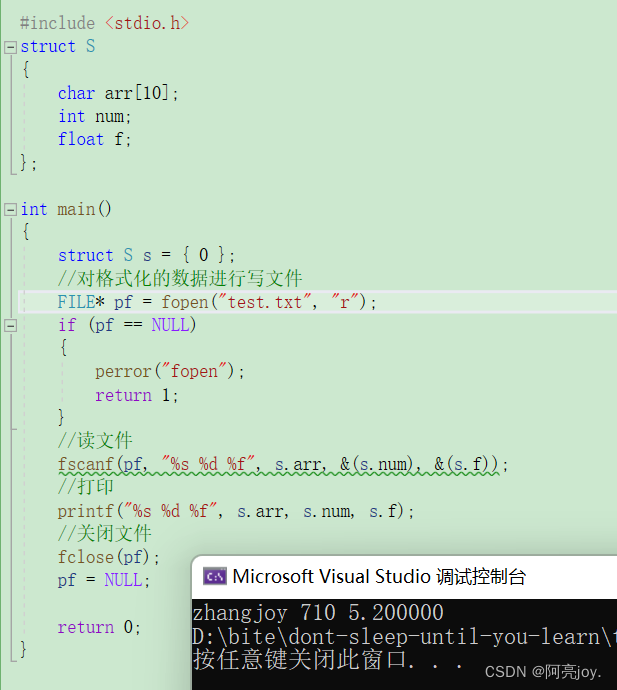
fprintf Functions and printf Function transformation fscanf Functions and scanf Function transformation
struct S
{
	char arr[10];
	int num;
	float f;
};

fscanf(stdin, "%s %d %f", s.arr, &(s.num), &(s.f));
<= = > scanf("%s %d %f", s.arr, &(s.num), &(s.f));

fprintf(stdout, "%s %d %f", s.arr, s.num, s.f);
<= = > printf("%s %d %f", s.arr, s.num, s.f);
fwrite The prototype of the function is as follows :
size_t fwrite ( const void * ptr, size_t size, size_t count, FILE * stream );
Code example :
// Binary reading and writing
#include <stdio.h>
struct S
{
	char arr[10];
	int num;
	float f;
};

int main()
{
	struct S s = { "zhangjoy",710,5.2f };
	// Write... In binary form
	FILE* pf = fopen("test.txt", "w");
	if (pf == NULL)
	{
		perror("fopen");
		return 1;
	}
	// Writing documents
	fwrite(&s, sizeof(struct S), 1, pf);
	// Close file
	fclose(pf);
	pf = NULL;

	return 0;
}
Output results :
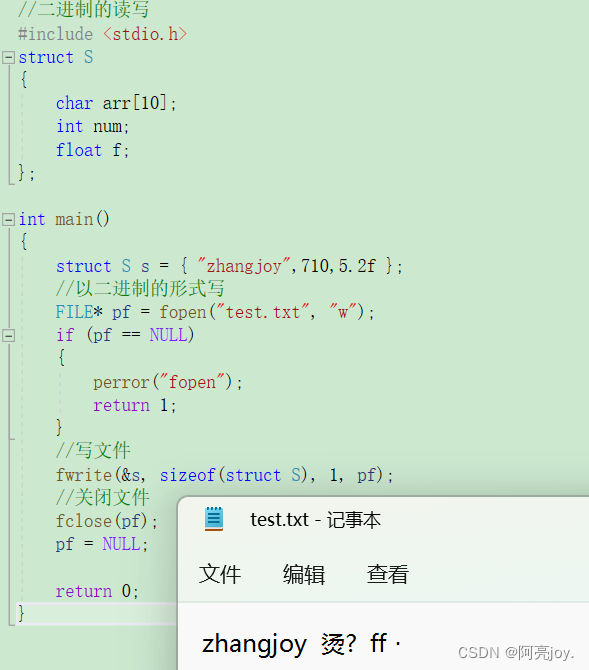
fread The prototype of the function is as follows :
size_t fread ( void * ptr, size_t size, size_t count, FILE * stream );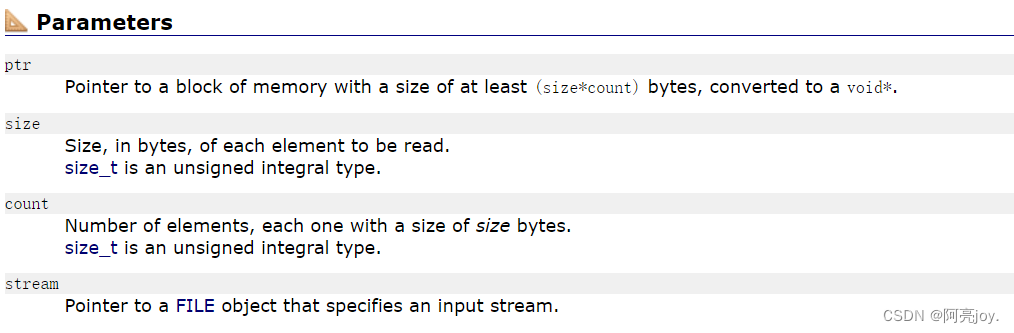
Code example :
// Binary reading and writing
#include <stdio.h>
struct S
{
	char arr[10];
	int num;
	float f;
};

int main()
{
	struct S s = { 0 };
	// Read in binary form
	FILE* pf = fopen("test.txt", "r");
	if (pf == NULL)
	{
		perror("fopen");
		return 1;
	}
	// Reading documents
	fread(&s, sizeof(struct S), 1, pf);
	// Print
	printf("%s %d %f", s.arr, s.num, s.f);
	// Close file
	fclose(pf);
	pf = NULL;

	return 0;
}
Output results :

1. Compare a set of functions
scanf / fscanf / sscanf
printf / fprintf / sprintf
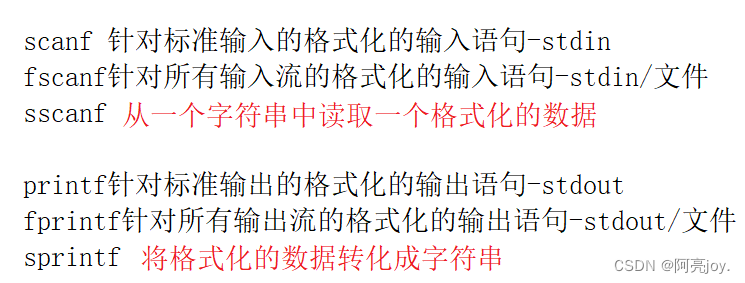
sprintf The prototype of the function is as follows :
int sprintf ( char * str, const char * format, ... );
Code example :
#include <stdio.h>
struct S
{
	char arr[10];
	int age;
	float f;
};

int main()
{
	struct S s = { "zhangjoy",23,5.2f };
	char buf[100] = { 0 };
	//sprintf Function to convert the formatted data into a string
	sprintf(buf, "%s %d %f", s.arr, s.age, s.f);

	printf("%s\n", buf);
	return 0;
}
Output results :

sscanf The prototype of the function is as follows :
int sscanf ( const char * s, const char * format, ...);
Code example :
#include <stdio.h>
struct S
{
	char arr[10];
	int age;
	float f;
};

int main()
{
	struct S s = { "zhangjoy",23,5.2f };
	struct S temp = { 0 };
	char buf[100] = { 0 };
	//sprintf Function to convert the formatted data into a string
	sprintf(buf, "%s %d %f", s.arr, s.age, s.f);
	printf("%s\n", buf);

	// From a string buf Restore a structure data in
	sscanf(buf, "%s %d %f", temp.arr, &(temp.age), &(temp.f));
	printf("%s %d %f\n", temp.arr, temp.age, temp.f);
	return 0;
}
Output results :

Random reading and writing of documents
1.fseek
If we read and write the data in the file randomly , Is that ok ? The answer is yes , We need a function fseek, It can locate the file pointer according to the position and offset of the file pointer , The function prototype is as follows :
int fseek ( FILE * stream, long int offset, int origin );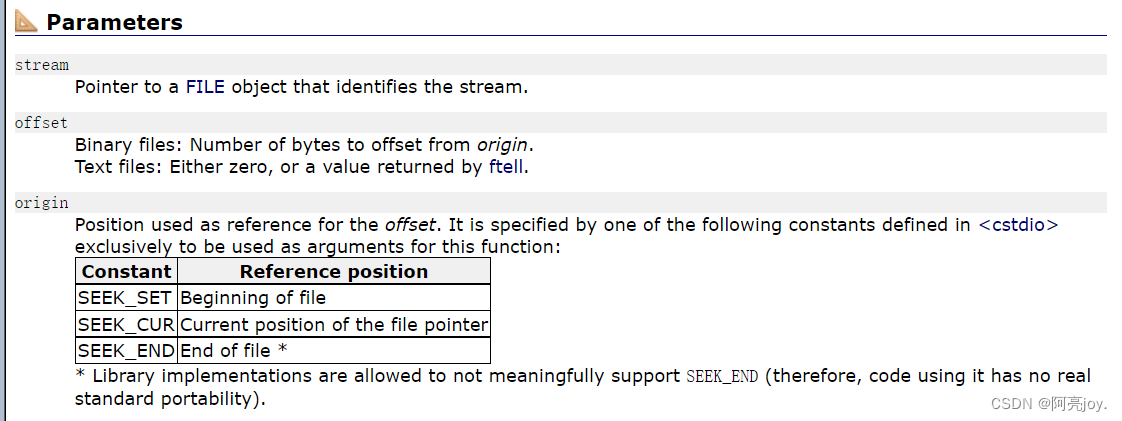
SEEK_CUR // The current location of the file pointer
SEEK_END // The position at the end of the file
SEEK_SET // The location where the file starts 
Code example :
#include <stdio.h>
int main()
{
	FILE* pf = fopen("test.txt", "r");
	if (pf == NULL)
	{
		perror("fopen");
		return 1;
	}
	// Read the file
	int ch = 0;
	while ((ch = fgetc(pf)) != EOF)
	{
		printf("%c", ch);//zhangjoy
		// At this time, the file pointer pf Point to y The back position
	}
	// Adjust file pointer
	fseek(pf, -1, SEEK_CUR);
	ch = fgetc(pf);
	printf("\n%c\n", ch);//y

	fseek(pf, -1, SEEK_END);
	ch = fgetc(pf);
	printf("%c\n", ch);//y

	fseek(pf, 0, SEEK_SET);
	while ((ch = fgetc(pf)) != EOF)
	{
		printf("%c", ch);//zhangjoy
	}

	// Close file
	fclose(pf);
	pf = NULL;

	return 0;
}
Output results :

2.ftell
Returns the offset of the file pointer from its starting position The function prototype is as follows :
long int ftell ( FILE * stream );
Code example :
#include <stdio.h>
int main()
{
	FILE* pf = fopen("test.txt", "r");
	if (pf == NULL)
	{
		perror("fopen");
		return 1;
	}
	// Read the file
	int ch = 0;
	// Adjust file pointer

	//zhangjoy
	fseek(pf, 0, SEEK_END);
	int ret = ftell(pf);
	printf("%d\n", ret);//8

	// Close file
	fclose(pf);
	pf = NULL;

	return 0;
}
Output results :

3.rewind
Return the file pointer to the beginning of the file rewind The prototype of the function is as follows :
void rewind ( FILE * stream );
Code example :
#include <stdio.h>
int main()
{
	FILE* pf = fopen("test.txt", "r");
	if (pf == NULL)
	{
		perror("fopen");
		return 1;
	}
	// Read the file
	int ch = 0;
	// Adjust file pointer

	// Let the file pointer point to the end of the file
	fseek(pf, 0, SEEK_END);
	// Let file pointer pf Go back to the starting position
	rewind(pf);
	while ((ch = fgetc(pf)) != EOF)
	{
		printf("%c", ch);//zhangjoy
	}
	// Close file
	fclose(pf);
	pf = NULL;

	return 0;
}
Output results :

Text files and binaries
stay C In language , According to the coding form of data storage , Data files can be divided into text files and binary files . Text files are written in characters ASCII A file that stores and encodes code values , The contents of the file are characters . A binary file is a file that stores binary data .
For example, for integers 1234, If stored in a text file , The contents of the file will contain four characters :49、50、51、52, They are '1'、'2'、'3'、'4' Of ASCII Code value ; If you put an integer 1234 Store in binary file , The contents of the file will be 1234 The corresponding binary number 0x04D2, Two bytes in total . For specific data, choose which type of file to store , It should be decided by the problems that need to be solved , And define it at the beginning of the program .


Determination of the end of file reading
1. Misused feof
feof The prototype of the function is as follows :
int feof ( FILE * stream );
Keep in mind : During file reading , Out-of-service feof The return value of the function is directly used to determine whether the end of the file . Instead, it applies when the file reading ends , The judgment is that the read failed and ended , Or end of file .
1. Whether the reading of text file is finished , Determine whether the return value is EOF ( fgetc ), perhaps NULL ( fgets )
for example :
- fgetc Judge whether it is EOF .
- fgets Determine whether the return value is NULL .
2. Judgment of reading end of binary file , Judge whether the return value is less than the actual number to be read .
for example :
- fread Judge whether the return value is less than the actual number to be read .

Code example 1:
#include <stdio.h>
int main()
{
	FILE* pfread = fopen("test.txt", "r");
	if (pfread == NULL)
	{
		return 1;
	}
	FILE* pfwrite = fopen("test2.txt", "w");
	if (pfwrite == NULL)
	{
		perror("pfwrite");
		fclose(pfread);
		pfread = NULL;
		return 1;
	}
	// File opened successfully
	// Reading documents
	int ch = 0;
	while ((ch = fgetc(pfread)) != EOF)
	{
		// Writing documents
		fputc(ch, pfwrite);
	}

	// Close file
	fclose(pfread);
	pfread = NULL;
	fclose(pfwrite);
	pfwrite = NULL;
	return 0;
}
Output results :

ferror The prototype of the function is as follows :
int ferror ( FILE * stream );
Code example 2:
#include <stdio.h>
int main()
{
	FILE* pfread = fopen("test.txt", "r");
	if (pfread == NULL)
	{
		return 1;
	}
	FILE* pfwrite = fopen("test2.txt", "w");
	if (pfwrite == NULL)
	{
		perror("pfwrite");
		fclose(pfread);
		pfread = NULL;
		return 1;
	}
	// File opened successfully
	// Reading documents
	int ch = 0;
	while ((ch = fgetc(pfread)) != EOF)
	{
		// Writing documents
		fputc(ch, pfwrite);
	}
	if (feof(pfread))
	{
		printf(" Encountered file introduction flag , The file ends normally \n");
	}
	else if (ferror(pfread))
	{
		printf(" File read failed end \n");
	}

	// Close file
	fclose(pfread);
	pfread = NULL;
	fclose(pfwrite);
	pfwrite = NULL;
	return 0;
}
Output results :

File buffer
ANSIC The standard is “ Buffer file system ” Processing of data files , The so-called buffer file system means that the system automatically opens up a block in memory for each file being used in the program “ File buffer ”. Data output from memory to disk is first sent to a buffer in memory , After the buffer is filled, it is sent to the disk together . If you read data from disk to computer , Then read the data from the disk file and input it into the memory buffer ( Fill the buffer ), And then send the data from the buffer to the program data area one by one ( Program variables, etc ). The size of the buffer depends on C The compiler system decides .
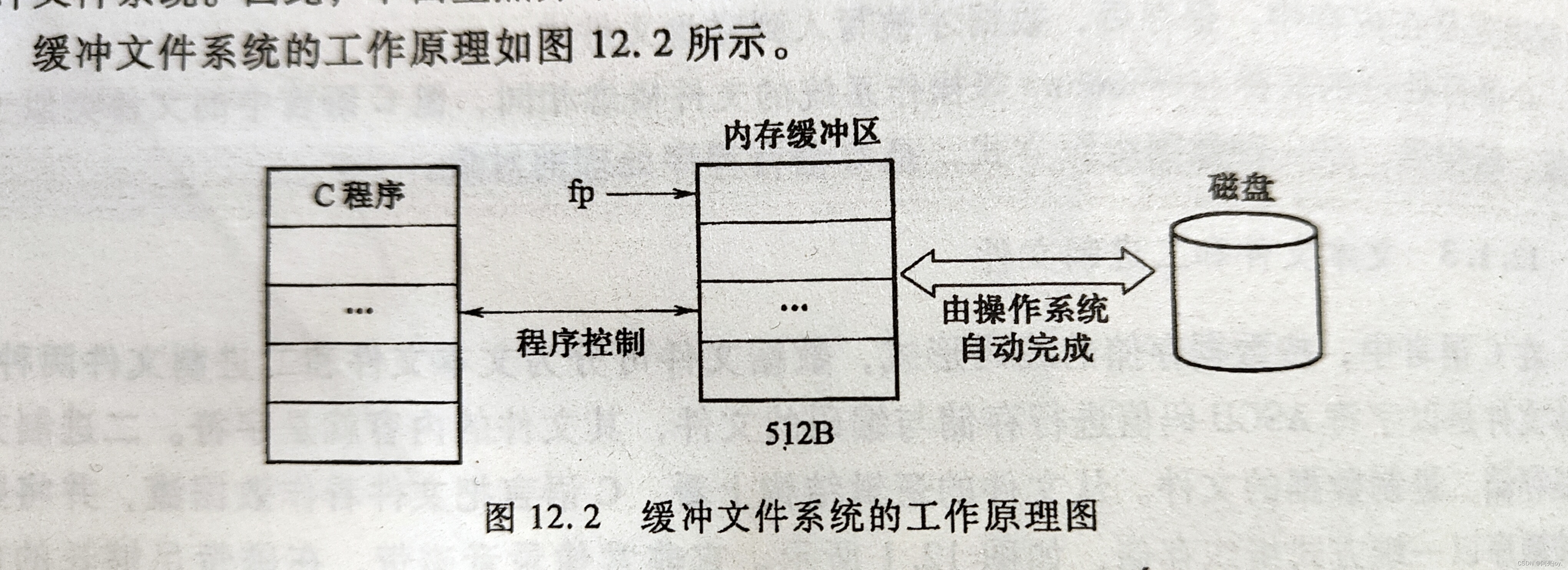

Here's a piece of code , It can prove the existence of file buffer .
Code example :
#include <stdio.h>
#include <windows.h>

int main()
{
	FILE* pf = fopen("test.txt", "w");
	fputs("abcdef", pf);// Put the code in the output buffer first
	printf(" sleep 10 second - The data has been written , open test.txt file , Found no content in the file \n");
	Sleep(10000);
	printf(" Refresh buffer \n");
	fflush(pf);// When the buffer is flushed , Write the data in the output buffer to a file ( disk )
	// notes :fflush  In high version VS It can't be used on
	printf(" Sleep again 10 second - here , Open again test.txt file , There's something in the file \n");
	Sleep(10000);
	fclose(pf);
	// notes :fclose When closing a file , It also flushes the buffer
	pf = NULL;
	return 0;
}
Output results :


Here's a conclusion : Because there is a buffer ,C Language when operating files , You need to flush the buffer or close the file at the end of the file operation . If you don't do , May cause problems in reading and writing files .
That's all about this blog , If you think you've got something , You can support it with a compliment !
Conclusion
Every good person has a period of silence , It was a time when I made a lot of efforts but failed to get results , We call it rooting .
边栏推荐
- JS_ Realize the separation of multiple lines of text into an array according to the newline
- Influxdb未授权访问&CouchDB权限绕过
- Simple installation of sqli Labs
- php 转义字符串
- Customization or GM, what is the future development trend of SaaS in China?
- Induction, generalization, deduction
- AMD64(x86_64)架构abi文档:上
- There are two tables in Oracle, a and B. these two tables need to be associated with the third table C. how to update the field MJ1 in table a to the value MJ2 in table B
- 25. Message subscription and publishing - PubSub JS
- numpy.cumsum
猜你喜欢

【HiFlow】腾讯云HiFlow场景连接器实现校园信息管理智能化

sqli-labs简单安装
Paper reading: hardnet: a low memory traffic network

Source code analysis of Nacos configuration center

Pytorch deep learning practice lesson 10 / assignment (basic CNN)

Part II - C language improvement_ 3. Pointer reinforcement

File upload and download demo

Cloud version upgrade

17. What is the situation of using ArrayList or LinkedList?

Jackson 解析 JSON 详细教程
随机推荐
Advanced part of Nacos
MySQL statement
FPGA realizes reading and writing of axi4 bus
系统集成项目管理工程师(软考中级)重点知识、背诵版
China trichlorosilane Market Forecast and Strategic Research Report (2022 Edition)
学习笔记-分布式事务理论
The goal you specified requires a project to execute but there is no POM in this directory
AMD64 (x86_64) architecture ABI document: upper
A great hymn
Jackson 解析 JSON 详细教程
requests-爬虫多页爬取肯德基餐厅位置
Influxdb unauthorized access & CouchDB permission bypass
Laplace distribution
Problems encountered in inserting large quantities of data into the database in the project
[tips] a simple method to create a version control project
Three implementation methods of single sign on
Feature Selective Anchor-Free Module for Single-Shot Object Detection
无法自动装配,未找到“RedisTemplate类型的Bean
Decompress the anchor and enjoy 4000w+ playback, adding a new wind to the Kwai food track?
项目上线就炸,这谁受得了