当前位置:网站首页>Swin transformer object detection project installation tutorial
Swin transformer object detection project installation tutorial
2022-07-23 09:02:00 【I'm not happy without code】
0 Basic environmental requirements
- pytorch
- CUDA
- Visual Studio
- anaconda
Be careful :
- I 'm on my own pytorch The version is 1.9.1,CUDA The version is 11.1,anaconda The version is :Anaconda3-2021.04-Windows-x86_64.exe,Visual Studio The version is Visual Studio Community 2019
- Another thing to note , Use python3.9 The following errors may appear in the version :
No matching distribution found for pycocotools_windows, in other words python3.9 Unable to install pycocotools_windows, So it's better to python Version changed to 3.6,3.7 or 3.8
1 install mmcv
Method 1 : Offline installation ( I use this method )
- First step
clone mmcv Project to local ( Such as d:)
git clone -b v1.3.1 https://github.com/open-mmlab/mmcv.git
Swin Transformer Required by the project mvcc Version must be >=1.2.4 And <=1.4.0, Otherwise, an error will be reported . So I use mmcv The version is 1.3.1
- The second step :
cd mmcv
pip install -r requirements.txt
- The third step :
find cl.exe The path address of , Then add it to the environment variable , Usually cl.exe Your location is right here Visual Studio In the installation directory of
My cl.exe Position in :
C:\Program Files (x86)\Microsoft Visual Studio\2019\Community\VC\Tools\MSVC\14.28.29910\bin\Hostx64\x86

- Step four
All the following commands need to be in Power Shell Command window execution ,Power Shell The position of the is shown in the red box in the figure below
open Power Shell, Enter the command as follows
set Path=c
cl
If the following results appear , Indicates that the environment variable is added successfully 
- Step five
View the native GPU Calculate the force :
You can use the following statement to view the GPU Calculate the force :
import torch
print(' Of the current graphics card CUDA Calculate the force :',torch.cuda.get_device_capability())

You can also open the following link to find GPU Computing power https://developer.nvidia.cn/zh-cn/cuda-gpus
My computer graphics card model is GTX1660TI, Cannot find your own in the table GPU model , So I chose something close to it RTX2060, The calculated force value is 7.5
- Step six
stay Power Shell Command window :
$env:TORCH_CUDA_ARCH_LIST="7.5" # Estimate your own computer GPU Calculate the force to set
$env:MMCV_WITH_OPS = 1
$env:MAX_JOBS = 4  #  According to what you can use CPU Set the number of cores
- Step seven
# Switch to mmcv In the directory
cd mmcv
# compile
python setup.py build_ext
# install
python setup.py build_ext
Method 2 : Online installation
Be careful : I just started with online installation , Although the installation was successful , But it's running later Swin Transformer Project demo when , The following error message appears :
No module named ‘mmcv_custom‘
Only later , It was because I installed mmcv The version is 1.4.0, This version is too high , You need to reduce the version , But according to my cuda Version and torch Version can only be used 1.4.0 And above , So give up method two , Method 1 is adopted , And successfully installed 1.3.1 Version of ,
- First step
First look at your own torch Version and CUDA edition , Then open the mmcv Of github link :https://github.com/open-mmlab/mmcv/blob/master/README.md, Check the configuration table below , Such as my torch The version is 1.9,CUDA The version is 11.1, So I choose the installation method shown in the red box below 
- The second step :
Open the arrow in the red box in the above figure , The details are as follows :

- The third step :
Then you need to open the link in the red box above :https://download.openmmlab.com/mmcv/dist/cu111/torch1.9.0/index.html, Check whether there is a required version in this link , Because my system is windows System ,python The version is 3.8, And I have to choose 1.4.0 Up to , So the optional results at this time are shown in the following red box 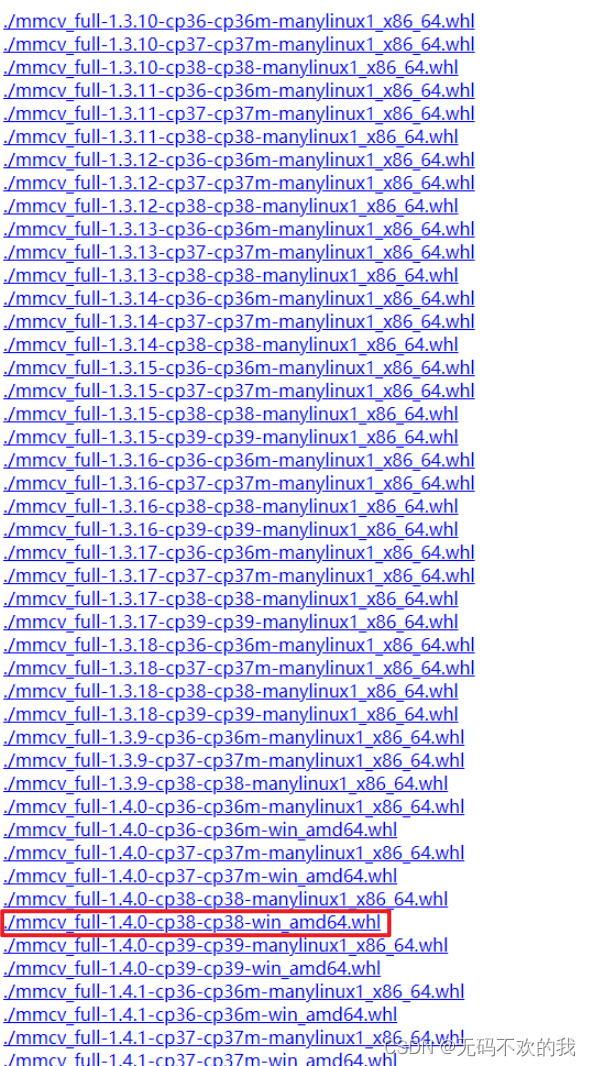
Be careful :
- Swin Transformer Required by the project mvcc Version must be :>=1.2.4 And <=1.4.0, Otherwise, an error will be reported , For example, I installed it for the first time mvcc The version is 1.4.1, The following error message will appear

- Step four ;
Enter the following installation command on the command line :
pip install mmcv-full== 1.4.0 -f https://download.openmmlab.com/mmcv/dist/cu111/torch1.9.0/index.html
Be careful : Here I download according to my version requirements , You can also download according to your specific computer situation , The method is similar to the above process
2 install mmdetection
mmdetection The version of must be the same as mmcv Versions match , Refer to the table below for details , Because of my mmcv The version is 1.3.1, therefore mmdetection The version of is set to 2.11.0
Enter the following four commands on the command line :
git clone -b v2.11.0 https://github.com/open-mmlab/mmdetection.git
cd mmdetection
pip install -r requirements/build.txt
pip install -v -e . # or "python setup.py develop"
3 install apex
It is used for half precision training , It can save memory and speed up training
clone apex Project to local ( Such as d:)
git clone https://github.com/NVIDIA/apex
Execute the following command :
cd apex
python setup.py install
4 install Swin-Transformer-Object-Detection
- clone mmcv Project to local ( Such as d:)
git clone https://github.com/SwinTransformer/Swin-Transformer-Object-Detection.git
- Execute the following command :
    cd Swin-Transformer-Object-Detection
    python setup.py develop
- Test for successful installation
First of all to Swin-Transformer-Object-Detection Of github Official websitehttps://github.com/SwinTransformer/Swin-Transformer-Object-DetectionDownload the weight file ,
Then put the weight file into Swin-Transformer-Object-Detection In the folder
Finally, enter the following test command on the command line , If the following result appears , The installation is successful :
python demo/image_demo.py demo/demo.jpg
configs/swin/mask_rcnn_swin_tiny_patch4_window7_mstrain_480-800_adamw_1x_coco.py
mask_rcnn_swin_tiny_patch4_window7_1x.pth
Be careful : The above test command is actually a line of command , The effect of entering it into the command line is as follows


If a message appears UserWarning: Matplotlib is currently using agg, which is a non-GUI backend , Can be found in demo/image_demo.py Add the following
import matplotlib
matplotlib.use('TkAgg')
边栏推荐
- 实操演练 | MySQL PROCESSLIST 表和 Navicat Monitor 识别慢速查询的简单方法
- 15000 words to summarize all features of ES6
- Development of ordering system in epidemic isolation area
- What are the seven layers of OSI's seven layer model? What is the role of each layer? This article is clear!
- The most detailed explanation of the output of three numbers from large to small
- 中金财富开户安全吗 股票怎么买
- 网络同步IO模型——多路复用(IO Multiplexing)
- DOM系列之禁止选中文字和禁止右键菜单
- 基于JSP实现OA办公系统
- 从一个 bug 中延伸出 canvas 最大内存限制和浏览器渲染原理
猜你喜欢

College students downloaded 2578 documents abnormally, and the IP of the University of Social Sciences of China was banned by a database

Arduino框架下合宙ESP32C3 +1.8“TFT液晶屏通过TFT_eSPI库驱动显示

Kali 2022.2 installation
Pagoda installation hyperf

The most detailed explanation of the output of three numbers from large to small

工作中遇到一个bug的解决过程

Talking about -- network security architecture design (II)

SQL Server database design -- select statement 2
AirServer第三方投屏软件v7.3.0中文版 (Airplay终端实用工具)
三个数从大到小输出最详细讲解
随机推荐
PostgreSQL and Navicat: the backbone of the database industry
[hero planet July training leetcode problem solving daily] the 22nd day of the orderly gathering
【云原生】风云暗涌的时代,DBA们的利刃出鞘了
疫情隔离区订餐系统的开发
7.paddlepaddle之图像数据处理
. net to develop cloud native applications, you only need to add oil to yourself
全新 IDEA 2022.2 正式发布,新特性很NICE
K3S - 轻量级Kubernetes集群
Implementation of OA office system based on JSP
UGUI源码解析——IClippable
Network synchronous IO model - IO multiplexing
Is it safe for CICC fortune to open an account? How to buy stocks
(动态规划例题)石子合并
[英雄星球七月集训LeetCode解题日报] 第22日 有序集合
Nanoid? Better than UUID
HCIP - - - BGP综合实验
NanoID 了解一下?比 UUID 更好用
What is the value of the new meta universe layout "primitive Cube" of "crazy diners"?
差分数组操作的一些性质
NodeJS 基于 Dapr 构建云原生微服务应用,从 0 到 1 快速上手指南