当前位置:网站首页>Istio1.12:安装和快速入门
Istio1.12:安装和快速入门
2022-07-24 15:16:00 【InfoQ】
前言

下载 Istio
0. Istio 版本的支持状态
1. 下载Istio安装包
$ curl -L https://istio.io/downloadIstio | sh -
curl -L https://istio.io/downloadIstio | ISTIO_VERSION=1.12.0 TARGET_ARCH=x86_64 sh -

# 或者

wget https://github.com/istio/istio/releases/download/1.12.0/istio-1.12.0-linux-amd64.tar.gz
tar zxvf istio-1.12.0-linux-amd64.tar.gz -C /usr/local/
2. 进入Istio安装目录
istio-1.12.0$ cd /usr/local/istio-1.12.0/
samples/目录下的示例应用程序
bin/目录下的istioctl客户端二进制文件 .
3. 添加环境变量 PATH
istioctl$ export PATH=$PWD/bin:$PATH
#或者设置环境变量
echo 'export ISTIO_HOME=/usr/local/istio-1.14.1' >> /etc/profile
echo 'export PATH=$PATH:$ISTIO_HOME/bin' >> /etc/profile
#加载变量
source /etc/profile
4. 验证效果(查看版本)
istioctl version

* istio-1.12.0 istioctl version
no running Istio pods in "istio-system"
1.12.0
You have new mail.
安装 Istio
- 对于本次安装,我们采用
demo配置组合。 选择它是因为它包含了一组专为测试准备的功能集合,另外还有用于生产或性能测试的配置组合。
- 如果你的平台有供应商提供的配置组合,比如:Openshift,则在下面命令中替换掉
demo配置项。更多细节请参阅你的平台说明
 istioctl install --set profile=demo -y
  Istio core installed
  Istiod installed
  Egress gateways installed
  Ingress gateways installed
  Installation complete
 Making this installation the default for injection and validation.

 Thank you for installing Istio 1.12. Please take a few minutes to tell us about your install/upgrade experience! https://forms.gle/FegQbc9UvePd4Z9z7
 You have new mail.
- 给命名空间添加标签,指示 Istio 在部署应用的时候,自动注入 Envoy 边车代理:
 $ kubectl label namespace default istio-injection=enabled
 namespace/default labeled
部署示例应用
- 部署
Bookinfo示例应用:
 $ kubectl apply -f samples/bookinfo/platform/kube/bookinfo.yaml
 service/details created
 serviceaccount/bookinfo-details created
 deployment.apps/details-v1 created
 service/ratings created
 serviceaccount/bookinfo-ratings created
 deployment.apps/ratings-v1 created
 service/reviews created
 serviceaccount/bookinfo-reviews created
 deployment.apps/reviews-v1 created
 deployment.apps/reviews-v2 created
 deployment.apps/reviews-v3 created
 service/productpage created
 serviceaccount/bookinfo-productpage created
 deployment.apps/productpage-v1 created
- 应用很快会启动起来。当每个 Pod 准备就绪时,Istio 边车代理将伴随它们一起部署。
 $ kubectl get services
 NAME TYPE CLUSTER-IP EXTERNAL-IP PORT(S) AGE
 details ClusterIP 10.0.0.212 <none> 9080/TCP 29s
 kubernetes ClusterIP 10.0.0.1 <none> 443/TCP 25m
 productpage ClusterIP 10.0.0.57 <none> 9080/TCP 28s
 ratings ClusterIP 10.0.0.33 <none> 9080/TCP 29s
 reviews ClusterIP 10.0.0.28 <none> 9080/TCP 29s
 $ kubectl get pods
 NAME READY STATUS RESTARTS AGE
 details-v1-558b8b4b76-2llld 2/2 Running 0 2m41s
 productpage-v1-6987489c74-lpkgl 2/2 Running 0 2m40s
 ratings-v1-7dc98c7588-vzftc 2/2 Running 0 2m41s
 reviews-v1-7f99cc4496-gdxfn 2/2 Running 0 2m41s
 reviews-v2-7d79d5bd5d-8zzqd 2/2 Running 0 2m41s
 reviews-v3-7dbcdcbc56-m8dph 2/2 Running 0 2m41s
2/2Running- 验证方方面面均工作无误。运行下面命令,通过检查返回的页面标题,来验证应用是否已在集群中运行,并已提供网页服务:
$ kubectl exec "$(kubectl get pod -l app=ratings -o jsonpath='{.items[0].metadata.name}')" -c ratings -- curl -s productpage:9080/productpage | grep -o "<title>.*</title>"
<title>Simple Bookstore App</title>
对外开放应用程序
- 把应用关联到 Istio 网关:
 $ kubectl apply -f samples/bookinfo/networking/bookinfo-gateway.yaml
 gateway.networking.istio.io/bookinfo-gateway created
 virtualservice.networking.istio.io/bookinfo created
- 确保配置文件没有问题:
 $ istioctl analyze
  No validation issues found when analyzing namespace: default.
确定入站 IP 和端口
INGRESS_HOSTINGRESS_PORT$ export INGRESS_PORT=$(kubectl -n istio-system get service istio-ingressgateway -o jsonpath='{.spec.ports[?(@.name=="http2")].nodePort}')
$ export SECURE_INGRESS_PORT=$(kubectl -n istio-system get service istio-ingressgateway -o jsonpath='{.spec.ports[?(@.name=="https")].nodePort}')
$ echo "$INGRESS_PORT"
32194
$ echo "$SECURE_INGRESS_PORT"
31632
$ export INGRESS_HOST=$(minikube ip)
$ echo "$INGRESS_HOST"
192.168.4.102
$ minikube tunnel
- 设置环境变量
GATEWAY_URL:
$ export GATEWAY_URL=$INGRESS_HOST:$INGRESS_PORT
- 确保 IP 地址和端口均成功的赋值给了环境变量:
 $ echo "$GATEWAY_URL"
 192.168.99.100:32194
验证外部访问
- 运行下面命令,获取 Bookinfo 应用的外部访问地址。
$ echo "http://$GATEWAY_URL/productpage"
- 把上面命令的输出地址复制粘贴到浏览器并访问,确认 Bookinfo 应用的产品页面是否可以打开。
查看仪表板
- 安装Kiali 和其他插件,等待部署完成。
 $ kubectl apply -f samples/addons
 $ kubectl rollout status deployment/kiali -n istio-system
 Waiting for deployment "kiali" rollout to finish: 0 of 1 updated replicas are available...
 deployment "kiali" successfully rolled out
- 访问 Kiali 仪表板。
$ istioctl dashboard kiali
- 在左侧的导航菜单,选择Graph,然后在Namespace下拉列表中,选择default。
- Kiali 仪表板展示了网格的概览、以及
Bookinfo示例应用的各个服务之间的关系。 它还提供过滤器来可视化流量的流动。
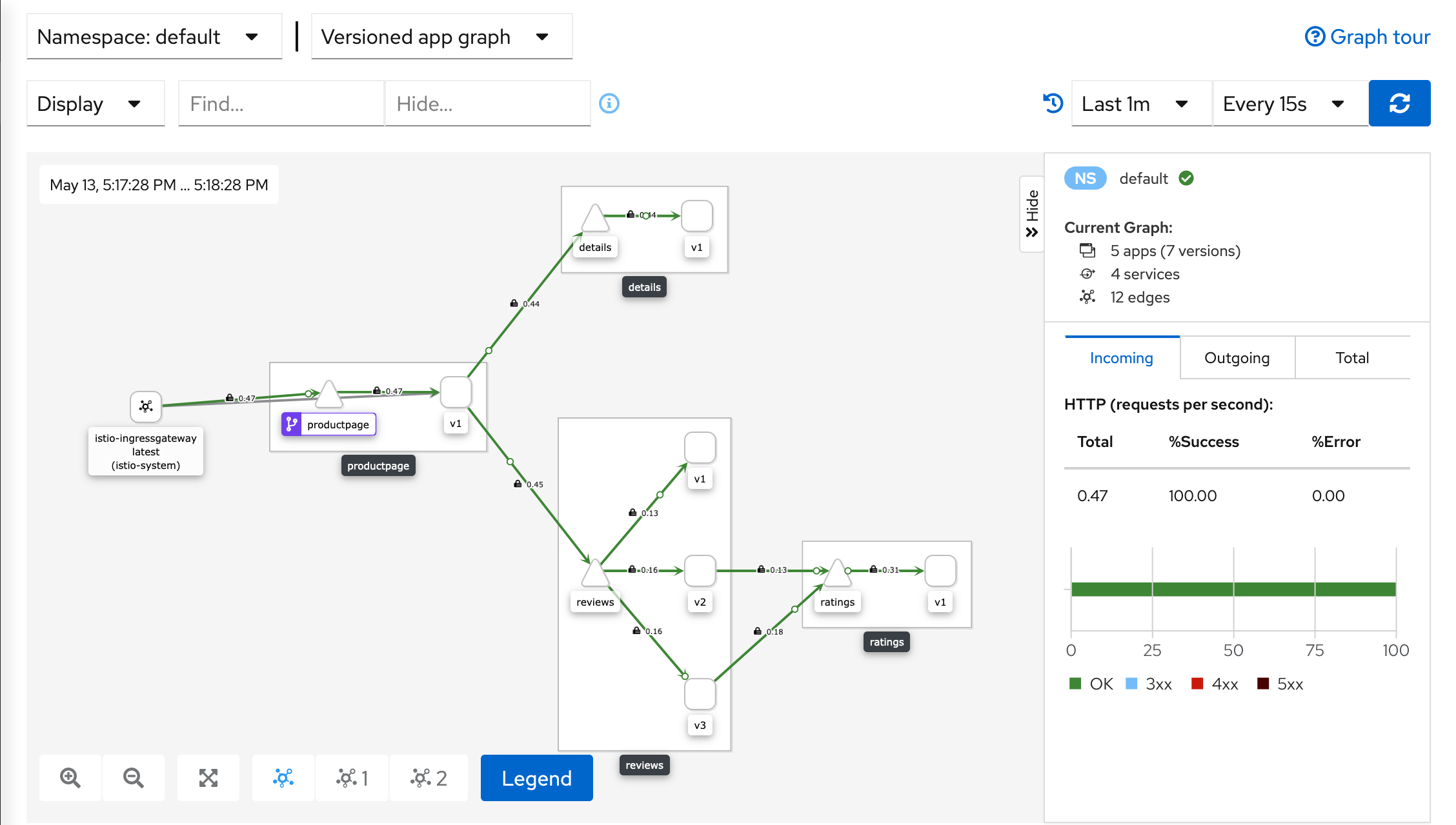
- Kiali Dashboard
卸载 Istio
$ istioctl x uninstall --purge
--purge$ istioctl x uninstall <your original installation options>
$ istioctl manifest generate <your original installation options> | kubectl delete -f -
istio-system$ kubectl delete namespace istio-system
参考链接
边栏推荐
- Learning rate adjustment strategy in deep learning (1)
- “00后”来了!数睿数据迎来新生代「无代码」生力军
- Mysql库的操作
- 深入浅出边缘云 | 2. 架构
- Date class and time class definitions (operator overload application)
- 佣金哪家券商最低,我要开户,手机上开户安不安全
- Overall testing framework for performance testing
- MongoDB入门学习
- Property datasource is required exception handling [idea]
- dataframe 分组后排序的前n行 nlargest argmax idmax tail !!!!
猜你喜欢

Detailed explanation of document operation
Jmmert aggregation test report

24.原生磁盘的使用
DS binary tree - maximum distance of binary tree nodes

Leetcode · daily question · 1184. distance between bus stops · simulation
2022 robocom world robot developer competition - undergraduate group (provincial competition) -- fifth question tree and bipartite diagram (completed)

Here comes the problem! Unplug the network cable for a few seconds and plug it back in. Does the original TCP connection still exist?

Outlook tutorial, how to set rules in outlook?

各种Normalization的直观理解

Android section 13 detailed explanation of 03sqlite database
随机推荐
佣金哪家券商最低,我要开户,手机上开户安不安全
JS data transformation -- Transformation of tree structure and tile structure
2022 RoboCom 世界机器人开发者大赛-本科组(省赛)---第一题 不要浪费金币 (已完结)
打假Yolov7的精度,不是所有的论文都是真实可信
Operation of MySQL Library
AG. DS binary tree -- hierarchical traversal
【Bug解决】Win10安装pycocotools报错
Google Earth engine - use MODIS data to export the fire area of monthly data
LeetCode高频题56. 合并区间,将重叠的区间合并为一个区间,包含所有区间
Getting started with mongodb
Huffman tree (optimal binary tree)
JSON file editor
Vector introduction and underlying principle
Various searches (⊙▽⊙) consolidate the chapter of promotion
深度学习中的学习率调整策略(1)
Decrypt "sea Lotus" organization (domain control detection and defense)
Calculate the M-day moving average price of two stocks
《Route planning method for UAV in unknown environment based on improved SAS algorithm》翻译
Fastjson code execution cve-2022-25845
Which securities company is the best and safest to open an account? How to open an account and speculate in stocks