当前位置:网站首页>[MySQL] installation tutorial and master-slave configuration
[MySQL] installation tutorial and master-slave configuration
2022-07-24 08:04:00 【Small source】
List of articles
Configuring master-slave libraries in an enterprise is an essential link , It can avoid the database downtime caused by many wonderful operations, which will cause the application to hang up .mysql The master-slave configuration of is relatively simple , Follow the document step by step , It's easy to use . I hope it will be of some help to you !
List of articles
Catalog
Two 、 Master slave configuration
1 Turn off firewall ( It can be modified to allow port communication )
2 Whether the master-slave test can be accessed remotely
3 Master database creation user slave And authorize ( Password complexity )
4 Master database query service ID And Master state
5 Set the master library from the Library
3、 ... and Limit user failure retry time
1、 Execute... From the library :
3、 Install the plug-in after login :
4、 The main library modifies the configuration file my.cnf Add two lines :
6、 Execute... From the library :
7、 Install the plug-in after login :
8、 Modify the configuration file from the Library my.cnf Add two lines :
9、 Restart from library mysql:
10、 Execute... From the library :
Preface
Installation package : mysql-8.0.26-linux-glibc2.12-x86_64.tar.xz
operating system : Centos8 And Kirin ( All have been tested and work well )
Server address :10.10.109.8 10.10.109.9
One 、 install
# decompression
tar -xvf mysql-8.0.26-linux-glibc2.12-x86_64.tar.xz
# Move
mv /opt/mysql-8.0.26-linux-glibc2.12-x86_64 /data
cd /data
mv mysql-8.0.26-linux-glibc2.12-x86_64 mysql
# Create a folder for storing data ( disk array )
mkdir -p /mysql/data
chmod -R 777 /mysql /data
# Create user ( Complexity requirements )
groupadd mysql
useradd -g mysql mysql
chown -R mysql.mysql /data/mysql
# Initialize database
cd /data/mysql/
./bin/mysqld --user=mysql --lower-case-table-names=1 --basedir=/data/mysql/ --datadir=/mysql/data/ --initialize ;
# Configure the main library my.cnf ( Modify the default port )
vi /etc/my.cnf
[client]

port=3209

socket=/data/mysql/mysql.sock


[mysqld]

port=3209

basedir=/data/mysql

datadir=/mysql/data

pid-file=/data/mysql/mysql.pid

socket=/data/mysql/mysql.sock

log_error=/data/mysql/error.log

server-id=1

character-set-server=utf8

lower-case-table-names=1

log-bin=mysql-bin

binlog-ignore-db=sys

binlog-ignore-db=mysql

binlog-ignore-db=information_schema

binlog-ignore-db=performance_schema

binlog_format=STATEMENT

open-files-limit=65000

default_authentication_plugin=mysql_native_password

innodb_buffer_pool_size=3GB
# start-up mysql
cp -a ./support-files/mysql.server /etc/init.d/mysql
chmod +x /etc/init.d/mysql
chkconfig --add mysql
Check whether the service is effective
chkconfig --list mysql
create a file
chmod -R 777 /mysql/data/
cd /data/mysql
touch error.log
touch mysql.pid
chmod –R 777 /data/mysql
start-up 、 stop it 、 restart
service mysql start
service mysql stop
chown -R mysql.mysql /data/mysql
service mysql restart
# Create a soft connection
ln -s /data/mysql/bin/mysql /usr/bin
ln -s /usr/lib64/libtinfo.so.6.1 /usr/lib64/libtinfo.so.5
# modify root password ( Complexity requirements )
mysql -uroot -p
ALTER USER 'root'@'localhost' IDENTIFIED WITH mysql_native_password BY 'new password';
# Increase remote link permissions
use mysql
update user set host ='%' where user='root';
select user,host from user;
Two 、 Master slave configuration
1 Turn off firewall ( It can be modified to allow port communication )
# View firewall status
systemctl status firewalld
# Turn off firewall
systemctl stop firewalld
2 Whether the master-slave test can be accessed remotely
mysql -uroot -p -h10.10.109.8
mysql -uroot -p -h10.10.109.9
3 Master database creation user slave And authorize ( Password complexity )
mysql -uroot -p
create user 'slave'@'%' identified with mysql_native_password by 'password';
grant replication slave on *.* to 'slave'@'%';
flush privileges;
4 Master database query service ID And Master state
# Sign in
mysql -uroot -p
# Inquire about server_id Whether it can be consistent in the configuration file
show variables like 'server_id';
# If it's not the same , Temporary settings can be set ID( Restart failure )
set global server_id = 1;
# Inquire about Master state , And record File and Position Value
show master status;
5 Set the master library from the Library
mysql -uroot -p
# Inquire about server_id Whether it can be consistent in the configuration file
show variables like 'server_id';
# If it's not the same , Temporary settings can be set ID( Restart failure )
set global server_id = 2;
# Set main database parameters
change master to master_host='10.10.109.8',master_port=3209,master_user='slave',master_password=' password ',master_log_file='mysql-bin.000006',master_log_pos=2812;
# Start syncing
start slave;
# Supported operations
stop slave;
reset slave;
start slave;
# Inquire about slave state
show slave status\G;
# If the master and slave databases are inconsistent , When deleting the master database, the slave database will report an error , Solution :
stop slave;
# skip 1 A mistake ( Multiple can be set 2.3……)
SET GLOBAL SQL_SLAVE_SKIP_COUNTER = 1;
start slave;
# In query status , If there are still mistakes, continue to skip
show slave status\G;
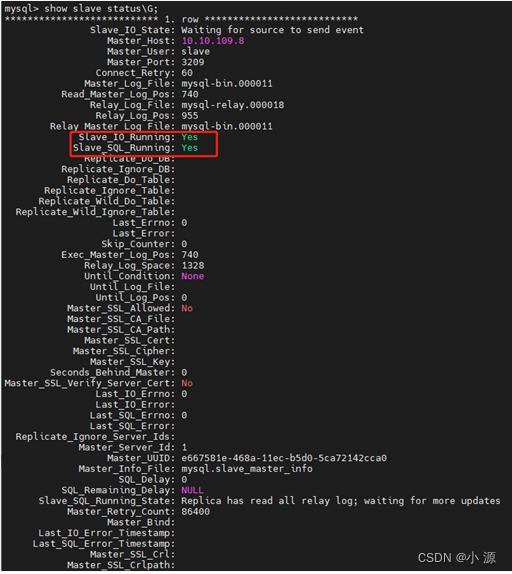
The final status is as follows :
3、 ... and Limit user failure retry time
1、 Execute... From the library :
stop slave;
2、 Main library execution :
mysql -u root -p
3、 Install the plug-in after login :
installplugin CONNECTION_CONTROL soname'connection_control.so';
installplugin CONNECTION_CONTROL_FAILED_LOGIN_ATTEMPTS soname'connection_control.so';
4、 The main library modifies the configuration file my.cnf Add two lines :
connection-control-failed-connections-threshold=5# Limit the number of login failures
connection-control-min-connection-delay=300000# Limit retrying time , Here is the millisecond , Pay attention to conversion according to demand , Here is 5 minute
5 restart mysql:
service mysql restart
Log in to the main database , See if it works
show variables like '%connection_control%'; 
6、 Execute... From the library :
mysql -u root -p
7、 Install the plug-in after login :
installplugin CONNECTION_CONTROL soname'connection_control.so';
installplugin CONNECTION_CONTROL_FAILED_LOGIN_ATTEMPTS soname'connection_control.so';
8、 Modify the configuration file from the Library my.cnf Add two lines :
connection-control-failed-connections-threshold=5# Limit the number of login failures connection-control-min-connection-delay=300000# Limit retrying time , Here is the millisecond , Pay attention to conversion according to demand , Here is 5 minute
9、 Restart from library mysql:
service mysql restart
Log in from the library database , See if it works
show variables like '%connection_control%';
10、 Execute... From the library :
start slave;
11、 Inquire about slave state
show slave status\G;
The end
summary
I hope it will help you , Don't forget to support Xiaobian !
边栏推荐
- how to add square on screenshot
- Collection of binary tree topics
- Jetson AgX Orin source change
- Multiple optimization methods print prime numbers between 100 and 200
- 生成模型与判别模型
- Detailed explanation of VAO
- Binary search common questions
- MySQL --- 子查询 - 标量子查询
- About the solution of thinking that you download torch as a GPU version, but the result is really a CPU version
- *Project recurrence * project implementation of thesis based on contextbasedemotionrecognitionusingematicdataset
猜你喜欢

Kotlin higher order function & DSL layout persuasion Guide

DGL库中一些函数或者方法的介绍

My six months at Microsoft

Train-clean-100 dataset

Robot operation continuous learning thesis (1) original text reading and Translation -- primitive generation strategy learning without catastrophic forgetting in robot operation

rbm 对比散度

MySQL -- subquery scalar subquery

NFT概念究竟是怎么回事。。全面了解NFT市场、技术和案例
![[matlab] (III) application of MATLAB in Higher Mathematics](/img/ff/72b13fb597d5bdf3a989dd86cb6888.png)
[matlab] (III) application of MATLAB in Higher Mathematics

33-SparkSql的介绍、DataFrame和DataSet
随机推荐
Semantic slam: Probabilistic Data Association for semantic slam
1005. Maximized array sum after K negations
OpenGL camera and periodic review
[matlab] (III) application of MATLAB in Higher Mathematics
What is the NFT concept.. Fully understand NFT market, technology and cases
学习笔记总结篇(一)
[target detection] IOU (intersection and combination ratio)
*Project recurrence * project implementation of thesis based on contextbasedemotionrecognitionusingematicdataset
News topic classification task -- tochtext library for text classification
Hcip day 10 notes
Database system - Basic Concepts
[golang from introduction to practice] student achievement management system
Solve the problem that Anaconda navigator cannot be opened
Kotlin coroutine (II): scope and cancellation
hcip第九天笔记
Tools for data visualization
Basic operation of queue
Learn - use do... While loop according to the formula e=1+1/1+ 1/2!+ 1/3!+…+ 1/n! Calculate the value of E (accuracy is 1e-6)
P1305新二叉树题解
Generative model and discriminant model