当前位置:网站首页>Keras deep learning practice (11) -- visual neural network middle layer output
Keras deep learning practice (11) -- visual neural network middle layer output
2022-06-24 14:22:00 【Hope Xiaohui】
Keras Deep learning practice (11)—— Visual neural network middle layer output
0. Preface
In the use of 《 Convolution neural network for gender classification 》 The application of , We construct a convolutional neural network (Convolutional Neural Network, CNN) Model , The model can be 95% To classify the gender of the characters in the image . however , of CNN What the model learned , It is still a black box for us .
In this section , We will learn how to extract the content features learned by various convolution kernels in the model . Besides , We will compare CNN The contents learned by convolution kernels in the first several convolution layers and the contents learned by convolution kernels in the last several convolution layers .
1. Visual neural network middle layer output
To extract what convolution kernel learned , We use the following strategies :
- Select the image to analyze
- Select the first convolution layer of the model , To understand what each convolution kernel in the first convolution layer has learned
- Calculate the output of convolution in the first layer , To extract the output of the first layer , You need to use a functional expression
API:- Functional expression
APIThe input of is the input image , The output is the output of the first layer of the model - Return to all channels ( Convolution kernel ) The output of the middle layer obtained on
- Functional expression
- The same steps are performed on the last convolution layer of the model , To visualize the output of the last convolution
- then , We will visualize the output of convolution operations on all channels
- Last , We will also visualize the output of a given channel on all images
Next , We will use Keras The implementation of the above strategy is used to visualize the contents learned by all convolution kernels of the first and last layers .
2. utilize Keras Visual neural network middle layer output
2.1 Data loading
We reuse 《 Convolution neural network for gender classification 》 Data loading code used in , And view the loaded pictures :
x = []
y = []
for i in glob('man_woman/a_resized/*.jpg')[:800]:
    try:
        image = io.imread(i)
        x.append(image)
        y.append(0)
    except:
        continue

for i in glob('man_woman/b_resized/*.jpg')[:800]:
    try:
        image = io.imread(i)
        x.append(image)
        y.append(1)
    except:
        continue
View the input image to be used for visualization :
from matplotlib import pyplot as plt
plt.imshow(x[-3])
plt.show()

2.2 Visualize the output of the first convolution layer
Define a functional expression API, Take the above image as input , Take the output of the first convolution layer as the output :
from keras.models import Model
vgg16_model = VGG16(include_top=False, weights='imagenet', input_shape=(256, 256, 3))
input_img = preprocess_input(x[-3].reshape(1, 256, 256, 3))
activation_model = Model(inputs=vgg16_model.input, outputs=vgg16_model.layers[1].output)
activations = activation_model.predict(preprocess_input(input_img))
In the above code , We have defined a system called activation_model The model of is used to obtain the output of the first convolution layer of the model , In this model , We pass images as input , And extract the output of the first layer as activation_model Model output . Once the model is defined , We can import the input image into the model to extract the output of the first layer . It should be noted that , We have to shape the input image , So that it can be input into the model .
The front in the first convolution layer visualized 49 The output of convolution kernels , As shown below :
fig, axs = plt.subplots(7, 7, figsize=(10, 10))
for i in range(7):
    for j in range(7):
        try:
            axs[i,j].set_ylim((224, 0))
            axs[i,j].contourf(first_layer_activation[0,:,:,((7*i)+j)],7,cmap='viridis')
            axs[i,j].set_title('filter: '+str((7*i)+j))
            axs[i,j].axis('off')
        except:
            continue
In the above , We created one 7 x 7 Canvas of , So that you can draw 49 Zhang image . Besides , We traverse first_layer_activation In front of 49 Channels , And draw the output , As shown below :

ad locum , We can see that some convolution kernels can extract the contour of the original image ( for example , Convolution kernel 0、11、30、34). in addition , Some convolution kernels have learned how to recognize some features of an image , For example, ears , eyes , Hair and nose ( For example, convolution kernel 12、27).
We continue to verify this , Make multiple images ( Use here 49 Zhang ) After passing through the first convolution layer, extract the 11 The output of convolution kernels ( That is, the th... Of the obtained characteristic graph 11 Channels ), To get the outline of the original image , As shown below :
input_images = preprocess_input(np.array(x[:49]).reshape(49,256,256,3))
activations = activation_model.predict(input_images)
fig, axs = plt.subplots(7, 7, figsize=(10, 10))
fig.subplots_adjust(hspace = .5, wspace=.5)
first_layer_activation = activations
for i in range(7):
    for j in range(7):
        try:
            axs[i,j].set_ylim((224, 0))
            axs[i,j].contourf(first_layer_activation[((7*i)+j),:,:,11],7,cmap='viridis')
            axs[i,j].set_title('image: '+str((7*i)+j))
            axs[i,j].axis('off')
        except:
            continue

plt.show()
In the previous code , Before we traverse 49 Zhang image , And use these images to draw the first convolution layer 11 The output of convolution kernels :

As can be seen from the above figure , In all the images , The first 11 Each convolution kernel learns the contour in the image .
2.3 Visualize the output of the last convolution layer
Next , We continue to learn what convolution kernel in last convolution layer learned . To understand the index of the last convolution layer in the model , We extract the layers in the model , And output the name of each layer :
for i, layer in enumerate(vgg16_model.layers):
    print(i, layer.name)
By executing the above code , The layer name will be printed out , as follows :
0 input_1
1 block1_conv1
2 block1_conv2
3 block1_pool
4 block2_conv1
5 block2_conv2
6 block2_pool
7 block3_conv1
8 block3_conv2
9 block3_conv3
10 block3_pool
11 block4_conv1
12 block4_conv2
13 block4_conv3
14 block4_pool
15 block5_conv1
16 block5_conv2
17 block5_conv3
18 block5_pool
You can see , The index of the last convolution layer in the model is 17, Can be extracted as follows :
activation_model = Model(inputs=vgg16_model.input,outputs=vgg16_model.layers[-2].output)
input_img = preprocess_input(x[-3].reshape(1, 256, 256, 3))
last_layer_activation = activation_model.predict(input_img)
Due to multiple pooling operations in the network , The resulting image size has been reduced many times , Reduce to 1 x 8 x 8 x 512, The output of each convolution kernel in the last convolution layer is visualized as follows :
count = 0
for i in range(7):
    for j in range(11):
        try:
            count+=1
            axs[i,j].set_ylim((6, 0))
            axs[i,j].contourf(last_layer_activation[0,:,:,((7*i)+j)],11,cmap='viridis')
            axs[i,j].set_title('filter: '+str(count))
            axs[i,j].axis('off')
        except:
            continue

plt.show()
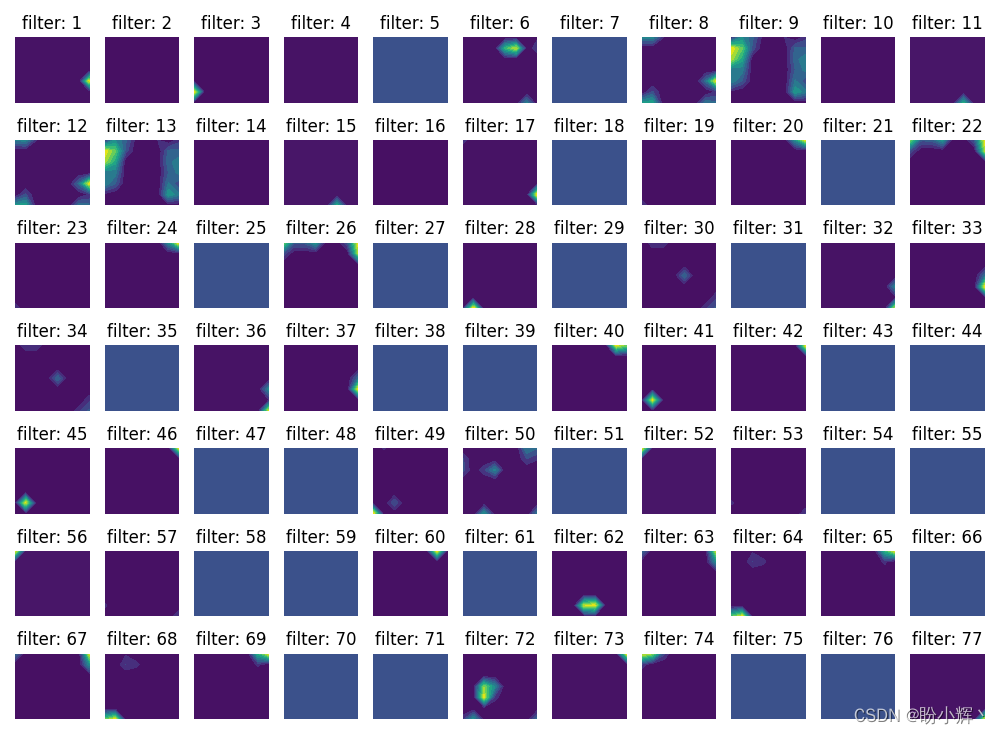
As shown above , We cannot intuitively see what the convolution kernel of the last convolution layer has learned , Because it is difficult to match low-level features to the original image , These low-level features can be gradually combined to get an intuitive image outline .
Summary
In this section , We aim at the problem of black box characteristics in the training process of convolutional neural networks , Learned how to extract the content features learned by various convolution kernels in the model , And compare the contents learned by the convolution kernel in the first several convolution layers of the convolution neural network with the contents learned by the convolution kernel in the last several convolution layers , So as to have a clearer understanding of the training process of convolutional neural network .
Related links
Keras Deep learning practice (1)—— Detailed explanation of neural network foundation and model training process
Keras Deep learning practice (2)—— Use Keras Building neural network
Keras Deep learning practice (3)—— Neural network performance optimization technology
Keras Deep learning practice (4)—— Detailed explanation of activation function and loss function commonly used in deep learning
Keras Deep learning practice (5)—— Detailed explanation of batch normalization
Keras Deep learning practice (6)—— Deeply studied the fitting problems and solutions
Keras Deep learning practice (7)—— Convolution neural network detailed explanation and implementation
Keras Deep learning practice (8)—— Use data enhancement to improve neural network performance
Keras Deep learning practice (9)—— The limitations of convolutional neural networks
Keras Deep learning practice (10)—— The migration study
边栏推荐
- Kunpeng arm server compilation and installation paddlepaddle
- laravel 8 实现Auth登录
- 厨卫电器行业B2B交易协同管理平台开发,优化企业库存结构
- A review of text contrastive learning
- STM32F1与STM32CubeIDE编程实例-WS2812B全彩LED驱动(基于SPI+DMA)
- P2PDB 白皮书
- Method of establishing unity thermodynamic diagram
- Return to new list
- Telecommuting: camping at home office gadgets | community essay solicitation
- 10_ Those high-profile personal signatures
猜你喜欢

Mit-6.824-lab4a-2022 (ten thousand words explanation - code construction)

SAP Marketing Cloud 功能概述(四)

The "little giant" specialized in special new products is restarted, and the "enterprise cloud" digital empowerment

在宇宙的眼眸下,如何正确地关心东数西算?

【无标题】
pgsql查询分组中某个字段最大或者最小的一条数据

Télétravail: Camping à la maison gadgets de bureau | rédaction communautaire

laravel下视图间共享数据

厨卫电器行业B2B交易协同管理平台开发,优化企业库存结构

数字臧品系统开发 NFT数字臧品系统异常处理源码分享
随机推荐
Detailed explanation of redis data types
数据库一些基本操作(提供了原数据库信息)
融云通信“三板斧”,“砍”到了银行的心坎上
Kotlin shared mutable state and concurrency
[environment setup] zip volume compression
【比特熊故事汇】6月MVP英雄故事|技术实践碰撞境界思维
AQS初探
在CVS中恢复到早期版本
高薪程序员&面试题精讲系列115之Redis缓存如何实现?怎么发现热key?缓存时可能存在哪些问题?
laravel下视图间共享数据
ASCII code table extracted from tanhaoqiang's C program design (comparison table of common characters and ASCII codes)
P2PDB 白皮书
港股上市公司公告 API 数据接口
R语言plotly可视化:可视化模型在整个数据空间的分类轮廓线(等高线)、meshgrid创建一个网格,其中每个点之间的距离由mesh_size变量表示、使用不同的形状标签表征、训练、测试及分类标签
在宇宙的眼眸下,如何正确地关心东数西算?
日常知识科普
Jupyter notebook操作
unity 等高线创建方法
The difference between V-IF and v-show
win10系统问题