当前位置:网站首页>Cloud platform monitoring system based on stm32+ Huawei cloud IOT design
Cloud platform monitoring system based on stm32+ Huawei cloud IOT design
2022-06-26 16:20:00 【InfoQ】
1. Preface
2. Specific needs


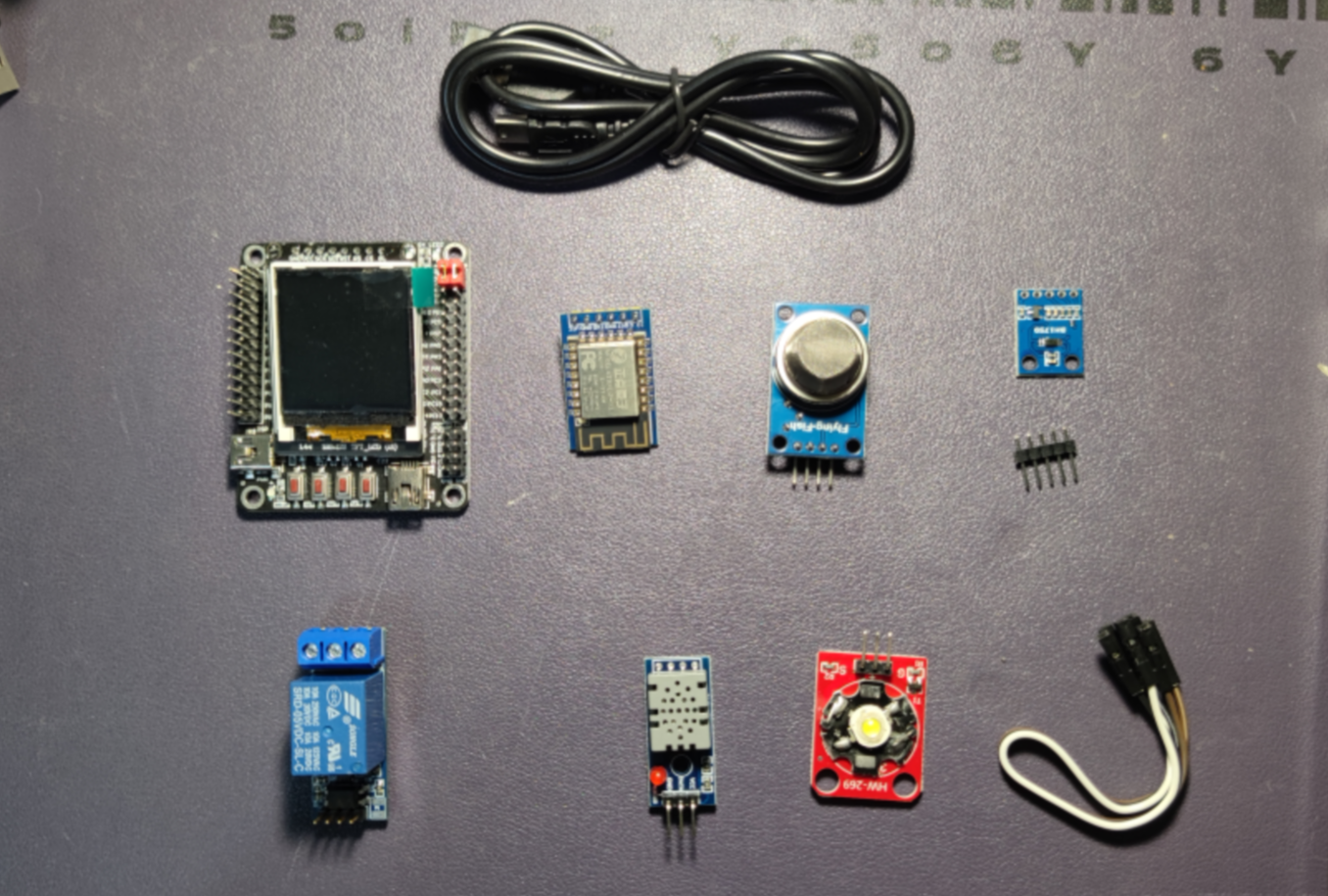
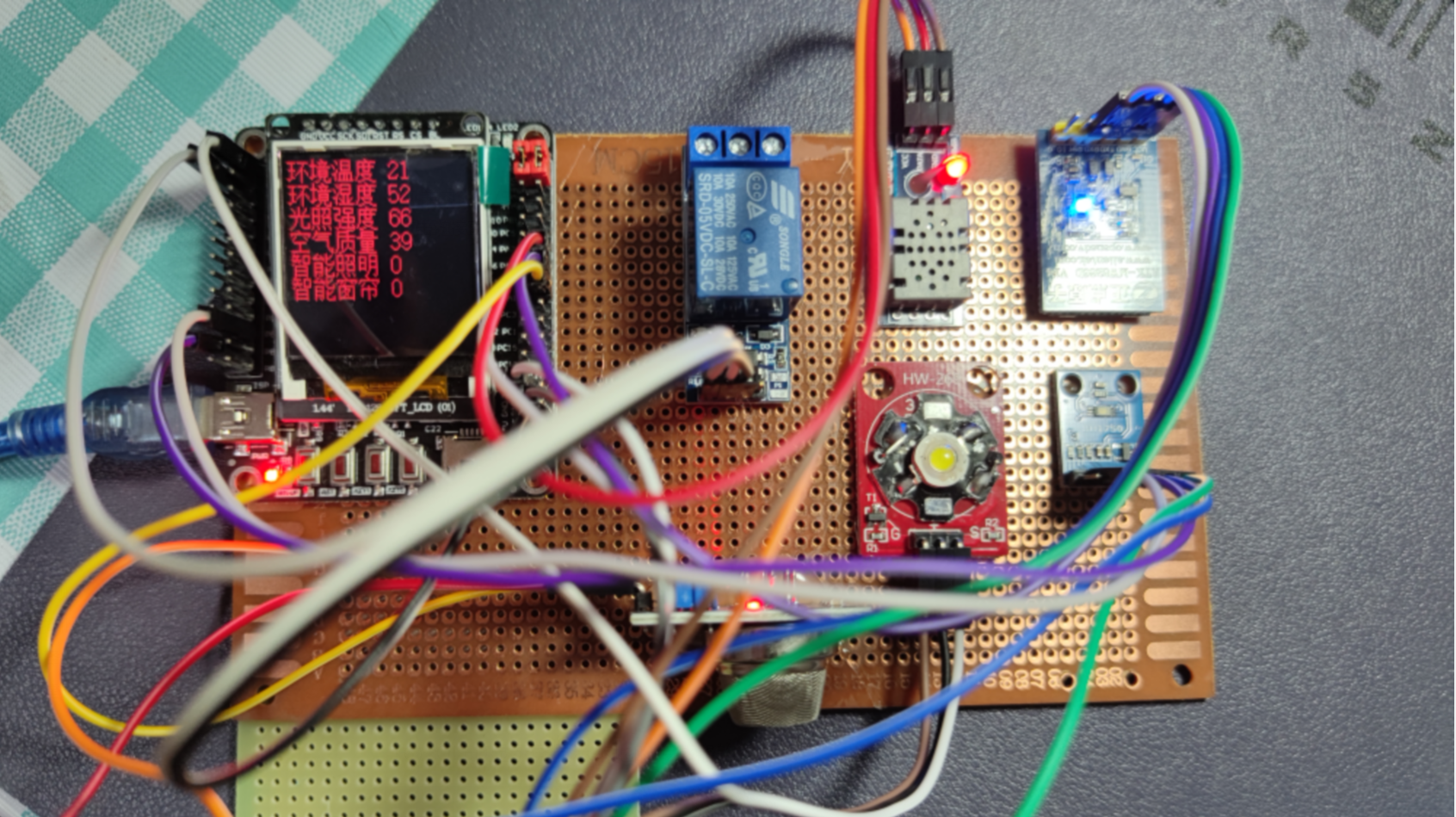


3. Hardware selection
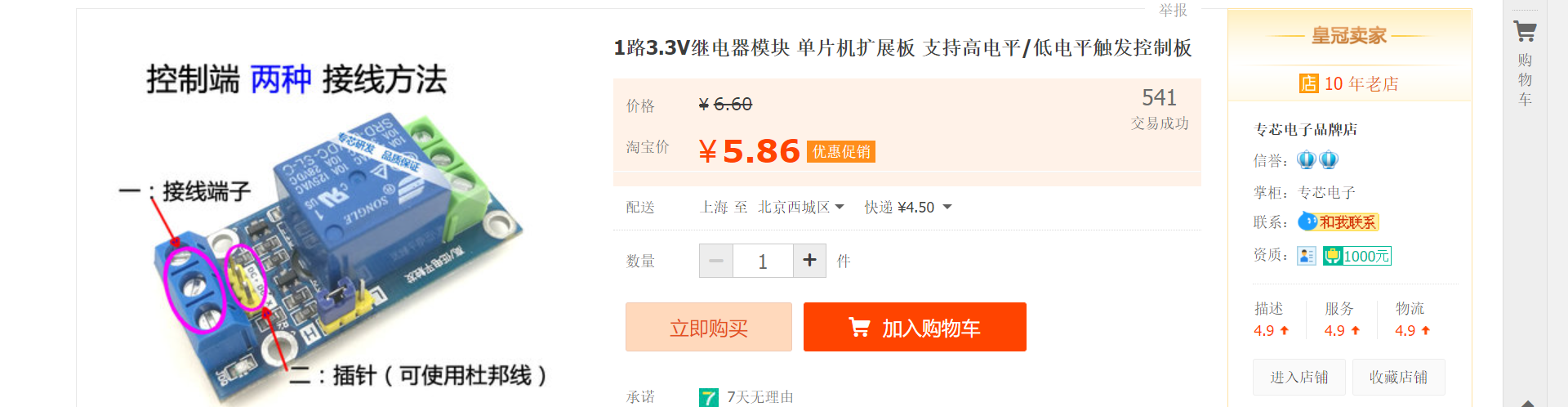
3.1 Relay
3.2 ESP8266 WIFI

3.3 MQ-135 Air quality sensors


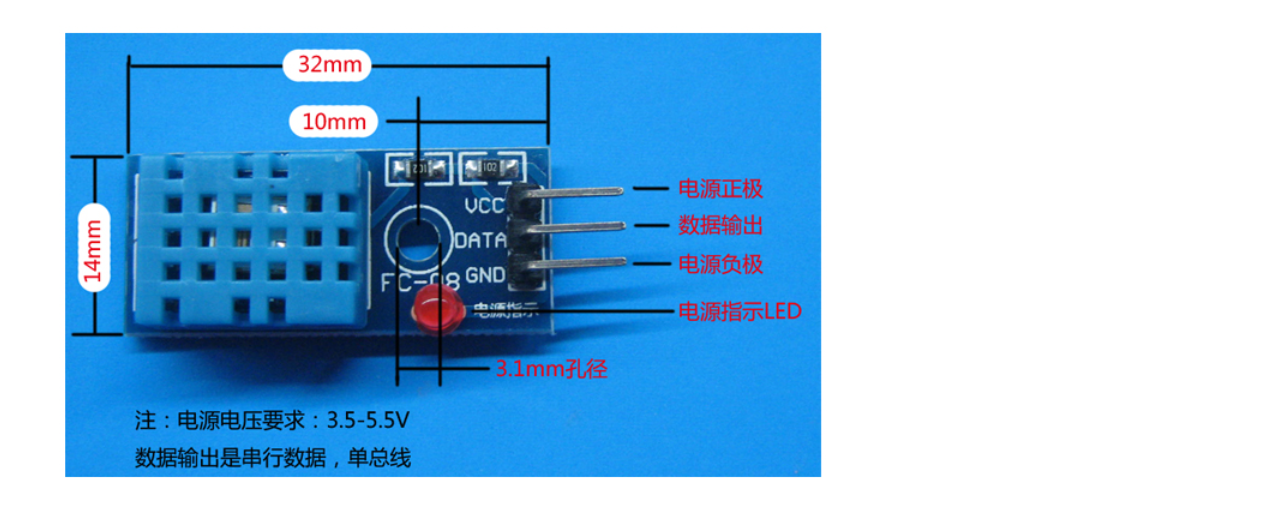
3.4 DHT11 Temperature and humidity sensor

3.5 STM32 System board

3.6 OLED display

OLED Is an organic light emitting diode, also known as organic laser display 、OLED Display technology has the characteristics of self illumination 、 Very thin organic material coating 、 And glass substrates 、 When an electric current is passing through 、 These organic materials emit light 、 and OLED The display screen can be viewed from a large angle 、 Low power consumption 、OLED Because it has self illumination at the same time 、 No backlight ( It's just that the power supply won't light up 、 Only when the driver and wiring are correct will it light up ) High contrast 、 Thin thickness and wide viewing angle 、 Quick reaction 、 Can be used for flexure panels 、 It has a wide temperature range 、 Excellent properties such as structure and manufacturing process 、 First contact 1286 All the screens are LCD Of 、 Need backlight 、 High power consumption 、 and OLED Low power consumption 、 More suitable for small systems 、 Due to the difference between the two luminescent materials 、 In different environments 、OLED Good display effect 、 Module power supply can be 3.3v It can also be 5V、 There is no need to modify the module circuit 、OLED The screen has multiple control commands 、 Can be controlled oLED The brightness of 、 Contrast 、 Switch boost circuit and other instructions 、 It is easy to operate 、 Rich in functions 、 Chinese characters can be displayed 、ASCH、 Patterns, etc 、 At the same time, in order to facilitate its application in products 、 reserve 4 individual M3 Fixing holes 、 It is convenient for users to fix it on the casing .
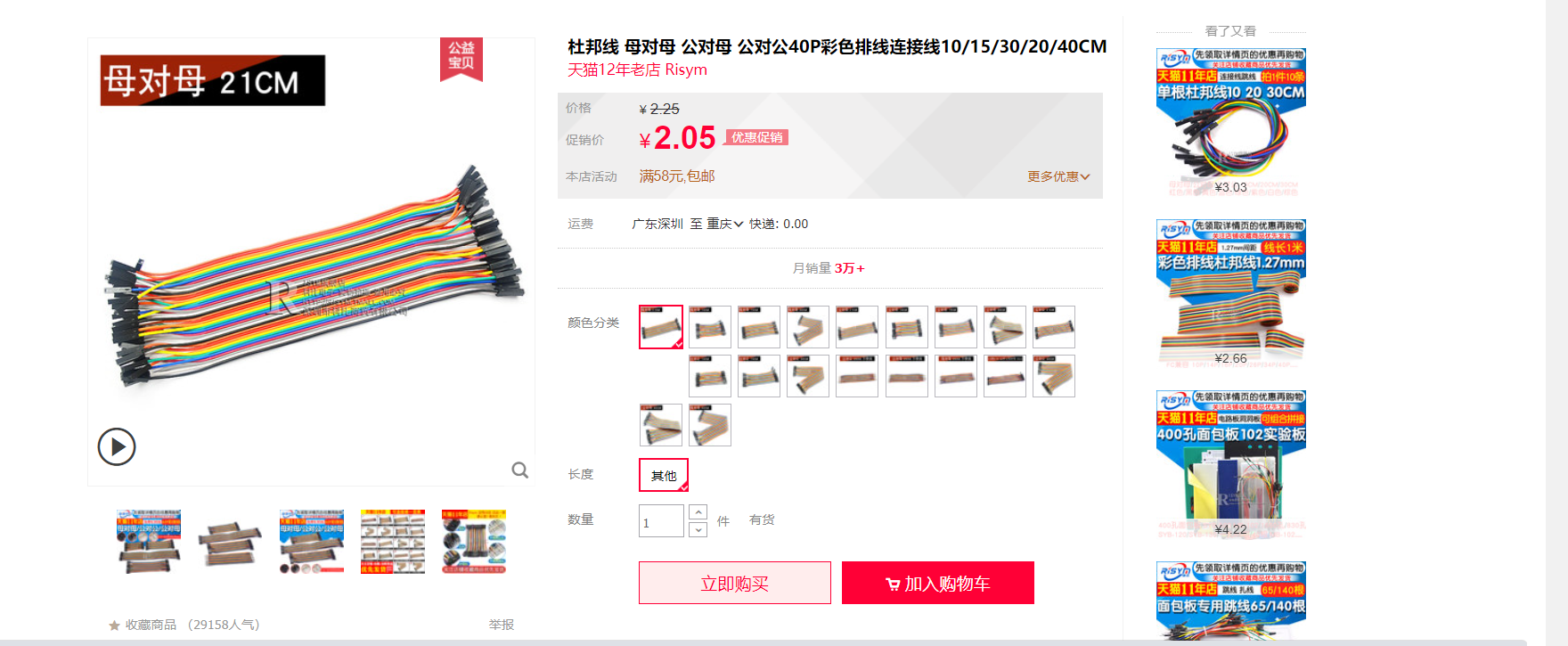
3.7 Female to female DuPont line
3.8 BH1750 Photosensitive sensors

4. Log in to Huawei cloud to create cloud products and devices
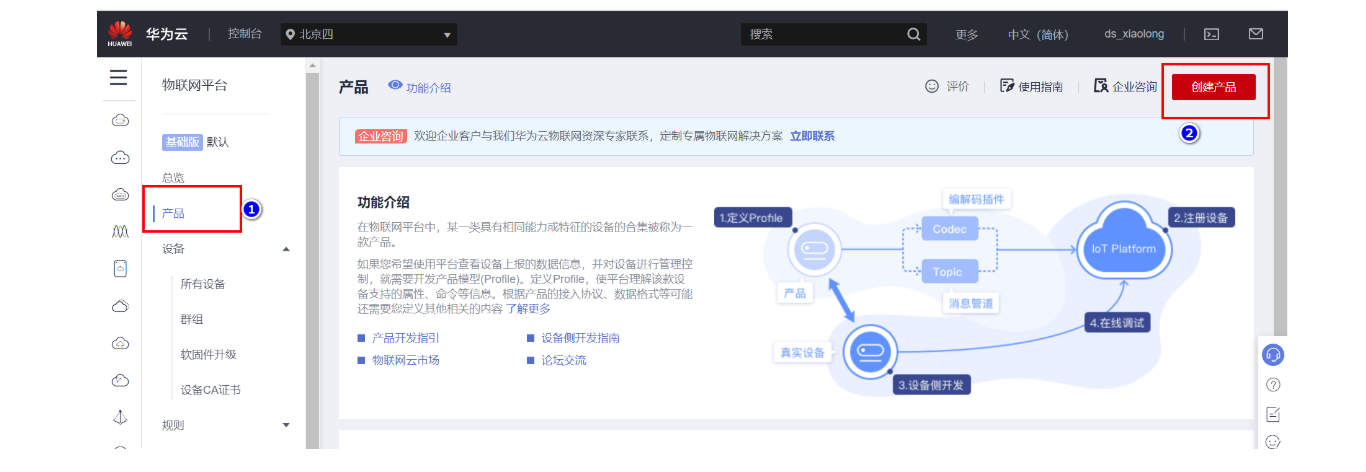
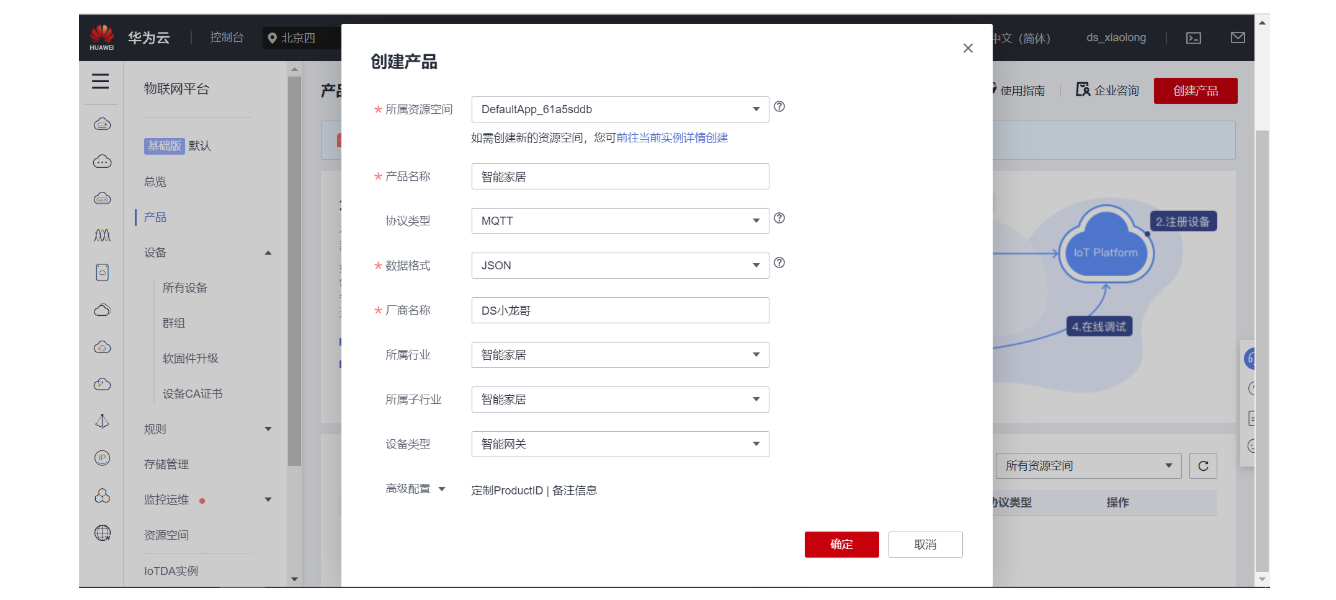
4.1 Create products


MQTT (1883) a161a58a78.iot-mqtts.cn-north-4.myhuaweicloud.com

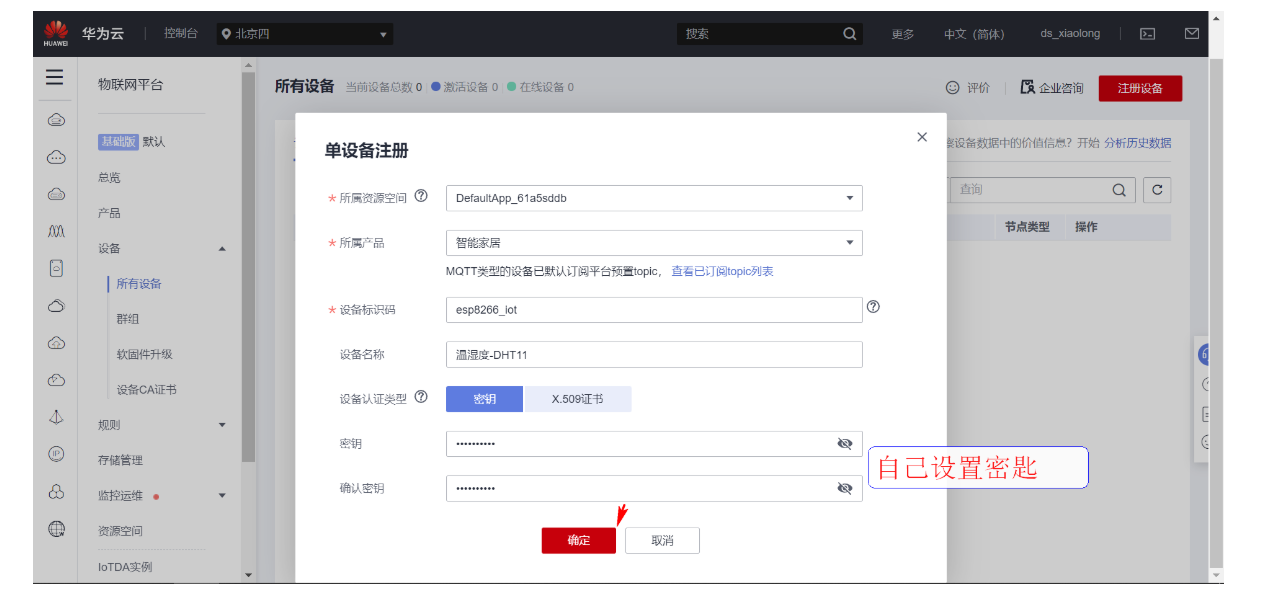
4.2 Create device

4.3 Product model definition


4.4 Generate MQTT Login key


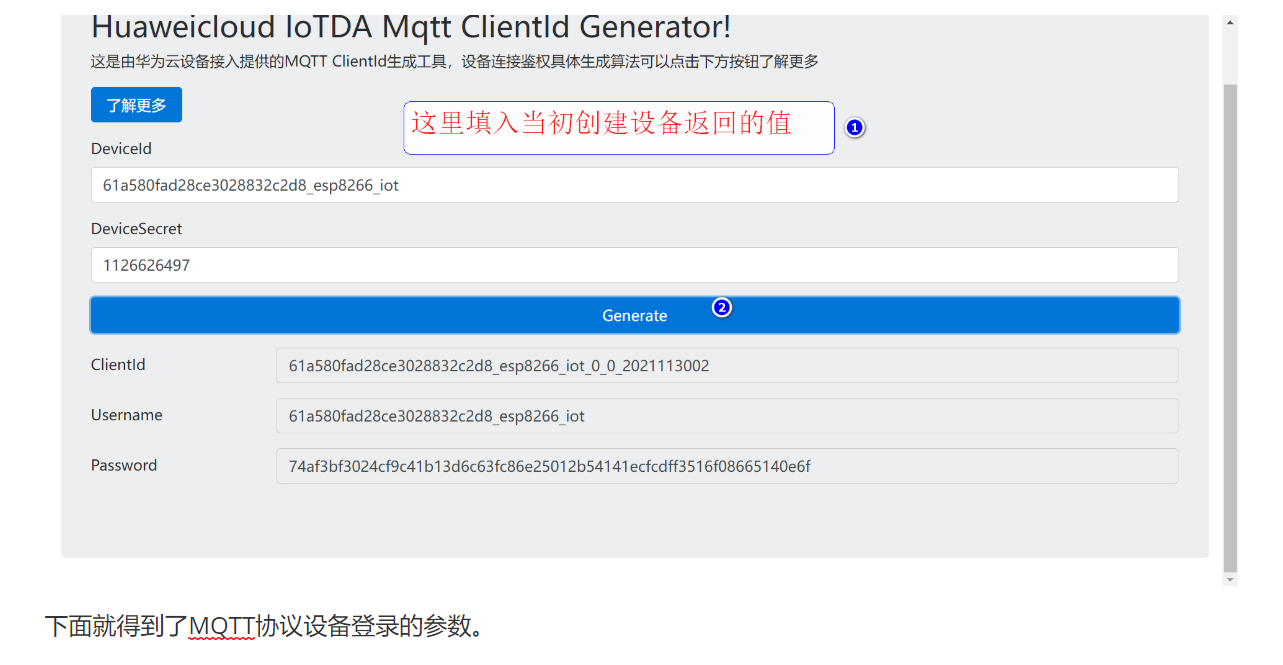
4.5 Use MQTT Client software login
a161a58a78.iot-mqtts.cn-north-4.myhuaweicloud.com121.36.42.100

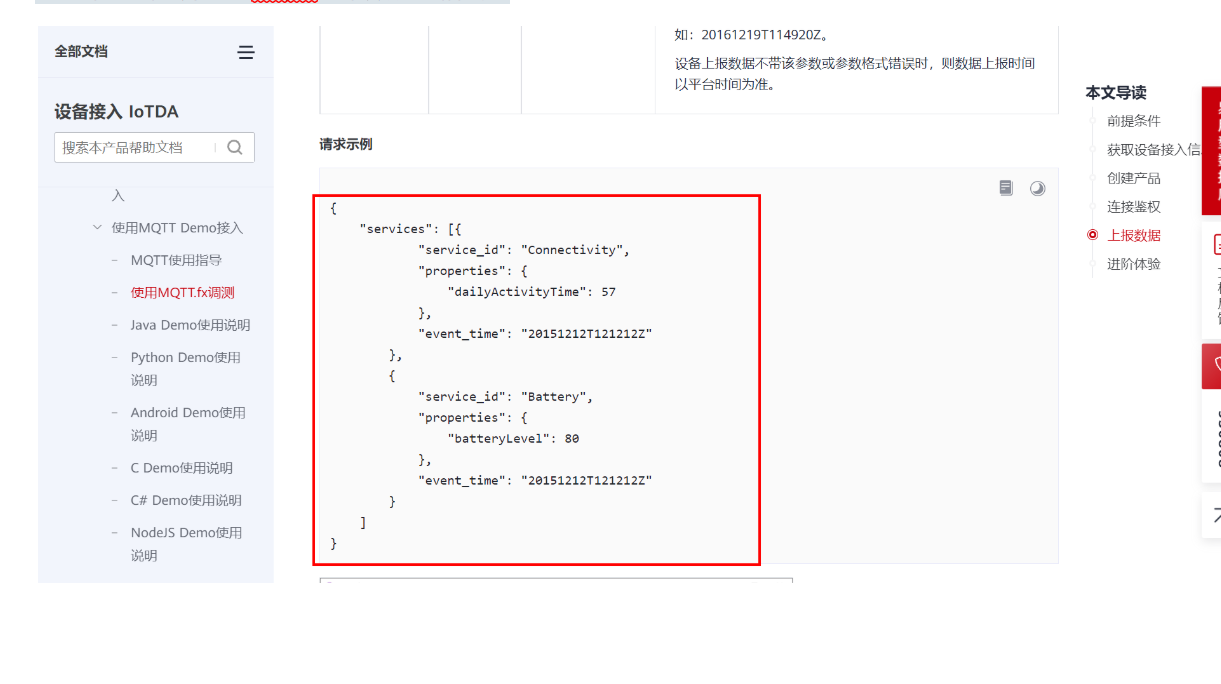
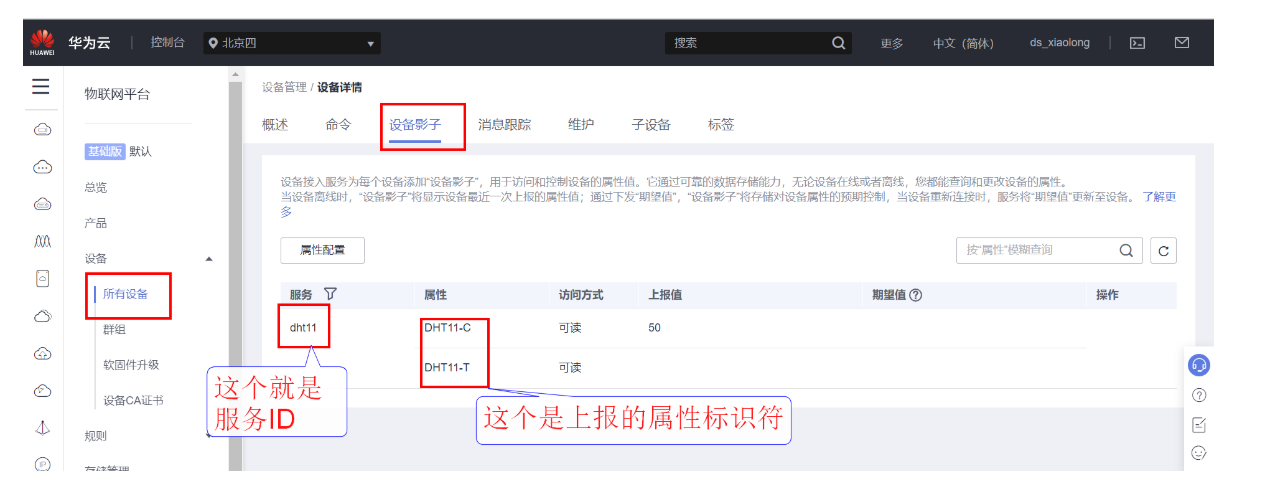
4.6 Report data

// Subscribe to topics :  The platform sends a message to the device
$oc/devices/61a580fad28ce3028832c2d8_esp8266_iot/sys/messages/down

// Equipment report data
$oc/devices/61a580fad28ce3028832c2d8_esp8266_iot/sys/properties/report

// Reported attribute message  ( Multiple attributes can be reported at a time , stay json Just add it to the )
{"services": [{"service_id": "dht11","properties":{"DHT11-C":50}}]}

5. STM32 Device code

5.1 LCD Chinese characters are modeled

5.2 Hardware connection
1. ESP8266 WIFI connection
ATK-ESP8266 A serial port WIFI Module and STM32 Serial port 2 Connect .
PA2(TX)--RXD  Module receiving pin
PA3(RX)--TXD  Module sending pin
GND---GND  The earth
VCC---VCC  Power Supply (3.3V~5.0V)

2. TFT 1.44  Inch color screen wiring
GND  Power ground
VCC  Pick up 5V or 3.3v Power Supply
SCL  Pick up PC8(SCL)
SDA  Pick up PC9(SDA)
RST  Pick up PC10
DC  Pick up PB7
CS  Pick up PB8
BL  Pick up PB11

3. DHT11  Temperature and humidity
VCC--VCC
GND---GND
DAT---PA5

4. LED The lamp - Simulate the lighting of the room
VCC--->5V
DAT--->PB12
GND--->GND

5.  Smart curtains - Simulate the curtains at home
VCC--->5V
DAT--->PB13
GND--->GND

6. MQ135 Air quality detection sensor
VCC--->5V
GND--->GND
DAT--->PA1

7. BH1750 Ambient light detection module :
SDA-----PB5
SCL-----PB6
GND---GND  The earth
VCC---VCC  Power Supply (3.3V~5.0V)

8.  On board LED Lamp wiring
LED1---PA8
LED2---PD2

9.  On board key wiring
K0---PA0
K1---PC5
K2---PA15
5.2 keil Project layout


5.3 main.c Code
#include "stm32f10x.h"
#include "led.h"
#include "delay.h"
#include "key.h"
#include "usart.h"
#include <string.h>
#include "timer.h"
#include "esp8266.h"
#include "motor.h"
#include "oled.h"
#include "dht11.h"
#include "adc.h"
#include <string.h>
#include <stdlib.h>
#include "font.h"
#include "mqtt.h"
#include "iic.h"
#include "bh1750.h"
/*
(1)ESP8266 A serial port WIFI, Used to communicate with Huawei cloud IOT To communicate remotely .
(2)DHT11 Temperature sensor , Check the temperature and humidity information of the local environment .
(3) Relay , To simulate the control of home appliances .
(4)BH1750 Photosensitive sensors , Detect the ambient light intensity
(5)MQ135 Air quality sensors . Combustible gas can be detected 、 Smoke concentration , Realize fire alarm .
(6)OLED The display shows the parameters of the local sensor , Real time display
*/
// Equipment information of Huawei Internet of things server
#define MQTT_ClientID "61b9ba3a2b2aa20288c1e7f1_QQ1126626497_0_0_2021121510"
#define MQTT_UserName "61b9ba3a2b2aa20288c1e7f1_QQ1126626497"
#define MQTT_PassWord "385ce91dfe7da5b7431868d5d87e7998163c493344040935d5a00024d6324242"
// Topics subscribed and published
#define SET_TOPIC "$oc/devices/61b9ba3a2b2aa20288c1e7f1_QQ1126626497_0_0_2021121510/sys/messages/down" // subscribe
#define POST_TOPIC "$oc/devices/61b9ba3a2b2aa20288c1e7f1_QQ1126626497_0_0_2021121510/sys/properties/report" // Release
// Set the connected router information
#define CONNECT_WIFI "Xiaomi_meizi6" // The name of the router to be connected -- Do not appear in Chinese 、 Special characters such as spaces
#define CONNECT_PASS "12170307yu" // The password of the router to be connected
#define CONNECT_SERVER_IP "121.36.42.100" // The server IP Address
#define CONNECT_SERVER_PORT 1883 // Server port number
//JTAG Mode setting , Used for setting up JTAG The pattern of
//mode:jtag,swd Mode setting ;00, All enable ;01, Can make SWD;10, All closed ;
#define JTAG_SWD_DISABLE 0X02
#define SWD_ENABLE 0X01
#define JTAG_SWD_ENABLE 0X00
void JTAG_Set(u8 mode)
{
u32 temp;
temp=mode;
temp<<=25;
RCC->APB2ENR|=1<<0; // Turn on the auxiliary clock
AFIO->MAPR&=0XF8FFFFFF; // eliminate MAPR Of [26:24]
AFIO->MAPR|=temp; // Set up jtag Pattern
}
u8 motor_flag=0; // The state of the curtain 0 Means closing 1 Means open
u8 led_flag=0; // Room lighting status 0 Means closing 1 Means open
u16 MQ135_data=0; //MQ135 Smoke sensor value
u8 DHT11_T=0; // ambient temperature
u8 DHT11_H=0; // ambient humidity
u8 BH1750_data=0; // Ambient light intensity
char request_id[100];
char mqtt_message[100];
//WIFI Send data storage area
char data_buff[300];
int main()
{
u8 esp8266_state=0;
u8 key;
u8 i;
u32 time_cnt=0;
u32 timer_hour_cnt=0; // Record the timing
JTAG_Set(JTAG_SWD_DISABLE); // Release PA15
LED_Init();
KEY_Init();
USART1_Init(115200);
Moto_Init(); // Fan 、 Heating rod initialization
USART2_Init(115200);// A serial port -WIFI
TIMER2_Init(72,20000); // Timeout time 20ms
DHT11_Init(); // initialization DHT11
Lcd_Init(); //LCD initialization
Lcd_Clear(0); // The screen is black
LCD_LED_SET;// adopt IO Control back light
AdcInit(); //ADC initialization -- testing MQ2 Smoke sensor data
IIC_Init();
printf(" Initializing WIFI One moment please .\r\n");
for(i=0;i<5;i++)
{
if(ESP8266_Init()==0)
{
esp8266_state=1;
break;
}
else
{
esp8266_state=0;
printf("ESP8266 Hardware detection error .\n");
}
}
if(esp8266_state)
{
printf(" Ready to connect to the server ....\r\n");
// Unencrypted port
printf("WIFI:%d\n",ESP8266_STA_TCP_Client_Mode(CONNECT_WIFI,CONNECT_PASS,CONNECT_SERVER_IP,CONNECT_SERVER_PORT,1));
//2. MQTT Protocol initialization
MQTT_Init();
//3. Connect to server
for(i=0;i<5;i++)
{
if(MQTT_Connect(MQTT_ClientID,MQTT_UserName,MQTT_PassWord)==0)
{
esp8266_state=1;
break;
}
esp8266_state=0;
printf(" Server connection failed , Retrying ...\n");
delay_ms(500);
}
printf(" Server connection successful .\n");
//3. Subscribe to topics
if(MQTT_SubscribeTopic(SET_TOPIC,0,1))
{
printf(" Topic subscription failed .\n");
}
else
{
printf(" Topic subscription succeeded .\n");
}
}
// ambient temperature
LCD_ShowChineseFont(0,0,16,HZ_FONT_16[0],RED,0);
LCD_ShowChineseFont(16*1,0,16,HZ_FONT_16[1],RED,0);
LCD_ShowChineseFont(16*2,0,16,HZ_FONT_16[2],RED,0);
LCD_ShowChineseFont(16*3,0,16,HZ_FONT_16[3],RED,0);
// ambient humidity
LCD_ShowChineseFont(0,16*1,16,HZ_FONT_16[4],RED,0);
LCD_ShowChineseFont(16*1,16*1,16,HZ_FONT_16[5],RED,0);
LCD_ShowChineseFont(16*2,16*1,16,HZ_FONT_16[6],RED,0);
LCD_ShowChineseFont(16*3,16*1,16,HZ_FONT_16[7],RED,0);
// Light intensity
LCD_ShowChineseFont(0,16*2,16,HZ_FONT_16[8],RED,0);
LCD_ShowChineseFont(16,16*2,16,HZ_FONT_16[9],RED,0);
LCD_ShowChineseFont(16*2,16*2,16,HZ_FONT_16[10],RED,0);
LCD_ShowChineseFont(16*3,16*2,16,HZ_FONT_16[11],RED,0);
// Air quality
LCD_ShowChineseFont(0,16*3,16,HZ_FONT_16[12],RED,0);
LCD_ShowChineseFont(16,16*3,16,HZ_FONT_16[13],RED,0);
LCD_ShowChineseFont(16*2,16*3,16,HZ_FONT_16[14],RED,0);
LCD_ShowChineseFont(16*3,16*3,16,HZ_FONT_16[15],RED,0);
// Intelligent lighting
LCD_ShowChineseFont(0,16*4,16,HZ_FONT_16[16],RED,0);
LCD_ShowChineseFont(16,16*4,16,HZ_FONT_16[17],RED,0);
LCD_ShowChineseFont(16*2,16*4,16,HZ_FONT_16[18],RED,0);
LCD_ShowChineseFont(16*3,16*4,16,HZ_FONT_16[19],RED,0);
// Smart curtains
LCD_ShowChineseFont(0,16*5,16,HZ_FONT_16[20],RED,0);
LCD_ShowChineseFont(16,16*5,16,HZ_FONT_16[21],RED,0);
LCD_ShowChineseFont(16*2,16*5,16,HZ_FONT_16[22],RED,0);
LCD_ShowChineseFont(16*3,16*5,16,HZ_FONT_16[23],RED,0);
while(1)
{
// Press the key to manually control the opening of curtains and LED The lamp
key=KEY_Scan();
if(key)printf("key=%d\r\n",key);
// control LED The lamp
if(key==2)
{
led_flag=!led_flag;
if(led_flag)
{
LED_OUT=1;
}
else
{
LED_OUT=0;
}
}
// Control relay
if(key==1)
{
motor_flag=!motor_flag;
if(motor_flag)
{
MOTOR_OUT=1;
}
else
{
MOTOR_OUT=0;
}
}
// Polling time arrives
if(time_cnt>=100)
{
time_cnt=0;
LED1=!LED1;
// Read the light intensity
BH1750_data=Read_BH1750_Data();
printf(" Ambient light intensity :%d\r\n",BH1750_data);
// Obtain the ambient temperature and humidity
if(DHT11_Read_Data(&DHT11_T,&DHT11_H))
{
printf(" Temperature reading failed .\r\n");
}
printf(" ambient temperature :%d\r\n ambient humidity :%d\r\n",DHT11_T,DHT11_H);
// Obtain air quality
MQ135_data=GetAdcCHxDATA(1);
printf(" Air quality :%d\r\n",MQ135_data);
//LCD The screen displays the temperature and humidity in real time 、 Air quality , System working status, etc .
// ambient temperature
sprintf(data_buff,"%d",DHT11_T);
Gui_DrawFont_GBK16(72,16*0,RED,0,(u8*)data_buff);
// ambient humidity
sprintf(data_buff,"%d",DHT11_H);
Gui_DrawFont_GBK16(72,16*1,RED,0,(u8*)" ");
Gui_DrawFont_GBK16(72,16*1,RED,0,(u8*)data_buff);
// Ambient light intensity
sprintf(data_buff,"%d",BH1750_data);
Gui_DrawFont_GBK16(72,16*2,RED,0,(u8*)" ");
Gui_DrawFont_GBK16(72,16*2,RED,0,(u8*)data_buff);
// Air quality
sprintf(data_buff,"%d",MQ135_data);
Gui_DrawFont_GBK16(72,16*3,RED,0,(u8*)" ");
Gui_DrawFont_GBK16(72,16*3,RED,0,(u8*)data_buff);
// Intelligent lighting
sprintf(data_buff,"%d",led_flag);
Gui_DrawFont_GBK16(72,16*4,RED,0,(u8*)" ");
Gui_DrawFont_GBK16(72,16*4,RED,0,(u8*)data_buff);
// Smart curtains
sprintf(data_buff,"%d",motor_flag);
Gui_DrawFont_GBK16(72,16*5,RED,0,(u8*)" ");
Gui_DrawFont_GBK16(72,16*5,RED,0,(u8*)data_buff);
// Report data
sprintf(data_buff,"{\"services\":{\"BH1750\":[{\"v\":%d}],\"DHT11_H\":[{\"v\":%d}],\"DHT11_T\":[{\"v\":%d}],\"MQ135\":[{\"v\":%d}],\"motor\":[{\"v\":%d}],\"LED\":[{\"v\":%d}]}}",
BH1750_data,DHT11_H,DHT11_T,MQ135_data,motor_flag,led_flag);
MQTT_PublishData(POST_TOPIC,data_buff,0);
printf(" Update data .\r\n");
}
// receive WIFI Returned data
if(USART2_RX_FLAG)
{
USART2_RX_BUFFER[USART2_RX_CNT]='\0';
printf("WIFI Receive the data :\r\n");
// The data returned to the serial port print server
for(i=0;i<USART2_RX_CNT;i++)
{
printf("%c",USART2_RX_BUFFER[i]);
}
/*
LED_ON The smart light is on
LED_OFF The intelligent lamp is off
MOTOR_ON Smart curtains open
MOTOR_OFF Intelligent curtain closing
*/
// If the attribute is distributed
if(USART2_RX_CNT>5)
{
// Answer to the server
if(strstr((char*)&USART2_RX_BUFFER[5],"cmd/request/"))
{
char *p=NULL;
p=strstr((char*)&USART2_RX_BUFFER[5],"cmd/request/");
if(p)
{
// Parsing data
strncpy(request_id,p+12,36);
}
// Data reported to the server
sprintf(mqtt_message,"success");
// Answer subject
sprintf(data_buff,"$sys/501579/dev1/cmd/response/%s",request_id);
MQTT_PublishData(data_buff,mqtt_message,0);
printf(" Release theme :%s\r\n",data_buff);
printf(" Release data :%s\r\n",mqtt_message);
}
//LED:0 LED:1 MOTOR:0 MOTOR:1
// turn on the light
if(strstr((char*)&USART2_RX_BUFFER[5],"LED:0"))
{
LED_OUT=0;
led_flag=0;
}
// Turn off the lights
else if(strstr((char*)&USART2_RX_BUFFER[5],"LED:1"))
{
LED_OUT=1;
led_flag=1;
}
// Open the curtains
else if(strstr((char*)&USART2_RX_BUFFER[5],"MOTOR:0"))
{
MOTOR_OUT=0;
motor_flag=0;
}
// Close the curtains
else if(strstr((char*)&USART2_RX_BUFFER[5],"MOTOR:1"))
{
MOTOR_OUT=1;
motor_flag=1;
}
}
USART2_RX_CNT=0;
USART2_RX_FLAG=0;
}
DelayMs(10);
time_cnt++;
timer_hour_cnt++;
}
}
边栏推荐
- 3 keras版本模型训练
- R语言使用cor函数计算相关性矩阵进行相关性分析,使用corrgram包可视化相关性矩阵、行和列使用主成分分析重新排序、下三角形中使用平滑的拟合线和置信椭圆,上三角形中使用散点图、对角线最小值和最大值
- Kept to implement redis autofailover (redisha)
- 【毕业季】致毕业生的一句话:天高任鸟飞,海阔凭鱼跃
- C语言读取数据
- 【力扣刷题】11.盛最多水的容器//42.接雨水
- Everyone is a scientist free gas experience Mint love crash
- 长安链交易防重之布谷鸟过滤器
- 100+数据科学面试问题和答案总结 - 基础知识和数据分析
- Solidus labs welcomes zhaojiali, former head of financial innovation in Hong Kong, as a strategic adviser
猜你喜欢

2 三种建模方式

Natural language inference with attention and fine tuning Bert pytorch

【力扣刷题】单调栈:84. 柱状图中最大的矩形

Tsinghua's "magic potion" is published in nature: reversing stem cell differentiation, and the achievements of the Nobel Prize go further. Netizen: life can be created without sperm and eggs

首例猪心移植细节全面披露:患者体内发现人类疱疹病毒,死后心脏重量翻倍,心肌细胞纤维化丨团队最新论文...
2 three modeling methods

【蓝桥杯集训100题】scratch辨别质数合数 蓝桥杯scratch比赛专项预测编程题 集训模拟练习题第15题
Redis Guide (8): principle and implementation of Qianfan Jingfa distributed lock

【力扣刷题】11.盛最多水的容器//42.接雨水

1-12Vmware新增SSH功能

随机推荐
Tencent Peking University's sparse large model training acceleration program het was selected into the VLDB of the international summit
若依微服务特殊字符串被过滤的解决办法
补齐短板-开源IM项目OpenIM关于初始化/登录/好友接口文档介绍
C语言读取数据
6 自定义层
R语言使用cor函数计算相关性矩阵进行相关性分析,使用corrgram包可视化相关性矩阵、行和列使用主成分分析重新排序、下三角形中使用平滑的拟合线和置信椭圆,上三角形中使用散点图、对角线最小值和最大值
[from deleting the database to running] the end of MySQL Foundation (the first step is to run.)
MHA switching (recommended operation process)
SAP OData 开发教程 - 从入门到提高(包含 SEGW, RAP 和 CDP)
5 model saving and loading
『C语言』题集 of ⑩
心情不好,我就这样写代码
Cookie和Session详解
首例猪心移植细节全面披露:患者体内发现人类疱疹病毒,死后心脏重量翻倍,心肌细胞纤维化丨团队最新论文...
Redis 迁移(操作流程建议)1
H5 close the current page, including wechat browser (with source code)
STEPN 新手入門及進階
6 custom layer
1 张量的简单使用
【从删库到跑路】JDBC 完结篇(一天学完系列!!学完赶紧跑!)