当前位置:网站首页>webdriver入门
webdriver入门
2022-06-12 14:18:00 【小小微的博客】
webdriver作为selenium新版本的插件,和selenium RC最大的不同在于其不需要启动服务,直接运行Java代码即可。
新建一个maven项目,pom文件的内容如下,这样就可以从selenium的官方下载webdriver所需要的包
<projectxmlns="http://maven.apache.org/POM/4.0.0"xmlns:xsi="http://www.w3.org/2001/XMLSchema-instance"
xsi:schemaLocation="http://maven.apache.org/POM/4.0.0 http://maven.apache.org/xsd/maven-4.0.0.xsd">
<modelVersion>4.0.0</modelVersion>
<groupId>Selenium2Test</groupId>
<artifactId>Selenium2Test</artifactId>
<version>1.0</version>
<dependencies>
<dependency>
<groupId>org.seleniumhq.selenium</groupId>
<artifactId>selenium-java</artifactId>
<version>2.44.0</version>
</dependency>
<dependency>
<groupId>com.opera</groupId>
<artifactId>operadriver</artifactId>
</dependency>
</dependencies>
<dependencyManagement>
<dependencies>
<dependency>
<groupId>com.opera</groupId>
<artifactId>operadriver</artifactId>
<version>0.16</version>
<exclusions>
<exclusion>
<groupId>org.seleniumhq.selenium</groupId>
<artifactId>selenium-remote-driver</artifactId>
</exclusion>
</exclusions>
</dependency>
</dependencies>
</dependencyManagement>
</project>
selenium webdriver调用Chrome的方法
首先下载一个chromedriver的驱动
下面的网站可以下载到各个版本Chrome对应的webdriver:
http://chromedriver.storage.googleapis.com/
http://npm.taobao.org/mirrors/chromedriver/
selenium webdriver项目的建立前面已经讲过了,对于任何浏览器,都是一致的
需要保证chromedriver和Chrome版本的对应,如果二者版本不对应,可能会无法正常调起Chrome
实现如下
"//Chrome执行文件的路径
System.setProperty("webdriver.chrome.driver", "C:\\Program Files (x86)\\Google\\Chrome\\Application\\chrome.exe");
//Chrome的driver的路径,相对当前项目根路径的相对路径
ChromeDriverService service = new ChromeDriverService.Builder().usingDriverExecutable(new File("driver\\chromedriver2.37.exe"))
.usingAnyFreePort().build();
service.start();
// 初始化driver
WebDriver driver = new RemoteWebDriver(service.getUrl(),DesiredCapabilities.chrome());
//打开浏览器
driver.get(");
webdriver调用Firefoxpackage lesson1;
import org.openqa.selenium.By;
import org.openqa.selenium.WebDriver;
import org.openqa.selenium.WebElement;
import org.openqa.selenium.firefox.FirefoxDriver;
publicclassExampleForFireFox{
publicstaticvoid main(String[] args){
// 如果你的 FireFox 没有安装在默认目录,那么必须在程序中设置
System.setProperty("webdriver.firefox.bin",
"D:\\Program Files\\Mozilla Firefox\\firefox.exe");
// 创建一个 FireFox 的浏览器实例
WebDriver driver =newFirefoxDriver();
// 让浏览器访问 Baidu
driver.get("http://www.baidu.com");
// 用下面代码也可以实现
// driver.navigate().to("http://www.baidu.com");
// 获取 网页的 title
System.out.println("1 Page title is: "+ driver.getTitle());
// 通过 id 找到 input 的 DOM
WebElement element = driver.findElement(By.id("kw"));
// 输入关键字
element.sendKeys("zTree");
// 显示搜索结果页面的 title
System.out.println("2 Page title is: "+ driver.getTitle());
// 关闭浏览器
driver.quit();
}
}
webdriver同selenium RC一样,可以结合selenium IDE来使用,在Firefox中安装selenium IDE插件
在Firefox选择附加组件,搜索selenium IDE,选择下面的插件进行安装

安装完成后,就可以在组件列表和Firefox的工具栏中看到selenium IDE的图标了

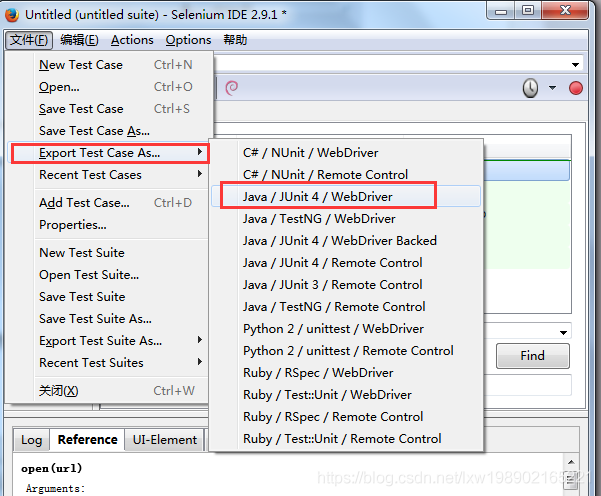
使用IDE录制浏览器的操作,并将操作export为Junit4 的代码,就可以导入selenium webdriver所在的项目进行使用了
使用上面导出的代码时会遇到几个问题
首先,selenium webdriver中并没有Junit的jar包 ,这个比较容易解决,直接导入个Junit的jar即可,这里我引入的是Junit 4.11版本的jar
之后又遇到一个问题,这个类里面引入了一个包,import static org.hamcrest.CoreMatchers.*; 但是这个包在这个类中未使用,本想着把import去掉即可,结果去掉之后出现了一个报错,说少这个包,之后求 助了百度,说是Junit新版本的jar里面没有包含hamcrest的包,但是实际上这个jar在Junit测试时是必备的,那就只能再引入这个包了,果然,在引入了hamcrest-core-1.3.jar这个包之后,代码不会报错了
再次执行,提示找不到Firefox的安装文件,本来看了参考的一些教程说Firefox如果安装在默认目录(D:\Program Files\Mozilla Firefox)就可以不用配置了,但是我这里虽然是默认安装目录,结果还是不能找到,那么就只有加上配置指定Firefox的目录了
System.setProperty("webdriver.firefox.bin","D:\\Program Files\\Mozilla Firefox\\firefox.exe");
经过上面的调整,代码已经能够正常执行并调起Firefox了
来自 <http://lxw198902165221.blog.163.com/blog/static/25895002220171233850323/>
边栏推荐
- TestEngine with ID ‘junit-vintage‘ failed to discover tests
- Crawler problem set (I) record
- Design of PLC intelligent slave station based on PROFIBUS DP protocol
- Reverse the encryption parameters of a hot water software
- Llvm pass-- virtual function protection
- How to set, reset and reverse bit
- C secret arts script Chapter 5 (structure) (Section 1)
- Three common methods of C language array initialization ({0}, memset, for loop assignment) and their principles
- Create a slice slice pit using the make method
- Redis核心配置和高级数据类型
猜你喜欢
![JS (I) error [err\u module\u not\u found]: cannot find package 'UUID' imported](/img/a4/ef2d73576e027a2179ec9251167fa4.jpg)
JS (I) error [err\u module\u not\u found]: cannot find package 'UUID' imported

Llvm pass-- virtual function protection

Player actual combat 13 create qtopengl project to promote window control and reload qoopenglwedge

2022版Redis数据删除策略

Pay attention to click and pursue more users to enter the website. What bidding strategy can you choose?

Detailed explanation of C language memset

JS (III) convert ES6 syntax to Es5 syntax

Socket model of punctual atom stm32f429 core board

Notepad common settings

Is Shell Scripting really a big technology?
随机推荐
[MySQL] basic database operation
Player actual combat 14 display YUV
你敢信?开发一个管理系统我只用了两天
How to package QT program learning records with inno setup
C secret arts script Chapter 2 (detailed explanation of pointers) (Section 3)
Design of PLC intelligent slave station based on PROFIBUS DP protocol
C語言中主函數調用另外一個函數,匯編代碼理解
Basic usage of scanner
In C language, the main function calls another function, which is understood by assembly code
Visual positioning guidance system for industrial manipulator (robot)
[early knowledge of activities] list of recent activities of livevideostack
Configuring OSPF pseudo connection for Huawei devices
Remote code injection
[OCR] aspriseocr C # English, number recognition (not Chinese)
Player practice 20 audio thread and video thread
Recursive summary of learning function
JS (III) convert ES6 syntax to Es5 syntax
C secret script Chapter 3 (detailed explanation of string function) (Section 2)
测试工程师如何转型测开
Common DOS commands