当前位置:网站首页>6.gui (graphics, filling)
6.gui (graphics, filling)
2022-06-22 16:18:00 【Xiaomurong】
6 GUI
Write a program that can draw all kinds of graphics , As shown in the figure below , You use radio buttons to select drawings , Use the check button to specify whether to fill .
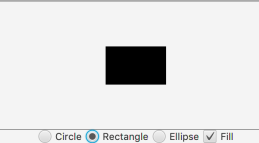
import javafx.application.Application;
import javafx.geometry.Insets;
import javafx.geometry.Pos;
import javafx.scene.Scene;
import javafx.scene.control.CheckBox;
import javafx.scene.control.ContentDisplay;
import javafx.scene.control.RadioButton;
import javafx.scene.control.ToggleGroup;
import javafx.scene.layout.BorderPane;
import javafx.scene.layout.HBox;
import javafx.scene.layout.StackPane;
import javafx.scene.paint.Color;
import javafx.scene.shape.Circle;
import javafx.scene.shape.Ellipse;
import javafx.scene.shape.Rectangle;
import javafx.stage.Stage;

public class JavaFx extends Application {

	private double paneWidth = 550;
	private double paneHeight = 200;

	@Override
	public void start(Stage args) throws Exception {

		StackPane pane = new StackPane();

		Circle circle = new Circle(20, 20, 60);
		circle.setStroke(Color.BLACK);//  edge
		circle.setFill(Color.WHITE);//  Default initial white

		Rectangle rectangle = new Rectangle(20, 20, 100, 60);
		rectangle.setStroke(Color.BLACK);

		Ellipse ellipse = new Ellipse(20, 20, 50, 70);
		ellipse.setStroke(Color.BLACK);

		pane.setStyle("-fx-border-color:black");//  Palette border color
		pane.getChildren().add(circle);

		RadioButton btcircle = new RadioButton("Circle");//  Radio button   side   There is a text
		btcircle.setTextFill(Color.BLACK);//  Black text text
		btcircle.setSelected(true);//  Radio button   The initial state   Choose
		btcircle.setLayoutX(5);//  Set the button position
		btcircle.setLayoutY(270);
		btcircle.setPadding(new Insets(5, 5, 5, 5));//  Set each button ( Between ) padding

		RadioButton btrectangle = new RadioButton("Rectangle");
		btrectangle.setTextFill(Color.BLACK);

		RadioButton btellipse = new RadioButton("Eclipse");
		btellipse.setTextFill(Color.BLACK);

		CheckBox btfill = new CheckBox("Fill");//  Check box ( If you have selected another line , This button is still available )
		btfill.setTextFill(Color.BLACK);

		ToggleGroup group = new ToggleGroup();
		btcircle.setToggleGroup(group);
		btcircle.setSelected(true);//  Choose... From the beginning
		btrectangle.setToggleGroup(group);
		btellipse.setToggleGroup(group);

		HBox hbox = new HBox(5);// HBox  The layout panel can easily arrange all the controls in a row .
		hbox.setSpacing(50);//  Set the distance between the controls
// hbox.setPadding(null);// Set control and  HBox  The distance between the edges
		hbox.setAlignment(Pos.CENTER);
		hbox.getChildren().addAll(btcircle, btrectangle, btellipse, btfill);//  take 4 Put a button into the scene
		hbox.setAlignment(Pos.CENTER);

		BorderPane borderPane = new BorderPane();
		borderPane.setCenter(pane);
		borderPane.setBottom(hbox);

		Scene scene = new Scene(borderPane, paneWidth, paneHeight + 40);
		args.setTitle(" curriculum design ");
		args.setScene(scene);
		args.show();

		btcircle.setOnAction(e -> {

			pane.getChildren().clear();//  Clear the previous screen
			pane.getChildren().add(circle);
			if (btfill.isSelected()) {

				circle.setFill(Color.BLACK);
			} else {

				circle.setFill(Color.WHITE);
			}
		});
		btrectangle.setOnAction(e -> {

			pane.getChildren().clear();
			pane.getChildren().add(rectangle);
			if (btfill.isSelected()) {

				rectangle.setFill(Color.BLACK);
			} else {

				rectangle.setFill(Color.WHITE);
			}
		});
		btellipse.setOnAction(e -> {

			pane.getChildren().clear();
			pane.getChildren().add(ellipse);
			if (btfill.isSelected()) {

				ellipse.setFill(Color.BLACK);
			} else {

				ellipse.setFill(Color.WHITE);
			}
		});
		btfill.setOnAction(e -> {

			if (btfill.isSelected()) {

				circle.setFill(Color.BLACK);
				rectangle.setFill(Color.BLACK);
				ellipse.setFill(Color.BLACK);
			} else {

				circle.setFill(Color.WHITE);
				rectangle.setFill(Color.WHITE);
				ellipse.setFill(Color.WHITE);
			}
		});
	}

	public static void main(String[] args) {

		launch(args);
	}
}
边栏推荐
- Google Chrome small details
- How to embody the value of knowledge management in business
- ORB_ VI ideological framework
- Linux安装mysql
- Simulation of vector
- 4. string (reverse order and case conversion)
- wallys/WiFi6 MiniPCIe Module 2T2R 2×2.4GHz 2x5GHz
- 【山大会议】应用设置模块
- Ironsource Luna offers a limited time discount for Apple search ads and enjoys 3 months of free service upon registration
- 知识管理在业务中的价值如何体现
猜你喜欢
![[VTK] model rotation and Translation](/img/4c/76b98797574627a63c385b22637836.png)



随机推荐
什么是 SAP ABAP? 类型、ABAP 完整形式和含义
Focus on creating a net red product. The xinjietu x70s is newly launched, starting from 87900
Research on ICT: domestic databases focus on the ICT market, and Huawei Gauss is expected to become the strongest
Luogu p2466 [sdoi2008] Sue's small ball solution
SAP ABAP 子屏幕教程:在 SAP 中调用子屏幕-010
Simulation of stack and queue
mysql - sql执行过程
Unity游戏优化(第2版)学习记录8
杜老师自建国内不蒜子统计平台
How to open a futures account? Is it safe to open an online futures account?
SAP ABAP 表控制与示例-07
odoo本地文档功能开发记录
[Shanda conference] project introduces Redux
SAP教程中的ALV报告 - ABAP列表查看器-012
3.抽象类(shape)
[Shanda conference] private chat channel webrtc tools
数睿数据荣获第二届ISIG中国产业智能大会两项年度大奖
CMake教程系列-00-简介
Jenkins 通过检查代码提交自动触发编译
webDriver以及Selenium使用总结