当前位置:网站首页>Prometheus入门使用(三)
Prometheus入门使用(三)
2022-07-23 09:34:00 【lionwerson】
Prometheus入门使用(三)
Prometheus告警简介:
Prometheus通过PromQL表达式定义触发告警条件,满足触发条件之后在web页面显示告警,关联Alertmanager之后就可以通过Alertmanager推送警告信息到不同的平台。
Prometheus告警架构图:

Prometheus告警设置:
Prometheus的告警规则通过PromQL表达式定义触发警告条件,满足条件时就会触发告警通知,
1.编辑prometheus.yml文件,设置rules文件路径:
rule_files:
  # - "first_rules.yml"
  # - "second_rules.yml"
  - /usr/local/prometheus/*.yml   #设置prmetheus下的所有rules文件,默认每分钟根据这些规则进行计算,可以通过**evaluation_interval**来覆盖默认的计算周期
2.编辑rules文件设置告警规则:
groups:                             #规则组下面可以设置多条规则
- name: hostStatsAlert               #规则组名称
  rules:
  - alert: hostCpuUsageAlert  #警告名称
    expr: (sum(increase(node_cpu_seconds_total[1m]))by(instance)) > 59 #告警PromQL表达式,满足条件触发告警
    for: 1m                   #评估等待时间,可选参数。用于表示只有当触发条件持续一段时间后才发送告警。在等待期间新产生告警的状态为pending
    labels:                   #自定义标签,允许用户指定要附加到告警上的一组附加标签
      severity: page
    annotations:              #附加信息
      summary: "Instance {
    { $labels.instance }} CPU usgae high"  #汇总警告报告信息
      description: "{
    { $labels.instance }} CPU usage above 85% (current value: {
    { $value }})" #详细描述警告信息

通过$labels.<labelname>变量可以访问当前告警实例中指定标签的值。$value则可以获取当前PromQL表达式计算的样本值

3.重启promtheus server

4.手动拉高cpu利用率:
[email protected]:~# cat /dev/zero>/dev/null
重启Prometheus server之后就可以看到设置的告警规则和当前的告警状态:

由于设置的等待时间为一分钟,所以一分钟之后警告状态才由PENDING转为FIRING状态:

部署AlertManager与Promtheus进行关联:
Alertmanager的配置:
| 配置 | 作用 |
|---|---|
| 全局配置(global) | 用于定义一些全局的公共参数,如全局的SMTP配置,Slack配置等内容 |
| 模板(templates) | 用于定义告警通知时的模板,如HTML模板,邮件模板等 |
| 告警路由(route) | 根据标签匹配,确定当前告警应该如何处理 |
| 接收人(receivers) | 接收人是一个抽象的概念,它可以是一个邮箱也可以是微信,Slack或者Webhook等,接收人一般配合告警路由使用 |
| 抑制规则(inhibit_rules) | 合理设置抑制规则可以减少垃圾告警的产生 |
1.下载AlertManger:

[email protected]:~# wget https://github.com/prometheus/alertmanager/releases/download/v0.24.0/alertmanager-0.24.0.linux-amd64.tar.gz

2.解压AlertManger执行文件:
[email protected]:~# tar -xzvf alertmanager-0.24.0.linux-amd64.tar.gz -C /usr/local/

3.创建链接文件:
[email protected]:~# ln -sv /usr/local/alertmanager-0.24.0.linux-amd64/alertmanager /usr/local/bin/alertmanager
'/usr/local/bin/alertmanager' -> '/usr/local/alertmanager-0.24.0.linux-amd64/alertmanager'

4.编辑AlertManager.yml文件:
route:                             #路由
  group_by: ['severity']           #划分的组
  group_wait: 30s
  group_interval: 5m
  repeat_interval: 1h
  receiver: 'web.hook'
receivers:
  - name: 'web.hook'
    webhook_configs:
      - url: 'http://127.0.0.1:5001/'
inhibit_rules:
  - source_match:
      severity: 'critical'
    target_match:
      severity: 'warning'
    equal: ['severity', 'dev', 'instance']     #当label为severity时,只发生一条报警信息

5.启动AlertManager
[email protected]:~# nohup alertmanager --config-file='/usr/local/alertmanager-0.24.0.linux-amd64/alertmanager.yml' &
访问http://IP:9093就可以在web界面看到告警的内容:

联动Prometheus和AlertManager:
1.编辑Prometheus.yml文件中的alerting部分
alerting:
  alertmanagers:
    - static_configs:
        - targets: ["192.168.0.50:9093"]
          # - alertmanager:9093
2.重启Prometheus
在这之后告警信息就会从Prometheus转发到AlertManager,再通过Alertmanager中的配置推送到不同平台(包括邮件,移动端,webhook等方式)
利用webhook发送报警信息:
route:                             #路由
  group_by: ['severity']
  group_wait: 30s
  group_interval: 5m
  repeat_interval: 1h
  receiver: 'web.hook'           #接收器
receivers:
  - name: 'web.hook'
    webhook_configs:             #接收器为webhook方式
      - url: 'http://127.0.0.1:5001/'  #推送的地址
inhibit_rules:
  - source_match:
      severity: 'critical'
    target_match:
      severity: 'warning'
    equal: ['severity', 'dev', 'instance']
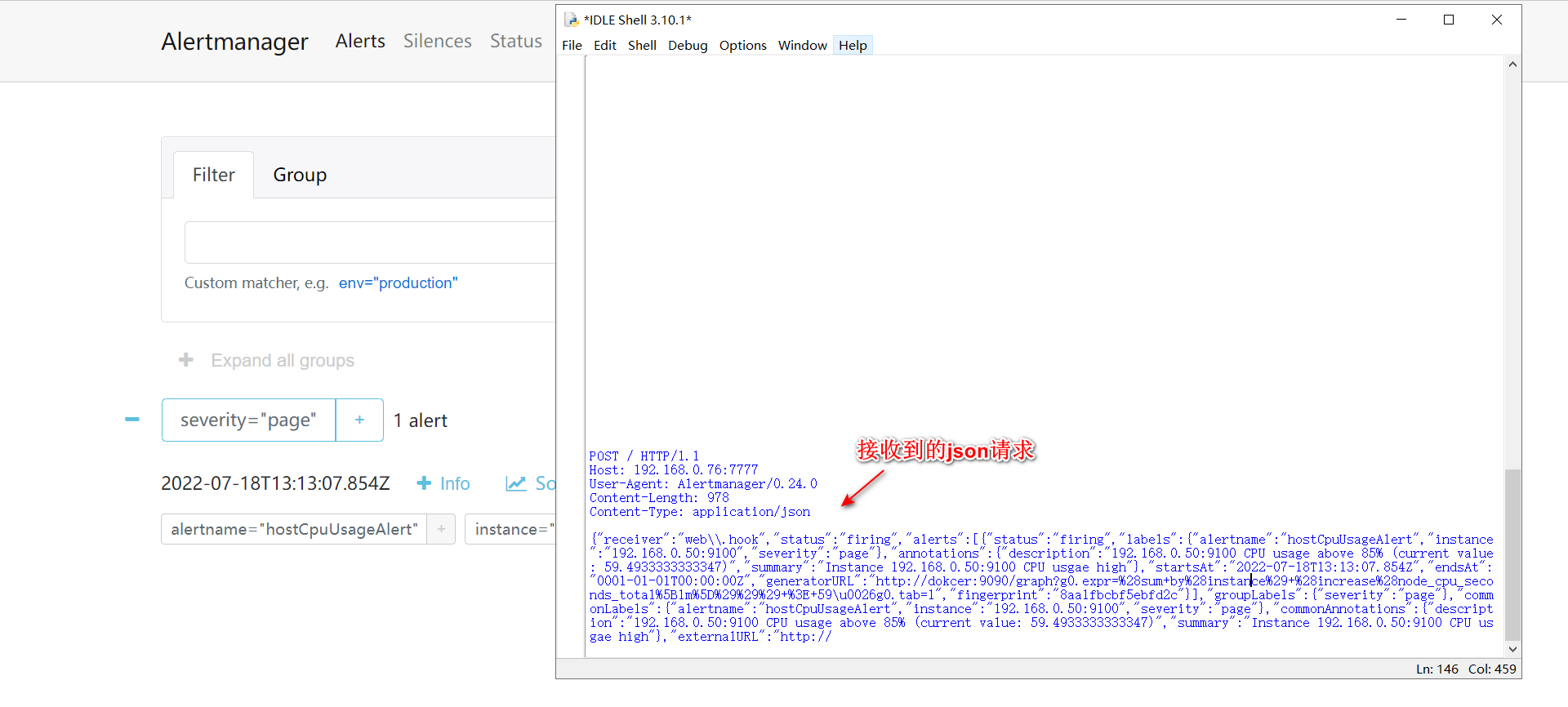
当触发报警信息时就会通过POST的方式向url地址发送json请求:
json格式:
{

  "version": "4",
  "groupKey": <string>,              // key identifying the group of alerts (e.g. to deduplicate)
  "truncatedAlerts": <int>,          // how many alerts have been truncated due to "max_alerts"
  "status": "<resolved|firing>",
  "receiver": <string>,
  "groupLabels": <object>,
  "commonLabels": <object>,
  "commonAnnotations": <object>,
  "externalURL": <string>,           // backlink to the Alertmanager.
  "alerts": [
    {

      "status": "<resolved|firing>",
      "labels": <object>,
      "annotations": <object>,
      "startsAt": "<rfc3339>",
      "endsAt": "<rfc3339>",
      "generatorURL": <string>,      // identifies the entity that caused the alert
      "fingerprint": <string>        // fingerprint to identify the alert
    },
    ...
  ]
}
验证webhook效果:
利用python写个简单的web server,url填好地址之后,就可以接收到alertmanager发送的post请求:
web_server:
import socket

def server_start(port):
    server = socket.socket()

    server.setsockopt(socket.SOL_SOCKET,socket.SO_REUSEADDR,True)

    server.bind(("192.168.0.76",port))

    server.listen(128)

    while True:
        client, ip_port = server.accept()

        print(f"客户端{
      ip_port[0]}连接成功")

        request_data = client.recv(1024).decode()

        print(request_data)  #打印接收到的信息

        if len(request_data) == 0:

            client.close()
        else:
            request_path = request_data.split(" ")[1]

            if request_path == "/":
                request_path = "index.html"
            else:
                request_path = request_path.replace("/","")
                print(request_path)

            try:
                with open(request_path, 'rb') as file:
                    file_content = file.read()

            except Exception as e:
                response_line = "HTTP/1.1 404 NOT FOUND\r\n"
                response_head = "Server: Python Server2.0\r\n"

                with open("../miniweb/error.html", "rb") as e:
                    error_data = e.read()

                    response_data = (response_line + response_head + "\r\n").encode() + error_data

                    client.send(response_data)

            else:
                response_line = "HTTP/1.1 200 Ok\r\n"
                response_head = "Server: Python Server2.0\r\n"

                response_data = (response_line + response_head + "\r\n").encode() + file_content

                client.send(response_data)

            finally:
                client.close()

if __name__ == '__main__':
    server_start(7777)
接收到的警告信息:
边栏推荐
- Looking for peak [Abstract dichotomy exercise]
- Is it risky and safe to open an account for stock speculation?
- 工作小记:一次抓包
- 【C語言】猜數字小遊戲+關機小程序
- OpenHarmony南向学习笔记——Hi3861+HC-SR04超声波检测
- 对象使用过程中背后调用了哪些方法
- [applet automation minium] i. framework introduction and environment construction
- The self-developed data products have been iterated for more than a year. Why not buy third-party commercial data platform products?
- [test platform development] 23. interface assertion function - save interface assertion and edit echo
- Wacom firmware update error 123, digital board driver cannot be updated
猜你喜欢

Oracle 报表常用sql

4. Find the median of two positive arrays

Yunna - how to strengthen fixed asset management? How to strengthen the management of fixed assets?

基于nextcloud构建个人网盘

Yunna | how to manage the fixed assets of the company? How to manage the company's fixed assets better?

Using shell script to block IP with high scanning frequency
![[record of question brushing] 19. Delete the penultimate node of the linked list](/img/be/7e81e9376cb04566d669db4c606309.png)
[record of question brushing] 19. Delete the penultimate node of the linked list

C language implementation of classroom random roll call system

Use of KOA framework

C# 线程锁和单多线程简单使用
随机推荐
利用js自动解析执行xss
C language introduction practice (11): enter a group of positive integers and sum the numbers in reverse order
@Feignclient detailed tutorial (illustration)
Towhee weekly model
对象使用过程中背后调用了哪些方法
[record of question brushing] 19. Delete the penultimate node of the linked list
身份证号正则验证
Linux scheduled database backup script
Towhee 每周模型
Game (2) of 2022 Henan Mengxin League: solution to supplementary questions of Henan University of Technology
Use of KOA framework
uni-app知识点和项目上遇到的问题和解决办法的记录
[interview frequency] cookies, sessions, tokens? Don't worry about being asked after reading it
云呐-如何加强固定资产管理?怎么加强固定资产管理?
Design and implementation of websocket universal packaging
APtos 简介及机制
正则表达式常用语法解析
[software test] MQ abnormal test encountered in disk-to-disk work
一道代码题看 CommonJS 模块化规范
【面试高频】cookie、session、token?看完再也不担心被问了