当前位置:网站首页>Wechat applet - get user location (longitude and latitude + city)
Wechat applet - get user location (longitude and latitude + city)
2022-07-26 02:17:00 【Mocode】
Wechat applet - Get the user's location ( Longitude and latitude + city )
List of articles
One 、 The goal is
Get the user's city
Two 、 Realize the idea
1. Use the interface function of wechat applet to obtain the longitude and latitude of the user's position
2. Change latitude and longitude Inverse analysis For structured text addresses
3. Extract the required address structure components according to the structured text address , Such as province 、 City 、 Districts and counties, etc .
3、 ... and 、 Implementation steps
3.1 Interface functions used
Wechat applet - Get the interface function of the user location :wx.getLocation(Object object)
You also need to use applet configuration :permission
Tencent location service - Reverse address resolution ( Coordinate position description ) The interface function :reverseGeocoder(options:Object)
3.2 Specific steps
3.2.1 Create interface
wxml file
<view class="view1"> Click to get user location </view>
<view class="view2"> Longitude of the user's location :{
   {latitude}}</view>
<view class="view2"> Latitude of the user's location :{
   {longitude}}</view>
<view class="view2"> User City :{
   {city}}</view>
wxss file
.view1 {
  background-color: yellow;
  width: 100%;
  height: 200rpx;
  margin-bottom: 20rpx;
}

.view2 {
  background-color: yellow;
  width: 100%;
  height: 100rpx;
  margin-bottom: 20rpx;
}
js file
// index.js
//  Get application instance
const app = getApp()

Page({

  data: {

    latitude: null,
    longitude: null,
    city: null
  },

  onLoad() {


  },

})
Interface effect 
3.2.2 Get the latitude and longitude of the user's position
Write a function that triggers the acquisition of longitude and latitude of the user's position getLocation, Call in function wx.getLocation Interface , Get the longitude 、 Latitude and other information , Then bind to the front-end interface .
3.2.2.1 stay app.json Configuration in file permission
When users first use this function , The applet asks the user whether he is authorized to obtain the user's location information . Don't ask again .( Clear the cache of developer tools 、 After recompiling the applet, it will ask again , Because the authorization information of the previous user has been cleared )
app.json file
{

  "pages":[
    "pages/index/index",
    "pages/logs/logs"
  ],
  "window":{

    "backgroundTextStyle":"light",
    "navigationBarBackgroundColor": "#fff",
    "navigationBarTitleText": "Weixin",
    "navigationBarTextStyle":"black"
  },
  "style": "v2",
  "sitemapLocation": "sitemap.json",

  // Add the following code ( The above code is already available after creating the applet project )
  "permission": {

    "scope.userLocation": {

      "desc": " Your location information will be used to show the effect of the applet location interface "
    }
  }
}
3.2.2.2 call wx.getLocation Interface
wxml file
// newly added bindtap This function , Make the user click this view It can trigger the function of obtaining the user's location
<view class="view1" bindtap="getLocation"> Click to get user location </view>
js file
// index.js
//  Get application instance
const app = getApp()

Page({

  data: {

    latitude: null,
    longitude: null,
    city: null
  },

  onLoad() {


  },

  //  Add the following code
  getLocation() {

    var that = this;
    wx.getLocation({

      type: 'wgs84',
      success (res) {

        const latitude = res.latitude
        const longitude = res.longitude
        const speed = res.speed
        const accuracy = res.accuracy
        console.log(res) // Output the obtained longitude and latitude information to the console for inspection
        that.setData({
     // Will get the longitude 、 The latitude values are assigned to local variables
          latitude: res.latitude,
          longitude: res.longitude
        })
      }
     })
  }
})
effect


3.2.3 Get the user's city
3.2.3.1 Configuration outside the applet
Apply for one in Tencent location service key
according to Tencent location service - Wechat applet Javascript In the development guide 【 Introduction and use restrictions 】 The instructions in , Complete the following steps .

Download the applet JavaScriptSDK
stay Tencent location service website Download it ( A choice , I downloaded it v1.2), Save to wechat applet project directory .
Unzip the downloaded compressed package to the current folder .
Security domain name settings
Sign in Wechat applet public platform , Using this applet appid( Or the test number of your wechat account ) Sign in , stay “ Server domain name ” To configure request Legitimate domain name :https://apis.map.qq.com.

3.2.3.2 call reverseGeocoder Interface
js file
// index.js
//  Get application instance
const app = getApp()

// newly added
//  introduce SDK Core class , Write this according to the path you put SDK Location of core classes
var QQMapWX = require('../../qqmap-wx-jssdk.js');

// newly added
//  Instantiation API Core class
var qqmapsdk = new QQMapWX({

  key: '……' //  Required , Fill in your application for Tencent location service key
});

Page({

  data: {

    latitude: null,
    longitude: null,
    city: null
  },

  onLoad() {


  },

  getLocation() {

    var that = this;
    wx.getLocation({

      type: 'wgs84',
      success (res) {

        const latitude = res.latitude
        const longitude = res.longitude
        const speed = res.speed
        const accuracy = res.accuracy
        console.log(res)
        that.setData({

          latitude: res.latitude,
          longitude: res.longitude
        })

        // newly added
        qqmapsdk.reverseGeocoder({

          // coordinates , Get the current location by default , Not a required parameter
          //Object Format
          location: {

            latitude: res.latitude,
            longitude: res.longitude
          },
          success: function(res) {
    // Callback after success
            console.log(res.result.ad_info.city);
            that.setData({

              city: res.result.ad_info.city
            })
            },
          fail: function(error) {

            console.error(error);
          },
          complete: function(res) {

            console.log(res);
          }
          })
      }
     })
  }
})
effect 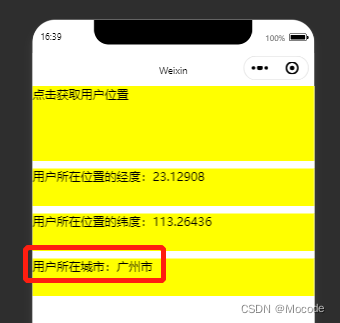
Reference resources
边栏推荐
- 1. Mx6ul core module use serial RTC test (XII)
- 由一个数据增量处理问题看到技术人员的意识差距
- 17_ Form Data
- [2019] [paper notes] tunable THz broadband absorption based on metamaterials——
- 17_表单数据
- uni-app跨域配置
- I came to the library applet check-in process analysis
- Web3.0 blog DAPP development practice [2022]
- LeetCode_ Dynamic programming_ Medium_ 264. Ugly number II
- TI AM335x工控模块网络跟文件系统NFS的实现
猜你喜欢

SQL手工盲注、报错注入
I.MX6UL核心模块使用连载-CAN、蜂鸣器测试 (十一)

Design and driver transplantation of matrix keyboard circuit of Ti am335x industrial control module

图解B+树的插入过程
![[2020] [paper notes] growth of bi2te3/cofeb double-layer heterojunction by magnetron sputtering——](/img/5d/7d26e2d0d832c95e1cc011995ce774.png)
[2020] [paper notes] growth of bi2te3/cofeb double-layer heterojunction by magnetron sputtering——

1. Mx6ul core module use serialization - view system information (II)

Acwing 379. hide and seek problem solution (minimum path non repeating point coverage)

CD from grabbing the track to building a streaming media server -- a case study of "moon in the hometown of sleep"
Illustration of the insertion process of b+ tree
我来图书馆小程序一键签到和一键抢位置工具
随机推荐
[2021] [paper notes] biological effects of cell membrane under infrared and THz - effect is a phenomenon, action is a mechanism - the benefits of THz to medicine
How to choose cloud note tool? What can I do with cloud notes?
Digital warehouse: on the construction practice of digital warehouse in banking industry
Postman报Json序列化错误
IDEA运行web项目出现乱码问题有效解决(附详细步骤)
Data warehouse: Practice of hierarchical structure of data warehouse in banking industry
Be careful about bitmap, the "memory Assassin"~
2022.7.25-----leetcode.919
1. Mx6ul core module uses serial NAND FLASH read / write test (III)
还在用==0 null equal 判断空值吗,对isEmpty 和 isBlank有多少了解呢
The slow loading of the first entry page of vite local operation
Characteristics and determination of neuraminidase from Clostridium perfringens in Worthington
本地仓库导致的报错
I.MX6UL核心模块使用连载-eMMC读写测试 (四)
数仓:浅谈银行业的数仓构建实践
1. Mx6ul core module serial Ethernet test (VII)
Adruino 基础实验学习(一)
TCP三次握手四次挥手
记录之目标检测NMS(非极大值抑制)
Basic usage of set, map, DOM classlist in ES6