当前位置:网站首页>Threads and thread pools
Threads and thread pools
2022-06-28 10:36:00 【0&1 * 1】
Threads and thread pools
One 、 Thread Introduction
1) Thread Introduction
1.python—> programing language ----> Developing applications
Program :1. The driver , For example, a graphics card driver 2. operating system , such as windows System 3. Applications , such as qq
Applications , Binary files stored on the hard disk , Only when it is loaded into the memory space , It has a life cycle
A process is a running application
Each process starts a thread by default , This thread is called the main thread , Thread belongs to process .
2) Implementation of threads
1. Thread module
Python Through two standard libraries _thread  and threading
 Provides support for threads  , threading Yes _thread It was packaged .
threading Module provides Thread , Lock , RLock , Condition And so on .
 Therefore, in actual use, we generally use threading
2.Thread
[ Failed to transfer the external chain picture (img-P8OvD1bm-1568727516294)(…/…/…/…/…/…/Desktop/Data/Python_note/work.md/photo/23.png)]
1.from threading import Thread
import time


def f1(people):
    print("hello,{}".format(people))
    time.sleep(3)
    print("bye")


def f2():
    print("hi")
    time.sleep(3)
    print("goodbye")


if __name__ == '__main__':
    #  Normal call , There is a sequence , The main thread
    # f1()
    # f2()
    #  Thread operation
    f1_thread = Thread(target=f1, args=(" Hu Ge ",), name='hello')  #  Created a thread instance
    f2_thread = Thread(target=f2, name='hi')   #  When an instance object , Function does not execute

    f1_thread.setName("dai")
    f1_thread.setName("hu")

    print("f1 name:", f1_thread.getName())
    print("f2 name:", f2_thread.getName())

    # f1_thread.setDaemon(True)
    # f2_thread.setDaemon(True)

    # f1_thread.start()   #  call start Method just started executing
    # f2_thread.start()

    # f1_thread.join()  #  Blocking call , The main thread waits
    # f2_thread.join()

    print(" Main thread execution completed ")

"""
 The main thread is finished , But the child thread is still not closed , The program has been unable to close
 The guardian thread : After the main thread is executed , The program closes
"""

2.from threading import Thread
import time


# class MyThread(Thread):
#     def run(self):
#         print('hello')
#         time.sleep(3)
#         print('bye')
#
#
# my_thread = MyThread()  #  Create a thread instance
# my_thread.start()

#  Overrides the class run Method , adopt start Method to automatically call... In the class run Method

class MyThread(Thread):
    def __init__(self, people, *args, **kwargs):
        super().__init__(*args, **kwargs)
        self.people = people

    def run(self):
        print('hello,{}'.format(self.people))
        time.sleep(3)
        print('bye')


my_thread = MyThread(" Qi Shijiu ", name="hello")  #  Create a thread instance
print(my_thread.getName())
my_thread.start()
3. Create thread
1( stay python There are two ways to create threads in , example Thread Class and inheritance overrides Thread class
example Thread class
2([ Failed to transfer the external chain picture (img-7ivm83nv-1568727516295)(…/…/…/…/…/…/Desktop/Data/Python_note/work.md/photo/24.png)]
3( Inherit Thread class
[ Failed to transfer the external chain picture (img-hZMy3PPT-1568727516295)(…/…/…/…/…/…/Desktop/Data/Python_note/work.md/photo/25.png)]
4(Join & setDaemon
 Before we talk about these two methods  ,  You need to know the concept of main thread and sub thread

 The main thread  :  When a program starts  ,  A thread starts running  ,  This thread is usually called the main thread of the program

 Sub thread  :  Because the program is executed at the beginning  ,  If you need to create threads again  ,  The created thread is the sub thread of the main thread

 The importance of the main thread lies in two aspects  :
1.  It's the thread that produces other threads
2.  Usually, it must finish the execution finally, such as performing various closing operations
5(join : Block caller , Until the call join () The thread execution of the method ends , Will continue to carry on
[ Failed to transfer the external chain picture (img-brvDhADK-1568727516296)(…/…/…/…/…/…/Desktop/Data/Python_note/work.md/photo/26.png)]
6(setDaemon() And join() Basically relative , join It will wait for the sub thread to finish executing ; and setDaemon Will not wait
[ Failed to transfer the external chain picture (img-HuN9FdLD-1568727516296)(…/…/…/…/…/…/Desktop/Data/Python_note/work.md/photo/27.png)]
Two 、 Threads Resource sharing between
1) The mutex
1. In multithreading  ,  All global variables are shared by all threads  ,  therefore  ,  The biggest danger of sharing data between threads is that multiple threads modify a variable at the same time  ,  That's a mess  ,  So we need mutexes  ,  To lock the data .

from threading import Thread, Lock

data = 0


def add_1():
    global data
    lock.acquire()
    for i in range(1000000):
        data += 1
    lock.release()


def red_1():
    global data
    lock.acquire()
    for i in range(1000000):
        data -= 1
    lock.release()


if __name__ == '__main__':
    #  Normal execution , The result is 0
    # add_1()
    # red_1()
    # print(data)
    lock = Lock()
    #  Thread operation
    t1 = Thread(target=add_1)
    t2 = Thread(target=red_1)
    t1.start()
    t2.start()
    t1.join()
    t2.join()
    print(data)

"""
data += 1
x = data + 1
data = x

data = 0
t1: x1 = data + 1 # x1 = 0 + 1 = 1
t2: x2 = data - 1 # x2 = 0 - 1 = -1
t1: data = x1 = 1
t2: data = x2 = -1

 result :data = -1
"""
2) Sharing of global variables between threads
1. Tips !
Because the thread belongs to the same process , So they share memory areas .
So global variables are public .
[ Failed to transfer the external chain picture (img-nejhngXC-1568727516297)(…/…/…/…/…/…/Desktop/Data/Python_note/work.md/photo/28.png)]
3) There is a contention problem between shared memory
1. Tips !
If 1000000 No effect
You can continue to add 0
[ Failed to transfer the external chain picture (img-aIm7n6jH-1568727516297)(…/…/…/…/…/…/Desktop/Data/Python_note/work.md/photo/29.png)]
3.[ Failed to transfer the external chain picture (img-U2d9s69K-1568727516297)(…/…/…/…/…/…/Desktop/Data/Python_note/work.md/photo/30.png)]
from threading import Thread

a = 5


def f():
    print(' I'm a child thread , I want to change the global variable value ')
    global a
    a = 2


if __name__ == '__main__':
    print(' I'm the main thread , Variable a The value of is {}'.format(a))
    t = Thread(target=f)
    t.start()
    t.join()
    print(' I'm the main thread , Variable a The value of is {}'.format(a))

#  Global variables are shared by all child threads . Resource competition
4) Use locks to control access to shared resources
[ Failed to transfer the external chain picture (img-ENJkv7WB-1568727516298)(…/…/…/…/…/…/Desktop/Data/Python_note/work.md/photo/31.png)]
5) Thread queue operation
1. The team : put(item)
2. Out of the team : get()
from threading import Thread
from queue import Queue
from random import randint

my_queue = Queue(10)    #  Create a queue object , Specify the queue length


def my_put(my_queue):
    """ Stuff the queue """
    for x in range(10):
        num = randint(0, 1000)
        my_queue.put(num)


def my_get(my_queue):
    """ Get something in the queue """
    for y in range(3):
        num = my_queue.get()
        print(num)


p = Thread(target=my_put, args=(my_queue,))
g = Thread(target=my_get, args=(my_queue,))
p.start()
g.start()
p.join()
g.join()
3. Test empty : empty() # The approximate
4. Test full : full() # The approximate
5. The queue length : qsize() # The approximate
6. End of the task : task_done()
from queue import Queue

my_queue = Queue(3)

if __name__ == '__main__':
    my_queue.put(1)
    print(my_queue.qsize())
    my_queue.get()
    print(my_queue.qsize())
    print(my_queue.empty())
    my_queue.put(1)
    my_queue.put(1)
    my_queue.put(1)
    print(my_queue.full())
    my_queue.task_done()    #  End of the task
    my_queue.task_done()    #  End of the task
    my_queue.task_done()    #  End of the task
    my_queue.task_done()    #  End of the task
    my_queue.join()  #  Waiting for completion , Used to determine task_done Is the number of times and put The same number of times
    print(" End of the task ")

    from threading import Thread, current_thread
from queue import Queue
import time
from multiprocessing.pool import ThreadPool

# class ThreadPool(object):
#     def __init__(self, n):  #  Parameters n Is the number of threads that can be reused
#         #  Create a queue , Put tasks in it
#         self.q = Queue(n)
#         #  Generating threads
#         for i in range(n):
#             Thread(target=self.worker, daemon=True).start()
#
#     def worker(self):
#         """ To complete the task fetching from the queue """
#         while True:  #  Dead cycle , In this way, the thread will never end , Keep using it
#             func, args, kwargs = self.q.get()   #  Get the task from the queue
#             func(*args, **kwargs)   #  Run the task you just got
#             self.q.task_done()  #  After execution , Notification queue
#
#     def put_q(self, func, args=(), kwargs={}):
#         """ Put tasks in the queue """
#         self.q.put((func, args, kwargs))
#
#     def join_q(self):
#         self.q.join()   #  Blocking , Waiting for completion
7. Waiting for completion : join()
3、 ... and 、 Thread pool
1) The concept of a pool
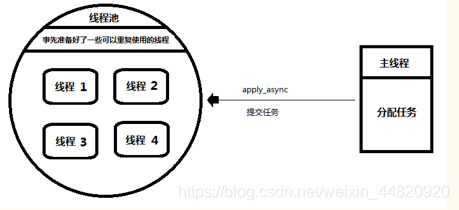
1. The main thread : Equivalent to producer , Just submit tasks to the thread pool .
It doesn't care how the thread pool performs tasks .
therefore , It doesn't matter which thread performs the task .
2. Thread pool : Equivalent to consumer , Responsible for receiving tasks ,
And assign the task to an idle thread to execute .
3.
2) Simple implementation of thread pool

3) Effect of implementation

4)python Built in thread pool

5) Other operations of the pool
1. Operation 1 : close - Close the submit channel , It is not allowed to submit tasks again
2. Operation two : terminate - suspend
边栏推荐
- MySQL cannot be opened. Flash back
- Six fusion positioning technologies in wireless communication application of Internet of things
- 错过金三银四,找工作4个月,面试15家,终于拿到3个offer,定级P7+
- Redis数据库
- How does ETF position affect spot gold price?
- 关于FTP的协议了解
- Idea failed to connect to SQL Sever
- etf持仓如何影响现货金价?
- Metersphere实现UI自动化元素不可点击(部分遮挡)
- Ruoyi integrated building block report (NICE)
猜你喜欢

Information hidden in the trend chart of Hong Kong London gold market
线程和线程池

Interface automation framework scaffold - use reflection mechanism to realize the unified initiator of the interface

ruoyi集成积木报表(nice)

Markdown -- basic usage syntax

接口自动化框架脚手架-参数化工具的实现

sqlcmd 连接数据库报错

idea连接sql sever失败
Set up your own website (11)

To enhance the function of jupyter notebook, here are four tips
随机推荐
接口自动化框架脚手架-参数化工具的实现
Mysql通用二进制安装方式
What is the difference between MySQL development environment and test environment??
Ffmpeg audio and video recording
Hystrix deployment
解决表单action属性传参时值为null的问题
一种跳板机的实现思路
Markdown -- basic usage syntax
Dear leaders, ask me if MySQL does not support early_ Offset mode? Unsupported star
接口自动化框架脚手架-利用反射机制实现接口统一发起端
Teach you how to handle the reverse SVG mapping of JS
Django数据库操作以及问题解决
[Unity][ECS]学习笔记(三)
2D code generator for openharmony application development
OpenHarmony应用开发之二维码生成器
sentinel
DlhSoft Kanban Library for WPF
Ideal interface automation project
知道 Redis RDB 这些细节,可以少踩很多坑
Set up your own website (11)