当前位置:网站首页>VNC viewer remote connection raspberry pie without display
VNC viewer remote connection raspberry pie without display
2022-06-25 00:19:00 【Bald again this year】
One : Download related tools :
1. Raspberry pie image tool download :Raspberry Pi OS – Raspberry Pi


2. Formatting tool :
This use SDCardFormatterv5, You can choose other tools .
3. Image burning tool :
This use Raspberry Pi, You can choose other tools .
4.VNC Viewer:
Download VNC Viewer | VNC Connect

5. Remote tools :
This use putty, You can choose other tools
PuTTY: a free SSH and Telnet client
Two :SD Card format :
① take SD Insert into the card reader , Then plug the card reader into the computer .
② Open the formatting tool SDCardFormatterv5.
③ Select what you want to format SD card .
④ Select the dialog box that pops up , choice “ yes ”.
⑤ And then it pops up , Prompt for formatting completion , Select OK , It's done. SD Card formatting .
3、 ... and : Burn image :
① Open the burning tool raspberry pi.
② Click on “CHOOSE OS”, Select the image file you just downloaded , And then click “CHOOSE SD CARD” Select the just formatted SD card , Then click WRITE.

③ Then a dialog box will pop up , choice “Continue/OK”, then , And started burning .

Four : configure network :
Use mobile hotspot
① On the computer , Open the burning image just now SD card .
② stay boot Under the table of contents , Build a ssh Empty file .
③ stay boot Under the table of contents , Create a text file first .
④ open the text file , Copy the following into the text .
country=CN
ctrl_interface=DIR=/var/run/wpa_supplicant GROUP=netdev
update_config=1

network={
	ssid=" Your wireless network name "
	psk=" Your wireless password "
	key_mgmt=WPA-PSK
	priority=1
}
among , take ssid Change the content of to the name of the mobile hotspot ,psk Change the content of to the password of the mobile phone hotspot .
⑤ Save the text just now , And change the name to wpa_supplicant.conf.
⑥ Take out SD card , take SD Insert the card into the raspberry pie , Turn on the phone hotspot and connect the raspberry pie at the same time .
⑦ You can check the raspberry pie on your mobile phone ip Address .
5、 ... and .putty Remote connection :
① open putty, stay Host Name It's about , Enter the results you just viewed IP Address , Then choose “open”.
② Select the dialog box that pops up , choice “ no ”.
③ Enter the user and password ( Default user :pi The default password :raspberry).
④ Start raspberry pie VNC service , Input instruction (sudo raspi-config), Configure raspberry pie .
⑤ Select... With the up and down keys “Interfacing Options”, Then press the left and right keys to select “Select”.
⑥ Then press the up and down keys to select “VNC”, Press the left and right keys to select “Select”.
⑦“would you like the vNc server to be enabled?”–> choice “Yes”.
⑧“The VNC server is enabled”–> Carriage return option “OK”.
⑨ Up and down key selection “Advanced Options”, Press the left and right keys to select “Select”.
⑩ Up and down key selection “Resolution”, Press the left and right keys to select “Select”.
⑪ Then there is the resolution selection , choice “DMT Mode 16”, Then choose “OK”.
⑫“The resolution is set to DMT mode 16”–> Carriage return option “OK”.
⑬ Back to the beginning , choice “Finish”, complete .
6、 ... and 、VNC Viewer Remote interface display :
1. install VNC Viewer
① choice ok

② Click on Next

③ Choose to agree to the agreement , And click the Next ④ choice Next
⑤ setup script , It may take a while

2.VNC Viewer Use
① After opening , First enter the name of raspberry pie at the top IP Address , Then enter... In the pop-up interface Username,Password, Click on OK
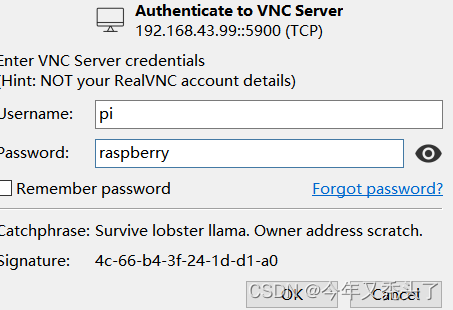
② The interface that appears , It's done. VNC Viewer Remote desktop

边栏推荐
- Discrete mathematics and its application detailed explanation of exercises in the final exam of spring and summer semester of 2018-2019 academic year
- Is it so difficult to calculate the REM size of the web page according to the design draft?
- 为什么生命科学企业都在陆续上云?
- Report on operation mode and future development trend of global and Chinese propenyl isovalerate industry from 2022 to 2028
- 技术分享| WVP+ZLMediaKit实现摄像头GB28181推流播放
- 软件测试与游戏测试文章合集录
- Im instant messaging development application keeping alive process anti kill
- Why do more and more physical stores use VR panorama? What are the advantages?
- I suddenly find that the request dependent package in NPM has been discarded. What should I do?
- svg+js键盘控制路径
猜你喜欢

Fast pace? high pressure? VR panoramic Inn brings you a comfortable life

JDBC —— 数据库连接

Im instant messaging development application keeping alive process anti kill
How can I persuade leaders to use DDD to construct the liver project?

在滴滴和字节跳动干了 5年软件测试,太真实…

有趣的checkbox计数器

Zed acquisition

Outer screen and widescreen wasted? Harmonyos folding screen design specification teaches you to use it

Ott marketing is booming. How should businesses invest?

VR全景制作的优势是什么?为什么能得到青睐?

随机推荐
Sitelock helps you with the top ten common website security risks
【Proteus仿真】定时器0作为16位计数器使用示例
wx小程序跳转页面
C程序设计专题 18-19年期末考试习题解答(下)
Reservoir dam safety monitoring
canvas线条的动态效果
Fast pace? high pressure? VR panoramic Inn brings you a comfortable life
Tongji and Ali won the CVPR best student thesis, lifeifei won the Huang xutao award, and nearly 6000 people attended the offline conference
Svg+js keyboard control path
Dry and wet contacts
VR全景制作的优势是什么?为什么能得到青睐?
Report on operation mode and future development trend of global and Chinese propenyl isovalerate industry from 2022 to 2028
Technology sharing | wvp+zlmediakit realizes streaming playback of camera gb28181
What are the advantages of VR panoramic production? Why is it favored?
UE4 WebBrowser chart cannot display problems
Difficult and miscellaneous problems: A Study on the phenomenon of text fuzziness caused by transform
Analysis report on development mode and investment direction of sodium lauriminodipropionate in the world and China 2022 ~ 2028
融合模型权限管理设计方案
Analysis report on operation trend and investment strategy of global and Chinese tetrahydrofurfuryl propionate industry from 2022 to 2028
Microsoft won the title of "leader" in the magic quadrant of Gartner industrial Internet of things platform again!