当前位置:网站首页>【Flutter -- 布局】流式布局(Flow和Wrap)
【Flutter -- 布局】流式布局(Flow和Wrap)
2022-07-24 15:16:00 【Kevin-Dev】

Flow
1. 简介
Flow 是一个实现流式布局算法的控件。流式布局在大前端是很常见的布局方式,但是一般使用 Flow 很少,因为其过于复杂,很多场景下都会去使用 Wrap 。
2. 属性
delegate:影响 Flow 具体布局的 FlowDelegate。
其中 FlowDelegate 包含如下几个方法:
- getConstraintsForChild: 设置每个 child 的布局约束条件,会覆盖已有的;
- getSize:设置 Flow 的尺寸;
- paintChildren:child 的绘制控制代码,可以调整尺寸位置,写起来比较的繁琐;
- shouldRepaint:是否需要重绘;
- shouldRelayout:是否需要重新布局。
其中,我们平时使用的时候,一般会使用到 paintChildren 以及 shouldRepaint 两个方法。
3. 使用场景
Flow 在一些定制化的流式布局中,有可用场景,但是一般写起来比较复杂,但胜在灵活性以及其高效。
4. 实例
1. 效果图

2. 示例代码
import 'package:flutter/material.dart';

void main() {

  runApp(const MyApp());
}

class MyApp extends StatelessWidget {

  const MyApp({
    Key? key}) : super(key: key);

  @override
  Widget build(BuildContext context) {

    return MaterialApp(
        title: 'Welcome to Flutter',

        home: Scaffold(
            appBar: AppBar(
              title: Text('流式布局'),
            ),
            body: Center(
              child: Flow(
                delegate: TestFlowDelegate(margin: EdgeInsets.all(10.0)),
                children: <Widget>[
                  Container(width: 80.0, height:80.0, color: Colors.red,),
                  Container(width: 80.0, height:80.0, color: Colors.green,),
                  Container(width: 80.0, height:80.0, color: Colors.blue,),
                  Container(width: 80.0, height:80.0,  color: Colors.yellow,),
                  Container(width: 80.0, height:80.0, color: Colors.brown,),
                  Container(width: 80.0, height:80.0,  color: Colors.purple,),
                ],
              ),
            )
        )
    );
  }
}

class TestFlowDelegate extends FlowDelegate {

  EdgeInsets margin;

  TestFlowDelegate({
    this.margin = EdgeInsets.zero});

  double width = 0;
  double height = 0;

  @override
  void paintChildren(FlowPaintingContext context) {

    var x = margin.left;
    var y = margin.top;
    //计算每一个子widget的位置
    for (int i = 0; i < context.childCount; i++) {

      var w = context.getChildSize(i)!.width + x + margin.right;
      if (w < context.size.width) {

        context.paintChild(i, transform: Matrix4.translationValues(x, y, 0.0));
        x = w + margin.left;
      } else {

        x = margin.left;
        y += context.getChildSize(i)!.height + margin.top + margin.bottom;
        //绘制子widget(有优化)
        context.paintChild(i, transform: Matrix4.translationValues(x, y, 0.0));
        x += context.getChildSize(i)!.width + margin.left + margin.right;
      }
    }
  }

  @override
  Size getSize(BoxConstraints constraints) {

    // 指定Flow的大小,简单起见我们让宽度竟可能大,但高度指定为200,
    // 实际开发中我们需要根据子元素所占用的具体宽高来设置Flow大小
    return Size(double.infinity, 200.0);
  }

  @override
  bool shouldRepaint(FlowDelegate oldDelegate) {

    return oldDelegate != this;
  }
}
Wrap
1. 简介
流式布局组件,如果内容宽度超出屏幕宽度,会自动折行显示。
2. 属性
direction:主轴(mainAxis)的方向,默认为水平。
alignment:主轴方向上的对齐方式,默认为start。
spacing:主轴方向上的间距。
runAlignment:run的对齐方式。run可以理解为新的行或者列,如果是水平方向布局的话,run可以理解为新的一行。
runSpacing:run的间距。
crossAxisAlignment:交叉轴(crossAxis)方向上的对齐方式。
textDirection:文本方向。
verticalDirection:定义了children摆放顺序,默认是down,见Flex相关属性介绍。
3. 使用场景
对于一些需要按宽度或者高度,让child自动换行布局的场景,可以使用,但是Wrap可以满足的场景,Flow一定可以实现,只不过会复杂很多,但是相对的会灵活以及高效很多。
4. 实例
1. 效果图
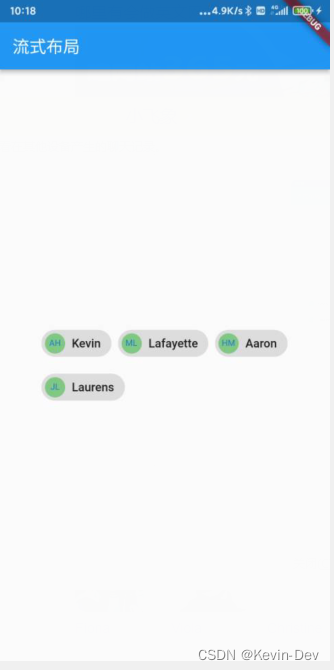
2. 代码
import 'package:flutter/material.dart';

void main() {

  runApp(const MyApp());
}

class MyApp extends StatelessWidget {

  const MyApp({
    Key? key}) : super(key: key);

  @override
  Widget build(BuildContext context) {

    return MaterialApp(
        title: 'Welcome to Flutter',

        home: Scaffold(
            appBar: AppBar(
              title: Text('流式布局'),
            ),
            body: Center(
              child: Wrap(
                spacing: 8.0,
                runSpacing: 4.0,
                children: <Widget>[
                  Chip(
                    avatar: CircleAvatar(
                        backgroundColor: Colors.green.shade300, child: new Text('AH', style: TextStyle(fontSize: 10.0),)),
                    label: Text('Kevin'),
                  ),

                  Chip(
                    avatar: CircleAvatar(
                        backgroundColor: Colors.green.shade300, child: new Text('ML', style: TextStyle(fontSize: 10.0),)),
                    label: Text('Lafayette'),
                  ),

                  Chip(
                    avatar: CircleAvatar(
                        backgroundColor: Colors.green.shade300, child: new Text('HM', style: TextStyle(fontSize: 10.0),)),
                    label: Text('Aaron'),
                  ),

                  Chip(
                    avatar: CircleAvatar(
                        backgroundColor: Colors.green.shade300, child: new Text('JL', style: TextStyle(fontSize: 10.0),)),
                    label: Text('Laurens'),
                  ),
                ],
              ),
            )
        )
    );
  }
}
边栏推荐
- PrestoUserError: PrestoUserError(type=USER_ERROR, name=INVALID_FUNCTION_ARGUMENT, message=“Escape st
- Activity Registration: how to quickly start the open source tapdata live data platform on a zero basis?
- Use of keywords const, volatile and pointer; Assembly language and view of register status
- 深度学习中的学习率调整策略(1)
- C# SQLite Database Locked exception
- A common Dao class and util
- JS data transformation -- Transformation of tree structure and tile structure
- 24.原生磁盘的使用
- 异或程序
- (09) flask is OK if it has hands - cookies and sessions
猜你喜欢

华为无线设备配置WPA2-802.1X-AES安全策略
云开发单机版图片九宫格流量主源码

VAE(变分自编码器)的一些难点分析
26. Code implementation of file using disk

Huawei camera capability

【OpenCV 例程300篇】238. OpenCV 中的 Harris 角点检测
Conflict resolution of onblur and onchange

【机器学习基础】——另一个视角解释SVM

Learning rate adjustment strategy in deep learning (1)
![[USENIX atc'22] an efficient distributed training framework whale that supports the super large-scale model of heterogeneous GPU clusters](/img/dc/be4dc55cdf3085a7b9e58ed6d6a16e.png)
[USENIX atc'22] an efficient distributed training framework whale that supports the super large-scale model of heterogeneous GPU clusters
随机推荐
循环结构practice
How do novices buy stocks for the first time? Which securities company is the best and safest to open an account
华为无线设备配置WPA2-802.1X-AES安全策略
Research Summary / programming FAQs
LeetCode·每日一题·1184.公交站间的距离·模拟
Spark: specify the date and output the log of the corresponding date (entry level - simple implementation)
LeetCode高频题56. 合并区间,将重叠的区间合并为一个区间,包含所有区间
图的存储和遍历
Detailed explanation of document operation
DS sort -- quick sort
(09) flask is OK if it has hands - cookies and sessions
做好架构设计离不开SOLID五大原则
27. Directory and file system
JS data transformation -- Transformation of tree structure and tile structure
Tensorflow framework of deep learning realizes vgg/rnn network / verification code generation and recognition / text classification
华为相机能力
Applet tab
野火stm32霸道,通过固件库实现流水灯
Huawei wireless device configuration wpa2-802.1x-aes security policy
DS diagram - the shortest path of the diagram (excluding the code framework)