当前位置:网站首页>Create OpenGL window
Create OpenGL window
2022-06-26 02:03:00 【_ Bruce】
#include <glad/glad.h>
#include <GLFW/glfw3.h>

#include <iostream>

void framebuffer_size_callback(GLFWwindow* window, int width, int height);
void processInput(GLFWwindow *window);

// settings
const unsigned int SCR_WIDTH = 800;
const unsigned int SCR_HEIGHT = 600;

int main()
{
    // glfw: initialize and configure
    // ------------------------------
    glfwInit();    // initialization GLFW
    // Use glfwWindowHint To configure GLFW
    // Version number 3.3
    glfwWindowHint(GLFW_CONTEXT_VERSION_MAJOR, 3);// The name of the option , Option name value      Main version 3
    glfwWindowHint(GLFW_CONTEXT_VERSION_MINOR, 3);   // Next version 3
    glfwWindowHint(GLFW_OPENGL_PROFILE, GLFW_OPENGL_CORE_PROFILE);

#ifdef __APPLE__
    glfwWindowHint(GLFW_OPENGL_FORWARD_COMPAT, GL_TRUE);
#endif

    // glfw window creation
    // --------------------
    GLFWwindow* window = glfwCreateWindow(SCR_WIDTH, SCR_HEIGHT, "LearnOpenGL", NULL, NULL);
    if (window == NULL)
    {
        std::cout << "Failed to create GLFW window" << std::endl;
        glfwTerminate();
        return -1;
    }
    glfwMakeContextCurrent(window);
    glfwSetFramebufferSizeCallback(window, framebuffer_size_callback);    // Monitor window changes

    // glad: load all OpenGL function pointers
    // ---------------------------------------
    if (!gladLoadGLLoader((GLADloadproc)glfwGetProcAddress))
    {
        std::cout << "Failed to initialize GLAD" << std::endl;
        return -1;
    }

    // render loop
    // -----------
    while (!glfwWindowShouldClose(window))
    {
        // input
        // -----
        processInput(window);

        // render
        // ------
        glClearColor(0.2f, 0.3f, 0.3f, 1.0f);
        glClear(GL_COLOR_BUFFER_BIT);

        // glfw: swap buffers and poll IO events (keys pressed/released, mouse moved etc.)
        // -------------------------------------------------------------------------------
        glfwSwapBuffers(window);
        // glfwPollEvents Function to check if any events are triggered ( For example, keyboard input 、 Mouse movement, etc )、 Update window status , And call the corresponding callback function ( You can set it manually through the callback method ).
        glfwPollEvents();
    }

    // glfw: terminate, clearing all previously allocated GLFW resources.
    // ------------------------------------------------------------------
    glfwTerminate();
    return 0;
}

// process all input: query GLFW whether relevant keys are pressed/released this frame and react accordingly
// ---------------------------------------------------------------------------------------------------------
void processInput(GLFWwindow *window)
{
    if(glfwGetKey(window, GLFW_KEY_ESCAPE) == GLFW_PRESS)
        glfwSetWindowShouldClose(window, true);
}

// glfw: whenever the window size changed (by OS or user resize) this callback function executes
// ---------------------------------------------------------------------------------------------
void framebuffer_size_callback(GLFWwindow* window, int width, int height)
{
    // make sure the viewport matches the new window dimensions; note that width and
    // height will be significantly larger than specified on retina displays.
    glViewport(0, 0, width, height);
}
边栏推荐
- On the difference between strlen and sizeof
- 宁要一个完成,不要千万个开始(转载自豆瓣)
- LeetCode 31 ~ 40
- Codecraft-17 and Codeforces Round #391 (Div. 1 + Div. 2, combined) C. Felicity is Coming!
- SDRAM控制器——仲裁模块的实现
- 17.11 std::atomic续谈、std::async深入谈
- Exploring temporary information for dynamic network embedding
- 一分钟了解同步、异步、阻塞和非阻塞的区别
- Find the multiplication order of n
- Pointnet/Pointnet++学习
猜你喜欢

Xiaomi tablet 5 Pro unlock bootloader
Playful girl wangyixuan was invited to serve as the Promotion Ambassador for the global finals of the sixth season perfect children's model

Sunshine boy chenhaotian was invited to be the spokesperson for the global finals of the sixth season perfect children's model
Sweet girl lisixia was invited to be the little host of the global finals of the sixth season perfect child model

Abnova anti GBA monoclonal antibody solution

pixel 6 root

一分钟了解同步、异步、阻塞和非阻塞的区别
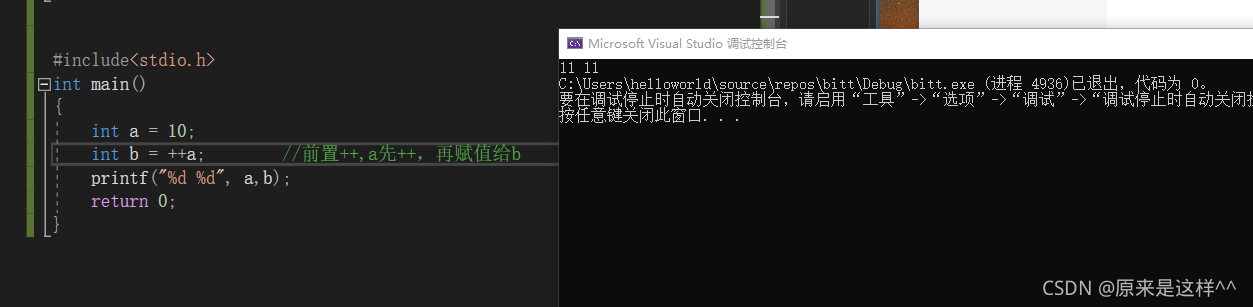
前置++,后置++与前置--与后置--(++a,a++与--a,a--)

Easy to understand C language keyword static

FPGA实现图像二值形态学滤波——腐蚀膨胀
随机推荐
wifi 相关知识详解
Chrome浏览器开发者工具使用
shell curl 执行脚本,带传参数,自定义参数
Weishi camera display
PTA class a simulated seventh bomb: 1160-1163
将weishi相机图片进行转换
PTA class a simulated third bomb: 1140-1143
A lost note for konjaku beginner
Connectez Le projecteur
Convert Weishi camera pictures
shell学习记录(四)
Tengwenze, a hot-blooded boy, was invited to serve as the image ambassador of the global finals of the sixth season perfect children's model
Show spirit chenzitong was invited to be the chief experience officer of the global finals of the sixth season perfect children's model
Dataframe extracts data from a column and converts it into a list
PTA class a simulated sixth bomb: 1156-1159
如何制定一个可实现的年度目标?
pixel 6 root
缓存技术之第一次亲密接触
The first intimate contact of caching technology
Tcp网络通信中各个状态的含义