当前位置:网站首页>Time series forecasting based on trend and seasonality
Time series forecasting based on trend and seasonality
2022-06-28 19:21:00 【deephub】
Time series forecasting is the task of forecasting based on time data . It involves building models to make observations , And in places like weather 、 engineering 、 economic 、 Applications such as financial or business forecasting drive future decisions .
This paper mainly introduces time series prediction and describes the two main models of any time series ( Trends and seasonality ). Based on these patterns, the time series are decomposed . The last one is called Holt-Winters Prediction model of seasonal method , To predict trends and / Or time series data of seasonal components .
To cover all this , We will use a time series data set , Include 1981 - 1991 Melbourne during the year ( Australia ) Temperature of . This data set can be obtained from this Kaggle download , You can also use the last part of this article GitHub download , It contains the data and code of this article . This data set is hosted by the Australian government meteorological service , And according to the “ Default terms of use ”(Open Access Licence) Get permission to .
Import libraries and data
First , Import the following libraries needed to run the code . In addition to the most typical Libraries , The code is also based on statsmomodels Functions provided by the library , The library provides classes and functions for estimating many different statistical models , Such as statistical test and prediction model .
from datetime import datetime, timedelta
import matplotlib.pyplot as plt
import numpy as np
import pandas as pd
import statsmodels.api as sm
from statsmodels.tsa.stattools import adfuller, kpss
from statsmodels.tsa.api import ExponentialSmoothing
%matplotlib inline
Here is the code for importing data . The data consists of two columns , One column is the date , The other column is 1981 - 1991 Melbourne in ( Australia ) Temperature of .
# date
numdays = 365*10 + 2
base = '2010-01-01'
base = datetime.strptime(base, '%Y-%m-%d')
date_list = [base + timedelta(days=x) for x in range(numdays)]
date_list = np.array(date_list)
print(len(date_list), date_list[0], date_list[-1])

# temp
x = np.linspace(-np.pi, np.pi, 365)
temp_year = (np.sin(x) + 1.0) * 15
x = np.linspace(-np.pi, np.pi, 366)
temp_leap_year = (np.sin(x) + 1.0)
temp_s = []
for i in range(2010, 2020):
    if i == 2010:
        temp_s = temp_year + np.random.rand(365) * 20
    elif i in [2012, 2016]:
        temp_s = np.concatenate((temp_s, temp_leap_year * 15 + np.random.rand(366) * 20 + i % 2010))
    else:
        temp_s = np.concatenate((temp_s, temp_year + np.random.rand(365) * 20 + i % 2010))
print(len(temp_s))

# df
data = np.concatenate((date_list.reshape(-1, 1), temp_s.reshape(-1, 1)), axis=1)
df_orig = pd.DataFrame(data, columns=['date', 'temp'])
df_orig['date'] =  pd.to_datetime(df_orig['date'], format='%Y-%m-%d')
df = df_orig.set_index('date')
df.sort_index(inplace=True)
df
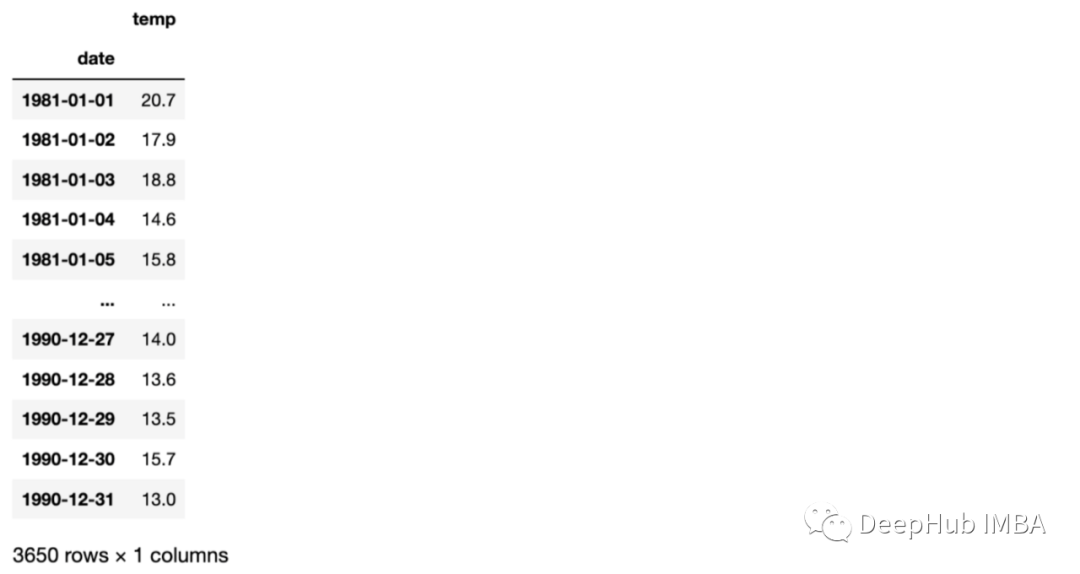
Visual datasets
Before we start analyzing the patterns of time series , Let's visualize each vertical dotted line corresponding to the data at the beginning of the year .
ax = df_orig.plot(x='date', y='temp', figsize=(12,6))
xcoords = ['2010-01-01', '2011-01-01', '2012-01-01', '2013-01-01', '2014-01-01',
           '2015-01-01', '2016-01-01', '2017-01-01', '2018-01-01', '2019-01-01']
for xc in xcoords:
    plt.axvline(x=xc, color='black', linestyle='--')
ax.set_ylabel('temperature')

Before moving on to the next section , Let's take a moment to look at the data . These data seem to have a seasonal variation , The temperature rises in winter , The temperature drops in summer ( southern hemisphere ). And the temperature doesn't seem to increase with time , Because the average temperature is the same in any year .
Time series patterns
The time series prediction model uses mathematical equations (s) Find patterns in a series of historical data . Then use these equations to put the data [ The historical time pattern in is projected into the future .
There are four types of time series patterns :
trend : Long term increase and decrease of data . A trend can be any function , Such as linear or exponential , And can change direction over time .
Seasonality : At a fixed frequency ( Hours of the day 、 week 、 month 、 Years etc. ) A cycle repeated in a series . The seasonal pattern has a fixed known period
periodic : Occurs when the data goes up or down , But there is no fixed frequency and duration , For example, caused by economic conditions .
The noise : Random variations in the series .
Most time series data will contain one or more patterns , But maybe not all . Here are some examples , We can identify these time series patterns :
Wikipedia's audience of the year ( On the left ): In this picture , We can identify an increasing trend , The audience increases linearly every year .
Us electricity consumption seasonal chart ( Chinese ): Each line corresponds to a year , Therefore, we can observe the seasonality of repeated electricity consumption every year .
ibex35 Daily closing price of ( Right picture ): This time series has an increasing trend with the passage of time , And a periodic pattern , Because there are some periods ibex35 Decline due to economic reasons .

If we assume that these patterns are additive decomposed , We can write this way :
Y[t] = t [t] + S[t] + e[t]
among Y[t] For data ,t [t] Is the trend period component ,S[t] Is the seasonal component ,e[t] Is noise ,t Is the time period .
On the other hand , Multiplicative decomposition can be written as :
Y[t] = t [t] *S[t] *e[t]
When the seasonal fluctuation does not change with the time series level , Additive decomposition is the most appropriate method . contrary , When the change of seasonal components is proportional to the level of time series , It is more suitable to use multiplication decomposition .
Decomposing data
A stationary time series is defined as one that is independent of the time at which it is observed . Therefore, time series with trend or seasonality are not stable , The white noise sequence is stationary . Mathematically speaking , If the mean and variance of a time series do not change , And the covariance is independent of time , So this time series is stationary . There are different examples to compare stationary and nonstationary time series . Generally speaking , Stationary time series do not have long-term predictable patterns .
Why is stability important ?
Stationarity has become a common assumption of many practices and tools in time series analysis . This includes trend estimation 、 Prediction and causal inference . therefore , in many instances , It is necessary to determine whether the data is generated by a fixed process , And convert it into an attribute with the sample generated by the process .
How to test the stationarity of time series ?
We can test it in two ways . One side , We can check manually by checking the mean and variance of the time series . On the other hand , We can use test functions to evaluate stationarity .
Some situations can be confusing . For example, a time series without trend and seasonality but with periodic behavior is stable , Because the length of the period is not fixed .
Check the trend
In order to analyze the trend of time series , We first use the 30 The rolling mean method of the day window is used to analyze the mean value over time .
def analyze_stationarity(timeseries, title):
    fig, ax = plt.subplots(2, 1, figsize=(16, 8))

    rolmean = pd.Series(timeseries).rolling(window=30).mean()
    rolstd = pd.Series(timeseries).rolling(window=30).std()
    ax[0].plot(timeseries, label= title)
    ax[0].plot(rolmean, label='rolling mean');
    ax[0].plot(rolstd, label='rolling std (x10)');
    ax[0].set_title('30-day window')
    ax[0].legend()

    rolmean = pd.Series(timeseries).rolling(window=365).mean()
    rolstd = pd.Series(timeseries).rolling(window=365).std()
    ax[1].plot(timeseries, label= title)
    ax[1].plot(rolmean, label='rolling mean');
    ax[1].plot(rolstd, label='rolling std (x10)');
    ax[1].set_title('365-day window')

pd.options.display.float_format = '{:.8f}'.format
analyze_stationarity(df['temp'], 'raw data')
    ax[1].legend()

In the diagram above , We can see the use of 30 How the rolling mean of the day window fluctuates with time , This is caused by the seasonal pattern of the data . Besides , When using 365 Day window , The rolling average increases over time , Indicates a slight increase over time .
This can also be evaluated by some tests , Such as Dickey-Fuller (ADF) and Kwiatkowski, Phillips, Schmidt and Shin (KPSS):
ADF The results of the test (p The value is less than 0.05) indicate , The original assumption of existence can be made in 95% Rejected at the confidence level of . therefore , If p The value is less than 0.05, Then the time series is stable .
def ADF_test(timeseries):
    print("Results of Dickey-Fuller Test:")
    dftest = adfuller(timeseries, autolag="AIC")
    dfoutput = pd.Series(
        dftest[0:4],
        index=[
            "Test Statistic",
            "p-value",
            "Lags Used",
            "Number of Observations Used",
        ],
    )
    for key, value in dftest[4].items():
        dfoutput["Critical Value (%s)" % key] = value
    print(dfoutput)

ADF_test(df)

Results of Dickey-Fuller Test:
Test Statistic                  -3.69171446
p-value                          0.00423122
Lags Used                       30.00000000
Number of Observations Used   3621.00000000
Critical Value (1%)             -3.43215722
Critical Value (5%)             -2.86233853
Critical Value (10%)            -2.56719507
dtype: float64
KPSS The results of the test (p The value is higher than 0.05) indicate , stay 95% At a confidence level of , The irresistible null hypothesis . So if p The value is less than 0.05, Then the time series is not stable .
def KPSS_test(timeseries):
    print("Results of KPSS Test:")
    kpsstest = kpss(timeseries.dropna(), regression="c", nlags="auto")
    kpss_output = pd.Series(
        kpsstest[0:3], index=["Test Statistic", "p-value", "Lags Used"]
    )
    for key, value in kpsstest[3].items():
        kpss_output["Critical Value (%s)" % key] = value
    print(kpss_output)

KPSS_test(df)

Results of KPSS Test:
Test Statistic           1.04843270
p-value                  0.01000000
Lags Used               37.00000000
Critical Value (10%)     0.34700000
Critical Value (5%)      0.46300000
Critical Value (2.5%)    0.57400000
Critical Value (1%)      0.73900000
dtype: float64
Although these tests seem to check the stationarity of the data , But these tests are useful for analyzing the trend of time series rather than seasonality .
The statistical results also show the influence of the stationarity of time series . Although the null hypothesis of the two tests is opposite .ADF The test shows that the time series is stable (p value > 0.05), and KPSS The test shows that the time series is not stable (p value > 0.05). But this dataset was created with a slight trend , So the results show that ,KPSS Tests are more accurate for analyzing this data set .
In order to reduce the trend of the data set , We can use the following methods to eliminate trends :
df_detrend = (df - df.rolling(window=365).mean()) / df.rolling(window=365).std()

analyze_stationarity(df_detrend['temp'].dropna(), 'detrended data')
ADF_test(df_detrend.dropna())

Check seasonality
As observed from the sliding window before , There is a seasonal pattern in our time series . Therefore, the difference method should be used to remove the potential seasonal or periodic patterns in the time series . Because the sample data set has 12 Months of seasonality , I use the 365 Lag difference :
df_365lag =  df - df.shift(365)

analyze_stationarity(df_365lag['temp'].dropna(), '12 lag differenced data')
ADF_test(df_365lag.dropna())

Now? , The moving mean and standard deviation remain more or less constant over time , So we have a stationary time series .
The combined code of the above methods is as follows :
df_365lag_detrend =  df_detrend - df_detrend.shift(365)

analyze_stationarity(df_365lag_detrend['temp'].dropna(), '12 lag differenced de-trended data')
ADF_test(df_365lag_detrend.dropna())

Decomposition mode
The decomposition based on the above schema can be achieved by ’ statmodels ' A useful in the package Python function seasonal_decomposition To achieve :
def seasonal_decompose (df):
    decomposition = sm.tsa.seasonal_decompose(df, model='additive', freq=365)

    trend = decomposition.trend
    seasonal = decomposition.seasonal
    residual = decomposition.resid

    fig = decomposition.plot()
    fig.set_size_inches(14, 7)
    plt.show()

    return trend, seasonal, residual

seasonal_decompose(df)

After looking at the four parts of the exploded view , so to speak , There is a strong seasonal component in our time series , And an increasing trend pattern over time .
Time series modeling
The appropriate model for time series data will depend on the specific characteristics of the data , for example , Does the data set have an overall trend or seasonality . Be sure to select the model that best fits the data .
We can use the following models :
- Autoregression (AR)
- Moving Average (MA)
- Autoregressive Moving Average (ARMA)
- Autoregressive Integrated Moving Average (ARIMA)
- Seasonal Autoregressive Integrated Moving-Average (SARIMA)
- Seasonal Autoregressive Integrated Moving-Average with Exogenous Regressors (SARIMAX)
- Vector Autoregression (VAR)
- Vector Autoregression Moving-Average (VARMA)
- Vector Autoregression Moving-Average with Exogenous Regressors (VARMAX)
- Simple Exponential Smoothing (SES)
- Holt Winter’s Exponential Smoothing (HWES)
Because of the seasonality in our data , So choose HWES, Because it applies to trends and / Or time series data of seasonal components .
This method uses exponential smoothing to encode a large number of past values , And use them to predict the present and future “ A typical ” value . Exponential smoothing refers to the use of exponential weighted moving average (EWMA)“ smooth ” A time series .
Before it's implemented , Let's create training and test data sets :
y = df['temp'].astype(float)
y_to_train = y[:'2017-12-31']
y_to_val = y['2018-01-01':]
predict_date = len(y) - len(y[:'2017-12-31'])
Here is the root mean square error (RMSE) Implementation as a measure to evaluate model errors .
def holt_win_sea(y, y_to_train, y_to_test, seasonal_period, predict_date):

    fit1 = ExponentialSmoothing(y_to_train, seasonal_periods=seasonal_period, trend='add', seasonal='add').fit(use_boxcox=True)
    fcast1 = fit1.forecast(predict_date).rename('Additive')
    mse1 = ((fcast1 - y_to_test.values) ** 2).mean()
    print('The Root Mean Squared Error of additive trend, additive seasonal of '+
          'period season_length={} and a Box-Cox transformation {}'.format(seasonal_period,round(np.sqrt(mse1), 2)))

    y.plot(marker='o', color='black', legend=True, figsize=(10, 5))
    fit1.fittedvalues.plot(style='--', color='red', label='train')
    fcast1.plot(style='--', color='green', label='test')
    plt.ylabel('temp')
    plt.title('Additive trend and seasonal')
    plt.legend()
    plt.show()

holt_win_sea(y, y_to_train, y_to_val, 365, predict_date)

The Root Mean Squared Error of additive trend, additive seasonal of period season_length=365 and a Box-Cox transformation 6.27

From the figure, we can see how the model captures the seasonality and trend of time series , There are some errors in the prediction of outliers .
summary
In this paper , We present trends and seasonality through a practical example based on temperature data sets . In addition to checking trends and seasonality , We also saw how to lower it , And how to create a basic model , Use these models to infer the temperature in the next few days .
It is very important to understand the main time series patterns and learn how to implement the time series prediction model , Because they have many applications .
This article data and code :
https://avoid.overfit.cn/post/51c2316b0237445fbb3dbf6228ea3a52
author :Javier Fernandez
边栏推荐
- sql面试题:求连续最大登录天数
- 智能计算系统3 Plugin 集成开发的demo
- The white paper on the panorama of the digital economy and the digitalization of consumer finance were released
- C#连接数据库完成增删改查操作
- Understanding of closures
- rancher增加/删除node节点
- 使用点云构建不规则三角网TIN
- Jenkins Pipeline 对Job参数的处理
- Anonymous function variable problem
- Matlab 2D or 3D triangulation
猜你喜欢
How to resolve kernel errors? Solution to kernel error of win11 system

春风动力携手华为打造智慧园区标杆,未来工厂创新迈上新台阶

Upward and downward transformation

How does the computer check whether the driver is normal

腾讯汤道生:面向数实融合新世界,开发者是最重要的“建筑师”

About Statistical Distributions

从设计交付到开发,轻松畅快高效率!

The amazing nanopc-t4 (rk3399) is used as the initial configuration and related applications of the workstation
![[C #] explain the difference between value type and reference type](/img/23/5bcbfc5f9cc6e8f4d647acf9219b08.png)
[C #] explain the difference between value type and reference type

《数字经济全景白皮书》消费金融数字化篇 重磅发布
随机推荐
Idea merge other branches into dev branch
Installation and configuration of CGAL in PCL environment 5.4.1
Building tin with point cloud
Bayesian inference problem, MCMC and variational inference
3D rotatable particle matrix
async-validator. JS data verifier
秋招经验分享 | 银行笔面试该怎么准备
How many objects are created after new string ("hello")?
There are thousands of roads. Why did this innovative storage company choose this one?
应用实践 | 10 亿数据秒级关联,货拉拉基于 Apache Doris 的 OLAP 体系演进(附 PPT 下载)
Rigid error: could not extract PIDs from PS output PIDS: [], Procs: [“bad pid
Build halo blog in arm version rk3399
Understanding of closures
如何通过W3school学习JS/如何使用W3school的JS参考手册
Shell script batch modify file directory permissions
new String(“hello“)之后,到底创建了几个对象?
G biaxial graph SQL script
Ffmpeg usage in video compression processing
Win11底部状态栏如何换成黑色?Win11底部状态栏换黑色的方法
pd. Difference between before and after cut interval parameter setting