当前位置:网站首页>UE4 LoadingScreen动态加载启动动画
UE4 LoadingScreen动态加载启动动画
2022-07-25 09:26:00 【飞起的猪】
一 UE4的加载模式
在切换关卡时,常常会因为关卡资源过大,造成卡顿,黑屏,那是因为资源过大导致主线程堵塞,引起界面黑屏卡顿,如果使用streamingLevel加载的loading方式,依然无法根本解决线程堵塞问题,这时候就需要用UE4的预加载过程,来开启单独的线程解决这个问题。
二 加载屏幕将具有的所属性的结构FLoadingScreenAttributes
FLoadingScreenAttributes LoadingScreen;
LoadingScreen.bAutoCompleteWhenLoadingCompletes = false;//是否在播放完所有电影并完成加载后,加载屏幕将消失
LoadingScreen.bWaitForManualStop = false;//是否一直播放movies,直到手动停止LoadingScreen.bMoviesAreSkippable = false;//是否加载完成,通过单击加载屏幕来跳过电影
LoadingScreen.MinimumLoadingScreenDisplayTime = 3.0f; // movie最少播放时间
LoadingScreen.PlaybackType = EMoviePlaybackType::MT_Looped;//是否循环
三 代码操作
一、创建C++类,GameInstance

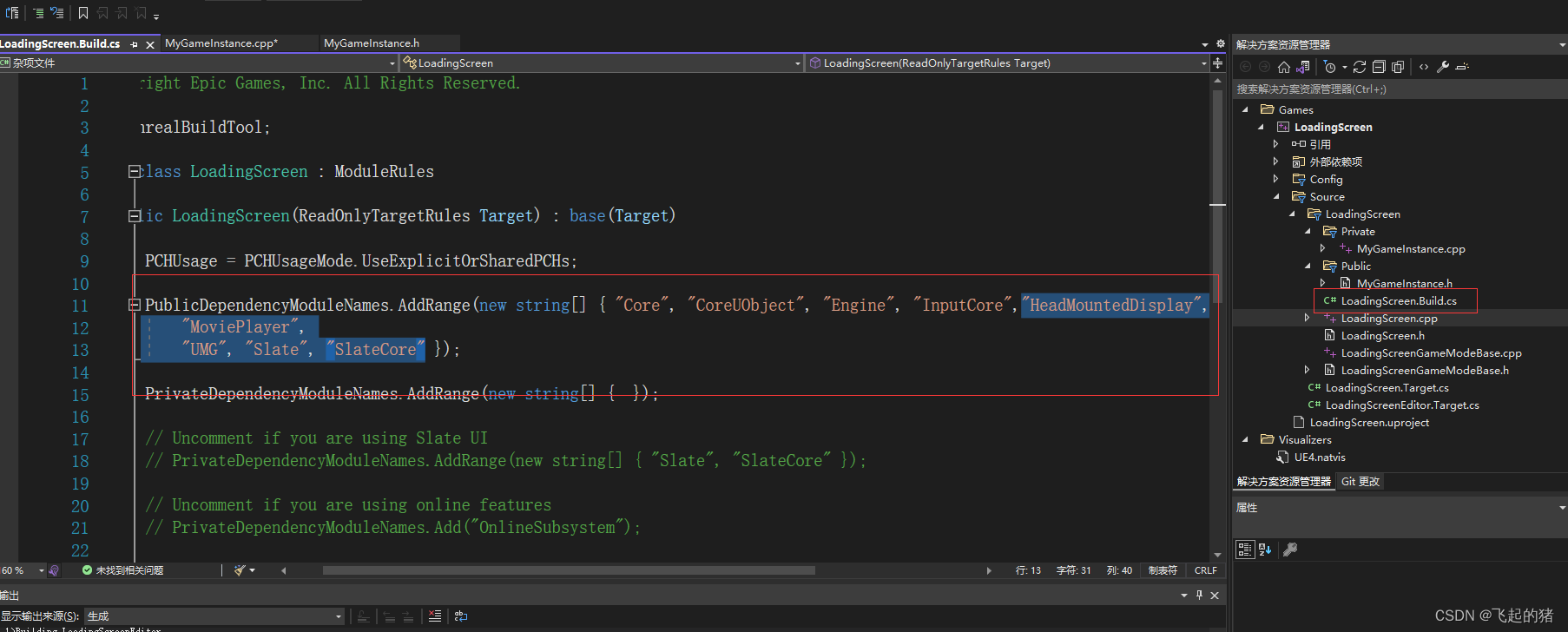
二、在你的项目的Build.cs中加入模块
"HeadMountedDisplay",
"MoviePlayer",
"UMG", "Slate", "SlateCore"
三、在MyGameInstance.h文件中
// Fill out your copyright notice in the Description page of Project Settings.

#pragma once

#include "CoreMinimal.h"
#include "Engine/GameInstance.h"
#include "Runtime/UMG/Public/UMG.h"
#include "Runtime/UMG/Public/UMGStyle.h"
#include "Runtime/UMG/Public/Slate/SObjectWidget.h"
#include "Runtime/UMG/Public/IUMGModule.h"
#include "Runtime/UMG/Public/Blueprint/UserWidget.h"
#include "Runtime/MoviePlayer/Public/MoviePlayer.h"
#include "Runtime/SlateCore/Public/Widgets/SWidget.h"
#include "MyGameInstance.generated.h"

/**
 *
 */
UCLASS()
class LOADINGSCREEN_API UMyGameInstance : public UGameInstance
{
	GENERATED_BODY()
public:
	virtual void Init() override;

	UFUNCTION()
		virtual void BeginLoadingScreen(const FString& MapName);
	UFUNCTION()
		virtual void EndLoadingScreen(UWorld* LoadedWorld);

	UPROPERTY()
		UUserWidget* CurrentWidget;
	// loading widget
	UPROPERTY(EditAnywhere, BlueprintReadOnly, Category = "UMGGame")
		TSubclassOf<UUserWidget> LoadingWidget;

};
四、在MyGameInstance.cpp文件中
// Fill out your copyright notice in the Description page of Project Settings.


#include "MyGameInstance.h"

void UMyGameInstance::Init()
{
    Super::Init();

    FCoreUObjectDelegates::PreLoadMap.AddUObject(this, &UMyGameInstance::BeginLoadingScreen);
    FCoreUObjectDelegates::PostLoadMapWithWorld.AddUObject(this,&UMyGameInstance::EndLoadingScreen);
}

void UMyGameInstance::BeginLoadingScreen(const FString& MapName)
{
	FLoadingScreenAttributes LoadingScreen;

	LoadingScreen.bAutoCompleteWhenLoadingCompletes = false;//是否在播放完所有电影并完成加载后,加载屏幕将消失
	LoadingScreen.bWaitForManualStop = false;//是否一直播放movies,直到手动停止
	LoadingScreen.bMoviesAreSkippable = false;//是否加载完成,就可以通过单击加载屏幕来跳过电影
	LoadingScreen.MinimumLoadingScreenDisplayTime = 3.0f; // movie最少播放时间
	//LoadingScreen.PlaybackType = EMoviePlaybackType::MT_Looped;

	LoadingScreen.WidgetLoadingScreen = FLoadingScreenAttributes::NewTestLoadingScreenWidget(); // movie不存在时,显示的widget

	if (LoadingWidget != nullptr)
	{
		CurrentWidget = CreateWidget<UUserWidget>(this, LoadingWidget);
		TSharedPtr<SWidget> LoadScreen = CurrentWidget->TakeWidget();
		LoadingScreen.WidgetLoadingScreen = LoadScreen;
	}
	else
	{
		UE_LOG(LogTemp, Warning, TEXT("LoadingWidget == nullptr"));
	}
	//LoadingScreen.MoviePaths.Add("squad_intro_movie");
	GetMoviePlayer()->SetupLoadingScreen(LoadingScreen);
}

void UMyGameInstance::EndLoadingScreen(UWorld* LoadedWorld)
{
	UE_LOG(LogTemp,Warning,TEXT("LoadSuccess"));
	GetMoviePlayer()->StopMovie();
}
五、在蓝图中设置一下项目设置,创建Gameinstance 蓝图

设置

六、创建widget,作为GameInstance 中为加载widget


最后编译运行即可:

参考官方文档:https://docs.unrealengine.com/5.0/en-US/API/Runtime/MoviePlayer/FLoadingScreenAttributes/
边栏推荐
猜你喜欢

Coredata storage to do list

ADC introduction

小程序分享功能

Mlx90640 infrared thermal imaging sensor temperature measurement module development notes (II)

Configuring ROS development environment with vscode: Causes and solutions to the problem of ineffective code modification

Download and installation of QT 6.2

文件的上传功能

Advanced introduction to digital IC Design SOC
![[deployment of deep learning model] deploy the deep learning model using tensorflow serving + tornado](/img/62/78abf16bb6c66726c6e394c9fb4f81.png)
[deployment of deep learning model] deploy the deep learning model using tensorflow serving + tornado
ESP32定时中断实现单、双击、长按等功能的按键状态机Arduino代码
随机推荐
CCF 201509-3 template generation system
Mlx90640 infrared thermal imaging sensor temperature measurement module development notes (II)
App lifecycle and appledelegate, scenedelegate
Download and installation of QT 6.2
JDBC总结
~2 CCF 2022-03-1 uninitialized warning
nodejs版本升级或切换的常用方式
Detailed explanation of MySQL database
@5-1 CCF 2019-12-1 reporting
小程序H5获取手机号方案
链表相关(设计链表及环链表问题)
About student management system (registration, login, student side)
JDBC操作数据库详解
rospy Odometry天坑小计
第五阶段第一周
工程监测多通道振弦传感器无线采集仪外接数字传感器过程
Record some JS tool functions
工程监测无线中继采集仪和无线网络的优势
广度优先遍历(图和二叉树的层序遍历相关问题)
Exciting method and voltage of vibrating wire sensor by hand-held vibrating wire acquisition instrument