当前位置:网站首页>ECMAScript 6 syntax addition (shorthand)
ECMAScript 6 syntax addition (shorthand)
2022-06-10 05:58:00 【Liaoruoxingchen lty】
ECMAScript 6.0( abbreviation ES6) yes JavaScript The next generation standard of language , Already in 2015 year 6 Officially released in . Optimized us JavaScript The programmability of language , improvement 、 Added some syntax to let us JavaScript The language is more powerful . Here is a brief record ES6 New syntax for .
New keyword let and const
let——ES6 In the new Keywords used to declare variables , its characteristic Yes :
1.let Declared variables have block level scope And only valid in the current scope , Cannot access... Outside the current scope let Declared variables ( and var The declared variables are global and can be accessed across scopes );
        if (true) {
            let a = 10;
            var b = 20;
        }
        console.log(b);     // 20  ( Access to b Variable , Normal print )
        console.log(a);     // a is not defined
2.let The declared variable has no variable promotion , therefore You have to declare it before you use it ( Cannot be in let Use this variable before declaring it ) and var Declared variables have the property of variable promotion ;
        console.log(b);     // undefined(var  With variable promotion )
        console.log(c);     //  Report errors : Cannot access before initialization “c”
        var b = 10;         // var  The defined variable will promote the variable
        let c = 30;         // let  Defined variables do not promote variables
3.let The declared variable has a temporary deadband in the current scope We need to pay attention to ( The general meaning of this temporary dead zone is combined with the following code analysis :if Medium d stay if Within the scope of and in let You can't access it normally before it is declared , Even if if There are global variables d It has been declared that , So it's equivalent to if Within the scope of until let To declare d In the previous area d What is undefined is , This area belongs to d Temporary dead zone of )
// Be careful :let Declared global variables stay Not used in block level scope let Statement ( Do not repeat the statement ) This global variable can be accessed normally in the block level scope , and In block level scope let Declared variables are inaccessible globally
        let d = 40;
        if (true) {
            console.log(d);     //  Report errors : Cannot access before initialization “d”
            let d = 50;         //  This is used here. let Declare variables d, Therefore, an error will be reported in the printing of the previous line
        }
console.log(d); // There is an error reported above, so it is not implemented here const——ES6 In the new Keywords for declaring constants , its characteristic Yes :
1. Has block level scope , The claim record is only valid in the current scope
        // 1. Has block level scope , The claim record is only valid in the current scope
        if (true) {
            const a = 10;
            if (true) {
                const a = 20;
                console.log(a); // 20
            }
            console.log(a); // 10
        }
        console.log(a); // a is not defined
2. Use const A constant must be declared with an initial value
        // 2. Use const A constant must be declared with an initial value
const PI; // Report errors : Missing initializer in constant declaration 3.const After the declared constant is assigned , The value cannot be changed , There are two types of data : Basic data type On the surface The value cannot be changed , If it is Complex data type , For example, arrays are “ Can't change ” It refers to the array of Memory address cannot be changed , Values that are not array items cannot be changed ( You can combine the following code and comments to better understand )
        // 3.const After the declared constant is assigned , The value cannot be changed . There are two types of data : Basic data types and complex data types
        const arr = [10, 20];    // arr Is a complex data type
        arr[0] = 30;        //  The modification here does not involve the change of data storage address, so it is possible
        console.log(arr);   // (2) [30, 20]
        arr = [1, 2]        //  The revision here refers to re - giving arr assignment , Need to reopen the memory address , So there's an error
        console.log(arr);   //  Report errors : Assign a value to a constant variable .
var、let、const The similarities and differences between the three :
| var | lei | const |
| Global scope | Block level scope | Block level scope |
| There is variable promotion | No variable promotion | No variable promotion |
| The value can be changed | The value can be changed | Declare and assign values , Value cannot be changed |
Deconstruct assignment
Array deconstruction assignment
Array deconstruction assignment allows us to Extract the value from the array according to the one-to-one correspondence, and then assign the value to the variable , If there are not enough values in the array , What we get from the excess is undefined
        //  Array deconstruction assignment
        let arr = [1, 2, 3];
        let [a, b, c, d, e] = arr;
        console.log(a);     // 1
        console.log(b);     // 2
        console.log(c);     // 3
        console.log(d);     // undefined
        console.log(e);     // undefined
In the code let [a, b, c, d, e] = arr in a, b, c One by one corresponds to arr Array 1, 2, 3, And beyond d, e be arr If there is no data corresponding to it in the array, the value is undefined
Object deconstruction assignment
Object deconstruction assignment Allows us to use the name of the variable to match the properties of the object , Match successfully assigned the value of the object property to the variable
        // Object deconstruction assignment
        let obj = {
            name: 'zhangsan',
            age: 18,
            sex: ' male '
        };
        let {name, age, sex} = obj;
        console.log(name+age+sex);  // zhangsan18 male ( It is very convenient to use the attribute value of the object through deconstruction and assignment )
In addition, we can alias the attributes of the object when we deconstruct and assign values , Then access the attribute value of the object through this alias :
        let obj = {
            name: 'zhangsan',
            age: 18,
            sex: ' male '
        };
        let {name: myName, age: myAge} = obj;   // myName and myAge Equivalent to name and age It's also known as
        console.log(myName + myAge);    // zhangsan18
        console.log(name);  //  When deconstructing, we use aliases to match values , Use here name There is no access to obj Of name Property value
Arrow function
Arrow function ——() => { }
Arrow function is a simple way to write a function , Usually we assign the arrow function to the variable / Constant through which the arrow function is called
        //  Arrow function
        let fn = () => {
            console.log(123);
        };
        fn();   // 123
Arrow function has two characteristics :
1. In the arrow function , If There is only one code in the function body also The result of code execution is the return value of the function , Then... Of the function body Braces can be omitted without writing ;
        const sum = (a, b) => a + b;
        console.log(sum(10, 20));   // 30
2. In the arrow function in , If There is only one formal parameter , Then the parameters outside the Parentheses can be omitted ;
         const fun = v => alert(v);
         fun(100)   //  Normal pop-up window display 100
In the arrow function this:
Arrow functions are not bound this, Arrow function There is no one's own this keyword , If Use... In the arrow function this, It will Points to... In the position defined by the arrow function this( That is this. this The arrow points to the layer above the function this)
        function f () {
            console.log(this);  //  there this Pointing to obj object ( Be being call() Changed )
            return () => {
                console.log(this);  //  there this It's also a direction obj, Because of something outside the function this It's pointing obj
            }
        }
        const obj = {name: 'zhangsan'};
        const resFn = f.call(obj);  //  Use call() change this Point to , take f Functional this Point to obj
        resFn();    //  Call to change this Pointing back f function
In the code f Function this Pointing to obj object , and f Arrow function inside the function this It also points to obj object .
The remaining arguments in the arrow function :
The remaining parameters :(first, ...args) => {}; // first Is the first parameter passed , and ...args Is all the remaining parameters except the first parameter ,args It's an array , and first You can omit Of , So you All parameters are stored in args Array in
<script>
        //  Use cases for remaining parameters
        //  Case study : For example, encapsulate a function to find the sum of any number , That is, the parameters of the function are not fixed , Is any number
        const sum = (...args) => {    // sum() Used to find n Sum of parameters
            let total = 0;
            args.forEach(item => total += item);
            return total;
        };
        console.log(sum(2, 5));     // 7
        console.log(sum(2, 5, 8));  // 15

        //  notes : The remaining parameters are used in conjunction with deconstruction assignment :
        let arr = [' Zhang San ', ' Li Si ', ' Wang Wu '];
        let [s1, ...s2] = arr;
        console.log(s1);    //  Zhang San
        console.log(s2);    // (2) [" Li Si ", " Wang Wu "]
</script>
Extension operator ——...
The extension operator can be used to merge arrays :
        //  The extension operator can be used to merge arrays
        //  Method 1
        let arr1 = [1, 2, 3];
        let arr2 = [4, 5, 6];
        let arr3 = [...arr1, ...arr2];  // ...arr1  It is equivalent to  1, 2, 3
        console.log(arr3);  // (6) [1, 2, 3, 4, 5, 6]

        //  Method 2 : Use push() Method
        arr1.push(...arr2); // ...arr2  It is equivalent to  4, 5, 6
        console.log(arr1);  // (6) [1, 2, 3, 4, 5, 6]
You can also use the extension operator Convert a pseudo array to a real array ( It's easy to use Array Object method )
        //  You can also use the extension operator to convert a pseudo array to a real array ( It's easy to use Array Object method )
        let divs = document.querySelectorAll("div");
        console.log(divs);  // NodeList(5) [div, div, div, div, div]  ( This is a pseudo array )
        // console.log(divs.push('a'));    // divs.push is not a function   Pseudo arrays cannot be used push Method
        let myDivs = [...divs];
        console.log(myDivs);    // (5) [div, div, div, div, div]    ( This is a true array )
        myDivs.push(' New elements ')
        console.log(myDivs);    // (6) [div, div, div, div, div, " New elements "]  ( You can use the array method )
ES6-Array An extension of ( part ):
Array.from()
Array.from() Methods and extension operators ... It's also OK Convert a pseudo array to a true array .
Array.from( Pseudo array , Callback function ) Method has two parameters , The second parameter, the callback function, can operate each item of the pseudo array
        // Array.from() Method can convert a pseudo array to a true array :
        var arrayLike = {
            "0": 1,
            "1": 2,
            "2": 3,
            "length": 3,
        }
        var arr = Array.from(arrayLike);
        console.log(arr);   // (3) [1, 2, 3]     Converted to a true array
        // Array.from( Pseudo array ,  Callback function ) Method has two parameters , The second parameter, the callback function, can operate each item of the pseudo array
        var arr2 = Array.from(arrayLike, item => item * 2) //  To achieve the pseudo array of each item multiplied by 2
        console.log(arr2);     // (3) [2, 4, 6]
Of the array instance find() and findIndex()
find((item, index) => { }) Method : Find the first qualified element in the array , Write the search request in the callback arrow function , What is returned is the found element , If in the end Not found Elements that meet the requirements are return undefined. Such as :
        // find((item, index) => {  }) Method :
        var arrs = [
            {
                id: 1,
                name: ' Zhang San '
            },
            {
                id: 2,
                name: ' Li Si '
            }
        ];
        var item = arrs.find(item => item.id == 2); //  lookup id be equal to 2 This element of
            console.log(item);  // {id: 2, name: " Li Si "}
findIndex((item, index) => { }) Method : Find the index of the first matching element in the array , Write the search request in the callback arrow function , The return is Found The index number of the element in the array , If in the end Not found Elements that meet the requirements Then return to undefined
Of the array instance includes()
includes(value) Method : verification Array Does it include value This value , Returns a Boolean value , With string includes The method is similar to .ES2016 This method is introduced .
notes :ES6 In addition to the above, there are many knowledge points about the expansion and improvement of arrays in , What is recorded here is only what I learned and recorded during my study , More details can be found at :ES6- Extension of arrays
Template string ——``
Template string :ES6 New ways to create strings , Use The quotation marks Definition namely :` Content `;
Such as :let name = `zhangsan`;
Of the template string Functions and features :
1. The template string can Use ${} Call variables / expression / function etc. ;
        let name = ` Zhang San `;
        console.log(name);  //  Zhang San
        console.log(` I have a friend named ${name}`);   //  I have a friend named Zhangsan

        let fn = () => {
            return ` I am a fn function `;
        }
        console.log(` I can call ->${fn()}`);   //  I can call -> I am a fn function
2. Template string Space allowed 、 Indent and wrap ( Printed The result has the same effect );
3. Element labels can be recognized in the template string . Such as div/span/p/li etc. ;
        let obj = {
            name: ' Li Si ',
            age: 18
        }
        console.log(`
        <ul>
            <li>${obj.name}</li>
            <li>${obj.age}</li>
        </ul>
        `);
Print effect screenshot :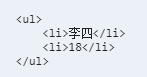
notes : If you need to use backquotes in the template string (`) This symbol is preceded by a backslash (\) escape .
For more details on Template Strings, visit :ES6- Template string
A string of startsWith() and endswith() Method
startsWith() Method is used for Determine whether the string starts with a character , Returns a Boolean value
endsWith() Method is used for Determine whether the string ends with a character , Returns a Boolean value
    <script>
        let str = `Hello!My name is LTY!`;

        // startsWith()  Method is used to determine whether a string begins with a character , Returns a Boolean value
        let start = str.startsWith("Hello")
        console.log(start);     // true

        // endsWith()  Method is used to determine whether a string ends with a character , Returns a Boolean value
        let end = str.endsWith("!")
        console.log(end);       // true
    </script>
Set data structure
Set and Array、Object Wait for the same It's a data structure ,Set Stored in the Data doesn't repeat .Set data-structured typeof yes object , While using Object.prototype.toString.call(new Set()) You can see that Set The data type of is [object Set] .Set Common methods in are add() 、delete() 、has() 、clear() See the following example code for usage :
    <script>
        // Set data structure : Set  and  Array、Object  And so on are all data structures ,Set  The data stored in will not be duplicated
        var s = new Set();
        console.log(typeof s);  // object
        console.log(Object.prototype.toString.call(s)); // [object Set]

        // size  Keywords are used to query  Set  The number of items in the middle
        console.log(s.size);    // 0

        // add()  Add a value , return  Set  Structure itself
        s.add("a").add("b").add("a")    //  Even if you add the same number multiple times  Set  This number will still be saved only once in
        console.log(s);     // Set(2) {'a', 'b'}
        console.log(s.size);    // 2

        // delete ()  Delete  Set  A value in , Returns a Boolean value , Indicates whether the deletion is successful
        s.delete("a")
        console.log(s.size);    // 1 ( The deletion succeeded, so  Set  Only one of them )

        // has()  Returns a Boolean value , Indicates whether the value is  Set  Members of
        var bu = s.has("c")
        console.log(bu);    // false (Set  Also there is no  'c'  This one )
        var bu = s.has("b")
        console.log(bu);    // true

        // clear()  eliminate  Set  All the members of the , return  undefined
        var cl = s.clear()
        console.log(cl);    // undefined
        console.log(s);     // Set(0) {}
    </script>
notes : Use Set The data structure can easily implement an array de duplication . Examples are as follows :
var arr = [1, 2, 4, 5, 3, 5, 3, 2, 4, 1]
var s = new Set(arr);   // Set  The data in is not duplicated
console.log(s); // Set(5) {1, 2, 4, 5, 3}
This article is just the author's habit of recording blogs during self-study to review and consolidate knowledge, so there will be many deficiencies and problems , I hope you will be more tolerant and correct . The author will try to correct it later 、 Perfect and supplement . thank you !
More about ECMAScript6.0 Knowledge through train ——ECMAScript6.0 introduction - Ruan Yifeng
study hard 、 Day day up ! :)
边栏推荐
- Unable to enter the ArrayList underlying solution during debug
- ArcGIS应用(十八)Arcgis 矢量图层属性表显示精度变化问题详解
- Exception assertion of assertj
- C#为应付期末涉及到大部分考点所设计的学生管理系统
- Idea cancels data simplification
- ArcGIS应用(十九)Arcgis 统计分析计算多波段图像最大值、最小值、平均值等
- [introduction to software engineering] summary of knowledge points | suitable for examination review | easy to pass the exam
- Web171~180 of ctfshow - SQL injection (1)
- Word vector: detailed explanation of glove model
- Audiotrack record of a problem in playing a wav file
猜你喜欢

error NU1202: Package Volo. Abp. Cli 5.2.1 is not compatible with netcoreapp3.1

Improper use of BigDecimal caused P0 accident!

Model Lightweight - cutting distillation Series yolov5 nonestructive Cutting (attached source)

N-gram language model

Solve the problem of npcap installation failure in Wireshark
![[data analysis] RFM analysis method](/img/74/20632b1aaacd71336b4f750dc1c057.png)
[data analysis] RFM analysis method

MySQL Part 1 (basic knowledge)

ArcGIS应用(十九)Arcgis 统计分析计算多波段图像最大值、最小值、平均值等
N-gram 语言模型

Jifeng lighting | the spotlight without secondary light spot is perfect. The hill is perfect
随机推荐
MYSQL第一篇(基础知识)
Cremb Pro backend sub administrator 403 problem analysis
Flink 系例 之 KeyedProcessFunction
ECMAScript 6语法新增(简记)
Apm飞控学习笔记之悬停loiter模式-Cxm
如何通过netstat命令分析网络情况
The browser is much more beautiful when installing this plug-in. It has the same custom component function as apple mobile phone
Flink's timewindow
Thesis reading (53):universal advantageous perturbations
Compilation error in multithreading
ArcGIS应用(十八)Arcgis 矢量图层属性表显示精度变化问题详解
Several skills of API interface optimization
Unable to enter the ArrayList underlying solution during debug
Using gat to parse minidump (graphical interface)
Basic concepts of multithreading family
Idea cancels data simplification
Practice of Flink CDC + Hudi massive data entering the lake in SF
Idea remote debugging code
Exception assertion of assertj
What does end system mean?