当前位置:网站首页>百度地图鹰眼轨迹服务
百度地图鹰眼轨迹服务
2022-07-27 16:18:00 【猫的幻想曲】
这里写目录标题
百度地图鹰眼轨迹服务
鹰眼轨迹服务概述:
- 鹰眼是一套轨迹管理服务,提供各端SDK和API供开发者便携接入,追踪所管理的车辆/人员等运动物体。
- 基于鹰眼提供的接口和云端服务,开发者可以迅速构建一套完全属于您自己的完整、精准且高性能的轨迹管理系统,可应用于车队管理、人员管理等领域。文档:https://lbsyun.baidu.com/index.php?title=yingyan
- 基本功能有:轨迹追踪、轨迹存储、轨迹查询、轨迹纠偏和里程计算、空间检索、地理围栏监控、轨迹分析等。

鹰眼轨迹服务基本概念:
- service
一个service(即鹰眼服务轨迹)对应一个轨迹管理系统,一个service里可管理多个终端设备(即entity),service的唯一标识符是service_id。 - entity
一个entity代表现实中一个被追踪轨迹的终端设备,它可以是一个人,一辆车或者任何运动的物体。同一个service中,entity以entity_name作为唯一标识 - track
entity移动所产生的连续轨迹被称为track,track由一系列轨迹点(point)组成。 - fence
fence即地理围栏,是指一定范围(如:圆形、多边形、线性、行政区)的虚拟地理区域,鹰眼将自动推送报警至开发者。开发者接收到报警后,可进行业务处理。 - 更多说明:https://lbsyun.baidu.com/index.php?title=yingyan/guide/concept
权限与配额:
- 鹰眼开发者的使用权限说明
- 数据存储:
- 开发者可向自己的鹰眼服务中上传轨迹数据。
- 鹰眼将为开发者存储最近1年的轨迹数据。
- 若需保留1年之外的轨迹数据,需要自己查询或导出数据进行自行存储。
- 数据访问:
- 开发者创建的鹰眼服务可被该账号下的ak访问,除非开发者授权,否则不可被其他开发者访问。
- 鹰眼轨迹管理台提供授权功能,支持开发者将自有service授权给其他开发者访问。

创建鹰眼服务:
- 使用鹰眼轨迹服务首先需要创建service,用于存储、访问和管理自己的一批终端和轨迹。
- 服务管理系统:https://lbsyun.baidu.com/trace/admin/service
- 每个service最多可管理100万终端(人、车等),一个开发者最多可创建10个service。
- 每个开发者拥有超过100万的终端,可以创建多个service分别管理。

获取服务id:

终端管理:
- 终端管理类接口主要实现:entity的创建、更新、删除、查询。
- 例如:添加骑行路线、删除骑行路线、更新骑行路线的属性信息(如:骑行路线的名称)等。
- 文档:https://lbsyun.baidu.com/index.php?title=yingyan/api/v3/entity
- entity管理类接口实现entity的创建、更新、删除、查询。包括4个接口:

添加entity:
/** * 新增实体 */
@Test
public void testEntityAdd(){

    String url = "http://yingyan.baidu.com/api/v3/entity/add";
    //创建实体
    String body = HttpRequest.post(url)
            .form("ak", ak)
            .form("service_id", 233718)
            .form("entity_name", "route_1_1001")
            .form("entity_desc", "用户1创建的1001路线")
            .execute().body();

    System.out.println(body);
}

添加entity自定义字段:


更新entity自定义字段:
/** * 更新entity */
@Test
public void testUpdateEntity(){

    String url = "http://yingyan.baidu.com/api/v3/entity/update";
    //创建实体
    String body = HttpRequest.post(url)
            .form("ak", ak)
            .form("service_id", 233718)
            .form("entity_name", "route_1_1001")
            .form("entity_desc", "用户1创建的1001路线")
            .form("route_name","从北京西站到天安门广场的路线")//自定义字段
            .execute().body();

    System.out.println(body);
}

删除entity:


查询entity:
/** * 查询entity */
@Test
public void testEntityList(){

    String url = "http://yingyan.baidu.com/api/v3/entity/list";
    //创建实体
    String body = HttpRequest.get(url)
            .form("ak", ak)
            .form("service_id", 233718)
            .form("filter", "entity_names:route_1_1001")
            .form("coord_type_output","gcj02") //返回坐标体系
            .execute().body();

    System.out.println(body);
}

轨迹上传:
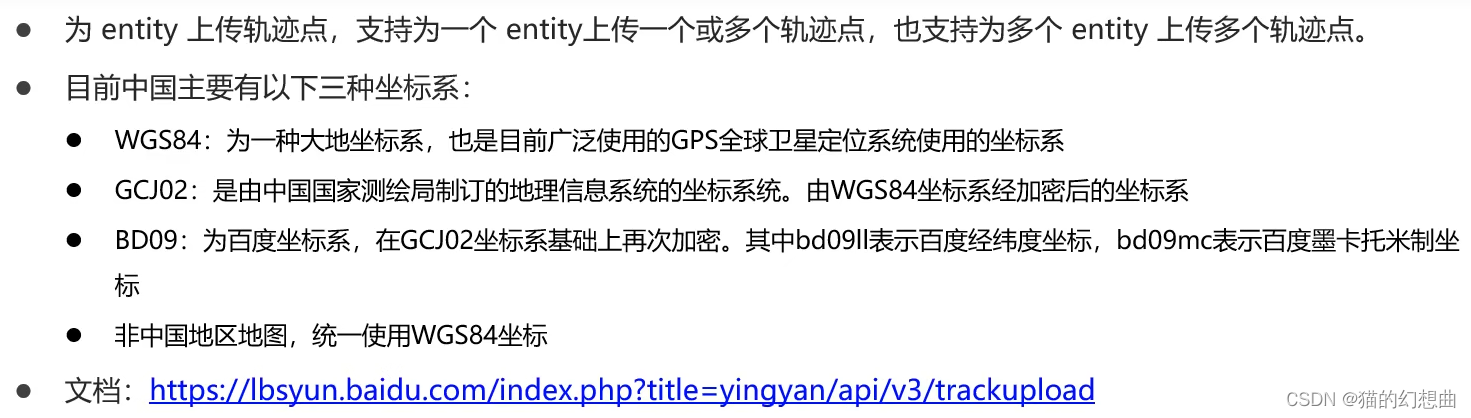 单点轨迹上传:
/** * 为一个entity上传一个轨迹点 */
@Test
public void testEntityAddpoint(){

    String url = "http://yingyan.baidu.com/api/v3/track/addpoint";
    //创建实体
    String body = HttpRequest.post(url)
            .form("ak", ak)
            .form("service_id", 233718)
            .form("entity_name", "route_1_1001")
            .form("latitude",31.041452) //纬度
            .form("longitude",121.618723) //经度
            .form("loc_time",System.currentTimeMillis()/1000) //定位时间戳,精确到秒
            .form("coord_type_input","bd09ll") //坐标类型
            .form("speed",10.23) //速度
            .form("direction",15) //方向
            .execute().body();

    System.out.println(body);
}
可看到坐标数据已经上传到百度地图服务: 批量轨迹上传:
/** * 批量添加轨迹点 */
@Test
public void testEntityAddpoints(){

    String url = "http://yingyan.baidu.com/api/v3/track/addpoints";

    List<Object> pointList = new ArrayList<>();
    pointList.add(MapUtil.builder().put("entity_name", "route_1_1001")
            .put("latitude",31.04122) //纬度
            .put("longitude",121.616163) //经度
            .put("loc_time",System.currentTimeMillis()/1000) //定位时间戳,精确到秒
            .put("coord_type_input","bd09ll") //坐标类型
            .put("speed",10.23) //速度
            .put("direction",15).build()); //方向

    pointList.add(MapUtil.builder().put("entity_name", "route_1_1002")
            .put("latitude",31.04219) //纬度
            .put("longitude",121.614618) //经度
            .put("loc_time",System.currentTimeMillis()/1000) //定位时间戳,精确到秒
            .put("coord_type_input","bd09ll") //坐标类型
            .put("speed",10.23) //速度
            .put("direction",15).build()); //方向

    //创建实体
    String body = HttpRequest.post(url)
            .form("ak", ak)
            .form("service_id", 233718)
            .form("point_list", JSONUtil.toJsonStr(pointList))
            .execute().body();

    System.out.println(body);
}
我们可以将多个轨迹点上传到百度地图,查看它在地图上的轨迹 :
/** * 为一个entity上传一个轨迹点(模拟用户骑行操作) */
@Test
public void testEntityAddpoint2(){

    String url = "http://yingyan.baidu.com/api/v3/track/addpoint";

    String point = "121.61931,31.041449|121.618851,31.041441|121.617953,31.041363|121.617531,31.041286|121.617531,31.041286|121.616444,31.041232|121.617378,31.045989";
    StrUtil.split(point,'|').forEach(pointStr -> {

        String[] splitStr = StrUtil.splitToArray(pointStr, ',');
        //创建实体
        String body = HttpRequest.post(url)
                .form("ak", ak)
                .form("service_id", 233718)
                .form("entity_name", "route_1_1003")
                .form("latitude", Convert.toDouble(splitStr[1])) //纬度
                .form("longitude",Convert.toDouble(splitStr[0])) //经度
                .form("loc_time",System.currentTimeMillis()/1000) //定位时间戳,精确到秒
                .form("coord_type_input","bd09ll") //坐标类型
                .form("speed",10.23) //速度
                .form("direction",15) //方向
                .execute().body();

        System.out.println(body);

        try {

            Thread.sleep(RandomUtil.randomInt(5,30)*1000);
        } catch (InterruptedException e) {

            e.printStackTrace();
        }
    });

}
根据时间查询轨迹:
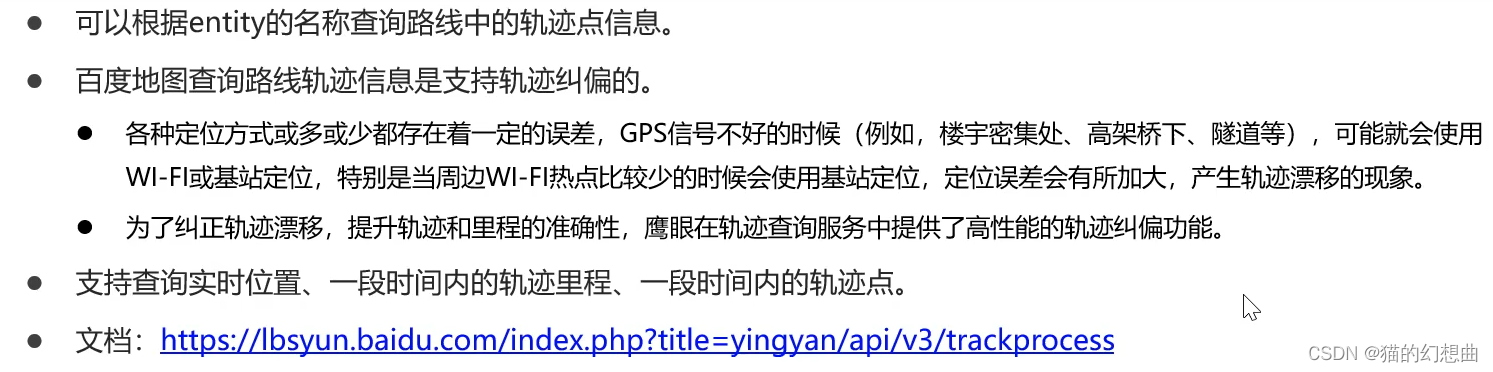
/** * 查询轨迹与纠偏 */
@Test
public void testEntityGetTrack(){

    String url = "http://yingyan.baidu.com/api/v3/track/gettrack";

    Long startTime = DateUtil.parse("2022-07-22 00:00:00").getTime() /1000 ;
    Long endTime = DateUtil.parse("2022-07-22 23:59:59").getTime() /1000 ;

    //创建实体
    String body = HttpRequest.get(url)
            .form("ak", ak)
            .form("service_id", 233718)
            .form("entity_name", "route_1_1003")
            .form("start_time",startTime) //开始时间
            .form("end_time",endTime) //结束时间
            .form("is_processed",1) //是否返回纠偏后轨迹
            .execute().body();

    System.out.println(body);
}

百度地图鹰眼轨迹服务的详解,仅供参考。
边栏推荐
- filebeat.yml配置文件关于多个服务的配置问题
- Generate PDM file from Navicat export table
- RSA encryption and decryption (compatible with wechat applet environment)
- 多功能无线遥控艾灸仪芯片-DLTAP703SD
- nacos显示服务注册地址错误
- 兆骑科创海内外引进高层次人才,创新创业项目对接
- The combination of text and words perfectly explains the implementation process of MySQL logical backup
- 输入框blur事件与click事件冲突问题
- Visual studio code installation tutorial (super detailed)
- 阿里架构师耗时280个小时整理的1015页分布式全栈小册,轻松入手分布式系统
猜你喜欢

10 SQL optimization schemes summarized by Alibaba P8 (very practical)

What should I do if MySQL master-slave replication data is inconsistent?

Alibaba architects spent 280 hours sorting out 1015 pages of distributed full stack pamphlets to easily start the distributed system

搭建一个简单的知识问答系统

2021.8.9 note request

Uniapp H5 cross domain problem

Visual studio code installation tutorial (super detailed)

图文结合,完美解释MySQL逻辑备份的实现流程
Installation and deployment of zabbix6.0

2021.7.13笔记 子查询
随机推荐
Installation and deployment of zabbix6.0
TS study notes class
[mit 6.s081] LEC 1: introduction and examples notes
I was forced to optimize the API gateway query interface
2021.7.13 note sub query
INSUFFICIENT_ ACCESS_ ON_ CROSS_ REFERENCE_ ENTITY APEX / SALESFORCE
nacos显示服务注册地址错误
MySQL查询列必须和group by字段一致吗?
机器学习——SVM训练集只有一类标签数据而引发的错误
Wechat applet wxacode.getunlimited generates applet code
「MySQL那些事」一文详解索引原理
mysql视图基本操作
知识图谱 — pyhanlp实现命名体识别(附命名体识别代码)
全自动吸奶器芯片-DLTAP703SD
Uniapp has no effect on the page selector on the app side
The second parameter of fragmenttransaction.replace reports an error
[mit 6.s081] LEC 5: calling conventions and stack frames risc-v notes
10 SQL optimization schemes summarized by Alibaba P8 (very practical)
智能失眠治疗仪产品-DLT8P68SA-杰力科创
你有没有在MySQL的order by上栽过跟头