当前位置:网站首页>QComboBox下拉菜单中有分隔符Separator时的样式设置
QComboBox下拉菜单中有分隔符Separator时的样式设置
2022-06-25 22:00:00 【北极熊的奋斗史】
先上效果图
没用样式的效果,巨丑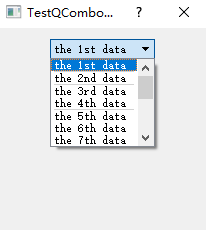
用了样式的效果,是不是你想要的呢?
网上基本搜不到下拉框的下拉列表中,有分隔符的样式设置,所以我从源代码出发,最终实现了这个效果,如果感到不错,可以给我打赏哦 !!!
上代码
测试数据代码
	QHBoxLayout* lay = new QHBoxLayout(this);

	// 创建测试用的下拉框对象
	QComboBox* cbo = new QComboBox(this);
	lay->addWidget(cbo, 0, Qt::AlignTop | Qt::AlignHCenter);

	// 添加测试用的数据
	cbo->addItem("the 1st data");
	cbo->insertSeparator(1);			// 添加的分割符
	cbo->addItem("the 2nd data");
	cbo->addItem("the 3rd data");
	cbo->insertSeparator(3);
	cbo->addItem("the 4th data");
	cbo->addItem("the 5th data");
	cbo->addItem("the 6th data");
	cbo->insertSeparator(6);
	cbo->addItem("the 7th data");
	cbo->addItem("the 8th data");
	cbo->addItem("the 9th data");
	cbo->addItem("the 10th data");
	cbo->insertSeparator(10);
	cbo->addItem("the 11th data");
	cbo->addItem("the 12th data");
	cbo->addItem("the 13th data");
	cbo->addItem("the 14th data");
样式代码
// 先给整体窗口添加一个背景颜色
	this->setStyleSheet(QString("QWidget#%1{background-color: #0b1127}").arg(this->objectName()));

	// 开始设置下拉框的样式
	QString strStyle(
		"QComboBox{ border-image:url(:/image/comboBox.png); font-family: \"Noto Sans S Chinese\"; font-size:16px; color: #ffffff; padding-left: 16px;}"
		"QComboBox::drop-down{ background: transparent; } "
		"QComboBox QFrame{border-image: url(:/image/cboDropFrame.png);}"
		"QComboBox QAbstractItemView{ padding-left: 8px; outline:0px; color: #ffffff; font-size:14px; font-family: \"Noto Sans S Chinese\"; } "
		"QComboBox QAbstractItemView::item { height: 16px; margin-top: 8px; margin-bottom:8px; } "
		"QComboBox QAbstractItemView::item:selected, QAbstractItemView::item:hover { background-color: rgba(0, 188, 212, 0.4); } "
		"QScrollBar::vertical{ background:transparent; margin: 0px 0px 0px 0px; width: 6px; }"
		"QScrollBar::handle:vertical{ background-color:#00BCD4; border-radius:3px; }"
		"QScrollBar::add-line:vertical{ height: 0px; }"
		"QScrollBar::sub-line:vertical{ height: 0px; }"
		"QScrollBar::add-page:vertical, QScrollBar::sub-page:vertical{background: transparent;}"
		);
	cbo->setStyleSheet(strStyle);
	cbo->setMinimumSize(QPixmap(":/image/comboBox.png").size());	// 修改下拉框的最小大小
	// 下面这句可以让下拉菜单应用上样式表的样式
// cbo->setItemDelegate(new QStyledItemDelegate()); // 但是这个样式代理类不能让分隔符变得好看,需要自己继承他自定义分隔符的样式
	cbo->setItemDelegate(new MStyledItemDelegate());		// 当有分割符时,使用这个自定义的样式代理
	// 下面两句可以设置下拉菜单背景透明
	cbo->view()->parentWidget()->setWindowFlags(Qt::Popup | Qt::FramelessWindowHint);
	cbo->view()->parentWidget()->setAttribute(Qt::WA_TranslucentBackground);
重点来了
自定义的样式样式代理类
MStyledItemDelegate::MStyledItemDelegate(QObject *parent /*= 0*/) : QStyledItemDelegate(parent)
{

	// 给分隔符设置默认颜色
	clrSeparator = QColor("#00BCD4");
}

void MStyledItemDelegate::paint(QPainter *painter, const QStyleOptionViewItem &option, const QModelIndex &index) const
{

	if (isSeparator(index)) {

		QRect rect = option.rect;
		if (const QAbstractItemView *view = qobject_cast<const QAbstractItemView*>(option.widget))
			rect.setWidth(view->viewport()->width());
		QStyleOption opt;
		opt.rect = rect;
		QPoint pt1(rect.left(), rect.top() + rect.height() / 2);
		QPoint pt2(rect.right(), pt1.y());
		painter->save();
		painter->setPen(clrSeparator);
		painter->drawLine(pt1, pt2);
		painter->restore();
	}
	else {

		QStyledItemDelegate::paint(painter, option, index);
	}
}

QSize MStyledItemDelegate::sizeHint(const QStyleOptionViewItem &option, const QModelIndex &index) const
{

	if (isSeparator(index)) {

		int pm = 1;		// 自定义分隔符高度为1px
		return QSize(pm, pm);
	}
	return QStyledItemDelegate::sizeHint(option, index);
}

bool MStyledItemDelegate::isSeparator(const QModelIndex &index)
{

	return index.data(Qt::AccessibleDescriptionRole).toString() == QLatin1String("separator");
}
打完收工…
源码链接
最后就是源码链接了,Qt5 + VS2013 写的测试工程
https://download.csdn.net/download/chenxipu123/12623816
微信打赏码

边栏推荐
- Recently prepared to translate foreign high-quality articles
- cookie、session、token
- Pit resolution encountered using East OCR (compile LAMS)
- Several optimization scenarios using like fuzzy retrieval in SQL
- Ue4 Ue5 combine le plug - in de reconnaissance vocale de bureau pour la reconnaissance vocale
- ACM. HJ16 购物单 ●●
- String deformation (string case switching and realization)
- Fegin client entry test
- How to download the software package of CDH version
- 牛客小白月賽52--E 分組求對數和(二分)
猜你喜欢

Oracle -- table operation

Several optimization scenarios using like fuzzy retrieval in SQL
 [email protected]@COLLATION_CONNECTION */"/>
.sql数据库导入错误:/*!40101 SET @[email protected]@COLLATION_CONNECTION */
2、一个向量乘它的转置,其几何意义是什么?
Ble Low Power Bluetooth networking process and Bluetooth role introduction
- [email protected]@COLLATION_ CONNECTION */"/>
. SQL database import error: / *! 40101 SET @OLD_ COLLATION_ [email protected]@COLLATION_ CONNECTION */
![[eosio] eos/wax signature error is_ Canonical (c): signature is not canonical](/img/d8/a367c26b51d9dbaf53bf4fe2a13917.png)
[eosio] eos/wax signature error is_ Canonical (c): signature is not canonical

Problem recording and thinking

UE4_ Ue5 combines the offline voice recognition plug-in for speech recognition
Paper notes: multi tag learning MSWl

随机推荐
Pycharm student's qualification expires, prompting no suitable licenses associated with account solution
Basic operator
【ModuleBuilder】GP服务实现SDE中两个图层相交选取
Use and difference between ue4\ue5 blueprint node delay and retroggable delay
Some points to pay attention to when closing mongodb services (as well as related commands when opening)
Xinchida nd04 nd04c nrf52832 (52810) ble module (low power Bluetooth communication module) at command test
Baidu: in 2022, the top ten hot spots will rise and the profession will be released. There is no suspense about the first place!
CDN加速是什么
Live800 online customer service system: do business across time and space, starting from each interaction
String deformation (string case switching and realization)
NLP text summary: use the pre training model to perform text summary tasks [transformers:pipeline, T5, Bart, Pegasus]
What is CDN acceleration
Multithreaded learning 1
The sum of logarithms in group 52--e of Niuke Xiaobai monthly race (two points)
Fastjson反序列化随机性失败
Pit resolution encountered using East OCR (compile LAMS)
How to use JMeter for interface testing
Meta universe standard forum established
【opencv450-samples】读取图像路径列表并保持比例显示
Comp2913 database