当前位置:网站首页>Quartz. Net getting started
Quartz. Net getting started
2022-06-21 05:59:00 【Wind god Shura envoy】
Preface
stay ASP.NET The common scheduling framework in is nothing more than Quartz.NET And Hangfire Two kinds of , In the past, I often used to develop Hangfire With its background management interface , It is very convenient and easy to use , Recently, I have encountered some problems in new projects schedule The needs of , Colleagues pushed Quartz.Net To work as a job scheduler ,Quartz.Net It is a fully functional work scheduling framework , from Java Popular scheduling framework Quartz Migration to .NET On ,open source And provide flexible settings for developers to use , In the new 3.0.7 Support .NET Core 2.1 edition , Today, let's briefly introduce Quartz.NET Installation and basic application of , If there are any problems or mistakes, you are welcome to give guidance .
install
First , First create a file named QuartzNetConsole Of Console Project , Then open Nuget Package Mnage Input “quartz” Search for , Install the latest version of Quartz.NET Kit 
Or in Nuget Package Console Input instruction
Install-Package Quartz
If there is Json Serialize requirements , You can also add Quartz.Serialization.Json
Use
Before using, introduce Quartz.Net A few important API And Interface
IScheduler: Main work schedule API、 through Start Method run Scheduling .JobBuilder、IJobDetail: throughJobBuilder.CreateproduceIJobDetailOfInstance.TriggerBuilder、ITrigger: throughTriggerBuilder.CreateproduceITriggerOfInstance.
IJob : The custom schedule category needs to be implemented Interface
The diagram is as follows 
.png)]
And then Console Project Program.cs Medium Main Add the following code
class Program
{

    static void Main(string[] args)
    {

        // trigger async evaluation
        RunProgram().GetAwaiter().GetResult();
    }

    private static async Task RunProgram()
    {

        try
        {

            //  establish  scheduler
            StdSchedulerFactory factory = new StdSchedulerFactory();
            IScheduler scheduler = await factory.GetScheduler();

            //  establish  Job
            IJobDetail job = JobBuilder.Create<ShowDataTimeJob>()
                .WithIdentity("job1", "group1")
                .Build();

            //  establish  Trigger, Run once per second
            ITrigger trigger = TriggerBuilder.Create()
                .WithIdentity("trigger1", "group1")
                .StartNow()
                .WithSimpleSchedule(x => x
                    .WithIntervalInSeconds(1)
                    .RepeatForever())
                .Build();

            //  Join in  ScheduleJob  in
            await scheduler.ScheduleJob(job, trigger);

            //  start-up
            await scheduler.Start();

            //  perform  10  second
            await Task.Delay(TimeSpan.FromSeconds(10));

            // say goodbye
            await scheduler.Shutdown();
        }
        catch (SchedulerException se)
        {

            await Console.Error.WriteLineAsync(se.ToString());
        }
    }
}
Which is to be executed ShowDataTimeJob The category code is as follows
internal class ShowDataTimeJob :IJob
{

		public async Task Execute(IJobExecutionContext context)
    {

        await Console.Out.WriteLineAsync($" present time  {
      DateTime.Now}");
    }
}
Program description
establish scheduler : through
factory.GetScheduler()obtainscheduleestablish
Job: UseJobBuilder.CreateestablishShowDataTimeJob, And define its key And group nameestablish
Trigger: UseTriggerBuilderestablishITrigger, Define its key And group name , And set the immediate execution time to execute once every second , amongShowDataTimeJobOfExecuteThis is the execution . The results are as follows :
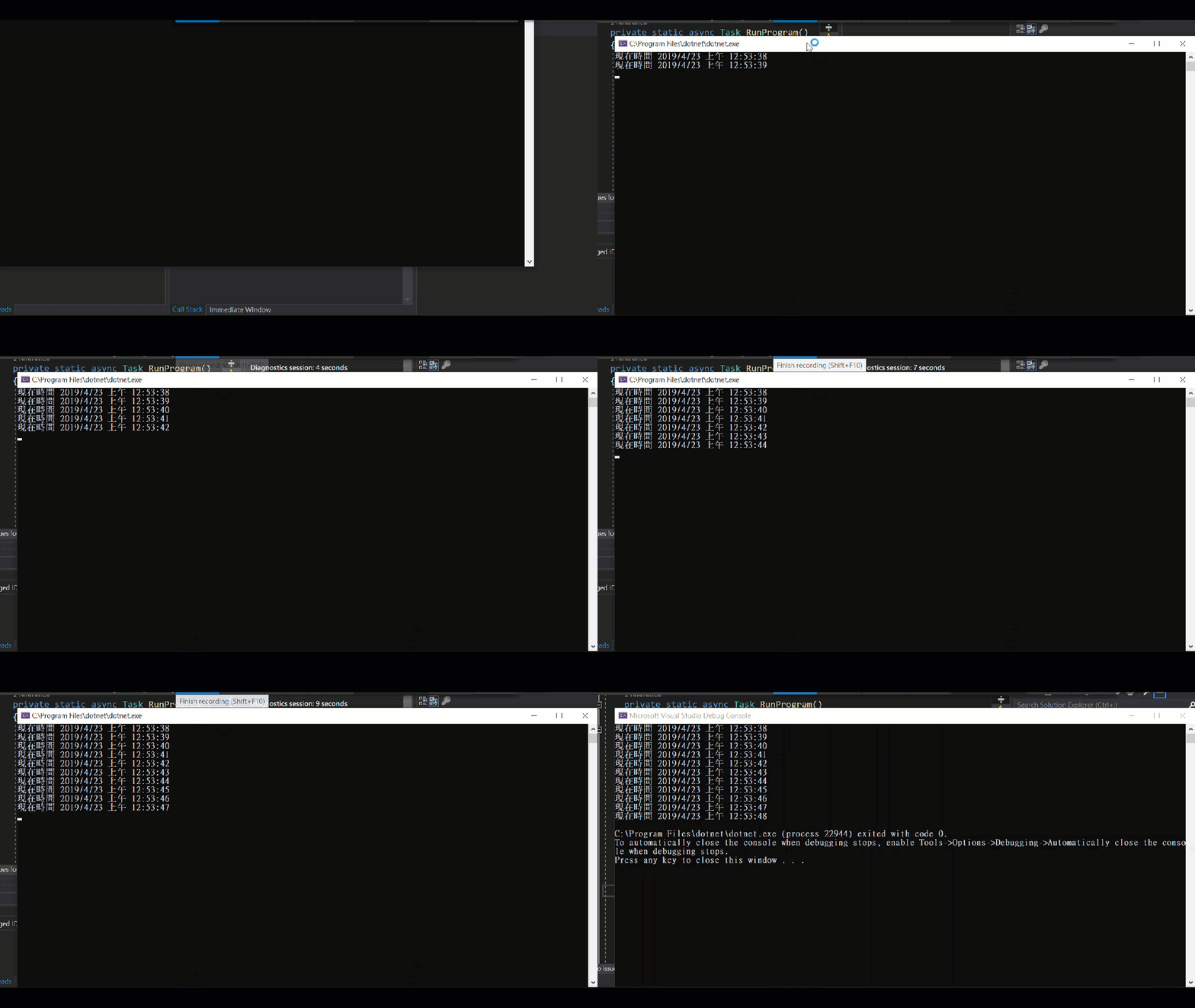
feeling
Through simple description and operation , You can quickly create Quartz.NET The function of work scheduling , But in fact, the requirements and implementation code in real life are often not so simple , If you are interested, you can first refer to the development instructions of the official website , I will share it with you in the future ,Happy Coding .
in addition ,Quartz.Net It can also be used with other kits to set the profile XML In the file , It can even be matched with a little hand-made spirit , Hand engrave some code and place the profile in YAML In the file , Convenient configuration . Besides ,JOB The definition and implementation cycle of can also be achieved by installing other packages , Store it SQL Server or Redis in , Get a more flexible configuration . Or, , It can be placed in... Like a profile YAML In the file .
边栏推荐
- Emotron Elton soft starter maintenance msf370/msf450
- 嵌入式编程复杂性
- Music genre classification based on CNN
- Private board of directors of science and technology innovators · digital intelligence future (issue 4): demonstration of transformation - survivor bias and blind people touching elephants
- Capacitive touch chip used in touch screen of mobile phone
- 完善业务细节必填项的确定,根据返回的状态码回显错误信息时,回显的信息与预期不符
- C language course design (detailed explanation of clothing management system)
- Memorizing Normality to Detect Anomaly: Memory-augmented Deep Autoencoder for Unsupervised Anomaly D
- GCC warning option understanding
- 硬件探索——数字钟的设计与制作
猜你喜欢

Hardware exploration -- Design and manufacture of digital clock

数据库是8.0的同学,在这个地方,加这一段?useSSL=false&serverTimezone=GMT%2B8&characterEncoding=utf8

398-哈希表(242.有效的字母异位词 & 349. 两个数组的交集 & 202. 快乐数)

Canvas制作经典贪吃蛇

微服务之分布式事务Seata
Basic operation of binary sort tree

sqli-labs25

Discussion on the American ess audio DAC decoder chip es9023

BGP - route announcement and reflector (explanation + configuration command)

代码生成器文件运行出错:The server time zone value ‘�й���ʱ��‘ is unrecognized or represents more than one time
随机推荐
tf. compat. v1.global_ variables_ initializer
Armcm3 authoritative guide notes - the impact of address misalignment in arm programming
Working principle of digital temperature sensor and analysis of temperature measurement principle
Ironocr 2022.1.0 supports 127 national languages
Implementation and analysis of transformer model
Importance of variables in code
397-链表(206.反转链表 & 24. 两两交换链表中的节点 & 19. 删除链表的倒数第 N 个结点 & 面试题 02.07. 链表相交 & 142.环形链表II)
硬件探索——数字钟的设计与制作
sqli-labs26
Embedded development experience of RTOS group
Memorizing Normality to Detect Anomaly: Memory-augmented Deep Autoencoder for Unsupervised Anomaly D
利用多核多线程进行程序优化
Deep thinking caused by a namenode RPC delay troubleshooting
Implementation of industrial memory copy function
[SQL injection 16] read / write file for SQL vulnerability exploitation
SSH copy ID batch password free script
GCC警告选项理解
Research and Analysis on the current situation of China's fluorenone market and forecast report on its development prospect (2022)
Connection refused : no futher information : localhost/127.0.0.1:6379
Kali shortcut keys and settings