当前位置:网站首页>Use of multithreading in QT
Use of multithreading in QT
2022-07-24 11:49:00 【Meishan swordsman】
Multithreading scenario
Desktop development in progress , The main thread is responsible for the window class , Other threads are responsible for application processing , Reduce the occurrence of window jams . Multithreading mechanism just meets this requirement , Improve user experience and code execution efficiency .
Using multithreading , There are some things that require extra attention :
The default thread is Qt It is called window thread in , Also called main thread , Responsible for window event processing or window control data update
The sub thread is responsible for the business logic processing in the background , No operation can be done on the window object in the child thread , These things need to be handled by the window thread
If you want to transfer data between the main thread and the sub thread , Need to use Qt Medium
Signal slotMechanism
quote : Da C who loves programming
Step into the theme :
Multithreading implementation mechanism :
The second implementation mechanism of multithreading is directly used here : Although this way of writing will be relatively complicated , But it is more flexible to use , The specific operation steps are as follows :
1、 Create a new class
Create a new class , Let this class start from QObject The derived
class MyWork:public QObject
{

    .......
}
2、 Add public member function
Add public member functions to the class , The function body is the business logic executed by the sub thread
class MyWork:public QObject
{

public:
    .......
    //  Specify the function name yourself ,  Whatever it's called ,  Parameters can be added according to actual requirements
    void working();
}
3、 establish QThread object
Create a... In the main thread QThread object , This is the object of the subthread
QThread* sub = new QThread;
4、 Create working class objects
Create the working class object in the main thread ( Never assign a parent to a created object )
MyWork* work = new MyWork(this);    // error
MyWork* work = new MyWork;          // ok
5、 take MyWork Object to the created child thread object
take MyWork Object to the created child thread object , Need to call QObject Class provides the moveToThread() Method
// void QObject::moveToThread(QThread *targetThread);
//  If work The parent object is specified ,  This function call fails
//  Tips : QObject::moveToThread: Cannot move objects with a parent
work->moveToThread(sub);	//  Move to a child thread to work
6、 Start the child thread
Start the child thread , call start(), Now the thread starts , But the object moved to the thread doesn't work
7、 call MyWork Class object's working function
call MyWork Class object's working function , Let this function start executing , At this time, it is running in the sub thread moved to
Sample code
mywork.h
#ifndef MYWORK_H
#define MYWORK_H

#include <QObject>

class MyWork : public QObject
{

    Q_OBJECT
public:
    explicit MyWork(QObject *parent = nullptr);

    //  Working function
    void working();

signals:
    void curNumber(int num);

public slots:
};

#endif // MYWORK_H
mywork.cpp
#include "mywork.h"
#include <QDebug>
#include <QThread>

MyWork::MyWork(QObject *parent) : QObject(parent)
{


}

void MyWork::working()
{

    qDebug() << " The address of the current thread object : " << QThread::currentThread();

    int num = 0;
    while(1)
    {

        emit curNumber(num++);
        if(num == 10000000)
        {

            break;
        }
        QThread::usleep(1);
    }
    qDebug() << "run()  completion of enforcement ,  The child thread exits ...";
}
mainwindow.cpp
#include "mainwindow.h"
#include "ui_mainwindow.h"
#include <QThread>
#include "mywork.h"
#include <QDebug>

MainWindow::MainWindow(QWidget *parent) :
    QMainWindow(parent),
    ui(new Ui::MainWindow)
{

    ui->setupUi(this);

    qDebug() << " The address of the main thread object : " << QThread::currentThread();

    //  Creating thread objects
    QThread* sub = new QThread;
    //  Create working class objects
    //  Never assign a parent to a created object
    //  If you specify : QObject::moveToThread: Cannot move objects with a parent
    MyWork* work = new MyWork;
    //  Move the working class object to the child thread object created
    work->moveToThread(sub);
    //  Start thread
    sub->start();
    //  Let the object of work start working ,  Click the start button ,  start-up
    connect(ui->startBtn, &QPushButton::clicked, work, &MyWork::working);
    //  Display the data
    connect(work, &MyWork::curNumber, this, [=](int num)
    {

        ui->label->setNum(num);
    });
}

MainWindow::~MainWindow()
{

    delete ui;
}
The phenomenon
After clicking the start button , Start counting operation 
Using this multithreading approach , Suppose there are multiple unrelated business processes that need to be processed , Then you can create multiple objects like MyWork Class , Put business processes into common member functions of multiple classes , Then move the instance object of this business class to the corresponding sub thread moveToThread() That's all right. , This makes the program more flexible , More readable , Easier to maintain .
边栏推荐
猜你喜欢

源码分析Sentry用户行为记录实现过程
![MOS tube - Notes on rapid recovery application (I) [principle]](/img/a1/8427c9b1d0ea0cecce820816510045.png)
MOS tube - Notes on rapid recovery application (I) [principle]

容错、熔断的使用与扩展

Chapter 1 Introduction
![[markdown grammar advanced] make your blog more exciting (IV: set font style and color comparison table)](/img/a5/c92e0404c6a970a62595bc7a3b68cd.gif)
[markdown grammar advanced] make your blog more exciting (IV: set font style and color comparison table)

Use prometheus+grafana to monitor server performance in real time

Record a garbage collection and analysis of gceasy
](/img/1f/37c5548ce84b6a217b4742431f1cc4.png)
运算放大器 —— 快速复苏笔记[壹](参数篇)

Paging query of employee information of black maredge takeout
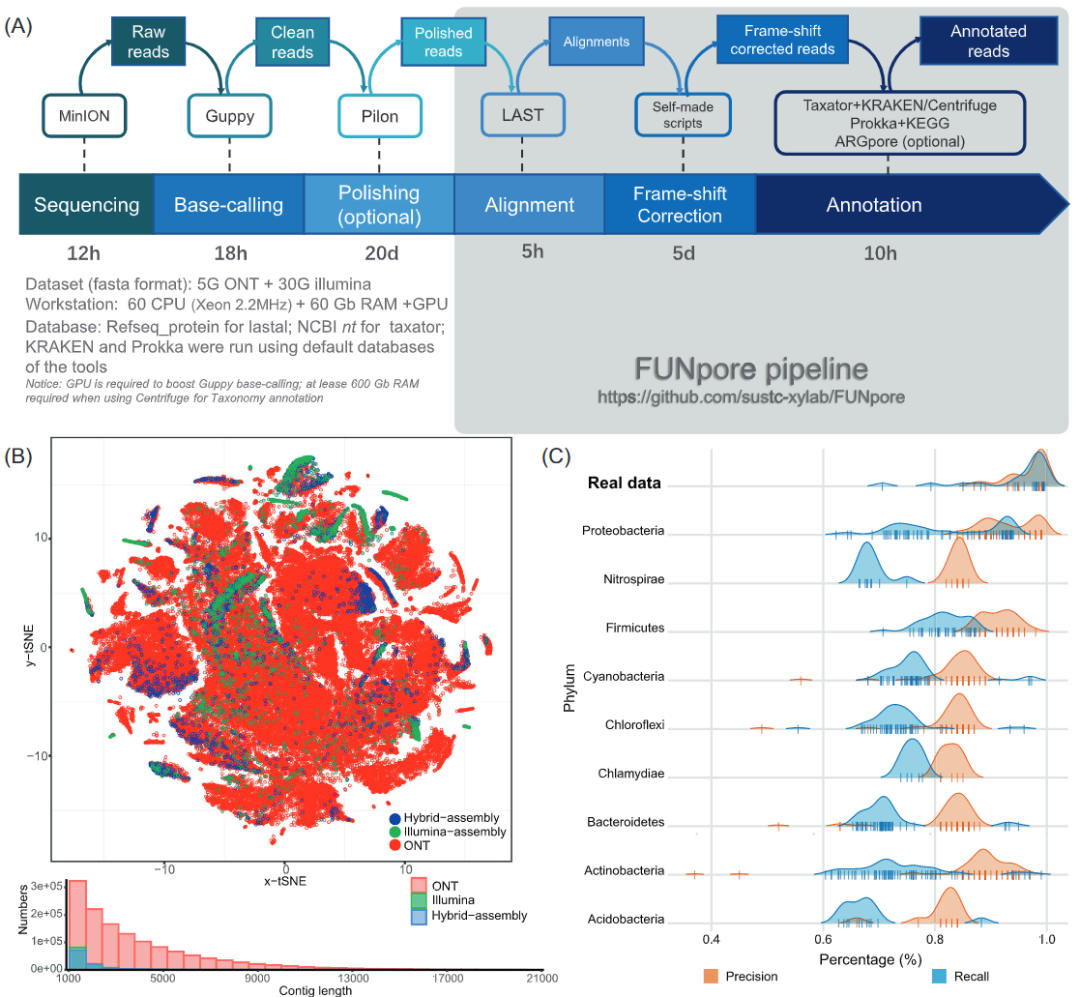
Imeta view | is short reading long amplicon sequencing applicable to the prediction of microbiome function?
随机推荐
Sorting out the ideas of data processing received by TCP server, and the note of select: invalid argument error
Detailed OSPF configuration of layer 3 switch / router [Huawei ENSP experiment]
Paging query of employee information of black maredge takeout
A*与JPS
链表——剑指offer面试题 02.07. 链表相交
C language programming code
Recommended SSH cross platform terminal tool tabby
[TA frost wolf umay - "hundred people plan] Figure 3.3 surface subdivision and geometric shader large-scale grass rendering
Cgo+gsoap+onvif learning summary: 9. Go and C conduct socket communication and onvif protocol processing
LogBack & MDC & a simple use
CCF 1-2 question answering record (1)
HCIP OSPF接口网络类型实验 第四天
String - 541. Reverse string II
Record a garbage collection and analysis of gceasy
Common formulas and application scenarios of discrete distribution
Imeta view | is short reading long amplicon sequencing applicable to the prediction of microbiome function?
【网络空间安全数学基础第3章】同余
GCC的基本用法
Shell script
08.01 adjacency matrix