当前位置:网站首页>Home page navigation + left menu of spa project development
Home page navigation + left menu of spa project development
2022-06-22 22:08:00 【Gu Bei!】
The content of this issue :
1、mock.js Analog response ajax request
2、 Construction of front desk main interface
3、 Exit function
4、 Left tree shrinkage function (vue The concept of bus )

One 、mock.js Analog response ajax request
1、 install mockjs rely on
npm install mockjs -D # Only in the development environment
2、 Configure development environment and production environment
For use only in the development environment mock, When packaged into the production environment, it is not used automatically mock, We can do it in env Make a configuration in
development environment dev.env.js:
'use strict'
const merge = require('webpack-merge')
const prodEnv = require('./prod.env')

module.exports = merge(prodEnv, {
  NODE_ENV: '"development"',
  MOCK:'true'
})
Production environment prod.env:
'use strict'
module.exports = {
  NODE_ENV: '"production"',
  MOCK:'false'
}
Only in the development environment will mockjs:main.js
process.env.MOCK && require('@/mock')
// The Vue build version to load with the `import` command
// (runtime-only or standalone) has been set in webpack.base.conf with an alias.
import Vue from 'vue'
//  Only in the development environment will mock.js
// development environment :true && require('@/mock') Will execute the following code , in other words mock.js Will be imported into the current environment
//  Production environment :false && require('@/mock') Will not execute the following code , in other words mock.js Will not be introduced into the current environment
process.env.MOCK && require('@/mock')

import 'element-ui/lib/theme-chalk/index.css'
import App from './App'
import router from './router'
import ElementUI from 'element-ui'
import axios from '@/api/http'  /* #vue Project pair axios Global configuration for  */
import VueAxios from 'vue-axios'


Vue.use(ElementUI)
Vue.use(VueAxios,axios)
Vue.config.productionTip = false

/* eslint-disable no-new */
new Vue({
  el: '#app',
  router,
  components: { App },
  template: '<App/>'
})
Introducing tools :

login-mock.js: Multiple interfaces can be generated , To build the data
// const loginInfo = {
//     code: -1,
//     message: ' Wrong password '
// }

// Use mockjs Generate random data from the template
const loginInfo = {
    'code|0-1': 0,
    'msg|3-10': 'msg'
}
export default loginInfo;
index.js: Reference data
import Mock from 'mockjs' // introduce mockjs,npm already installed
import action from '@/api/action' // Import request address

// Global settings : Set all ajax The timeout for the request , Analog network transmission takes time
Mock.setup({
    // timeout: 400  // Time delay 400s Request to data
    timeout: 200 - 400 // Time delay 200-400s Request to data
})

// Test data of landing , And add to mockjs
import loginInfo from '@/mock/json/login-mock.js'
let s1 = action.getFullPath('SYSTEM_USER_DOLOGIN')
Mock.mock(s1, "post", loginInfo)
// Mock.mock(s1, /post|get/i, loginInfo)
summary mock.js Use :
①、 Define the returned by the interface call json Format
②、 Back to json The format is bound with the corresponding interface request address index.js
s1 Address :http://localhost:8080/t_216/userAction_login.action
let s1 = action.getFullPath('SYSTEM_USER_DOLOGIN')
Mock.mock(s1, "post", loginInfo)
Presenting results : The results are randomly generated , There are successes and failures

Two 、 The concept of bus
1、 Import components into

AppMain.vue:
<template>
	<el-container class="main-container">
		<el-aside v-bind:class="asideClass">
			<LeftNav></LeftNav>
		</el-aside>
		<el-container>
			<el-header class="main-header">
				<TopNav></TopNav>
			</el-header>
			<el-main class="main-center">Main</el-main>
		</el-container>
	</el-container>
</template>

<script>
	//  Import components
	import TopNav from '@/components/TopNav.vue'
	import LeftNav from '@/components/LeftNav.vue'

	//  Export module
	export default {
		data(){
      return{
        asideClass:'main-aside'
      }
    },
    components:{
      TopNav,LeftNav
    },
    created(){
      this.$root.Bus.$on('collapsed-side',(v)=>{
        this.asideClass=v ? 'main-aside-collapsed':'main-aside';
      })
    }
	};
</script>
<style scoped>
	.main-container {
		height: 100%;
		width: 100%;
		box-sizing: border-box;
	}

	.main-aside-collapsed {
		/*  stay CSS in , By declaring... On a style ! important , You can change the default CSS Style priority rules , Give the style attribute declaration the highest priority  */
		width: 64px !important;
		height: 100%;
		background-color: #334157;
		margin: 0px;
	}

	.main-aside {
		width: 240px !important;
		height: 100%;
		background-color: #334157;
		margin: 0px;
	}

	.main-header,
	.main-center {
		padding: 0px;
		border-left: 2px solid #333;
	}
</style>
LeftNav.vue:
<template>
	<el-menu default-active="2" class="el-menu-vertical-demo" background-color="#334157"
	 text-color="#fff" active-text-color="#ffd04b" :collapse="collapsed" >
		<!-- <el-menu default-active="2" :collapse="collapsed" collapse-transition router :default-active="$route.path" unique-opened class="el-menu-vertical-demo" background-color="#334157" text-color="#fff" active-text-color="#ffd04b"> -->
		<div class="logobox">
			<img class="logoimg" src="../assets/img/logo.png" alt="">
		</div>
		<el-submenu index="1">
			<template slot="title">
				<i class="el-icon-location"></i>
				<span> Navigation one </span>
			</template>
			<el-menu-item-group>
				<template slot="title"> Group one </template>
				<el-menu-item index="1-1"> Options 1</el-menu-item>
				<el-menu-item index="1-2"> Options 2</el-menu-item>
			</el-menu-item-group>
			<el-menu-item-group title=" grouping 2">
				<el-menu-item index="1-3"> Options 3</el-menu-item>
			</el-menu-item-group>
			<el-submenu index="1-4">
				<template slot="title"> Options 4</template>
				<el-menu-item index="1-4-1"> Options 1</el-menu-item>
			</el-submenu>
		</el-submenu>
		<el-menu-item index="2">
			<i class="el-icon-menu"></i>
			<span slot="title"> Navigation two </span>
		</el-menu-item>
		<el-menu-item index="3" disabled>
			<i class="el-icon-document"></i>
			<span slot="title"> Navigation three </span>
		</el-menu-item>
		<el-menu-item index="4">
			<i class="el-icon-setting"></i>
			<span slot="title"> Navigation four </span>
		</el-menu-item>
	</el-menu>
</template>
<script>
	export default {
  data(){
    return{
      collapsed:false
    }
  },
  created(){
    this.$root.Bus.$on('collapsed-side',(v)=>{
      this.collapsed=v;
    })
  }
	}
</script>
<style>
	.el-menu-vertical-demo:not(.el-menu--collapse) {
		width: 240px;
		min-height: 400px;
	}

	.el-menu-vertical-demo:not(.el-menu--collapse) {
		border: none;
		text-align: left;
	}

	.el-menu-item-group__title {
		padding: 0px;
	}

	.el-menu-bg {
		background-color: #1f2d3d !important;
	}

	.el-menu {
		border: none;
	}

	.logobox {
		height: 40px;
		line-height: 40px;
		color: #9d9d9d;
		font-size: 20px;
		text-align: center;
		padding: 20px 0px;
	}

	.logoimg {
		height: 40px;
	}
</style>
TopNav.vue:
<template>
	<!-- <el-menu :default-active="activeIndex2" class="el-menu-demo" mode="horizontal" @select="handleSelect" background-color="#545c64"
	 text-color="#fff" active-text-color="#ffd04b">
		<el-menu-item index="1"> Processing center </el-menu-item>
		<el-submenu index="2">
			<template slot="title"> My workbench </template>
			<el-menu-item index="2-1"> Options 1</el-menu-item>
			<el-menu-item index="2-2"> Options 2</el-menu-item>
			<el-menu-item index="2-3"> Options 3</el-menu-item>
			<el-submenu index="2-4">
				<template slot="title"> Options 4</template>
				<el-menu-item index="2-4-1"> Options 1</el-menu-item>
				<el-menu-item index="2-4-2"> Options 2</el-menu-item>
				<el-menu-item index="2-4-3"> Options 3</el-menu-item>
			</el-submenu>
		</el-submenu>

		<el-menu-item index="3" disabled> Message center </el-menu-item>
		<el-menu-item index="4"><a href="https://www.ele.me" target="_blank"> Order management </a></el-menu-item>
	</el-menu> -->
	<el-menu class="el-menu-demo" mode="horizontal" background-color="#334157" text-color="#fff" active-text-color="#fff">
		<el-button class="buttonimg">
			<img class="showimg" :src="collapsed?imgshow:imgsq" @click="doToggle()">
		</el-button>
		<el-submenu index="2" class="submenu">
			<template slot="title"> Super administrator </template>
			<el-menu-item index="2-1"> Set up </el-menu-item>
			<el-menu-item index="2-2"> Personal center </el-menu-item>
			<el-menu-item @click="exit()" index="2-3"> sign out </el-menu-item>
		</el-submenu>
	</el-menu>
</template>

<script>
	export default {
		data(){
     return{
       collapsed:false,
       imgsq:require('@/assets/img/sq.png'),
       imgshow:require('@/assets/img/show.png')
     }
    },
    methods:{
      doToggle(){
        this.collapsed=!this.collapsed;
        this.$root.Bus.$emit("collapsed-side",this.collapsed);
      },
      exit(){
        this.$router.push({
          path:'/login'
        })
      }
    }
	}
</script>

<style scoped>
	.el-menu-vertical-demo:not(.el-menu--collapse) {
		border: none;
	}

	.submenu {
		float: right;
	}

	.buttonimg {
		height: 60px;
		background-color: transparent;
		border: none;
	}

	.showimg {
		width: 26px;
		height: 26px;
		position: absolute;
		top: 17px;
		left: 17px;
	}

	.showimg:active {
		border: none;
	}
</style>
2、 Import image

3、 Configuration components
index.js:
import Vue from 'vue'
import Router from 'vue-router'
import HelloWorld from '@/components/HelloWorld'
import login from '@/views/login'
import Reg from '@/views/Reg'
import AppMain from '@/components/AppMain'
import LeftNav from '@/components/LeftNav'
import TopNav from '@/components/TopNav'

Vue.use(Router)

export default new Router({
  routes: [
    {
      path: '/',
      name: 'login',
      component: login
    },
    {
      path: '/login',
      name: 'login',
      component: login
    },
    {
      path: '/Reg',
      name: 'Reg',
      component: Reg
    },
    {
      path: '/AppMain',
      name: 'AppMain',
      component: AppMain,
      children:[
        {
          path: '/LeftNav',
          name: 'LeftNav',
          component: LeftNav
        },
        {
          path: '/TopNav',
          name: 'TopNav',
          component: TopNav
        }
      ]
    }
  ]
})
4、 Log in to the jump interface
Login.js Add the jump of the interface after successful login to the file :
this.$router.push({path:'/AppMain'});
5、 Defining variables , Certified components LeftNav.vue,AppMain.vue,TopNav.vue The code is on top
Presenting results :

6、 Click on the top left corner to shrink it
①、 Define mainline :main.js
new Vue({
  el: '#app',
  data(){
    return{
      //  Define mainline
      Bus:new Vue({

      })
    }
  },
  router,
  components: { App },
  template: '<App/>'
})
②、 Picture switching , Define click events
TopNav:
<script>
    export default {
        data(){
      return{
        collapsed:false,
        //  Picture to be displayed without folding
        imgshow:require('@/assets/img/show.png'),
        imgsq:require('@/assets/img/sq.png')
      }
    },
    methods:{
      doToggle(){
        this.collapsed=!this.collapsed;
      }
    }
    }
</script>
Registration events :TopNav
<script>
    export default {
        data(){
      return{
        collapsed:false,
        //  Picture to be displayed without folding
        imgshow:require('@/assets/img/show.png'),
        imgsq:require('@/assets/img/sq.png')
      }
    },
    methods:{
      doToggle(){
        this.collapsed=!this.collapsed;
        this.$root.Bus.$emit("collapsed-aside",this.collapsed);
      }
    }
    }
</script>
monitor :LeftNav
<script>
    export default {
        data(){
      return{
        collapsed:false
      }
    },
    //  Triggered when a component is accessed ,v It refers to the collapsed variable
    created(){
      this.$root.Bus.$on("collapsed-aside",(v)=>{
        this.collapsed=v;
      });
    }
    }
</script>
AppMain:
<script>
    //  Import components
    import TopNav from '@/components/TopNav.vue'
    import LeftNav from '@/components/LeftNav.vue'

    //  Export module
    export default {
        data(){
      return {
        asideClass:'main-aside'
      }
    },
    //  Certified components
    components:{
      TopNav,LeftNav
    },
    //  Triggered when a component is accessed ,v It refers to the collapsed variable
    created(){
      this.$root.Bus.$on("collapsed-aside",(v)=>{
        this.asideClass=v ? 'main-aside-collapsed ' : 'main-aside';
      });
    }
    };
</script>
effect :
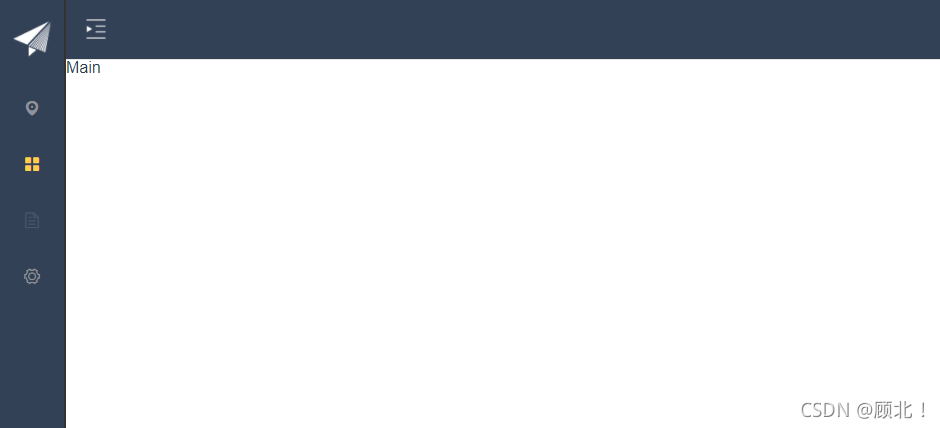
3、 ... and 、 Exit function
Click to exit :TopNav
<script>
    export default {
        data(){
      return{
        collapsed:false,
        //  Picture to be displayed without folding
        imgshow:require('@/assets/img/show.png'),
        imgsq:require('@/assets/img/sq.png')
      }
    },
    methods:{
      doToggle(){
        this.collapsed=!this.collapsed;
        this.$root.Bus.$emit("collapsed-aside",this.collapsed);
      },
      exit(){
        this.$router.push({path:'/Login'});
      }
    }
    }
</script>边栏推荐
- 第026讲:字典:当索引不好用时2 | 课后测试题及答案
- Linux安装Mysql(包成功!!)
- How to carry out encryption protection for equipment under extortion virus rampant
- DACL output on Jerry's hardware, DAC output sound of left and right channels [chapter]
- 6月PMP考试准考证问题及注意事项,考生必读
- British teddy bear joins the pubg mobile game
- VS代码一键整理快捷键
- 7-9 超级玛丽
- v-if和v-for哪个优先级更高?
- HarmonyOS应用开发培训第二次
猜你喜欢




随机推荐
SPA项目开发之动态树+数据表格+分页
杰理之硬件上 DACL 输出,DAC 输出左右声道的声音【篇】
322.零钱兑换
For an unforgettable memory: special topic of Sun Jian
v-if和v-for哪个优先级更高?
安卓kotlin sp dp转px
List of outstanding talents: no crystal vibration, one drag, eight burn and upgrade [chapter]
Lesson 029: Documents: a task? After class test questions and answers
《跟唐老师学习云网络》 - OpenStack网络实现
90- review of several recently optimized Oracle databases
Is data scientist a promising profession?
Redis核心技术与实战:学习总结目录
CyCa children's physique etiquette Shenzhen training results assessment successfully concluded
RealNetworks vs. Microsoft: the battle in the early streaming media industry
HarmonyOS应用开发培训第二次
第027讲:集合:在我的世界里,你就是唯一 | 课后测试题及答案
Lesson 022: function: recursion is god horse after class test questions and answers
92 match for several_ Recognize SQL write example
Why do you think it is common for Chinese people to earn more than 10000 yuan a month?
Can the characteristics of different network structures be compared? Ant & meituan & NTU & Ali proposed a cross architecture self supervised video representation learning method CaCl, performance SOTA