当前位置:网站首页>firewall 命令简单操作
firewall 命令简单操作
2022-07-26 04:00:00 【qq_43479892】
优质资源分享
| 学习路线指引(点击解锁) | 知识定位 | 人群定位 |
|---|---|---|
| 🧡 Python实战微信订餐小程序 🧡 | 进阶级 | 本课程是python flask+微信小程序的完美结合,从项目搭建到腾讯云部署上线,打造一个全栈订餐系统。 |
| Python量化交易实战 | 入门级 | 手把手带你打造一个易扩展、更安全、效率更高的量化交易系统 |
Firewalld 是维护防火墙策略的守护程序的名称。使用 firewall-cmd 命令与防火墙配置进行交互, 使用区域概念对与系统交互的流量进行分段。网络接口分配给一个或多个区域,每个区域都包含允许的端口和服务的列表。默认区域还可用于管理与任何区域都不匹配的流量。
0 语法规则
|  | Usage: firewall-cmd [OPTIONS...] |
|  |  |
|  | General Options |
|  |  -h, --help Prints a short help text and exists |
|  |  -V, --version Print the version string of firewalld |
|  |  -q, --quiet Do not print status messages |
|  |  |
|  | Status Options |
|  |  --state Return and print firewalld state |
|  |  --reload Reload firewall and keep state information |
|  |  --complete-reload Reload firewall and lose state information |
|  |  --runtime-to-permanent |
|  |  Create permanent from runtime configuration |
|  |  --check-config Check permanent configuration for errors |
1. 状态检查
firewall-cmd --state

2 如果没有开启,可以先开启
systemctl start firewalld && systemctl --enable firewalld
3查看现有防护策略
|  | # 查看防火墙,添加的端口也可以看到 |
|  | firewall-cmd --list-all |
|  | # 显示支持的区域列表 |
|  | firewall-cmd --get-zones |
|  | # 显示所有公共区域(public) |
|  | firewall-cmd --zone=public --list-all |
4 查看默认zone配置,默认是public
firewall-cmd --get-default-zone

5.添加端口访问 ,使用 --add-port 参数,例如设置80端口TCP访问:
| | firewall-cmd --add-port=80/tcp |
上面规则会在机器重启时,策略失效,需要添加参数 --permanent 保证长期有效
| | firewall-cmd --add-port=80/tcp --permanent |
6 重新加载firewall 配置
| | firewall-cmd --reload |
7 添加services 服务
查看当前支持的系统service:
| | firewall-cmd --get-services |

添加http service 服务
| | firewall-cmd --add-service=http --permanent && firewall-cmd --reload |
添加 Jenkins service:
| | firewall-cmd --add-service=jenkins --permanent && firewall-cmd --reload |
8 删除services 服务和端口
|  | firewall-cmd --remove-service=http # 阻止http端口 |
|  | firewall-cmd --remove-port=80tcp # 阻止通过tcp访问3306 |
边栏推荐
- Opencv learning notes - edge detection and Canny operator, Sobel operator, lapiacian operator, ScHARR filter
- [Reading Notes - > data analysis] Introduction to BDA textbook data analysis
- 【云原生之kubernetes】kubernetes集群下ConfigMap使用方法
- 基于Caffe ResNet-50网络实现图片分类(仅推理)的实验复现
- Brief tutorial for soft exam system architecture designer | case analysis and problem solving skills
- Find My技术|物联网资产跟踪市场规模达66亿美元,Find My助力市场发展
- 5 years, 1.4W times, NFT og's road to immortality Web3 column
- oracle 11g “密码延迟验证”特性
- Bracket nesting problem (recommended Collection)
- [深入研究4G/5G/6G专题-42]: URLLC-13-《3GPP URLLC相关协议、规范、技术原理深度解读》-7-低延时技术-1-子载波间隔扩展
猜你喜欢

Worked overtime for a week to develop a reporting system. This low code free it reporting artifact is very easy to use

The B2B2C multi merchant system has rich functions and is very easy to open
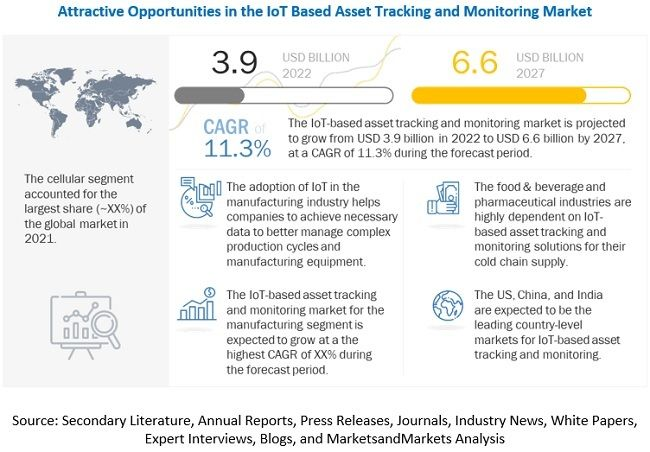
Find my technology | the Internet of things asset tracking market has reached US $6.6 billion, and find my helps the market develop

1311_ Hardware design_ Summary of ICT concept, application, advantages and disadvantages

MySQL索引失效场景以及解决方案

括号嵌套问题(建议收藏)

基于SSM选课信息管理系统
Find My技术|物联网资产跟踪市场规模达66亿美元,Find My助力市场发展

Apple removed the last Intel chip from its products

Bond network mode configuration
随机推荐
Wechat applet to realize music player (4) (use pubsubjs to realize inter page communication)
redux
Chapter 18: explore the wonders of the mean in the 2-bit a~b system, specify the 3x+1 conversion process of integers, specify an interval to verify the angular Valley conjecture, explore the number of
Data elements
基于移位寄存器的同步FIFO
Communication protocol and message format between microservices
Advanced content of MySQL -- three MySQL logs that must be understood binlog, redo log and undo log
Laravel8 implements interface authentication encapsulation using JWT
想要做好软件测试,可以先了解AST、SCA和渗透测试
中国数据库 OceanBase 入选 Forrester Translytical 数据平台报告
某大厂开发和测试干了一架,还用鼠标线勒脖子...
CPU and GPU are out of date, and the era of NPU and APU begins
PHP object conversion array
Acwing第 61 场周赛【完结】
如何构建面向海量数据、高实时要求的企业级OLAP数据引擎?
oracle 11g “密码延迟验证”特性
waf详解
php 实现从1累加到100的算法
How does redis implement persistence? Explain the AOF trigger mechanism and its advantages and disadvantages in detail, and take you to quickly master AOF
Go Plus Security:一款Build Web3不可或缺的安全生态基础设施