当前位置:网站首页>uniapp 移动端 两种横竖屏切换方案
uniapp 移动端 两种横竖屏切换方案
2022-07-28 05:30:00 【HousLin】
全局配置横竖屏
1、在pages.json中添加配置:
"globalStyle": {

		"pageOrientation": "auto"
	}
此方法可以配置全部页面横竖屏切换()
2、打开uniapp的manifest.json 文件,找到左侧菜单最后一栏 “源码视图”,点进去,在最底部添加以下代码
"orientation" : [
		//竖屏正方向
		"portrait-primary",
		//竖屏反方向
		"portrait-secondary",
		//横屏正方向
		"landscape-primary",
		//横屏反方向
		"landscape-secondary",
		//自然方向
		"default"
	]
方案一、横竖屏自动切换的页面
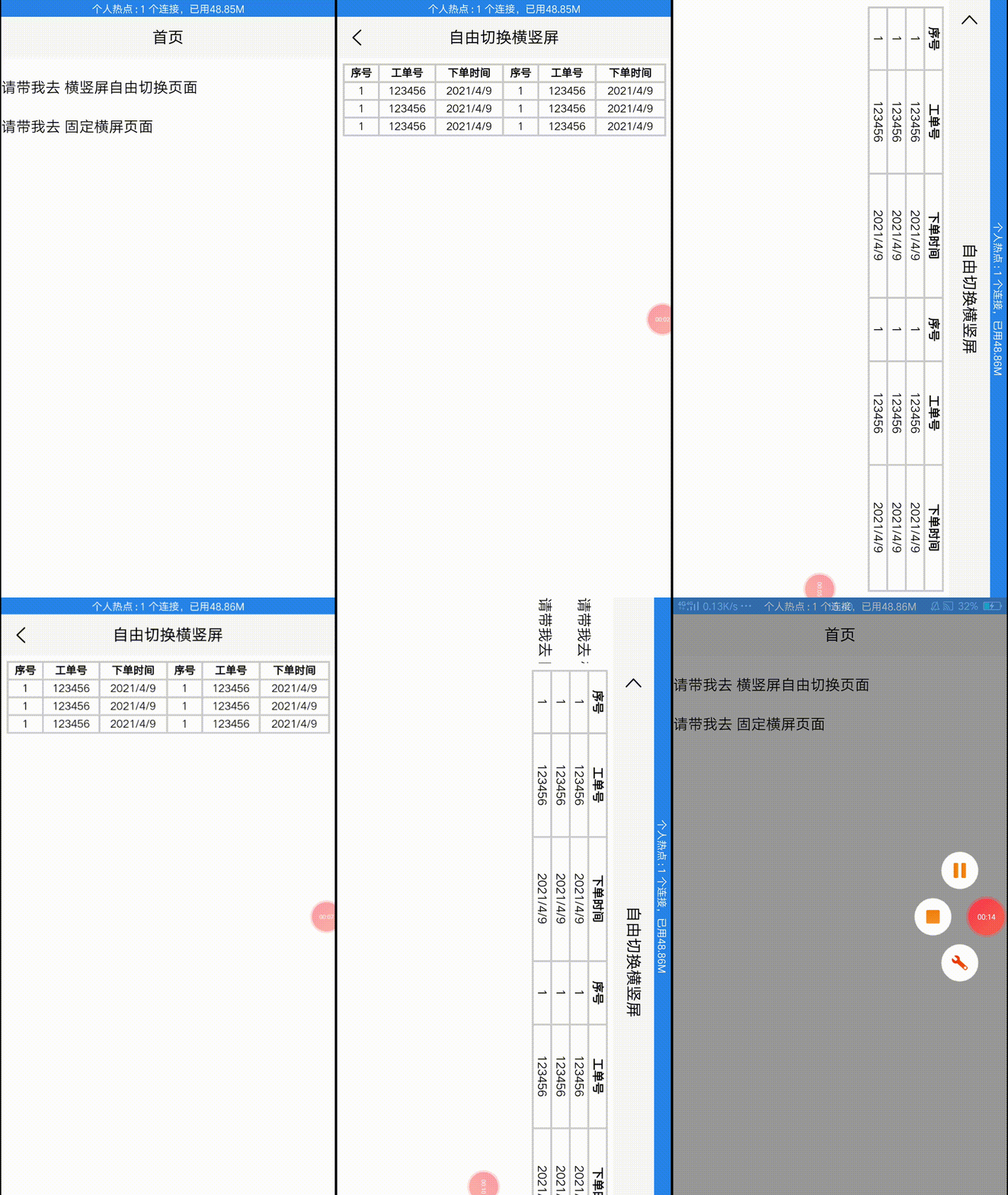
说明:这个方案是指定某个页面 可根据用户手机横/竖自动切换,不过需要写两套样式,横竖各一套, 在data定义一个判断横竖的值,再搭配uniapp 页面生命周期onResize监听窗口的变化,横时isLandScape初始值为true,竖为false,给最外层view根标签的类样式使用三元判断动态绑定,isLandScape的值为true用横屏类样式,false用竖屏类样式。1、我们先来看张效果图
2、需要横竖屏自动切换的页面写入
	// 页面加载完给自然方向,它就能根据用户横竖自动切换
	onLoad() {

			// #ifdef APP-PLUS
			plus.screen.lockOrientation('default');
			// #endif
		},
	// 页面关闭时清除横屏正方向
	onUnload() {

			// #ifdef APP-PLUS
			plus.screen.lockOrientation('portrait-primary');
			// #endif
		},
3、其他不需要横屏的页面 例如:index.vue
在两个生命周期中设置竖屏 并且关闭页面时清除
	onLoad() {

			// #ifdef APP-PLUS
				 plus.screen.lockOrientation('portrait-primary');
			// #endif
		},
	onUnload() {

			// #ifdef APP-PLUS
				  plus.screen.lockOrientation('portrait-primary');
			// #endif
		},
特别说明:// #ifdef APP-PLUS 与 // #endif 是让代码在app生效,解决plus is not defined的报错
4、核心逻辑代码
①、在data中初始一个判断横竖屏切换的值
isLandScape: false // 是否横屏,默认为竖屏
②、在页面生命周期onResize中监听窗口的变化
		onResize() {

			let _this = this
			uni.getSystemInfo({

				success: function(res) {

					if (res.windowWidth > res.windowHeight) {

						// 横屏
						_this.isLandScape = true
					} else {

						// 竖屏
						_this.isLandScape = false
					}
				}
			})
		}
5、在需要横竖屏切换的页面中用CSS预处理语言写两套样式(横/竖),我用的是scss
// 竖屏 chart_portrait是父类包裹层,tbcls只是我的表格样式,你可以根据你的具体需求写相应的样式 .chart_portrait {

		height: 36vh;
		font-size: 2vh;
		text-align: center; .tbcls {

			width: 97vw;
		}
	}

	// 横屏 .chart_lanscape {

		height: 82vh;
		font-size: 2vw;
		text-align: center; .tbcls {

			width: 98vw;
		}

	}
6、用三元判断data中的isLandScape是否为false,是的话为竖屏,那么就用竖屏类样式,否则用横屏类样式
<view :class="{
     'chart_portrait': !isLandScape, 'chart_lanscape': isLandScape}">
</view>
方案二 进入指定页面固定死横屏,出来自动切为竖屏
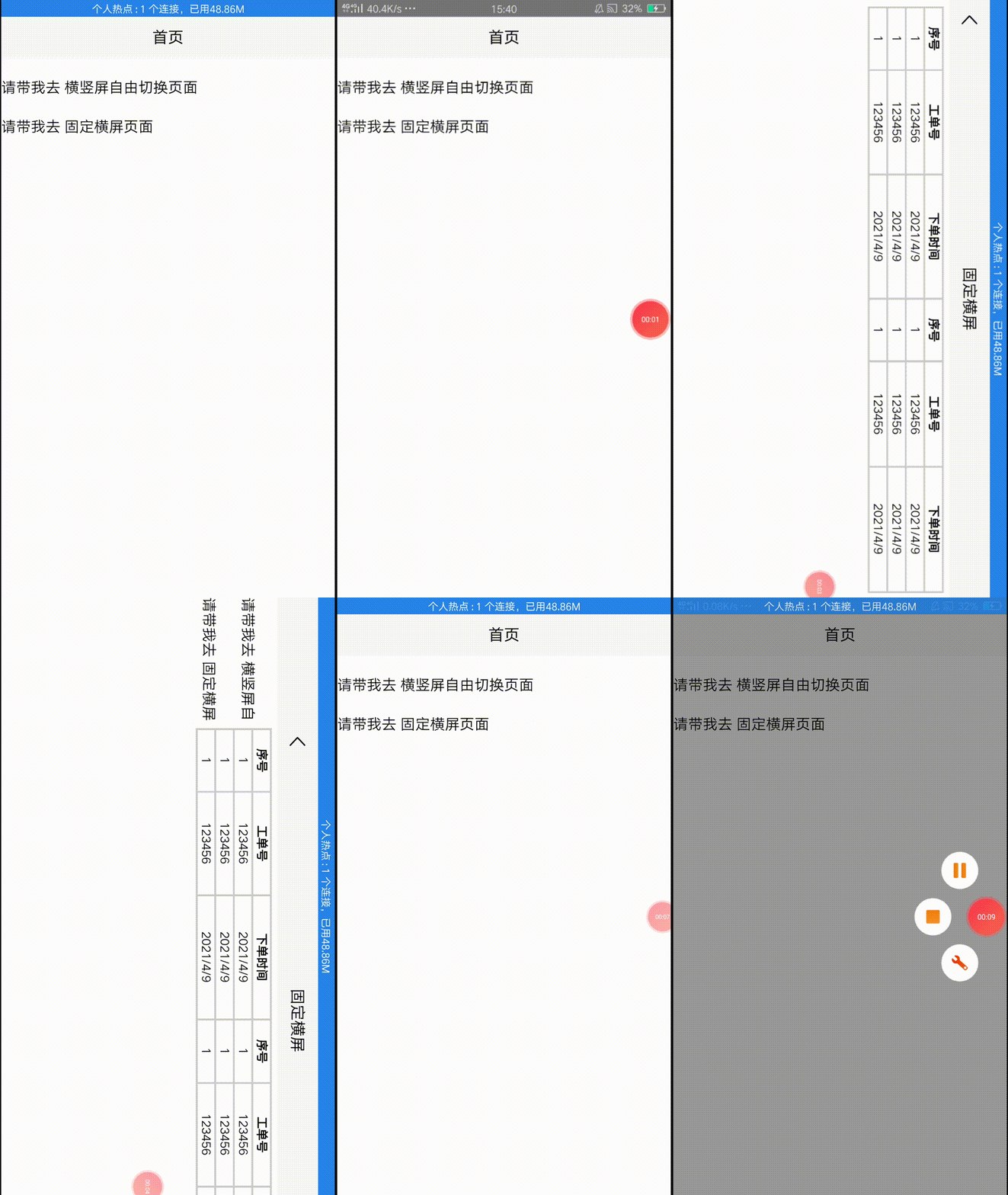
说明:这个方案就相对简单很多,只需要进入切换为横屏,出来切竖屏,不过根标签view需要修改样式,我用的vw/vh,会自动适配高宽,也可以用百分比和rem,但是别用rpx,有坑1、还是先看效果图
2、js
  onLoad() {

    // 进入当前页面 自动切换成固定横屏
    // #ifdef APP-PLUS
    plus.screen.lockOrientation("landscape-primary");
    // #endif
  },
  onUnload() {

    // 退出当前页面时 自动切换成竖屏
    // #ifdef APP-PLUS
    plus.screen.lockOrientation("portrait-primary");
    // #endif
  },
3、css
// 横屏 .chart_lanscape {

  height: 82vh;
  font-size: 2vw;
  text-align: center; // 这是我的表格类名 让其宽为视口宽的98% .tbcls {

    width: 98vw;
  }
}
两个方案的区别
相同点:都是指定某个页面,两种退出当前页面都是自动切换为竖屏模式
不同点:
第一种:可根据用户手机横/竖自动切换,不过需要写两套样式,横竖各一套,
在data定义一个判断横竖的值,再搭配uniapp 页面生命周期onResize监听窗口的变化,横时isLandScape初始值为true,竖为false,给最外层view根标签的类样式使用三元判断动态绑定,isLandScape的值为true用横屏类样式,false用竖屏类样式。
第二种: 进入就固定死横屏,只需要写一套类样式。
注意
需要横/竖屏切换的页面尽量使用 百分比布局 和 px , rem,切换时有rpx坑
结尾
这两个效果图的源代码我已经发在码云上了,感兴趣的小伙伴可以去阅读或克隆到本地用真机调试感受一下横竖屏(不知如何真机调试,点我进入教程)。希望这篇文章能帮到你,感谢您的观看。
参考文章链接:https://blog.csdn.net/weixin_50880237/article/details/109848509
gitee源代码:https://gitee.com/lhs1303574731/uni-moblile-demo
边栏推荐
猜你喜欢

rsync+inotify实现远程实时同步

DOM -- page rendering, style attribute operation, preloading and lazy loading, anti shake and throttling

Redis sentinel mode and cluster

PXE unattended installation management

学生执勤问题

Easypoi one to many, merge cells, and adapt the row height according to the content

Group management and permission management

Canvas drawing 1

Generate create table creation SQL statement according to excel

Metasploit penetration MS7_ 010 exercise
随机推荐
Freemaker merges cells, uses if and else tags, and processes null and empty strings
easypoi导出表格带echars图表
MOOC Weng Kai C language week 6: arrays and functions: 1. Arrays 2. Definition and use of functions 3. Parameters and variables of functions 4. Two dimensional arrays
codesensor:将代码转化为ast后再转化为文本向量
Raspberry pie serial port
A timed task reminder tool
The.Joernindex database has no content after Joern runs
开虚拟机KALI2022.2下安装GVM
Standard C language summary 1
Log in to Oracle10g OEM and want to manage the monitor program, but the account password input page always pops up
rsync+inotify实现远程实时同步
Pytorch - storage and loading model
Shell -- first day homework
Operation document tree
Metasploit penetration MS7_ 010 exercise
Circular linked list problem
Shell--第一天作业
MOOC Weng Kai C language week 3: judgment and cycle: 1. Judgment
Starting point Chinese website font anti crawling technology web page can display numbers and letters, and the web page code is garbled or blank
easypoi一对多,合并单元格,并且根据内容自适应行高