当前位置:网站首页>OSPF综合实验
OSPF综合实验
2022-06-23 00:34:00 【玄天·木玄玑】

子网划分:
172.16.0.0/16
172.16.0.0/19 ------area0
172.16.0.0/24 -------P2P骨干
172.16.0.0/30
172.16.0.4/30
172.16.0.8/30
172.16.1.0/24 -------MA骨干
172.16.1.0/29
172.16.1.8/29
172.16.1.16/29
.....
172.16.2.0/24 --- 用户网段
172.16.3.0/24 --- 用户网段
172.16.4.0/24 --- 用户网段
......
172.16.32.0/19 ------area1
172.16.32.0/24 -------P2P骨干
172.16.32.0/30
172.16.32.4/30
172.16.32.8/30
.....
172.16.33.0/24 -------MA骨干
172.16.33.0/29
172.16.33.8/29
172.16.33.16/29
.....
172.16.34.0/24 ---r1环回
172.16.35.0/24 ---r2环回
172.16.36.0/24 ---r3环回
......
172.16.64.0/19 ------area2
172.16.64.0/24 -------P2P骨干
172.16.64.0/30
172.16.64.4/30
172.16.64.8/30
.....
172.16.65.0/24 -------MA骨干
172.16.65.0/29
172.16.65.8/29
172.16.65.16/29
.....
172.16.66.0/24 ---r11环回
172.16.67.0/24
172.16.68.0/24
......
172.16.96.0/19 ------area3
172.16.96.0/24 -------P2P骨干
172.16.96.0/30
172.16.96.4/30
172.16.96.8/30
.....
172.16.97.0/24 -------MA骨干
172.16.97.0/29
172.16.97.8/29
172.16.97.16/29
.....
172.16.98.0/24 ---r8环回
172.16.99.0/24
172.16.100.0/24
......
172.16.128.0/19 ------area4
172.16.128.0/24 -------P2P骨干
172.16.128.0/30
172.16.128.4/30
172.16.128.8/30
.....
172.16.129.0/24 -------MA骨干
172.16.129.0/29
172.16.129.8/29
172.16.129.16/29
.....
172.16.130.0/24 ---r9环回
172.16.131.0/24 ---r10环回
172.16.132.0/24
......
172.16.160.0/19 ------rip
172.16.160.0/20 ---环回
172.16.176.0/20 ---环回
实验步骤:
第一步 基础配置
area 1
R1
[r1]int g0/0/0
[r1-GigabitEthernet0/0/0]ip add 172.16.33.1 29
Apr 21 2022 16:43:16-08:00 r1 %%01IFNET/4/LINK_STATE(l)[0]:The line protocol IP
on the interface GigabitEthernet0/0/0 has entered the UP state.
[r1-GigabitEthernet0/0/0]int l0
[r1-LoopBack0]ip add 172.16.34.1 24
R2
[r2]int g0/0/0
[r2-GigabitEthernet0/0/0]ip add 172.16.33.2 29
Apr 21 2022 16:44:22-08:00 r2 %%01IFNET/4/LINK_STATE(l)[0]:The line protocol IP
on the interface GigabitEthernet0/0/0 has entered the UP state.
[r2-GigabitEthernet0/0/0]int l0
[r2-LoopBack0]ip add 172.16.35.1 24
R3
[r3]int g0/0/0
[r3-GigabitEthernet0/0/0]ip add 172.16.33.3 29
Apr 21 2022 16:45:00-08:00 r3 %%01IFNET/4/LINK_STATE(l)[0]:The line protocol IP
on the interface GigabitEthernet0/0/0 has entered the UP state.
[r3-GigabitEthernet0/0/0]int l0
[r3-LoopBack0]ip add 172.16.36.1 24
area 0
R4
[r4]int s4/0/0
[r4-Serial4/0/0]ip add 34.0.0.2 24
[r4-Serial4/0/0]
Apr 21 2022 16:52:44-08:00 r4 %%01IFNET/4/LINK_STATE(l)[0]:The line protocol PPP
IPCP on the interface Serial4/0/0 has entered the UP state.
[r4-Serial4/0/0]int s4/0/1
[r4-Serial4/0/1]ip add 45.0.0.2 24
[r4-Serial4/0/1]int s3/0/0
[r4-Serial3/0/0]ip add 46.0.0.2 24
[r4-Serial3/0/0]int g0/0/0
[r4-GigabitEthernet0/0/0]ip add 47.0.0.2 24
Apr 21 2022 16:53:31-08:00 r4 %%01IFNET/4/LINK_STATE(l)[1]:The line protocol IP
on the interface GigabitEthernet0/0/0 has entered the UP state.
[r4-GigabitEthernet0/0/0]int l0
[r4-LoopBack0]ip add 4.4.4.4 24
R3
[r3]int s4/0/0
[r3-Serial4/0/0]ip add 34.0.0.1 24
[r3]int t 0/0/0
[r3-Tunnel0/0/0]ip add 172.16.1.1 29
[r3-Tunnel0/0/0]tunnel-protocol gre p2mp
[r3-Tunnel0/0/0]source 34.0.0.1
[r3-Tunnel0/0/0]nhrp network-id 100
[r3-Tunnel0/0/0]nhrp entry multicast dynamic
[r3]ip route-static 0.0.0.0 0 34.0.0.2
R5
[r5]int s4/0/0
[r5-Serial4/0/0]ip add 45.0.0.1 24
[r5]int l0
[r5-LoopBack0]ip add 172.16.2.1 24
[r5]ip route-static 0.0.0.0 0 45.0.0.2
[r5]int t 0/0/0
[r5-Tunnel0/0/0]ip add 172.16.1.2 29
[r5-Tunnel0/0/0]tunnel-pro gre p2mp
[r5-Tunnel0/0/0]source s4/0/0
[r5-Tunnel0/0/0]nhrp network-id 100
[r5-Tunnel0/0/0]nhrp entry 172.16.1.1 34.0.0.1 register
R6
[r6]int s4/0/0
[r6-Serial4/0/0]ip add 46.0.0.1 24
[r6-Serial4/0/0]
[r6-Serial4/0/0]int l0
[r6-LoopBack0]ip add 172.16.3.1 24
[r6-LoopBack0]q
[r6]ip route-static 0.0.0.0 0 46.0.0.2
[r6]int t0/0/0
[r6-Tunnel0/0/0]tunnel-pro gre p2mp
[r6-Tunnel0/0/0]source s4/0/0
[r6-Tunnel0/0/0]nhrp network-id 100
[r6-Tunnel0/0/0]nhrp entry 172.16.1.1 34.0.0.1 register
R7
[r7]int g0/0/0
[r7-GigabitEthernet0/0/0]ip add 47.0.0.1 24
[r7-GigabitEthernet0/0/0]int l0
[r7-LoopBack0]ip add 172.16.4.1 24
[r7-LoopBack0]q
[r7]ip route-static 0.0.0.0 0 47.0.0.2
[r7]int t0/0/0
[r7-Tunnel0/0/0]ip add 172.16.1.4 29
[r7-Tunnel0/0/0]tunnel-prot gre p2mp
[r7-Tunnel0/0/0]source g0/0/0
[r7-Tunnel0/0/0]
[r7-Tunnel0/0/0]nhrp network-id 100
[r7-Tunnel0/0/0]nhrp entry 172.16.1.1 34.0.0.1 register
area 2
R6
[r6]int g0/0/0
[r6-GigabitEthernet0/0/0]ip add 172.16.65.1 29
R11
[r11]int g0/0/0
[r11-GigabitEthernet0/0/0]ip add 172.16.65.2 29
[r11-GigabitEthernet0/0/0]int g0/0/1
[r11-GigabitEthernet0/0/1]ip add 172.16.65.9 29
[r11-GigabitEthernet0/0/1]int l0
[r11-LoopBack0]ip add 172.16.66.1 24
R12
[r12]int g0/0/0
[r12-GigabitEthernet0/0/0]ip add 172.16.65.10 29
area 3
R7
[r7]int g0/0/1
[r7-GigabitEthernet0/0/1]ip add 172.16.97.1 29
R8
[r8]int g0/0/0
[r8-GigabitEthernet0/0/0]ip add 172.16.97.2 29
[r8-GigabitEthernet0/0/0]int g0/0/1
[r8-GigabitEthernet0/0/1]ip add 172.168.97.9 29
[r8-GigabitEthernet0/0/1]int l0
[r8-LoopBack0]ip add 172.16.98.1 24
R9
[r9]int g0/0/0
[r9-GigabitEthernet0/0/0]ip add 172.16.97.10 29
area 4
R9
[r9]int g0/0/1
[r9-GigabitEthernet0/0/1]ip add 172.16.129.1 29
[r9-GigabitEthernet0/0/1]int l0
[r9-LoopBack0]ip add 172.16.130.1 24
R10
[r10]int g0/0/0
[r10-GigabitEthernet0/0/0]ip add 172.16.129.2 29
[r10-GigabitEthernet0/0/0]int l0
[r10-LoopBack0]ip add 172.16.131.1 24
RIP
R12
[r12]int l0
[r12-LoopBack0]ip add 172.16.160.1 20
[r12-LoopBack0]int l1
[r12-LoopBack1]ip add 172.16.176.1 20
第二步 配置动态路由
R1
[r1]ospf 1 router-id 1.1.1.1
[r1-ospf-1]a 1
[r1-ospf-1-area-0.0.0.1]networ
[r1-ospf-1-area-0.0.0.1]network 172.16.0.0 0.0.255.255
R2
[r2]ospf 1 router-id 2.2.2.2
[r2-ospf-1]a 1
[r2-ospf-1-area-0.0.0.1]network 172.16.0.0 0.0.255.255
R3
[r3]ospf 1 router-id 3.3.3.3
[r3-ospf-1]a 1
[r3-ospf-1-area-0.0.0.1]network 172.16.32.0 0.0.7.255
[r3-ospf-1-area-0.0.0.1]q
[r3-ospf-1]a 0
[r3-ospf-1-area-0.0.0.0]network 172.16.1.1 0.0.0.0
R5
[r5]ospf 1 router-id 5.5.5.5
[r5-ospf-1]a 0
[r5-ospf-1-area-0.0.0.0]network 172.16.0.0 0.0.255.255
R6
[R6]ospf 1 router-id 6.6.6.6
[R6-ospf-1]a 0
[R6-ospf-1-area-0.0.0.0]network 172.16.0.0 0.0.3.255
[R6-ospf-1-area-0.0.0.0]q
[R6-ospf-1]area 2
[R6-ospf-1-area-0.0.0.2]network 172.16.65.1 0.0.0.0
R7
[r7]ospf 1 router-id 7.7.7.7
[r7-ospf-1]a 0
[r7-ospf-1-area-0.0.0.0]network 172.16.0.0 0.0.7.255
[r7-ospf-1-area-0.0.0.0]q
[r7-ospf-1]a 3
[r7-ospf-1-area-0.0.0.3]network 172.16.97.1 0.0.0.0
R8
[r8]ospf 1 router-id 8.8.8.8
[r8-ospf-1]a 3
[r8-ospf-1-area-0.0.0.3]network 172.16.0.0 0.0.255.255
R9
[r9]ospf 1 router-id 9.9.9.9
[r9-ospf-1]a 3
[r9-ospf-1-area-0.0.0.3]network 172.16.97.10 0.0.0.0
[r9-ospf-1-area-0.0.0.3]q
[r9-ospf-1]ospf 2 router-id 9.9.9.9
[r9-ospf-2]a 4
[r9-ospf-2-area-0.0.0.4]network 172.16.128.0 0.0.3.255
R10
[r10]ospf 1 router-id 10.10.10.10
[r10-ospf-1]a 4
[r10-ospf-1-area-0.0.0.4]network 172.16.0.0 0.0.255.255
R11
[r11]ospf 1 router-id 11.11.11.11
[r11-ospf-1]a 2
[r11-ospf-1-area-0.0.0.2]network 172.16.0.0 0.0.255.255
R12
[r12]ospf 1 router-id 12.12.12.12
[r12-ospf-1]a 2
[r12-ospf-1-area-0.0.0.2]network 172.16.65.10 0.0.0.0
[r12]rip 1
[r12-rip-1]v 2
[r12-rip-1]network 172.16.0.0
第三步 修改MGRE类型
R3
[r3]int t0/0/0
[r3-Tunnel0/0/0]ospf network-type p2mp
R5
[r5]int t0/0/0
[r5-Tunnel0/0/0]ospf network-type p2mp
R6
[r6]int t0/0/0
[r6-Tunnel0/0/0]ospf network-type p2mp
R7
[r7]int t0/0/0
[r7-Tunnel0/0/0]ospf network-type p2mp
第四步 area 4和RIP 区域 配置 重发布
R9
[r9]ospf 1
[r9-ospf-1]import-route ospf 2
R12
[r12]ospf 1
[r12-ospf-1]import-route rip 1
第五步 R10 配置缺省指向R9
R9
[r9-ospf-1]ospf 2
[r9-ospf-2]default-route-advertise
第六步 做区域汇总和特殊区域 减少LSA更新量
汇总
R3
[r3]ospf 1
[r3-ospf-1]a 1
[r3-ospf-1-area-0.0.0.1]abr-summary 172.16.32.0 255.255.224.0
[r3]ip route-static 172.16.32.0 19 NULL 0
R6
[r6]ospf 1
[r6-ospf-1]a 2
[r6-ospf-1-area-0.0.0.2]abr-summary 172.16.64.0 255.255.224.0
[r6]ip route-static 172.16.64.0 19 NULL 0
R7
[r7]ospf 1
[r7-ospf-1]a 3
[r7-ospf-1-area-0.0.0.3]abr-summary 172.16.96.0 255.255.224.0
[r7]ip route-static 172.16.96.0 19 NULL 0
R9
[r9-ospf-1]asbr-summary 172.16.128.0 255.255.224.0
[r9]ip route-static 172.16.128.0 19 NULL 0
R12
[r12]ospf 1
[r12-ospf-1]asbr-summary 172.16.160.0 255.255.224.0
[r12]ip route-static 172.16.160.0 19 NULL 0
特殊区域
a1
[r1]ospf 1
[r1-ospf-1]a 1
[r1-ospf-1-area-0.0.0.1]stub
[r2]ospf 1
[r2-ospf-1]a 1
[r2-ospf-1-area-0.0.0.1]stub
[r3]ospf
[r3-ospf-1]a 1
[r3-ospf-1-area-0.0.0.1]stub no-summary
a3
[r7]ospf 1
[r7-ospf-1]a 3
[r7-ospf-1-area-0.0.0.3]nssa no-summary
[r8]ospf 1
[r8-ospf-1]a 3
[r8-ospf-1-area-0.0.0.3]nssa
[r9]ospf 1
[r9-ospf-1]a 3
[r9-ospf-1-area-0.0.0.3]nssa
a2
[r6]ospf 1
[r6-ospf-1]a 2
[r6-ospf-1-area-0.0.0.2]nssa no-summary
[r11]ospf 1
[r11-ospf-1]a 2
[r11-ospf-1-area-0.0.0.2]nssa
[r12]ospf 1
[r12-ospf-1]a 2
[r12-ospf-1-area-0.0.0.2]nssa
第七步 配置NAT
R3
[r3]acl 2000
[r3-acl-basic-2000]rule permit source 172.16.0.0 0.0.255.255
[r3-acl-basic-2000]q
[r3]int Serial 4/0/0
[r3-Serial4/0/0]nat outbound 2000
R7
[r7]acl 2000
[r7-acl-basic-2000]rule permit source 172.16.0.0 0.0.255.255
[r7-acl-basic-2000]q
[r7]int g 0/0/0
[r7-GigabitEthernet0/0/0]nat outbound 2000
R6
[r6]acl 2000
[r6-acl-basic-2000]rule permit source 172.16.0.0 0.0.255.255
[r6-acl-basic-2000]q
[r6]int s 4/0/0
[r6-Serial4/0/0]nat outbound 2000
第八步 修改HELLO时间
[r3]int t 0/0/0
[r3-Tunnel0/0/0]ospf timer hello 5
[r5]int t 0/0/0
[r5-Tunnel0/0/0]ospf timer hello 5
[r6]int t 0/0/0
[r6-Tunnel0/0/0]ospf timer hello 5
[r7]int t 0/0/0
[r7-Tunnel0/0/0]ospf timer hello 5
第九步 手工认证
[r1]ospf 1
[r1-ospf-1]area 1
[r1-ospf-1-area-0.0.0.1]authentication-mode md5 1 123456
[r2]ospf 1
[r2-ospf-1]area 1
[r2-ospf-1-area-0.0.0.1]authentication-mode md5 1 cipher 123456
[r3]ospf 1
[r3-ospf-1]area 1
[r3-ospf-1-area-0.0.0.1]authentication-mode md5 1 cipher 123456
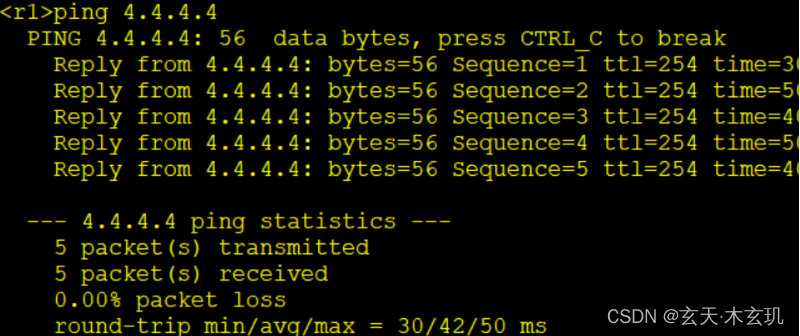
实验结果
边栏推荐
- Anti shake & throttling enhanced version
- Because I said: volatile is a lightweight synchronized, the interviewer asked me to go back and wait for the notice!
- Dml:data manipulation language
- Mysql8.0 easily completes gtid master-slave replication
- [go] go polymorphism
- 昆仑分布式数据库Sequence功能及其实现机制
- 打新债到底靠不靠谱呀?是不是安全的?
- Problèmes rencontrés lors de l'utilisation de redistemplate
- Optimization - linear programming
- Redistemplate encountered problems with \x00
猜你喜欢

初学者如何快速入门深度学习?

【首发】Redis系列2:数据持久化提高可用性

Typecho imitation of Lu Songsong's blog theme template / Technology Information blog theme template

【GO】go mod模式, package 12import/add is not in GOROOT

事务系统的隔离级别
![[go] getting started with go modules](/img/0a/58c50bb624c91b88a88aea280aa650.jpg)
[go] getting started with go modules

SAP UI5 应用开发教程之一百零二 - SAP UI5 应用的打印(Print)功能实现详解

Oracle ASM使用asmcmd中的cp命令来执行远程复制

數據庫中數據的儲存結構和方式是什麼?

Binary tree to string and string to binary tree
随机推荐
Which brokerage platform is better and safer for a brokerage to open an account on a mobile phone? What if you need a low commission
Express, route, request object, response object, middleware, EJS template
Sword finger offer 05 Replace spaces
Ansible 学习总结(8)—— Ansible 控制提权相关知识总结
Binary tree to string and string to binary tree
权限想要细化到按钮,怎么做?
【UVM】别再说你的 VIP 用不了 RAL Model
数据库中数据的储存结构和方式是什么?
MySQL-Seconds_behind_master 的精度误差
SAP UI5 应用开发教程之一百零三 - 如何在 SAP UI5 应用中消费第三方库
Sword finger offer 11 Minimum number of rotation array
【GO】go语言interface
“听觉”营销价值凸显,喜马拉雅迎来新局点
LeetCode刷题——715. Range 模块
Package management tools --npm, -cnpm, -yan, -cyarn
Webrtc series - 4connection sorting of network transmission
一文简述:钓鱼攻击知多少
昆仑分布式数据库Sequence功能及其实现机制
掘地三尺搞定 Redis 与 MySQL 数据一致性问题
Sword finger offer 06 Print linked list from end to end