当前位置:网站首页>如何在 pyqt 中实现桌面歌词
如何在 pyqt 中实现桌面歌词
2022-07-24 03:05:00 【qq_43479892】
优质资源分享
| 学习路线指引(点击解锁) | 知识定位 | 人群定位 |
|---|---|---|
| 🧡 Python实战微信订餐小程序 🧡 | 进阶级 | 本课程是python flask+微信小程序的完美结合,从项目搭建到腾讯云部署上线,打造一个全栈订餐系统。 |
| Python量化交易实战 | 入门级 | 手把手带你打造一个易扩展、更安全、效率更高的量化交易系统 |
前言
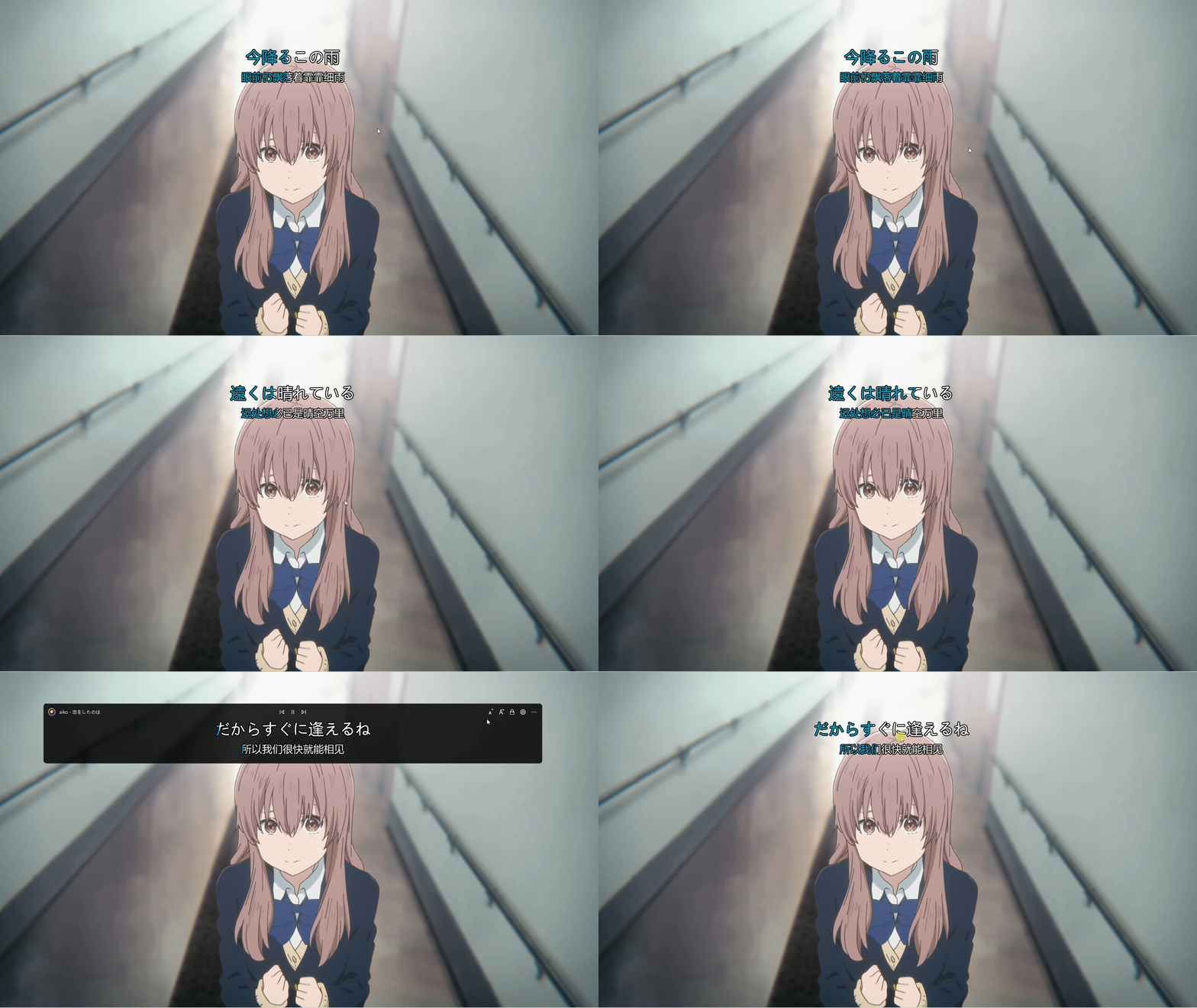
酷狗、网抑云和 QQ 音乐都有桌面歌词功能,这篇博客也将使用 pyqt 实现桌面歌词功能,效果如下图所示:
代码实现
桌面歌词部件 LyricWidget 在 paintEvent 中绘制歌词。我们可以直接使用 QPainter.drawText 来绘制文本,但是通过这种方式无法对歌词进行描边。所以这里更换为 QPainterPath 来实现,使用 QPainterPath.addText 将歌词添加到绘制路径中,接着使用 Qainter.strokePath 进行描边,Qainter.fillPath 绘制歌词,这里的绘制顺序不能调换。
对于歌词的高亮部分需要特殊处理,假设当前高亮部分的宽度为 w,我们需要对先前绘制歌词的 QPainterPath 进行裁剪,只留下宽度为 w 的部分,此处通过 QPainterPath.intersected 计算与宽度为 w 的矩形路径的交集来实现裁剪。
对于高亮部分的动画,我们既可以使用传统的 QTimer,也可以使用封装地更加彻底的 QPropertyAnimation 来实现(本文使用后者)。这里需要进行动画展示的是高亮部分,也就是说我们只需改变“高亮宽度”这个属性即可。PyQt 为我们提供了 pyqtProperty,类似于 python 自带的 property,使用 pyqtProperty 可以给部件注册一个属性,该属性可以搭配动画来食用。
除了高亮动画外,我们还在 LyricWidget 中注册了滚动动画,用于处理歌词长度大于视口宽度的情况。
复制# coding:utf-8
from PyQt5.QtCore import QPointF, QPropertyAnimation, Qt, pyqtProperty
from PyQt5.QtGui import (QColor, QFont, QFontMetrics, QPainter, QPainterPath,
                         QPen)
from PyQt5.QtWidgets import QWidget


config = {
    "lyric.font-color": [255, 255, 255],
    "lyric.highlight-color": [0, 153, 188],
    "lyric.font-size": 50,
    "lyric.stroke-size": 5,
    "lyric.stroke-color": [0, 0, 0],
    "lyric.font-family": "Microsoft YaHei",
    "lyric.alignment": "Center"
}


class LyricWidget(QWidget):
    """ Lyric widget """

    def \_\_init\_\_(self, parent=None):
        super().__init__(parent=parent)
        self.setAttribute(Qt.WA_TranslucentBackground)
        self.lyric = []
        self.duration = 0
        self.__originMaskWidth = 0
        self.__translationMaskWidth = 0
        self.__originTextX = 0
        self.__translationTextX = 0

        self.originMaskWidthAni = QPropertyAnimation(
            self, b'originMaskWidth', self)
        self.translationMaskWidthAni = QPropertyAnimation(
            self, b'translationMaskWidth', self)
        self.originTextXAni = QPropertyAnimation(
            self, b'originTextX', self)
        self.translationTextXAni = QPropertyAnimation(
            self, b'translationTextX', self)

    def paintEvent(self, e):
        if not self.lyric:
            return

        painter = QPainter(self)
        painter.setRenderHints(
            QPainter.Antialiasing | QPainter.TextAntialiasing)

        # draw original lyric
        self.__drawLyric(
            painter,
            self.originTextX,
            config["lyric.font-size"],
            self.originMaskWidth,
            self.originFont,
            self.lyric[0]
        )

        if not self.hasTranslation():
            return

        # draw translation lyric
        self.__drawLyric(
            painter,
            self.translationTextX,
            25 + config["lyric.font-size"]*5/3,
            self.translationMaskWidth,
            self.translationFont,
            self.lyric[1]
        )

    def \_\_drawLyric(self, painter: QPainter, x, y, width, font: QFont, text: str):
        """ draw lyric """
        painter.setFont(font)

        # draw background text
        path = QPainterPath()
        path.addText(QPointF(x, y), font, text)
        painter.strokePath(path, QPen(
            QColor(*config["lyric.stroke-color"]), config["lyric.stroke-size"]))
        painter.fillPath(path, QColor(*config['lyric.font-color']))

        # draw foreground text
        painter.fillPath(
            self.__getMaskedLyricPath(path, width),
            QColor(*config['lyric.highlight-color'])
        )

    def \_\_getMaskedLyricPath(self, path: QPainterPath, width: float):
        """ get the masked lyric path """
        subPath = QPainterPath()
        rect = path.boundingRect()
        rect.setWidth(width)
        subPath.addRect(rect)
        return path.intersected(subPath)

    def setLyric(self, lyric: list, duration: int, update=False):
        """ set lyric

 Parameters
 ----------
 lyric: list
 list contains original lyric and translation lyric

 duration: int
 lyric duration in milliseconds

 update: bool
 update immediately or not
 """
        self.lyric = lyric or [""]
        self.duration = max(duration, 1)
        self.__originMaskWidth = 0
        self.__translationMaskWidth = 0

        # stop running animations
        for ani in self.findChildren(QPropertyAnimation):
            if ani.state() == ani.Running:
                ani.stop()

        # start scroll animation if text is too long
        fontMetrics = QFontMetrics(self.originFont)
        w = fontMetrics.width(lyric[0])
        if w > self.width():
            x = self.width() - w
            self.__setAnimation(self.originTextXAni, 0, x)
        else:
            self.__originTextX = self.__getLyricX(w)
            self.originTextXAni.setEndValue(None)

        # start foreground color animation
        self.__setAnimation(self.originMaskWidthAni, 0, w)

        if self.hasTranslation():
            fontMetrics = QFontMetrics(self.translationFont)
            w = fontMetrics.width(lyric[1])
            if w > self.width():
                x = self.width() - w
                self.__setAnimation(self.translationTextXAni, 0, x)
            else:
                self.__translationTextX = self.__getLyricX(w)
                self.translationTextXAni.setEndValue(None)

            self.__setAnimation(self.translationMaskWidthAni, 0, w)

        if update:
            self.update()

    def \_\_getLyricX(self, w: float):
        """ get the x coordinate of lyric """
        alignment = config["lyric.alignment"]
        if alignment == "Right":
            return self.width() - w
        elif alignment == "Left":
            return 0

        return self.width()/2 - w/2

    def getOriginMaskWidth(self):
        return self.__originMaskWidth

    def getTranslationMaskWidth(self):
        return self.__translationMaskWidth

    def getOriginTextX(self):
        return self.__originTextX

    def getTranslationTextX(self):
        return self.__translationTextX

    def setOriginMaskWidth(self, pos: int):
        self.__originMaskWidth = pos
        self.update()

    def setTranslationMaskWidth(self, pos: int):
        self.__translationMaskWidth = pos
        self.update()

    def setOriginTextX(self, pos: int):
        self.__originTextX = pos
        self.update()

    def setTranslationTextX(self, pos):
        self.__translationTextX = pos
        self.update()

    def \_\_setAnimation(self, ani: QPropertyAnimation, start, end):
        if ani.state() == ani.Running:
            ani.stop()

        ani.setStartValue(start)
        ani.setEndValue(end)
        ani.setDuration(self.duration)

    def setPlay(self, isPlay: bool):
        """ set the play status of lyric """
        for ani in self.findChildren(QPropertyAnimation):
            if isPlay and ani.state() != ani.Running and ani.endValue() is not None:
                ani.start()
            elif not isPlay and ani.state() == ani.Running:
                ani.pause()

    def hasTranslation(self):
        return len(self.lyric) == 2

    def minimumHeight(self) -> int:
        size = config["lyric.font-size"]
        h = size/1.5+60 if self.hasTranslation() else 40
        return int(size+h)

 @property
    def originFont(self):
        font = QFont(config["lyric.font-family"])
        font.setPixelSize(config["lyric.font-size"])
        return font

 @property
    def translationFont(self):
        font = QFont(config["lyric.font-family"])
        font.setPixelSize(config["lyric.font-size"]//1.5)
        return font

    originMaskWidth = pyqtProperty(
        float, getOriginMaskWidth, setOriginMaskWidth)
    translationMaskWidth = pyqtProperty(
        float, getTranslationMaskWidth, setTranslationMaskWidth)
    originTextX = pyqtProperty(float, getOriginTextX, setOriginTextX)
    translationTextX = pyqtProperty(
        float, getTranslationTextX, setTranslationTextX)

折叠
上述代码对外提供了两个接口 setLyric(lyric, duration, update) 和 setPlay(isPlay),用于更新歌词和控制歌词动画的开始与暂停。下面是一个最小使用示例,里面使用 Qt.SubWindow 标志使得桌面歌词可以在主界面最小化后仍然显示在桌面上,同时不会多出一个应用图标(Windows 是这样,Linux 不一定):
复制class Demo(QWidget):

    def \_\_init\_\_(self):
        super().__init__(parent=None)
        # 创建桌面歌词
        self.desktopLyric = QWidget()
        self.lyricWidget = LyricWidget(self.desktopLyric)

        self.desktopLyric.setAttribute(Qt.WA_TranslucentBackground)
        self.desktopLyric.setWindowFlags(
            Qt.FramelessWindowHint | Qt.SubWindow | Qt.WindowStaysOnTopHint)
        self.desktopLyric.resize(800, 300)
        self.lyricWidget.resize(800, 300)

        # 必须有这一行才能显示桌面歌词界面
        self.desktopLyric.show()

        # 设置歌词
        self.lyricWidget.setLyric(["Test desktop lyric style", "测试桌面歌词样式"], 3000)
        self.lyricWidget.setPlay(True)


if __name__ == '\_\_main\_\_':
    app = QApplication(sys.argv)
    w = Demo()
    w.show()
    app.exec_()
后记
至此关于桌面歌词的实现方案已经介绍完毕,完整的播放器界面代码可参见:https://github.com/zhiyiYo/Groove,以上~~
边栏推荐
- Unity 消息推送
- About Aries framework addition, deletion, modification and query - query demo
- Take you into the world of MySQL mvcc
- What is the security of Treasury reverse repo
- Job hunting and recruitment system of SSM part-time job hunting
- Attack and defense world web practice area (view_source, get_post, robots)
- 攻防世界WEB练习区(backup、cookie、disabled_button)
- Do securities companies really have principal guaranteed financial products?
- Analyze the space practice field required by maker education activities
- Summernote supports custom video upload function
猜你喜欢

String.split() the most detailed source code interpretation and precautions

Dynamic programming-01 knapsack problem

CMT 注册——Google Scholar Id,Semantic Scholar Id,和 DBLP Id

Nodejs builds cloud native microservice applications based on dapr, a quick start guide from 0 to 1
A simple and perfect WPF management system framework source code

openEuler 资源利用率提升之道 01:概论
Recommendation system topic | recommendation system architecture and single domain cross domain recall model
Ways to improve the utilization of openeuler resources 01: Introduction

The next stop of data visualization platform | gifts from domestic open source data visualization datart "super iron powder"

PMP preparation experience | good habits, good process, good results
随机推荐
微信公众号在线客服接入发方法和功能详解
Some properties of differential array operation
Honey, we are homeless now
Description of relevant resolutions in video on demand
Daily gossip (I)
og seo
The new idea 2022.2 was officially released, and the new features are nice
Mobile keyboard (day 73)
go errors
X Actual combat - Cloud Server
日常杂谈(一)
Redux Usage Summary
Summernote rich text editor
ssm的求职招聘系统兼职应聘求职
Rules for generating 13 digit barcode EAN-13 Code: the thirteenth digit is the verification code obtained by calculating the first twelve digits.
Summernote font displays Chinese
Jparepository extension interface
MySQL sub database and sub table and its smooth expansion scheme
Ways to improve the utilization of openeuler resources 01: Introduction
CMT registration - Google Scholar ID, semantic scholar ID, and DBLP ID