当前位置:网站首页>Mysql database explanation (III)
Mysql database explanation (III)
2022-06-26 13:18:00 【C chord~】
Catalog
One 、 Another way to specify the primary key
1. Copy all contents of the table ( Including data and table structure )
2. Copy table data or structure
3、 ... and . Clear the table 、 Clear the data in the table
Four 、 Create a temporary table
5、 ... and 、mysql Common constraints
6、 ... and . Foreign key constraints
5. Change the password of the current login user
6. Change other user passwords
8、 ... and . User authorization
One 、 Another way to specify the primary key
use ab;

create table if not exists syl (
id int(4) zerofill primary key auto_increment,
student_name varchar(20) not null,
cardid varchar(18) not null unique key,
hobby varchar(50));
if not exists	 Indicates whether the table to be created exists , If it doesn't exist, create a table
int(4) zerofill	 Indicates if the value is less than 4 digit , Then use “0” fill
auto_increment	 Indicates that this field is a self growing field , That is, each record is automatically incremented 1, The default from the 1 Began to increase ; Self growing field data cannot be duplicated ; Self growing fields must be primary keys ; If the added record data does not specify the value of this field and the addition fails, it will be automatically incremented once
unique key	 Represents the unique key constraint for this field , The data in this field cannot be repeated ; There can only be one primary key in a table ,  But there can be multiple unique keys in a table
not null	 Indicates that this field is not allowed to be NULL


Two . clone 、 Copy table
1. Copy all contents of the table ( Including data and table structure )
create table The new name of the table (select * from Replicated table name )

 2. Copy table data or structure
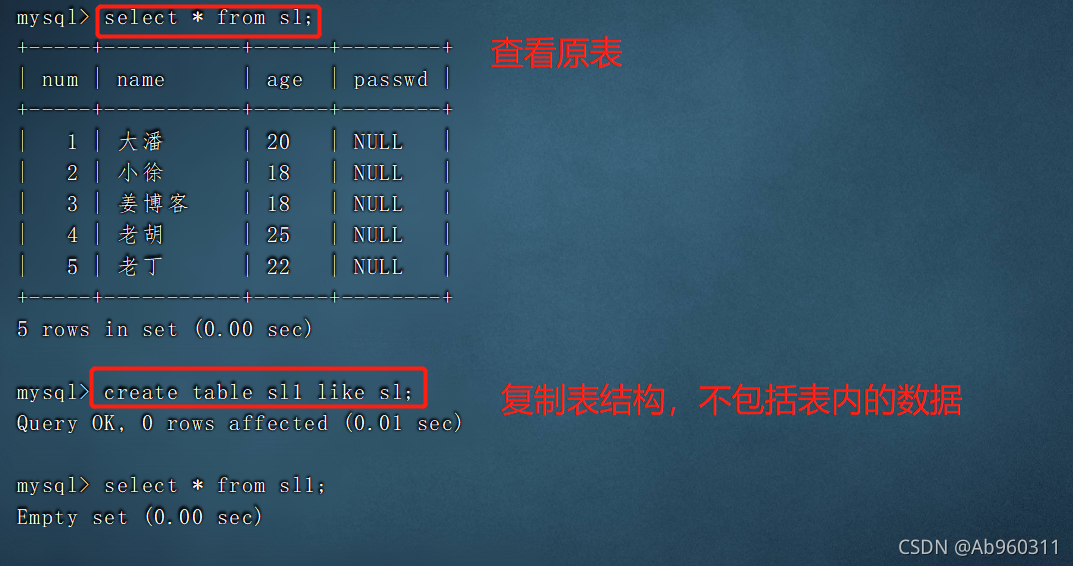
create table  The new name of the table  like  Replicated table name ;  # Copy the format , Can copy the format of the table to the new table , But there's no content
insert into  The new name of the table  select * from  Replicated table name ;  # Copy the contents of the original table to the new table

3、 ... and . Clear the table 、 Clear the data in the table
1. Method 1
delete from  Table name ;

#delete After emptying the table , There are deleted record entries in the returned result ;delete When working, delete record data line by line ; If there is a self growing field in the table , Use delete from  After deleting all records , The newly added record will be changed from the original largest record  ID  Continue to write the record automatically later
2. Method 2
truncate table  Table name ;

#truncate  After emptying the table , No deleted entries are returned ;truncate  When working, the table structure is rebuilt as it is , So in terms of speed  truncate  than  delete  Empty the watch, quick ; Use  truncate table  After clearing the data in the table ,ID  From  1  Start re recording .
3. Method 3
drop table Database name . Table name ;
4. Three ways to compare
- Delete speed : drop > truncate > delete
- drop To delete a table directly
- truncate Refactoring for direct destruction
- delete Delete item by item
Security :
drop and truncate They don't keep records , It is not convenient for data recovery
delete Because there are every step of the delete operation , Therefore, when it is deleted by mistake, the recovery operation can be carried out according to the log
therefore delete The best security
Four 、 Create a temporary table
create temporary table Table name ( Field 1 type , Field 2 type [,primary key ( Primary key name )]);
- After the temporary table is created successfully , Use show tables The command cannot see the created temporary table , The temporary table will be destroyed after the connection exits
- Before exiting the connection , You can also perform operations such as adding, deleting, modifying, and querying , However, you cannot create foreign keys
5、 ... and 、mysql Common constraints
 Primary key constraint   	primary key
 Foreign key constraints 	    foreign key
 Non empty constraint   	not null
 Unique constraint 	    unique [key
 Default constraint 	default
 Self increasing constraint 	   auto_increment
6、 ... and . Foreign key constraints
Definition
- If the same attribute field is a primary key in Table 1 , In Table 2, it is not the primary key , This field is called the foreign key of Table 2
effect
- Ensure data integrity and consistency
Master and slave tables
Tables with public keywords as primary keys are primary key tables ( Parent table 、 Main table )
Tables with public keywords as foreign keys are foreign key tables ( From the table 、 appearance )
notes : The fields of the primary table associated with the foreign key must be set as the primary key , It is required that the slave table cannot be a temporary table , The fields of the master-slave table have the same data type 、 Character length and constraints
After creating the master-slave table , insert data ( First, the main watch , From the watch ), Delete data records ( First from the watch , Back main table ), Delete foreign key constraint fields ( Delete the foreign key constraint first , Then delete the foreign key name )
7、 ... and . User management
1. A new user
create user ' user name '@' Source address ' [identified by [passwd] ' password '];
- user name : Specify the user name that will be created
- Source address : Specify which hosts the newly created user can log on to , You can use IP Address 、 Network segment 、 The form of host name , Available to local users localhost, Allow any host to log in
- Wildcards available %
password ’: If plaintext password is used , Direct input ’ password ’, Inserted into the database by Mysql Automatic encryption ;
If you use an encrypted password , You need to use it first SELECT PASSWORD(‘ password ’); Get ciphertext , Then add... To the statement PASSWORD ‘ Ciphertext ’;
If you omit “IDENTIFIED BY” part , Then the user's password will be empty ( Not recommended )
2. View user information
use mysql;

select User,authentication_string,Host from user;
3. Rename user
rename user 'lisi'@'localhost' to 'wangwu'@'localhost';
4. Delete user
drop user ' user name '@'localhost';
5. Change the password of the current login user
set password = password(' New password ');
6. Change other user passwords
set password for ' user name '@'localhost' = password(' New password ');
use mysql;
select User,authentication_string,Host from user;
8、 ... and . User authorization
1. Give authority
grant  Raise the right
grant  Permission list  on  Database name . Table name  to ' user name '@' Source address ' [identified by ' password '];
- Permission list : Used to list various database operations authorized for use , Separated by commas (all Express all )
- Source address : Used to specify the user name and the client address to which access is allowed , The source address can be a domain name 、IP Address , You can also use “%” wildcard
2、 View permissions
show grants for user name @ Source address ;
3、 Revoke authority
revoke Permission list on Database name . Table name from user name @ Source address ;
summary
mysql To create a new user, you need to specify permissions
There are two ways to copy tables :1 Copy the table contents and structure together 2. The table contents and structure are copied separately
The function of foreign keys is to ensure the integrity and consistency of data
The temporary table can be used normally before the user exits , The table will be automatically destroyed after exiting
边栏推荐
猜你喜欢

Beifu PLC obtains system time, local time, current time zone and system time zone conversion through program
10秒内完成火灾预警,百度智能云助力昆明官渡打造智慧城市新标杆

Beifu PLC passes MC_ Readparameter read configuration parameters of NC axis

2、并行接口、协议和相关芯片介绍(8080、8060)

Basic methods for network diagnosis and hardware troubleshooting of Beifu EtherCAT module

Basic configuration and test of Beifu twincat3 NCI in NC axis interface
倍福PLC通过程序获取系统时间、本地时间、当前时区以及系统时间时区转换

Oplg: new generation cloud native observable best practices

适配器模式(Adapter)

倍福CX5130换卡对已有的授权文件转移操作
随机推荐
Script - crawl the customized storage path of the cartoon and download it to the local
Summary of wechat applet test points
原型模式(prototype)
H5 video automatic playback and circular playback
UVa11582 [快速幂]Colossal Fibonacci Numbers!
tauri vs electron
Electron official docs series: References
Arcpy——InsertLayer()函数的使用:掺入图层到地图文档里
Beifu cx5130 card replacement and transfer of existing authorization files
8. [STM32] timer (TIM) -- interrupt, PWM, input capture experiment (proficient in timer)
Solutions to insufficient display permissions of find and Du -sh
G - Cow Bowling
Bridge mode
Coprime and non coprime of template problems of Chinese remainder theorem
Analysis of state transition diagram of Beifu NC axis
Word document export (using fixed template)
Oplg: new generation cloud native observable best practices
P5733 [deep foundation 6. example 1] automatic correction
适配器模式(Adapter)
MySQL数据库讲解(四)