当前位置:网站首页>[on Nacos] get started quickly
[on Nacos] get started quickly
2022-06-27 12:04:00 【Liangyou】
If you want to know more Nacos course , welcome star 《On Nacos》 Open source project . be based on Nacos 2.x To get started 、 principle 、 Source code 、 Introduction to actual combat , Help developers get started quickly Nacos.
Installation package
install
Step one : Can pass https://github.com/alibaba/nacos/releases Find the corresponding version , Download packaged Nacos. You can use the following command to download the corresponding Nacos edition . What we're downloading right now is 2.1.0 edition , You can use the following command :
wget https://github.com/alibaba/nacos/releases/download/2.1.0/nacos-server-2.1.0.tar.gz
Step two : After downloading the compressed package, you need to decompress it with a command :
tar -xzf nacos-server-2.1.0.tar.gz
Step three :cd To nacos Under the table of contents , First, let's introduce the directory structure
.
|____LICENSE
|____bin                                 // nacos  Start of 、 Stop script
| |____startup.sh
| |____startup.cmd
| |____shutdown.sh
| |____shutdown.cmd
|____target                              // nacos  Server side  jar  package
| |____nacos-server.jar
|____NOTICE
|____conf                                // naocs  The configuration file 、sql Script 、 Cluster configuration, etc
| |____1.4.0-ipv6_support-update.sql
| |____schema.sql
| |____nacos-mysql.sql
| |____application.properties.example
| |____nacos-logback.xml
| |____cluster.conf.example
| |____application.properties
Step four : Stand alone mode starts Nacos
Linux/Unix/Mac
Start command ( -m standalone Stand alone mode start ):
sh startup.sh -m standalone
If you are using ubuntu System , Or run the script to report an error [[ Symbol not found , Try the following operation :
bash startup.sh -m standalone
Windows
Start command ( -m standalone Stand alone mode start ):
startup.cmd -m standalone
The following log shows that it has been started naocs 了 , Detailed log nacos/logs/start.out.
nacos is starting with standalone
nacos is starting,you can check the /Users/lixiaoshuang/nacos-related/nacos/logs/start.out
Step five : Access... Through a browser :http://127.0.0.1:8848/nacos Sign in nacos Console , The default account name and password are :nacos、nacos.

remarks : By default, it is unnecessary to start in stand-alone mode MySQL Of , If you want to use it MySQL You can modify the data source information in the configuration
Configuration Management
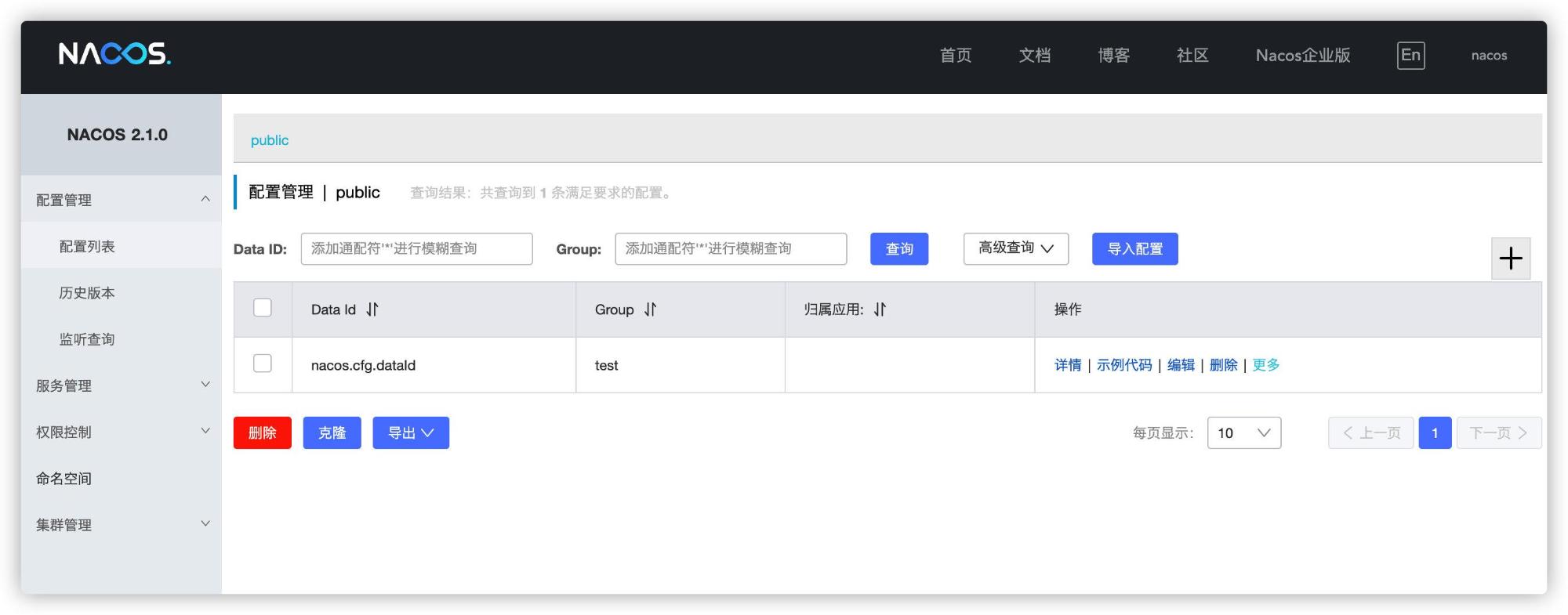
adopt curl Command invocation Nacos Of Open API Let's have a quick experience of Nacos Configuration management capabilities .
Release configuration :
curl -X POST "http://127.0.0.1:8848/nacos/v1/cs/configs?dataId=nacos.cfg.dataId&group=test&content=Hello Nacos"
adopt curl After the command is issued and configured , You can configure management through the console - View the configuration information in the configuration list .
Get configuration :
curl -X GET "http://127.0.0.1:8848/nacos/v1/cs/configs?dataId=nacos.cfg.dataId&group=test"

Service registration & Find out
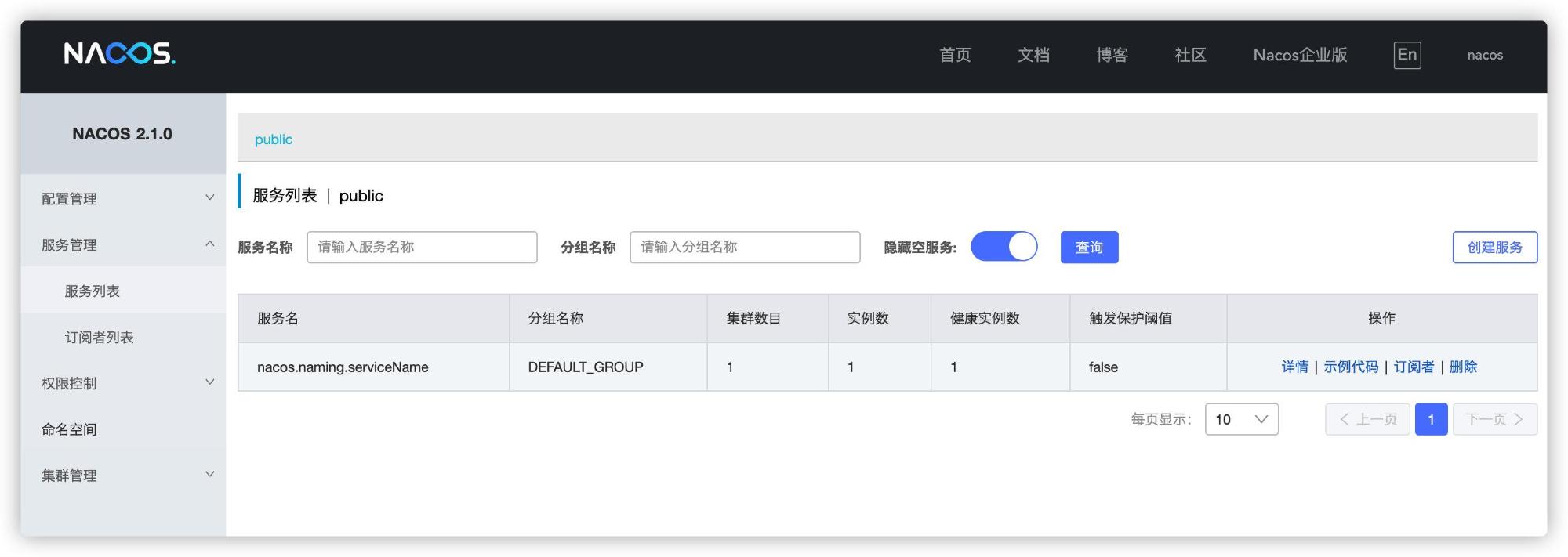
adopt curl Command invocation Nacos Of Open API Let's have a quick experience of Nacos Service discovery capabilities for .
Service registration :
curl -X POST 'http://127.0.0.1:8848/nacos/v1/ns/instance?serviceName=nacos.naming.serviceName&ip=20.18.7.10&port=8080'
After execution curl After the command , You can manage services on the console - View the registered service information in the service list .
Service discovery :
curl -X GET 'http://127.0.0.1:8848/nacos/v1/ns/instance/list?serviceName=nacos.naming.serviceName'

Use MySQL
If you want to Nacos Use MySQL To do the underlying storage , First we need to find out nacos/conf In the catalog nacos-mysql.sql . perform sql Script creation nacos Related library tables .
Then you just need to modify application.properties file , First cd To nacos/conf Under the table of contents , use vim Command to change application.properties file , Find the following comment :
#*************** Config Module Related Configurations ***************#
### If use MySQL as datasource:
# spring.datasource.platform=mysql

### Count of DB:
# db.num=1

### Connect URL of DB:
# db.url.0=jdbc:mysql://127.0.0.1:3306/nacos?characterEncoding=utf8&connectTimeout=1000&socketTimeout=3000&autoReconnect=true&useUnicode=true&useSSL=false&serverTimezone=UTC
# db.user.0=nacos
# db.password.0=nacos
Release comment , modify db.url.0 The database link of is the actual database address to be connected , Modify corresponding user、password.
#*************** Config Module Related Configurations ***************#
### If use MySQL as datasource:
spring.datasource.platform=mysql

### Count of DB:
db.num=1

### Connect URL of DB:
db.url.0=jdbc:mysql://127.0.0.1:3306/nacos?characterEncoding=utf8&connectTimeout=1000&socketTimeout=3000&autoReconnect=true&useUnicode=true&useSSL=false&serverTimezone=UTC
db.user.0=root
db.password.0=12345678
After modifying the above configuration , Through nacos/bin The startup script under the directory starts nacos that will do :
sh startup.sh -m standalone
Debugging the source code
Step one : adopt git The order will nacos Warehouse clone To local
git clone https://github.com/alibaba/nacos.git
Step two : Use idea open nacos Source code

Step three : Use mvn clean compile -U -Dmaven.test.skip=true Command to compile the project

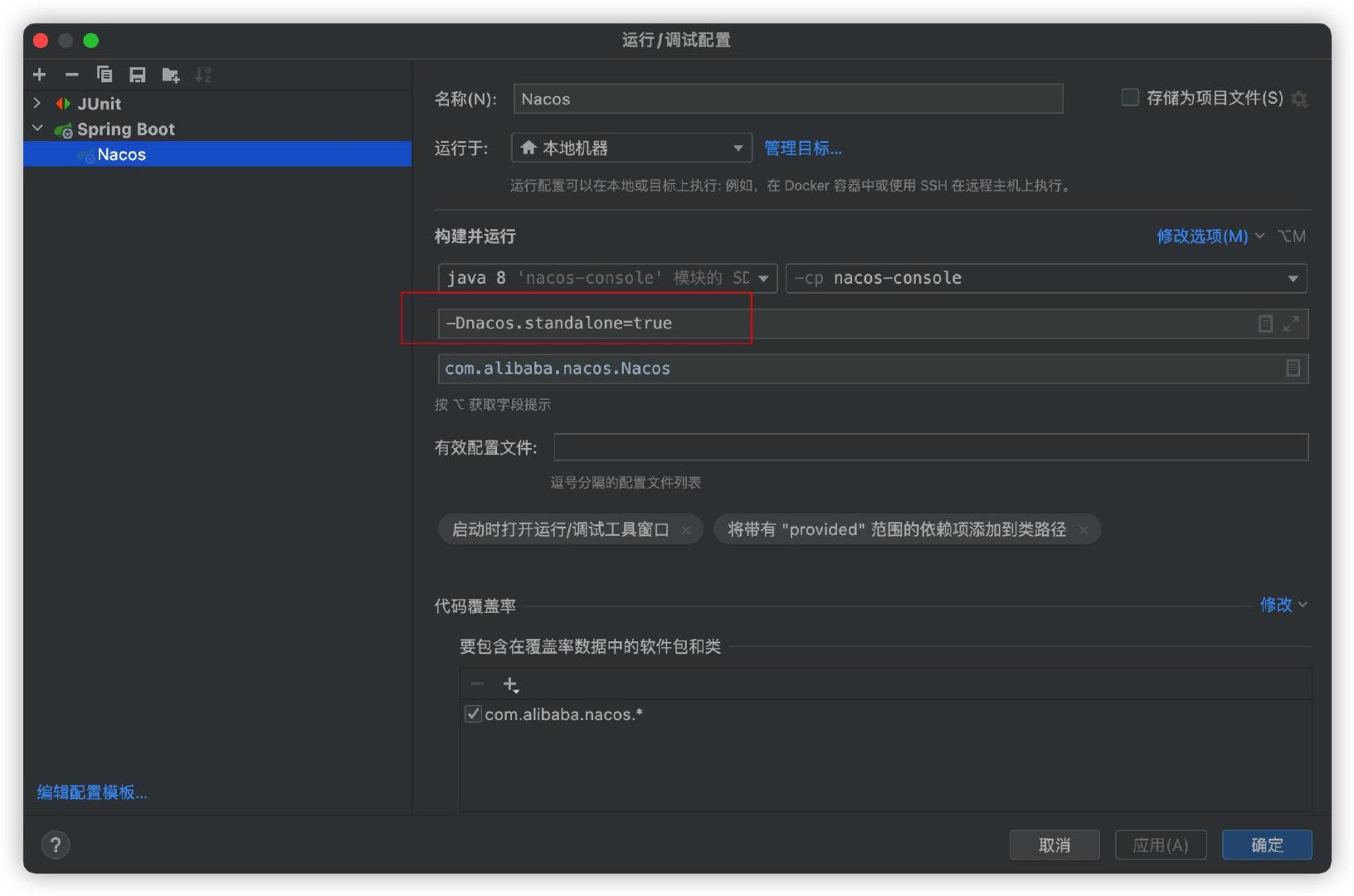
Step four : find com.alibaba.nacos.Nacos Start class , stay idea Add... At startup VM Parameters -Dnacos.standalone=true, And then it starts , You can debug nacos Source code .
边栏推荐
- R语言使用epiDisplay包的dotplot函数通过点图的形式可视化不同区间数据点的频率、使用by参数指定分组参数可视化不同分组的点图分布、使用dot.col参数指定分组数据点的颜色
- Unity shader learning (II) the first shader
- Research Report on the overall scale, major manufacturers, major regions, products and application segments of hydraulic torque in the global market in 2022
- 56. Core principle of flutter - flutter startup process and rendering pipeline
- 1. Mx6ull startup mode
- i.mx6ull(单片机) c语言环境搭建
- QStyle类用法总结(二)
- R语言dplyr包arrange函数排序dataframe数据、通过多个数据列排序dataframe数据、指定第一个字段降序排序,第二字段不指定(默认升序排序)
- 动态规划【三】(区间dp)石子合并
- 手把手带你入门 API 开发
猜你喜欢

Summary of qstype class usage (III)

AutoCAD - three pruning methods

mysql学习1:安装mysql

Comment modifier Node Fichiers dans les modules

Redis distributed lock 15 ask, what have you mastered?
![Dynamic programming [4] (counting class DP) example: integer partition](/img/06/4b3863bbb85582348c6f4ea7c5511e.png)
Dynamic programming [4] (counting class DP) example: integer partition

The wonderful use of 0 length array in C language

I.MX6ULL启动方式

Wechat applet realizes five-star evaluation

MQTT协议栈原理及交互流程图
随机推荐
Leetcode 177 The nth highest salary (June 26, 2022)
优博讯出席OpenHarmony技术日,全新打造下一代安全支付终端
L'utilisation de C language 0 length Array
C/s architecture
56. Core principle of flutter - flutter startup process and rendering pipeline
Research Report on the overall scale, major producers, major regions, products and application segments of swine vaccine in the global market in 2022
MapReduce practical cases (customized sorting, secondary sorting, grouping, zoning)
. Net6 access skywalking link tracking complete process
器审科普:创新医疗器械系列科普——胸骨板产品
R语言使用glm函数构建泊松对数线性回归模型处理三维列联表数据构建饱和模型、使用step函数基于AIC指标实现逐步回归筛选最佳模型、解读分析模型
FileOutputStream
mysql学习1:安装mysql
Jerry's serial port communication serial port receiving IO needs to set digital function [chapter]
Master formula
解开C语言的秘密《关键字》(第六期)
I.MX6ULL启动方式
Getting started with go web programming: validators
Interviewer: with the for loop, why do you need foreach?
千万不要错过,新媒体运营15个宝藏公众号分享
数学知识——博弈论(巴什博奕、尼姆博奕、威佐夫博奕)思路及例题