当前位置:网站首页>Shell basic commands
Shell basic commands
2022-07-23 05:59:00 【imysy_ 22_】
shell brief introduction
With all kinds of Linux The graphic degree of the system is constantly improving , Users in the desktop environment , By clicking on 、 Drag and drop and other operations can complete most of the work . However , many Ubuntu Linux Function use shell Command to implement , Than using a graphical interface , Finish faster 、 More direct .
shell Is a scripting language , The essence is a document , What's in the file is Instructions in a specific format , The system can use a script parser to translate or parse instructions and execute ( It doesn't need to compile ).shell Both applications It's another scripting language ( Applications analysis Scripting language ).

command It is the user who sends a control request to the system kernel , The text stream that interacts with it .
shell It's a command line interpreter , Parse user commands into instructions that the operating system can understand , Realize the interaction between users and operating system .
When several commands need to be executed repeatedly , You can put these commands together , Add certain control statements , The editor becomes shell Script file , hand shell Batch execution .
The user types the command text at the command line prompt , Start with Shell Interact
next ,shell Convert the user's commands or keys into instructions that the kernel can understand
Control the operating system to respond , Until the relevant hardware equipment is controlled
then ,shell Pass the output through shell Submit to the user
shell Command parser
The original UNIX shell After years of development , By different agencies 、 For different purposes , Many different types of shell Program . current shell There are mainly several :
- Bourne Shell( abbreviation sh): It is Unix One of the first shell Program , It has already become an industrial standard . At present, almost all Linux All systems support it . however Bourne Shell The operation control function of is weak , And it does not support alias and history .
- C Shell( abbreviation csh)
- Korn Shell( abbreviation ksh)
- Bourne Again Shell:( abbreviation bash) Ability to provide environment variables to configure users Shell Environmental Science , Support history , Built in arithmetic function , Wildcard expressions are supported , Built in simplification of common commands .
bash In addition to the command editing function sh There are great improvements , It also adds special functions, which greatly facilitates users in Shell Operations on the command line .
- Supplement commands and documents
- In the use of Shell On command , Many users will often encounter the situation that the command or file name is not fully remembered Bash Shell The command and file name completion function of will help users . After entering the first few characters of a command or file name , Press TAB Key or ESC Key to automatically fill in the remaining string that has not been entered .
- If there are multiple commands or files with the same prefix ,shell All commands or files with the same prefix will be listed .shell The prompt message given , Help users recall and complete input . Then wait for the user to enter enough characters .
- Press twice in a row TAB Key or ESC key , Used to command complement ; Press once TAB key , Used to complete the file name .
- Query command history
- The user is in Shell There is great continuity in the operation under , The command you once entered may need to be used more than once . When users find problems in operation , You need to check the operations you have performed .Bash Save the command sequence that the user has typed in a command history table . Press “ individual ” Key sum “” key , You can query the command history .
- Bash Shell It also provides history command . This command lists the command history table , From record number 1 Start , All at once .
history [numberline]
- wait
shell Command format
shell The prompt identifies the beginning of the command line . The user enters a command at the prompt and presses Enter key , Finish submitting instructions to the system .
- Usually shell The command prompt is in the following format :

- username: user name , Display the account of the currently logged in user
- hostname: Host name , Displays the host name of the login , For example, if far After logging in , Then the login host name will be displayed ;
- direction: Directory name , Displays the current path , When displayed in the root directory as “/”, When displayed in the user's home directory as “~”;
Usually a command contains three elements : Command name 、 Options 、 Parameters . Command name is required , Options and parameters can be optional . The command format is shown in the figure :

- $:Shell Prompt , If the current user is a superuser , The prompt is “#”, Other users' prompts are “$”;
- Command: Command name ,Shell Order or procedure , Case sensitive
- Options: Command options , Used to change the type of command execution action , from “-” guide , You can have multiple options at the same time ;
- Argument: Command parameter , Point out the object or target of the command , Some commands allow multiple arguments
- The three elements of a command are separated by spaces ;
- If you write multiple commands on one line , Use semicolon (;) Separate the commands ;
- If a command cannot be written on one line , Use a backslash at the end of the line (\) Indicate that the order is not over .
The Conduit
Pipes can connect a series of commands , It means that the output of the first command will be used as the input of the second command , Pass it through the pipe to the second command , The output of the second command will be used as the input of the third command , And so on . It's like using “|” The symbol is connected into a pipe .

Of the above operations , With the help of pipes “|”, take ls The output of is directly used as wc Command input . Using pipes can skillfully combine some commands , Get the effect that a single command cannot achieve . For example, use the above command combination , Get is /usr/bin Number of files in the directory .
Input / Output redirection
Input / Output redirection is a change shell Command or program default standard input / Output target , Redirect to a new goal .
linux The default standard input in is defined as keyboard , Standard output is defined as terminal window .
The user can change the input or output for the current operation , Force the input or output source of a specific command to be an external file .

Order replacement
Command substitution is to take the output of one command as an argument to another command . The command format is as follows .
- among , command command2 The output of will be used as a command command1 Parameters of . We need to pay attention to , The single quotation mark of the command substitution is ESC Key below ` key
- pwd The command is used to display the absolute path of the current directory . On the command line above , Use the command substitution character , take pwd The running result of is as ls Arguments to the command . Final , The result of command execution is to display the file contents of the current directory .

( Now just know how to use it , Later, we will practice in depth )
frequently-used shell command :
man ( Get online help )
Generally, the online help information includes the following sections :
- NAME: Name of the command
- SYNOPSIS: The syntax of the command
- DESCRIPTION: General description and purpose of the command
- OPTIONS: Describe all the parameters or options of the command
- SEE ALSO: List the functions directly related to this command in the online help page Other commands that can be similar
- BUGS: Explain any known problems or defects in the command or its output
- EXAMPLES: Common usage examples
- AUTHORS: The author of the online help page and the command
passwd
Use alone passwd command , It means to change the password of the current user . The following command example is used to modify the user's own password .

su
su The command is used to temporarily change the user's identity , Have permissions of other users . Ordinary users can use su The command temporarily has the authority of super user ; Super users can also use ordinary user identity to complete some operations . When you need to give up your current user identity , have access to exit Command switch back .su The general syntax format of the command is :

Options “-c” It means that it ends after executing a command ;-m Indicates that the environment variables remain unchanged ;- Indicates when the user identity is changed , Use the user's environment at the same time .

Use alone su command , The default is to convert to super user root.
echo
echo The command is used in standard output —— The display shows a paragraph of text , It usually serves as a reminder .echo The general syntax format of the command is :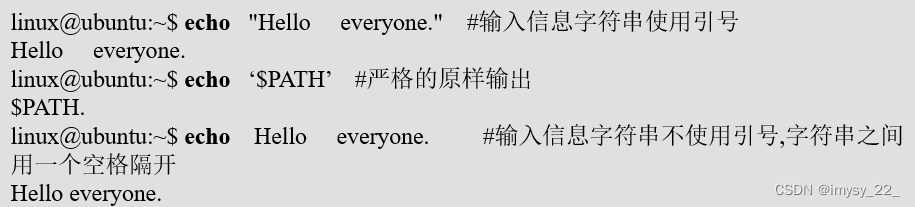
Options -n Does not wrap after output text . The prompt string can be quoted , Or you can skip it .
date
date The command is used to display and set the system date and time .
Options -s In accordance with the said datestr Date display format setting date ; Use alone date command , Used to display the current date in the system clock .
df
df The command is used to view disk space usage . Checking disk space is something users should often do , Because no one wants to see roots or /var Partitions fill up inadvertently , In order to clean up in time .df The general format of the command is :
among , Parameters Filesystem Represents a physical file system . The meaning of each option is shown in the table .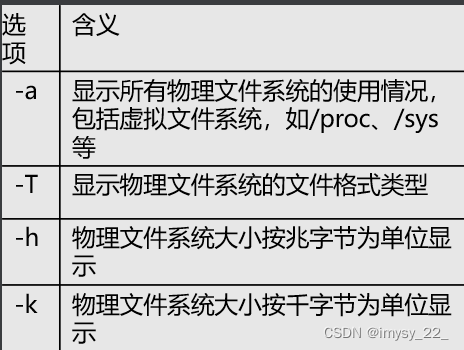
-l : List only local file systems 
du
du command , Lists the number of disk blocks used by directories and files , Each piece accounts for 512 Bytes .
Common parameters :
- -a : List only the number of free files
- -h : List disk usage (KB)
- -s : List the total free space (KB)




边栏推荐
猜你喜欢






随机推荐
Conditional statement of shell
Basic process of unit approval
LIinux下的基本C编程的三类高频函数操作详解第一类——文件操作函数(f)
echo音箱配对及操作方法
amber教程4.6:对体系氢键分析
Learn the input file parameters of amber software MD
stored procedure
指针学习日记(二)
Digital verification code identification completes automatic login
zstuAcm夏令营旗手
Process of using Zen
vim编辑器的使用
多进程常见问题——创建多个线程时访问同一个父线程变量(临界资源)时如何加锁使得共享父线程变量不被重复修改?
关于如何在终端设置有颜色的字体
判断Set中课程是否存在,Contains方法
学习amber软件md的输入文件参数
应用 Collections.sort() 实现 List 排序
Jmeter上传和下载文件
Fiddler Script个性化配置显示
移动应用分类