当前位置:网站首页>Mongodb common commands
Mongodb common commands
2022-07-26 05:24:00 【Monster in the North Sea】
Select and create databases
use Database name
If the database exists, select it , If the database does not exist, it will be created automatically . The following statement creates
commentdb database :
use commentdb
view the database :show dbs
But you won't see the database you created , In essence, it has not been created , Only after you actually perform the write operation can you create .
View set , You need to select the database first , To view the collection of this database :show collections
After the database is created , You don't have to create collections , Insert data directly ,
Insert and query documents
After selecting the database , Use collections to manipulate documents , Insert document syntax format :
db. Collection name .insert( data );
Insert the following test data :
db.comment.insert({content:“ The tenth power course ”,userid:“1011”})
The syntax format of the query set :
db. Collection name .find()
Inquire about spit All documents in the collection , Enter the following command :
db.comment.find()
There will be a file called _id Field of , This is equivalent to the primary key of the table in our original relational database , This field is not specified when you insert a document record ,MongoDB Automatically created , The type is ObjectID type . If we specify this field when inserting a document record, we can also , Its type can be ObjectID type , It can also be MongoDB Any type supported .
Test statement
db.comment.insert({
    _id:"1",content:" Why did it go wrong ",userid:"1012",thumbup:2020});
db.comment.insert({
    _id:"2",content:" Work overtime until midnight ",userid:"1013",thumbup:1023});
db.comment.insert({
    _id:"3",content:" What if the mobile traffic exceeds ",userid:"1013",thumbup:111});
db.comment.insert({
    _id:"4",content:" perseverance prevails ",userid:"1014",thumbup:1223});

In the same set , Data composition can be different .
Query according to certain conditions , Such as query userid by 1013 The record of , As long as find() Add parameters to , So are the parameters json Format , as follows :
db.comment.find({userid:‘1013’})
Just return the first data that meets the conditions , We can use findOne Command to implement :
db.comment.findOne({userid:‘1013’})
Return the specified number of records , Can be in find After the method is called limit To return results , for example :
db.comment.find().limit(2)
Modifying and deleting documents
Modify the syntax structure of the document :
db. Collection name .update( Conditions , Revised data )
modify _id by 1 The record of , Thumb up for 1000, Enter the following statement :
db.comment.update({_id:“123”},{thumbup:1000})
It was found after execution that , This document is in addition to thumbup The other fields are missing .
To solve this problem , We need to use modifiers $set To achieve , The order is as follows :
db.comment.update({_id:“123”},{$set:{“name”:“ Zhang San ”}})
This field can be modified if any , Add this field without 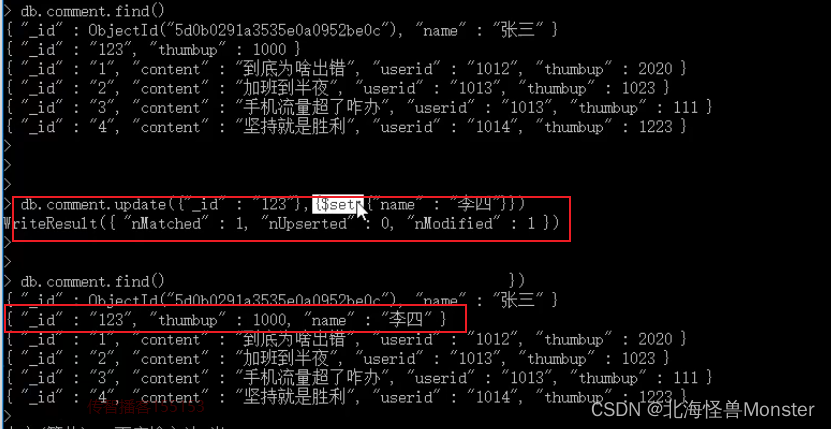
Delete the syntax structure of the document :
db. Collection name .remove( Conditions )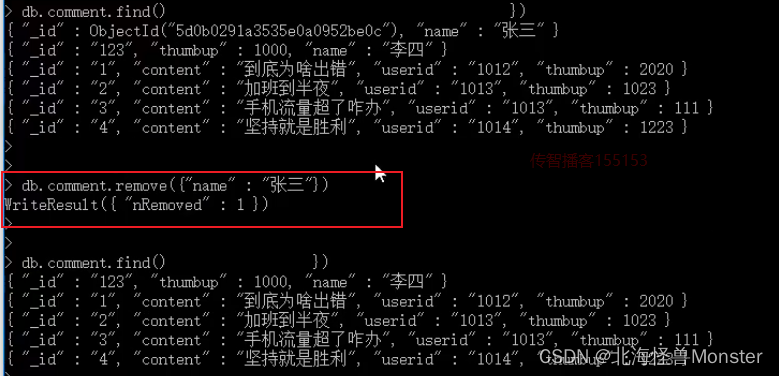
The following statement can delete all the data , Use with caution ~ Delete all data
db. Collection name .remove({})
Delete conditions can be placed in braces , Delete... For example thumbup by 1000 The data of , Enter the following statement :
db. Collection name .remove({thumbup:1000})
Count the number
Use of statistical record conditions count() Method . Statistics of the following statements spit The number of records in the collection :
db. Collection name .count()
Statistics by condition , For example, statistics userid by 1013 The number of records :
db.comment.count({userid:“1013”})
Fuzzy query
MongoDB The fuzzy query is realized by regular expression . The format is :
/ Fuzzy query string /
Query comments contain “ Traffic ” All documents of , The code is as follows :
db.comment.find({content:/ Traffic /})
Query comments with “ Work overtime ” At the beginning ,
db.comment.find({content:/^ Work overtime /})
Query comments with “ Work overtime ” At the end of the ,
db.comment.find({content:/ Work overtime $/})
Greater than Less than It's not equal to
db. Collection name .find({ “field” : { $gt: value }}) // Greater than : field > value
db. Collection name .find({ “field” : { $lt: value }}) // Less than : field < value
db. Collection name .find({ “field” : { $gte: value }}) // Greater than or equal to : field >= value
db. Collection name .find({ “field” : { $lte: value }}) // Less than or equal to : field <= value
db. Collection name .find({ “field” : { $ne: value }}) // It's not equal to : field != value
The number of query comment likes is greater than 1000 The record of :db.comment.find({thumbup:{$gt:1000}})
Inclusion and exclusion
Include use $in The operator
Query the comments collection userid Field contains 1013 and 1014 Documents :
db.comment.find({userid:{$in:[“1013”,“1014”]}})
Does not include the use of KaTeX parse error: Expected '}', got 'EOF' at end of input: ….find({userid:{ nin:[“1013”,“1014”]}})
Conditional connection
If we need to satisfy the above two conditions at the same time , Need to use $and Operator to associate conditions ( amount to SQL Of and). The format is :
KaTeX parse error: Expected '}', got 'EOF' at end of input: ….comment.find({ and:[ {thumbup:{ KaTeX parse error: Expected 'EOF', got '}' at position 9: gte:1000}̲} ,{thumbup:{ lt:2000} }]})
If the relationship between two or more conditions is or , We use operators for association , With the front and It's the same way , The format is :
KaTeX parse error: Expected '}', got 'EOF' at end of input: ….comment.find({ or:[ {userid:“1013”} ,{thumbup:{$lt:2000} }]})
Column value growth
Increase or decrease the value of a column on the basis of the original value , have access to $inc Operator : To give a negative number is to reduce
db.comment.update({_id:“2”},{$inc:{thumbup:1}})
边栏推荐
- No background, no education? Is it really hopeless for specialist testers to enter Internet factories?
- FTP实验及概述
- Mysql优化
- TZC 1283: simple sorting - function method
- It's enough for newcomers to learn how to do functional tests
- Simulation of future air pollution changes
- Meta analysis [whole process, uncertainty analysis] method based on R language and meta machine learning
- NetCore MySql The user specified as a definer (‘admin‘@‘%‘) does not exist
- mysql如果计算本月变动/本月增幅/同比变动/同比增幅?
- List converted to tree real use of the project
猜你喜欢

MySQL master-slave synchronization and master-slave synchronization delay solution
Mysql优化
Nacos registry

SSTI-payload和各种绕过方法

LAMP架构

DOM event flow event bubble event capture event delegate
![Meta analysis [whole process, uncertainty analysis] method based on R language and meta machine learning](/img/87/9f8353c5c9c700eaa63f66697aa44a.png)
Meta analysis [whole process, uncertainty analysis] method based on R language and meta machine learning

测试必备工具之Fiddler,你真的了解吗?

LeetCode链表问题——203.移除链表元素(一题一文学会链表)

Day011 一维数组
随机推荐
Seata submits at details in two stages
怎么办理聚合收款码
C language function
Mathematical modeling and optimization analysis based on general optimization software gams
NPM operation instruction
FTP实验及概述
ALV报表流程图解
Week 6 Learning Representation: Word Embedding (symbolic →numeric)
517. Super washing machine
SQL injection
新人如何做好功能测试,学会这几项够用了
ALV report flow diagram
Thread三种实现方式 和 Handler的用法
C语言实现发牌功能基本方法
Why is the value represented by a negative number greater than an integer by 1?
SAP report development steps
C语言函数
Excel VBA: summarize calculation output results by date (SUMIF)
Day011 一维数组
SSH远程管理