当前位置:网站首页>ZABBIX deployment instructions (server+win client + switch (H3C))
ZABBIX deployment instructions (server+win client + switch (H3C))
2022-06-27 08:03:00 【dog6507371】
Deploy Zabbix Stepped on several pits , This document records the deployment instructions in detail , There are also screenshots at each step , More suitable for novice operation .
Server deployment
Environmental preparation :
Centos 7.0 X64
Shell Sign in root user
1. Turn off firewall :
sed -i 's/SELINUX=enforcing/SELINUX=disabled/' /etc/selinux/config
systemctl disable --now firewalld

2. obtain zabbix Download source
rpm -Uvh https://repo.zabbix.com/zabbix/5.0/rhel/7/x86_64/zabbix-release-5.0-1.el7.noarch.rpm

3. Replace zabbix.repo Source , For Ali
sed -i 's#http://repo.zabbix.com#https://mirrors.aliyun.com/zabbix#' /etc/yum.repos.d/zabbix.repo
5. Empty cache , download zabbix Server side
yum clean all

yum makecache

yum install zabbix-server-mysql zabbix-agent –y
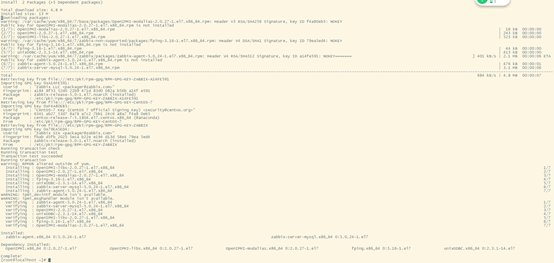
6. Installation tools , Can be on the machine , Use multiple versions of software , And it will not affect the dependency environment of the whole system
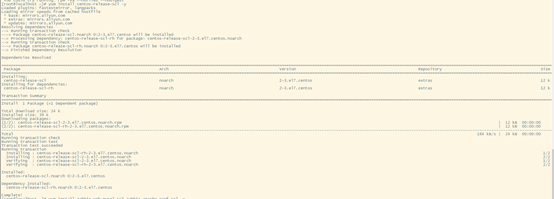
yum install centos-release-scl -y
7. change zabbix.repo in zabbix-frontend The numerical
vi /etc/yum.repos.d/zabbix.repo
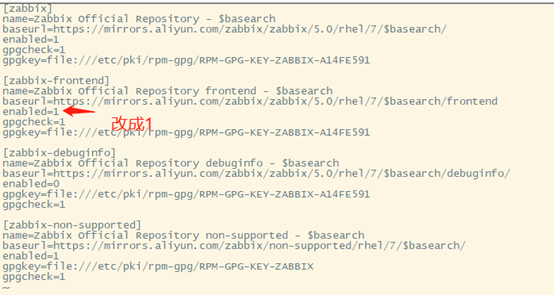
After a change esx :wq Save and exit
8. install zabbix Front end environment , And is installed to scl In the environment

yum install zabbix-web-mysql-scl zabbix-apache-conf-scl –y
9. install zabbix The required database ,mariadb
yum install mariadb-server –y

10. Configure the database startup
systemctl enable --now mariadb

11. Initialize database , And set the password
mysql_secure_installation

mysql -u root -p Get into mysql database Input password
12. Add database users ## The following operations are database operations
# Access to database , Create a zabbix database :
create database zabbix character set utf8 collate utf8_bin;
# Create a zabbix user , password 123
create user [email protected] identified by '123';
# Modify the permissions
grant all privileges on zabbix.* to [email protected];
# sign out
\quit
13. Use zabbix-mysql command , Import database information
# mysql -u user name -p Database name
zcat /usr/share/doc/zabbix-server-mysql*/create.sql.gz | mysql -u zabbix -p zabbix
# Input password 123

14. modify zabbix server The configuration file , Change database password
# Get into /etc/zabbix/zabbix_server.conf in , modify DBPassword Password for database
vim /etc/zabbix/zabbix_server.conf
DBPassword=123

# Check whether the modification is successful
grep '^DBPass' /etc/zabbix/zabbix_server.conf
15. modify zabbix PHP Configuration file for
# Get into /etc/opt/rh/rh-php72/php-fpm.d/zabbix.conf Change the last line in to php_value[date.timezone] = Asia/Shanghai

Vi /etc/opt/rh/rh-php72/php-fpm.d/zabbix.conf
systemctl restart rh-php72-php-fpm # restart PHP service
16. start-up zabbix Related server
systemctl restart zabbix-server zabbix-agent httpd rh-php72-php-fpm
systemctl enable zabbix-server zabbix-agent httpd rh-php72-php-fpm
17. visit zabbix entrance
This machine ip/zabbix
18. The default user name after successful installation :Admin, The password is :zabbix
Install client
Client installation (Win edition )
1、 Official website download client
https://www.zabbix.com/cn/download_agents
2、 Install client , Update configuration information
Installation directory conf The file editing configuration is as follows
# This is a configuration file for Zabbix agent service (Windows)
# To get more information about Zabbix, visit http://www.zabbix.com
LogFile=C:\Program Files\Zabbix Agent\zabbix_agentd.log #Log File address
Server=192.168.11.159 # Server address
ListenPort=10050
ServerActive=192.168.11.159 # Server address
Hostname=192.168.10.113 # Client host IP
Include=C:\Program Files\Zabbix Agent\zabbix_agentd.d\
3、 Add a host to the server Hostname enter the computer name IP Address input IP Address Wait a few minutes for the automatic addition to succeed
H3C Switch deployment instructions
Turn on snmp Function command
Systemview View :
snmp-agent
snmp-agent sys-info version v2
display information :SNMPv1 and SNMPv2c are insecure because they transmit the community string and data in plaintext form.
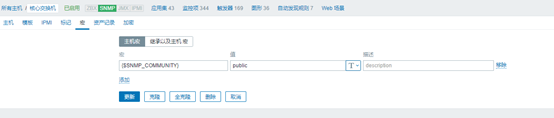
snmp-agent community read public
snmp-agent sys-info version v2c v3
display information :SNMPv1 and SNMPv2c are insecure because they transmit the community string and data in plaintext form.
snmp-agent trap enable
snmp-agent target-host trap address udp-domain 192.168.11.159 udp-port 161 params securityname public v2c
#192.168.11.159 by zabbix Of IP Address
Zabbix Add the host as shown in the following figure


边栏推荐
- js打印99乘法表
- After working in a large factory for ten years with an annual salary of 400000 yuan, I was suddenly laid off. If the company wanted to abandon you, it wouldn't leave any kindness
- Speech signal processing - concept (4): Fourier transform, short-time Fourier transform, wavelet transform
- Programming life - what do you think of the 35 year old bottleneck of programmers?
- (note) Anaconda navigator flashback solution
- LVGL GUI GUIDER移植代码到STM32
- js例题打印1-100之间所有7的倍数的个数及总和
- Speech synthesis: tacotron explains [end-to-end speech synthesis model] [compared with traditional speech synthesis, it does not have complex phonetics and acoustic feature modules, but only uses < te
- 淘宝虚拟产品开店教程之作图篇
- JS uses the while cycle to calculate how many years it will take to grow from 1000 yuan to 5000 yuan if the interest rate for many years of investment is 5%
猜你喜欢

c#的初步认识

Basic knowledge | JS Foundation

Mapping of Taobao virtual product store opening tutorial

(note) Anaconda navigator flashback solution

No matter how good LCD and OLED display technologies are, they cannot replace this ancient display nixie tube

【12. 最大连续不重复子序列】
淘宝虚拟产品开店教程之作图篇

The IPO of Yefeng pharmaceutical was terminated: Yu Feng, the actual controller who had planned to raise 540million yuan, made P2P investment

2022 love analysis · panoramic report of it operation and maintenance manufacturers

All tutor information on one page
随机推荐
js来打印1-100间的质数并求总个数优化版
Etcd tutorial - Chapter 5 etcd etcdctl usage
The 6th Blue Bridge Cup
js输出形状
Error in idea connection database
No matter how good LCD and OLED display technologies are, they cannot replace this ancient display nixie tube
基础知识 | js基础
[batch dos-cmd command - summary and summary] - map folder to virtual disk - subst
游戏六边形地图的实现
js打印99乘法表
"Short video" Linxia fire rescue detachment carries out fire safety training
Refer to | the computer cannot access the Internet after the hotspot is turned on in win11
期货反向跟单靠谱吗?
After working in a large factory for ten years with an annual salary of 400000 yuan, I was suddenly laid off. If the company wanted to abandon you, it wouldn't leave any kindness
若xn>0,且x(n+1)/xn>1-1/n(n=1,2,...),证明级数∑xn发散
参考 | Win11 开启热点之后电脑不能上网
【12. 最大连续不重复子序列】
【论文阅读】Intrinsically semi-supervised methods
安装jenkins
Blind survey shows that female code farmers are better than male code farmers