当前位置:网站首页>Nexus3 build local warehouse
Nexus3 build local warehouse
2022-06-12 20:30:00 【lihongbao80】
One 、 install Nexus3
1、docker-compose.yaml To configure
notes :8081 Ports are open for background use ,5000 and 5001 The port is open to the warehouse , You can change it to something else , Just configure docker You can fill in the open port in the warehouse , I'm not alone mapping , They all use 8081
version: "3.0"
services:
    nexus:
        image: sonatype/nexus3:3.38.1
        container_name: nexus3
        ports:
            - 8081:8081
            - 5000:5000
            - 5001:5001
        environment:
            NEXUS_CONTEXT: nexus3
        volumes:
            - ./data:/nexus-data
        environment:
            ES_JAVA_OPTS: "-Xmx1024m -Xms1024m"
2、 start-up nexus
Use docker-compose up -d Start up , After the visit http://192.168.40.147:8081/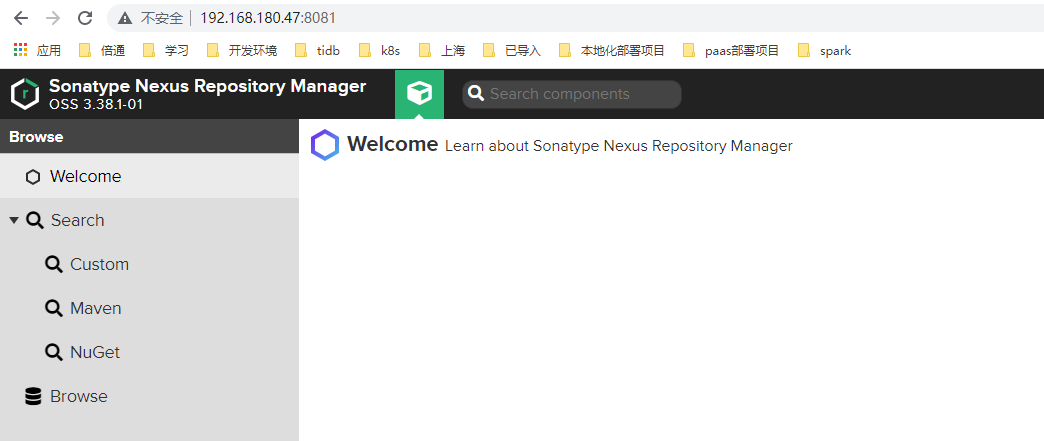
Login username admin The password goes through cat data/admin.password see
After logging in, you can change the password to a memorable password
3、 Installation may encounter problems
problem :
Pass after startup docker ps -a see nexus3 Status of is exit , stay docker-compose.yaml You can view the startup log under the same level directory , adopt docker-compose logs -f Command view , It is found that you do not have permission to access the file directory created by the host
resolvent :
It can be created manually mkdir data/instances After creation, check whether the status is started
If it's not solved : to grant authorization chmod 777 data/
Two 、 To configure docker Warehouse
1、 summary
Default warehouse description
maven-central:maven Central treasury , The default from the https://repo1.maven.org/maven2/ Pull jar
maven-releases: Private library distribution jar, Please install for the first time Deployment policy Set to Allow redeploy
maven-snapshots: Private library snapshot ( Debug version )jar
maven-public: Warehouse groups , Combine the above three warehouses to provide external services , In the local maven Basic configuration settings.xml Or project pom.xml Use inNexus Warehouse type introduction
Nexus3 Provided 3 Types of Docker Warehouse , The first two can create multiple warehouses , The last one can aggregate them all into one URL To visit .
hosted: Local repository , Usually we deploy our own artifacts to this type of warehouse . For example, the company's second-party library .
proxy: Agent warehouse , They are used to represent remote public warehouses , Such as maven The central warehouse .
group: Warehouse team , Used to merge multiple hosted/proxy Warehouse , When your project wants to be in multiple repository You don't need to refer to resources more than once , Just quote one group that will do .
2、 establish Blob Stores
Fill in name, The path is automatically generated , You can also modify the mounting address yourself 
blob stores There are two , One is the system default , One is just created . If you don't want to create it yourself , It is also possible to use the default file storage directory of the system . Create... Then repository when , Storage directory selection default That's all right. . Newly created Directory , Can be in /data/blobs/ You can see... Under the directory .
3、 Configure warehouse
1) To configure hosted Type of

hosted The type warehouse is used as our private warehouse . Note the configuration in the red box , Fill in , Click Create warehouse 
The image above Hosted set an option , There are three values in the option :
Allow redeploy: It is allowed to submit code repeatedly under the same version number , nexus Distinguish by time
Disable redeploy: It is not allowed to submit code repeatedly under the same version number
Read-Only: No version is allowed to be submitted
Native maven-releases Kuo is Disable redeploy Set up , maven-snapshots yes Allow redeploy.
2) To configure proxy Type of
proxy Type warehouse , It can help us access the network that we can't reach directly , Like another private warehouse , Or public warehouses abroad 

Here are some remote warehouses :
jboss Of maven Central warehouse address :http://repository.jboss.com/maven2/
Ali cloud, maven Central warehouse address :http://maven.aliyun.com/nexus/content/groups/public/
apache Of maven Central warehouse address :http://repo.maven.apache.org/maven2/
3) To configure group Type of


Must be hosted repositories【 Managed Repository 】 In the order of proxy repositories【 Agent Repository 】 Before , Because a group【 Group Repository 】 These managed and proxy repositories can be included in . And a whole group As a public, An interface for others to use . So when looking for rack bags , If the agent repository is in front , That is to find it from the remote first jar, Instead of starting from the managed Repository ( Local repository ) To find out if there is jar. In this way, the cost of accessing the external network is compared with that of searching locally , Of course, the managed repository should be given priority before the proxy Repository .
4、Maven To configure
apache-maven-3.6.3 Under the setting.xml Documents and projects pom.xml The relationship between documents is :settting.xml Files are global settings , and pom.xml Files are local settings .pom.xml Files are important for the project , Is preferred . and pom.xml If the image address is not configured in the file , Just follow settting.xml Find the address defined in .
Obtain the group warehouse as shown in the above figure smart_group Warehouse address , modify setting.xml The documents are as follows :
  <localRepository>d:/maven_test/</localRepository>
   <!--nexus The server ,id Set up a warehouse name-->
  <servers>
    <server>
        <id>custom_group</id>
        <username>admin</username>
        <password>admin123</password>
    </server>
  </servers>
  <!-- Warehouse group url Address ,id and name Can write group warehouse name,mirrorOf Is set to central-->
  <mirrors>
    <mirror>
        <id>custom_group</id>
        <name>custom_group</name>
        <url>http://192.168.124.189:8081/repository/custom_group/</url>
        <mirrorOf>central</mirrorOf>
    </mirror>
  </mirrors>
After modification, you can recompile the project , You have to add parameters -U,(-U,–update-snapshots, Force update releases、snapshots Type of plug-in or dependency Library , otherwise maven It's only updated once a day snapshot rely on ). The agent warehouse will download... From the remote central warehouse jar package .
mvn clean compile -U
5、 The management platform uploads three parties jar package
There are some jar It was provided by a third party , Not in the central warehouse , We can upload these local three parties jar Package to hosted repository In the host warehouse .

After successful upload , You can see that hosted repository and group repository There are already three parties just uploaded in jar package 
6、 Command upload tripartite jar package
stay setting.xml Add... To the configuration file hosted repository server
<!--id Customize , But when using the command to upload, you will use -->
<server>
    <id>custom_hosted</id>
    <username>admin</username>
    <password>admin123</password>
</server>
Use the following command to upload jar package :
mvn deploy:deploy-file -DgroupId=com.sinoeyes -DartifactId=hspharm-paas-enum -Dversion=1.0.0-dev2.0-SNAPSHOT -Dpackaging=jar -DpomFile="E:\hspharm\work\hspharm-paas-enum-1.0.0-dev2.0-SNAPSHOT.pom" -Dfile="E:\hspharm\work\hspharm-paas-enum-1.0.0-dev2.0-SNAPSHOT.jar" -Durl=http://192.168.180.47:8081/repository/hspharm-host/ -DrepositoryId=hspharm-host
Command interpretation :
-DgroupId=byd.ghy Customize
-DartifactId=portal-auth Customize
-Dversion=1.0.0 Customize , Three customizations , constitute pom.xml Identification in the file
-Dpackaging=jar The type of transmission is jar type
-Dfile=D:\auth-server.jar jar Local disk location of the package
-Durl=http://ip:8081/repository/custom_hosted/ hosted The address of the repository
-DrepositoryId=custom_hosted Need and setting.xml Configured in the file ID Agreement
After successful upload ,hosted repository You can already see 
7、deploy Deploy jar Package to private service
release and snapshots jar Package difference
SNAPSHOT Version represents unstable ( Snapshot version ), Still in the development stage , There will be changes at any time .
When uploading the same version number jar When the package ,SNAPSHOT A series of new numbers will be automatically appended after the version number , That is, the log tag ,
nexus Different versions will be distinguished according to the log label , stay maven When referencing , If you are using snapshot edition ,
Re import maven When , Will go to private Kula to get the latest uploaded code .
RELEASE It represents a stable version ( The release ), Generally, after going online, they will use RELEASE edition .
in other words 1.0,2.0 This version can only have one , In other words, under the current version number , There can be no different jar.
establish snapshot Warehouse
Can be in nexus Add a snapshot Warehouse , Used exclusively for storage snapshot Version of jar package .snapshot So is the warehouse hosted Type of , How to create and hosted repository type . Create good after , Just join the group warehouse .
Be sure to choose Deployment Policy by allow redeploy

Same operation , establish Release Type of warehouse , And join the group
8、 project pom.xml File configuration
You can pom Set specific... In the file relaeses Kuhe snapshots library . If the suffix of the version number of the current project contains -SNAPSHOT, similar ***-SNAPSHOT, Will put the project jar Package submitted to snapshots In the library , Didn't bring -SNAPSHOT If so, it will submit releases In the library .
stay pom.xml Configuration in file distributionManagement The nodes are as follows , Execute in the project deploy After the command ,jar The package will be uploaded to nexus in .
setting.xml Middle configuration
<server>
    <id>custom_snapshots</id>
    <username>admin</username>
    <password>admin123</password>
</server>
<server>
    <id>custom_releases</id>
    <username>admin</username>
    <password>admin123</password>
</server>
pom.xml To configure
    <repositories>
        <repository>
            <id>custom_group</id>
            <name>Nexus Repository</name>
            <url>http://192.168.124.189:8081/repository/custom_group/</url>
            <snapshots>
                <enabled>true</enabled>
            </snapshots>
            <releases>
                <enabled>true</enabled>
            </releases>
        </repository>
    </repositories>
    <pluginRepositories>
        <pluginRepository>
            <id>custom_group</id>
            <name>Nexus Plugin Repository</name>
            <url>http://192.168.124.189:8081/repository/custom_group/</url>
            <snapshots>
                <enabled>true</enabled>
            </snapshots>
            <releases>
                <enabled>true</enabled>
            </releases>
        </pluginRepository>
    </pluginRepositories>
<!-- Project distribution information , In execution mvn deploy Post indicates the location to be published . With this information, you can deploy the website to a remote server or components jar Deploy to remote warehouse . -->
    <distributionManagement>
        <repository><!-- Information needed to deploy project generated artifacts to remote repositories  -->
            <id>custom_releases</id><!--  here id and settings.xml Of id bring into correspondence with  -->
            <name>Nexus Release Repository</name>
            <url>http://192.168.124.189:8081/repository/custom_releases/</url>
        </repository>
        <snapshotRepository><!-- Where to deploy the snapshot of the component ? If the element is not configured , Default deployment to repository Warehouse for element configuration , See distributionManagement/repository Elements  -->
            <id>custom_snapshots</id><!--  here id and settings.xml Of id bring into correspondence with  -->
            <name>Nexus Snapshot Repository</name>
            <url>http://192.168.124.189:8081/repository/custom_snapshots/</url>
        </snapshotRepository>
    </distributionManagement>
By default ,maven Compilation and packaging will not download SNAPSHOT Version of jar package , So it needs to be in pom.xml The configuration in the file supports downloading snapshot edition jar package .
mvn clean deploy -Dmaven.test.skip=true
边栏推荐
- Properties to YML
- Optimization of SQL statements
- At the beginning of SAP QM, assign sampling strategy for quantitative characteristics
- [untitled]
- MySQL field truncation principle and source code analysis
- 测试人如何规划自己的未来?才能实现入行2年达到25k?
- QT pro file configuration ffmpeg macro
- synchronized下的 i+=2 和 i++ i++执行结果居然不一样
- SPI one master and many slaves
- more-copy. JS specifies that the file template is generated to the specified file directory
猜你喜欢
![[leetcode 16 solution] the sum of the nearest three numbers](/img/7d/befc79145bb88a2ec39524b2c9bb54.jpg)
[leetcode 16 solution] the sum of the nearest three numbers

Wechat jsapi payment pit summary

Wechat applet notes
Illustrator tutorial, how to recolor artwork in illustrator?

What is the difference between union and union all

typeScript的定义类型:不能将类型“Timeout”分配给类型“number”;

Lightroom 大使系列:用 Meg Loeks 捕捉怀旧之情

Installation of xv6 system

2 R programming

逐向双碳:东数西算中的绿色需求与竞争焦点
随机推荐
入行5年从10k的功能测试到年薪40w的测试开发,花7天时间整理的超全学习路线
Understanding of data in memory
Nexus3搭建本地仓库
Niuke net: somme des trois nombres
Optimization of SQL statements
Properties to YML
Technology to understand
MySQL log
A Zhu and Xu Baobao's high-rise game - difference
more-copy. JS specifies that the file template is generated to the specified file directory
牛客网:三数之和
Since using low code development, the development efficiency has been increased by 10 times
牛客網:三數之和
Macro definitions and functions
Lightroom Ambassador series: capturing nostalgia with MEG loeks
What does MySQL full value match mean
What is a hash index?
centos7 安装 mysql 5.7
阿里前辈给我推荐的软件测试人员必读书籍(附电子书),让我受益匪浅...
登錄mysql