当前位置:网站首页>如何把Netflix数据集转换成Movielens格式?
如何把Netflix数据集转换成Movielens格式?
2022-07-29 12:33:00 【白水baishui】
我们的目标是把Netflix数据集的格式转换成:用户id、物品id、评分、时间戳格式。在开始转换之前,先下载Netflix数据集:netflix-prize-data。点击“Download”,下载文件archive.zip并解压。
我们只选用combined_data的4个文件此时文件目录如下:
接下来开始转换:
1、先导入需要用到的包
from datetime import datetime
import pandas as pd
import numpy as np
2、读入combined_data_1-4的数据
df1 = pd.read_csv('./combined_data_1.txt', header = None, names = ['user_id', 'rating', 'timestamp'], usecols=[0,1,2])  # 读入combined_data_1
# df2 = pd.read_csv('./combined_data_2.txt', header = None, names = ['user_id', 'rating', 'timestamp'], usecols=[0,1,2]) # 读入combined_data_2
# df3 = pd.read_csv('./combined_data_3.txt', header = None, names = ['user_id', 'rating', 'timestamp'], usecols=[0,1,2]) # 读入combined_data_3
# df4 = pd.read_csv('./combined_data_4.txt', header = None, names = ['user_id', 'rating', 'timestamp'], usecols=[0,1,2]) # 读入combined_data_4

df1['rating'] = df1['rating'].astype(float)
# df2['rating'] = df2['rating'].astype(float)
# df3['rating'] = df3['rating'].astype(float)
# df4['rating'] = df4['rating'].astype(float)

print('Dataset 1 shape: {}'.format(df1.shape))
# print('Dataset 2 shape: {}'.format(df2.shape))
# print('Dataset 3 shape: {}'.format(df3.shape))
# print('Dataset 4 shape: {}'.format(df4.shape))
print('-Dataset examples-')
print(df1.iloc[::5000000, :])
输出:
Dataset 1 shape: (24058263, 3)
-Dataset examples-
          user_id  rating   timestamp
0              1:     NaN         NaN
5000000   2560324     4.0  2005-12-06
10000000  2271935     2.0  2005-04-11
15000000  1921803     2.0  2005-01-31
20000000  1933327     3.0  2004-11-10
3、合成4个数据集并重构索引
df = df1
# df.append(df2)
# df.append(df3)
# df.append(df4)
df.index = np.arange(0, len(df))
print('Full dataset shape: {}'.format(df.shape))
print('-Dataset examples-')
print(df.iloc[::5000000, :])
输出:
Full dataset shape: (24058263, 3)
-Dataset examples-
          user_id  rating   timestamp
0              1:     NaN         NaN
5000000   2560324     4.0  2005-12-06
10000000  2271935     2.0  2005-04-11
15000000  1921803     2.0  2005-01-31
20000000  1933327     3.0  2004-11-10
4、数据清洗,去除rating为0的数据行
df_nan = pd.DataFrame(pd.isnull(df.rating))
df_nan = df_nan[df_nan['rating'] == True]
df_nan = df_nan.reset_index()

item_np = []
item_id = 1

for i,j in zip(df_nan['index'][1:],df_nan['index'][:-1]):
    # 使用numpy
    temp = np.full((1,i-j-1), item_id)
    item_np = np.append(item_np, temp)
    item_id += 1

# 考虑最后一条记录和其长度
# 使用numpy
last_record = np.full((1,len(df) - df_nan.iloc[-1, 0] - 1),item_id)
item_np = np.append(item_np, last_record)
print('Item numpy: {}'.format(item_np))
print('Length: {}'.format(len(item_np)))
输出:
Item numpy: [1.000e+00 1.000e+00 1.000e+00 ... 4.499e+03 4.499e+03 4.499e+03]
Length: 24053764
5、将物品(电影)id加入dataframe
def time2stamp(cmnttime): # 时间转时间戳函数
    cmnttime = datetime.strptime(cmnttime,'%Y-%m-%d')
    stamp = int(datetime.timestamp(cmnttime))
    return stamp

df = df[pd.notnull(df['rating'])].copy()
df['item_id'] = item_np.astype(int)
df['user_id'] = df['user_id'].astype(int)
df = df.loc[:,['user_id', 'item_id', 'rating', 'timestamp']] # 交换两列位置
df['timestamp'] = df['timestamp'].astype(str).apply(time2stamp) # 时间转成时间戳
print('-Dataset examples-')
print(df.iloc[::5000000, :])
输出:
-Dataset examples-
          user_id  item_id  rating   timestamp
1         1488844        1     3.0  1125936000
5000996    501954      996     2.0  1093449600
10001962   404654     1962     5.0  1125244800
15002876   886608     2876     2.0  1127059200
20003825  1193835     3825     2.0  1060704000
6、保存dataframe
# df.sort_values(by=["user_id", "timestamp"], ascending=[True, True]) # 先按用户id排序,然后按时间戳排序
df.to_csv('./ratings.dat', sep=',', index=0, header=0)
完成
边栏推荐
- What should I do if the webpage is hijacked and redirected?Release net repair method
- 传奇服务端GOM引擎和GEE引擎区别在哪里?
- WordPress 版本更新
- TiCDC synchronization delay problem
- C语言小游戏------贪吃蛇----小白专用
- "Pure theory" FPN (Feature Pyramid Network)
- 一口气说出4种主流数据库ID自增长,面试官懵了
- Chapter 6 c + + primer notes 】 【 function
- A recent paper summarizes
- 网页被劫持跳转怎么办?发布网修复方法
猜你喜欢

npm出现报错 npm WARN config global `--global`, `--local` are deprecated. Use `--location=global
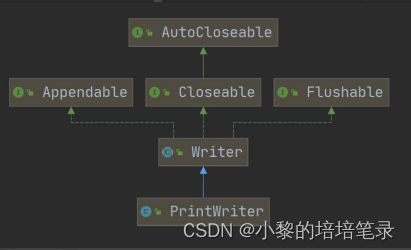
IO flow: node flow and process flow summarized in detail.

金仓数据库KingbaseES客户端编程接口指南-ODBC(6. KingbaseES ODBC 的扩展属性)

国内首秀元宇宙Live House圆满收官,百事可乐虚拟偶像真的好会!!

Navicat如何连接MySQL
![[GO语言基础] 一.为什么我要学习Golang以及GO语言入门普及](/img/ac/80ab67505f7df52d92a206bc3dd50e.png)
[GO语言基础] 一.为什么我要学习Golang以及GO语言入门普及

阿里云官方 Redis 开发规范!
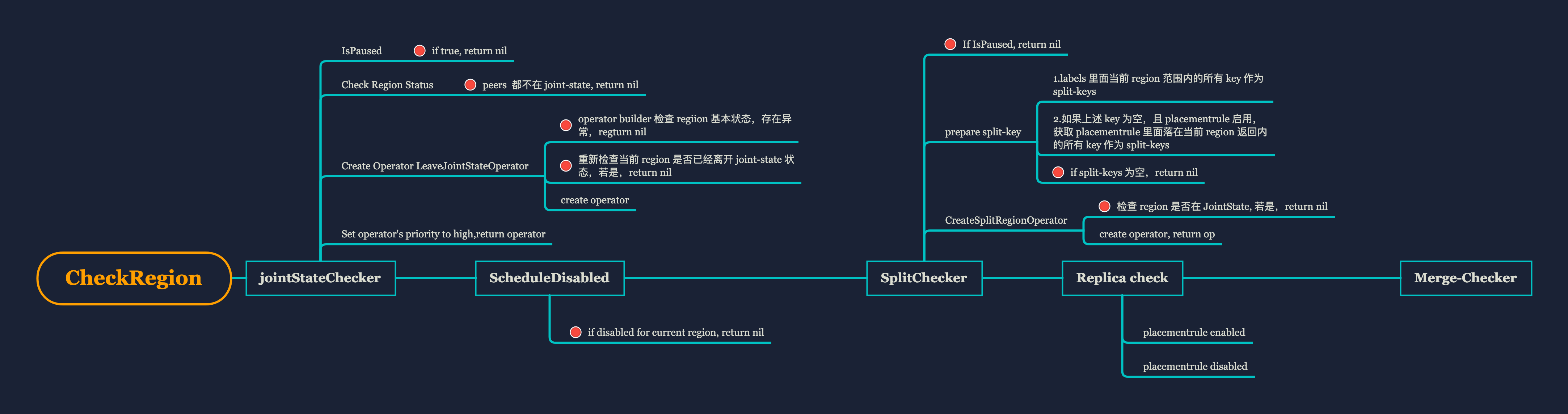
PD 源码分析- Checker: region 健康卫士

近期论文总结
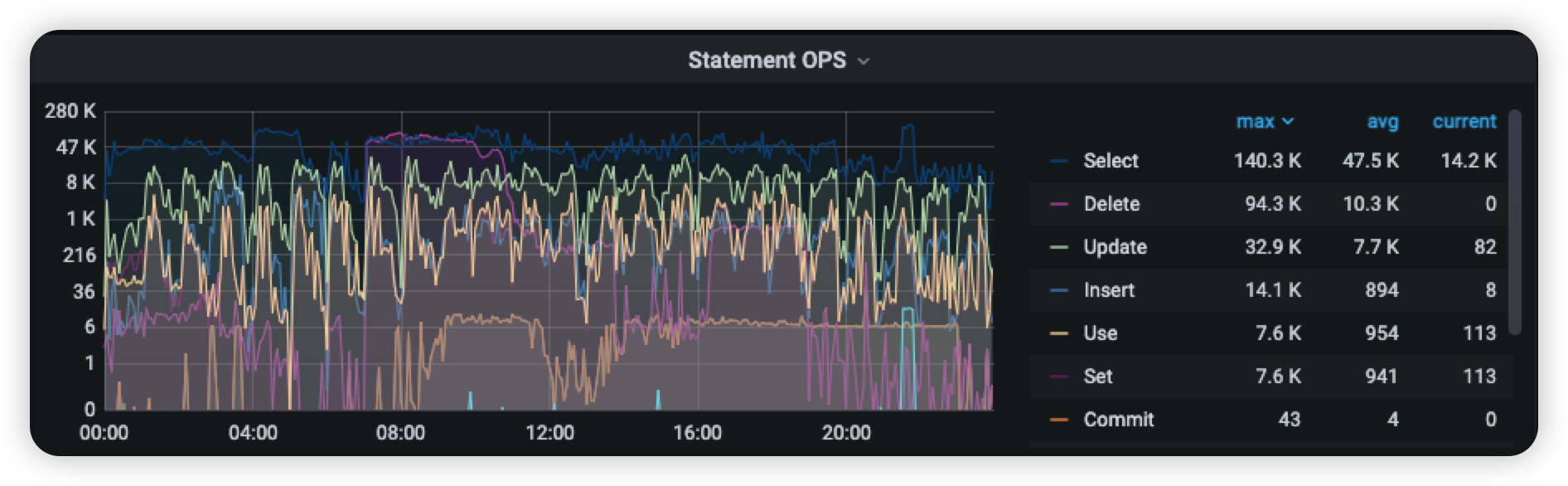
TiDB upgrade share with case (TiDB v4.0.1 to v5.4.1)
随机推荐
The adb for mysql in what platform for development
Windows系统Mysql8版本的安装教程
A recent paper summarizes
piglit_get_gl_enum_name 参数遍历
Bika LIMS 开源LIMS集—— SENAITE的使用(用户、角色、部门)
RedisTemplate使用详解
TiDB升级与案例分享(TiDB v4.0.1 → v5.4.1)
Mysql stored procedures, rounding
国内首秀元宇宙Live House圆满收官,百事可乐虚拟偶像真的好会!!
容器化 | 在 Rancher 中部署 MySQL 集群
Draw boxes of WPF screenshots controls and ellipse (4) "imitation WeChat"
TiFlash 源码阅读(五) DeltaTree 存储引擎设计及实现分析 - Part 2
MySQL如何对SQL做prepare预处理(解决IN查询SQL预处理仅能查询出一条记录的问题)
网页被劫持跳转怎么办?发布网修复方法
MySQL八股文背诵版
MLX90640 infrared thermal imaging temperature measuring sensor module development notes (9)
跨域: 汇总
[MySQL view] View concept, create, view, delete and modify
TiCDC Migration - TiDB to MySQL Test
[纯理论] FCOS