当前位置:网站首页>QML控件类型:TabBar
QML控件类型:TabBar
2022-06-28 11:19:00 【友善啊,朋友】
一、描述
TabBar 继承自 Container。提供了一个基于标签的导航模型。允许用户在不同的视图或子任务之间切换。

TabBar 填充了 TabButton 控件,可以与任何提供 currentIndex 属性的布局或容器控件一起使用,例如 StackLayout 或 SwipeView。
import QtQuick
import QtQuick.Controls
import QtQuick.Layouts

Window {
    width: 640
    height: 480
    visible: true
    title: qsTr("Hello World")
    TabBar {
        id: bar
        width: parent.width
        TabButton {
            text: qsTr("Home")
        }
        TabButton {
            text: qsTr("Discover")
        }
        TabButton {
            text: qsTr("Activity")
        }
    }

    StackLayout {
        width: parent.width
        currentIndex: bar.currentIndex
        Item {
            id: homeTab
        }
        Item {
            id: discoverTab
        }
        Item {
            id: activityTab
        }
    }
}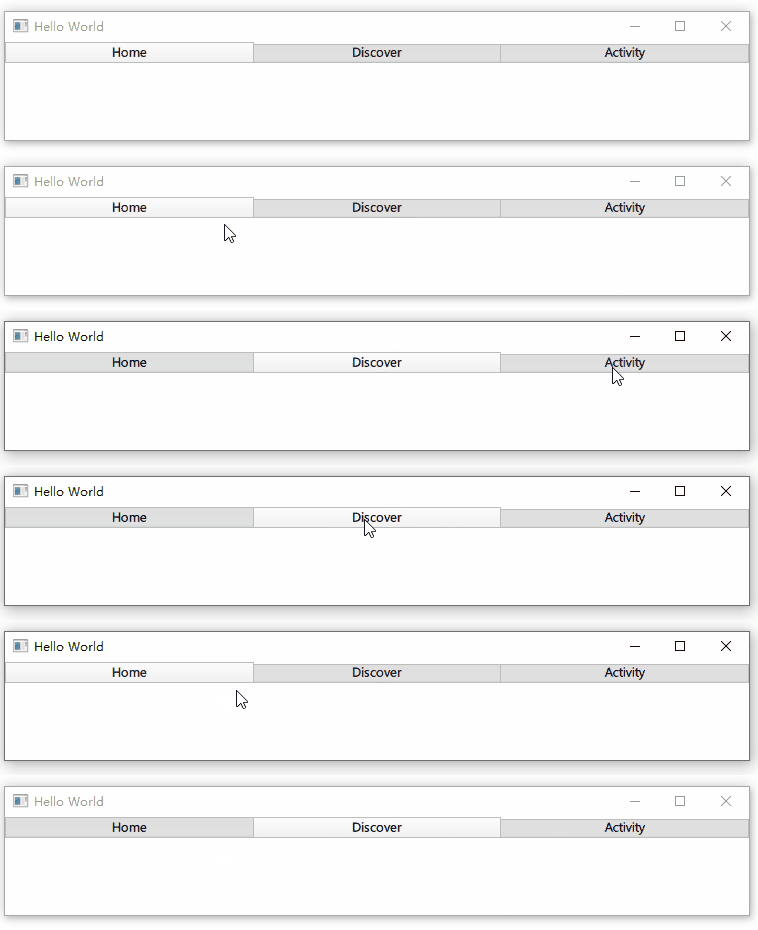
TabBar 通常填充有一组静态选项卡按钮,这些按钮被内联定义为 TabBar 的子项。
1.1、调整标签大小
默认情况下,TabBar 会调整其按钮的大小以适应控件的宽度,可用空间平均分配给每个按钮。可以通过为按钮设置显式宽度来覆盖默认的调整大小行为。
以下示例说明了如何将每个选项卡按钮保持在其隐式大小,而不是调整大小以适应选项卡栏:
import QtQuick
import QtQuick.Controls
import QtQuick.Layouts

Window {
    width: 640
    height: 480
    visible: true
    title: qsTr("Hello World")
    TabBar {
        id: bar
        width: parent.width
        TabButton {
            text: "First"
            width: implicitWidth
        }
        TabButton {
            text: "Second"
            width: implicitWidth
        }
        TabButton {
            text: "Third"
            width: implicitWidth
        }
    }

    StackLayout {
        width: parent.width
        currentIndex: bar.currentIndex
        Item {
            id: homeTab
        }
        Item {
            id: discoverTab
        }
        Item {
            id: activityTab
        }
    }
} 
1.2、轻弹标签
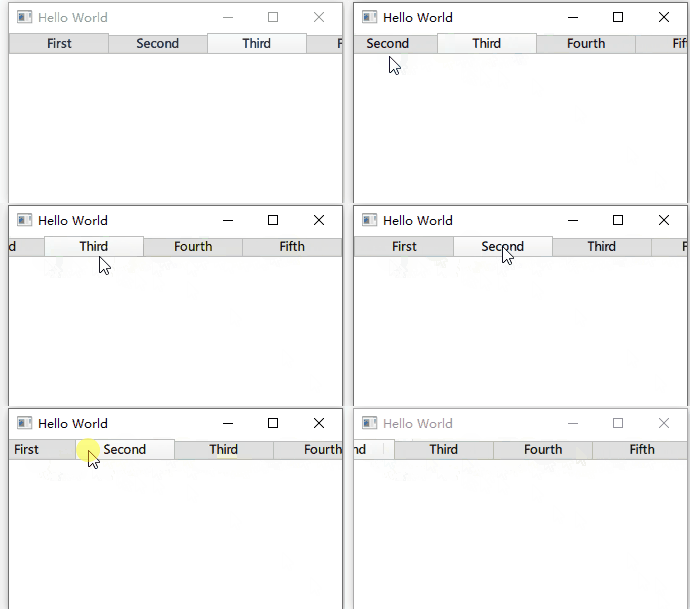
如果按钮的总宽度超过标签栏的可用宽度,它会自动变为可轻弹的。
import QtQuick
import QtQuick.Controls
import QtQuick.Layouts

Window {
    width: 640
    height: 480
    visible: true
    title: qsTr("Hello World")
    TabBar {
        id: bar
        width: parent.width

        Repeater {
            model: ["First", "Second", "Third", "Fourth", "Fifth"]

            TabButton {
                text: modelData
                width: Math.max(100, bar.width / 5)
            }
        }
    }

    StackLayout {
        width: parent.width
        currentIndex: bar.currentIndex
        Item {
            id: homeTab
        }
        Item {
            id: discoverTab
        }
        Item {
            id: activityTab
        }
    }
}
二、属性成员
1、contentHeight : real / contentWidth : real
内容高度 / 宽度。用于计算 TabBar 的总隐式高度 / 宽度。
2、position : enumeration
TabBar 的位置。默认值是特定于样式的。
- TabBar.Header:顶部,作为窗口或页面标题。
- TabBar.Footer:底部,作为窗口或页面页脚。
如果 TabBar 被指定为 ApplicationWindow 或 Page 的页眉或页脚,则会自动设置适当的位置。
三、附加属性成员
1、【只读】TabBar.index : int
TabBar 中每个 TabButton 的索引。它附加到 TabBar 的每个 TabButton。
2、【只读】TabBar.position : enumeration
TabBar 的位置。它附加到 TabBar 的每个 TabButton。
3、【只读】TabBar.tabBar : TabBar
管理此 TabButton 的 TabBar 。它附加到 TabBar 的每个 TabButton。
边栏推荐
猜你喜欢

智联招聘基于 Nebula Graph 的推荐实践分享

vsftpd服务的部署及优化

JS基础3

Zero foundation self-study SQL course | if function
JS foundation 3
This Exception was thrown from a job compiled with Burst, which has limited exception support. 报错

How to use output in katalon

网页提示此站点不安全解决方案

科研丨Web of Science检索技巧

Making and using of static library

随机推荐
【agora】get 一个 agora_refptr 对象的用法示例
Graduated
近况
Zero foundation self-study SQL course | if function
使用logrotate对宝塔的网站日志进行自动切割
Redis6 1: what problems can be solved by the introduction of NoSQL and redis?
李宏毅《机器学习》丨7. Conclusion(总结)
一套十万级TPS的IM综合消息系统的架构实践与思考
JS foundation 1-js introduction and operator
什么是主链系统?
Which broker is safer and more convenient to open an account for Oriental Fortune mobile stock?
[QT] connect syntax reference implementation
mysql-. SQL file phishing Online
JS foundation 2
Xshell and xftp tutorial
将浏览器中的文件 url转换为File流
太阳能无线LED显示屏的特点
100 important knowledge points that SQL must master: retrieving data
[sword finger offer] 49 Ugly number
工控安全之勒索病毒篇