当前位置:网站首页>OSS file upload
OSS file upload
2022-07-24 05:22:00 【Wang Jiujiu】
1. Disadvantages of uploading files to local servers
1. When our server restarts , Or when closed , The files we upload to the server will disappear
2. When our server group is , If I first visited A The server , Upload my files to A The server , When I visited for the second time , I'm not visiting A The server , It is B The server , Then I can't access my files
2. How to solve the shortcomings of local servers
1. Build a file server by yourself , Put all the documents in it
2. Use third-party tools
3. Upload ordinary files to OSS
1. introduce OSS rely on
 <dependencies>
<!--OSS Dependence -->
    <dependency>
      <groupId>repMaven.commons-fileupload</groupId>
      <artifactId>commons-fileupload</artifactId>
      <version>1.4</version>
    </dependency>
<!--MVC Dependence -->
    <dependency>
      <groupId>org.springframework</groupId>
      <artifactId>spring-webmvc</artifactId>
      <version>5.2.15.RELEASE</version>
    </dependency>
    <dependency>
      <groupId>com.fasterxml.jackson.core</groupId>
      <artifactId>jackson-databind</artifactId>
      <version>2.13.2.2</version>
    </dependency>
    <dependency>
      <groupId>repMaven.javax.servlet</groupId>
      <artifactId>servlet-api</artifactId>
      <version>2.5</version>
    </dependency>
    <dependency>
      <groupId>org.projectlombok</groupId>
      <artifactId>lombok</artifactId>
      <version>RELEASE</version>
      <scope>compile</scope>
    </dependency>
<dependency>
      <groupId>com.aliyun.oss</groupId>
      <artifactId>aliyun-sdk-oss</artifactId>
      <version>3.10.2</version>
    </dependency>
  </dependencies>
2. Code writing
You can find it in Alibaba cloud's product documentation


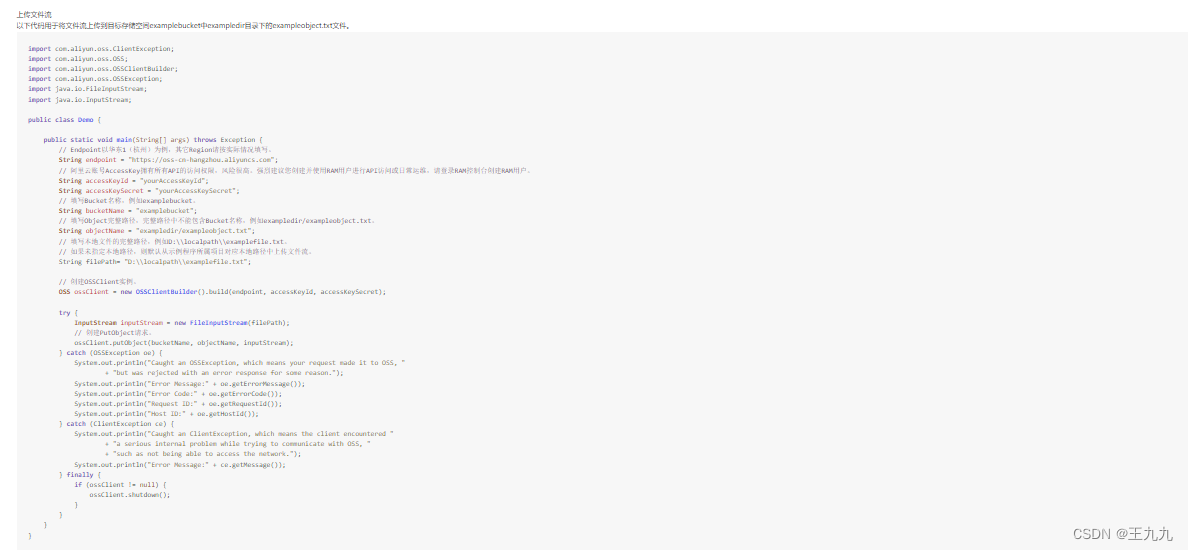
Code :
import com.aliyun.oss.ClientException;
import com.aliyun.oss.OSS;
import com.aliyun.oss.OSSClientBuilder;
import com.aliyun.oss.OSSException;
import java.io.FileInputStream;
import java.io.InputStream;

public class Demo {

    public static void main(String[] args) throws Exception {
        // Endpoint East China 1( Hangzhou ) For example , Other Region Please fill in according to the actual situation .
        //endpoint  Find one's own bucked The catalog of    Click the name of your bag , Then click overview , Yes endpoint Internet address
        String endpoint = "https://oss-cn-hangzhou.aliyuncs.com";
        //  Alicloud account AccessKey Have all the API Access rights of , The risk is high . It is highly recommended that you create and use it RAM The user carries out API Visit or daily operations , Please log in RAM Console creation RAM user .
        // My secret key
        String accessKeyId = "yourAccessKeyId";
        String accessKeySecret = "yourAccessKeySecret";
        //  Fill in Bucket name , for example examplebucket.
        String bucketName = "examplebucket";
        //  Fill in Object The full path , The full path cannot contain Bucket name , for example exampledir/exampleobject.txt.
        String objectName = "exampledir/exampleobject.txt";
        //  Fill in the full path of the local file , for example D:\\localpath\\examplefile.txt.
        //  If no local path is specified , By default, the file stream is uploaded from the local path corresponding to the project to which the sample program belongs .
        String filePath= "D:\\localpath\\examplefile.txt";

        //  establish OSSClient example .
        OSS ossClient = new OSSClientBuilder().build(endpoint, accessKeyId, accessKeySecret);

        try {
            InputStream inputStream = file.getInputStream(filePath);
            //  establish PutObject request .
            ossClient.putObject(bucketName, objectName, inputStream);
        } catch (OSSException oe) {

        } finally {
            if (ossClient != null) {
                ossClient.shutdown();
            }
        }
    }
}
2.elementui Asynchronous upload OSS The server
1. front end
<%--
  Created by IntelliJ IDEA.
  User: ykq
  Date: 2022/6/9
  Time: 15:53
  To change this template use File | Settings | File Templates.
--%>
<%@ page contentType="text/html;charset=UTF-8" language="java" %>
<html>
<head>
    <title>Title</title>
    <!-- introduce element have to css style -->
    <link type="text/css" rel="stylesheet" href="css/index.css"/>
    <!-- introduce vue have to js file   This has to be element Introduced before -->
    <script type="text/javascript" src="js/vue.js"></script>
    <script type="text/javascript" src="js/qs.min.js"></script>
    <script type="text/javascript" src="js/axios.min.js"></script>
    <!--element have to js file -->
    <script type="text/javascript" src="js/index.js"></script>
</head>
<body>
    <div id="app">
        <%--action: File upload path --%>
        <el-upload
                class="avatar-uploader"
                action="/login"
                :show-file-list="false"
                :on-success="handleAvatarSuccess"
                :before-upload="beforeAvatarUpload">
            <img v-if="imageUrl" :src="imageUrl" class="avatar">
            <i v-else class="el-icon-plus avatar-uploader-icon"></i>
        </el-upload>
    </div>
</body>
<script>
     var app=new Vue({
           el:"#app",
           data:{
               imageUrl:"",
           },
           methods:{
               // Method triggered after successful upload
               handleAvatarSuccess(res, file) {
                   this.imageUrl=res.data;
               },
               // Method triggered before uploading
               beforeAvatarUpload(file) {
                   const isJPG = file.type === 'image/jpeg';
                   const isPNG = file.type === 'image/png';
                   const isLt2M = file.size / 1024 / 1024 < 2;
                   if (!isJPG) {
                       this.$message.error(' Uploading a picture of your head can only be  JPG  Format !');
                   }
                   if (!isLt2M) {
                       this.$message.error(' The size of the uploaded image cannot exceed  2MB!');
                   }
                   return isJPG && isLt2M;
               }
           }
     })
</script>

<style>
    .avatar-uploader .el-upload {
        border: 1px dashed #d9d9d9;
        border-radius: 6px;
        cursor: pointer;
        position: relative;
        overflow: hidden;
    }
    .avatar-uploader .el-upload:hover {
        border-color: #409EFF;
    }
    .avatar-uploader-icon {
        font-size: 28px;
        color: #8c939d;
        width: 178px;
        height: 178px;
        line-height: 178px;
        text-align: center;
    }
    .avatar {
        width: 178px;
        height: 178px;
        display: block;
    }
</style>
</html>
Back end
package com.ykq.utils;

import com.aliyun.oss.OSS;
import com.aliyun.oss.OSSClientBuilder;
import org.springframework.web.multipart.MultipartFile;

import java.io.InputStream;
import java.util.Calendar;
import java.util.UUID;

/**
 * @program: qy151-springmvc-upload
 * @description:
 * @author:  Yan Keqi 2
 * @create: 2022-06-10 16:00
 **/
public class OSSUtils {

    public static String upload(MultipartFile file){
        // Endpoint East China 1( Hangzhou ) For example , Other Region Please fill in according to the actual situation .
        String endpoint = "oss-cn-hangzhou.aliyuncs.com";

        //LTAI78XQAZq2s5Rv
        //qdyZxR0x4LoUpTVbuyvCGdcrhEyw7H
        //  Alicloud account AccessKey Have all the API Access rights of , The risk is high . It is highly recommended that you create and use it RAM The user carries out API Visit or daily operations , Please log in RAM Console creation RAM user .
        String accessKeyId = "LTAI78XQAZq2s5Rv";
        String accessKeySecret = "qdyZxR0x4LoUpTVbuyvCGdcrhEyw7H";
        //  Fill in Bucket name , for example examplebucket.
        String bucketName = "jiu99";
        // You upload to oss The name after   Will help you create folders according to the date .  Call the following method to get the name of the file after uploading
        String objectName =fileName(file);
        //  establish OSSClient example .
        OSS ossClient = new OSSClientBuilder().build(endpoint, accessKeyId, accessKeySecret);

        try {
            InputStream inputStream =file.getInputStream();
            //  establish PutObject request .
            ossClient.putObject(bucketName, objectName, inputStream);
        } catch (Exception oe) {

        } finally {
            if (ossClient != null) {
                ossClient.shutdown();
            }
        }
        //https://qy151.oss-cn-hangzhou.aliyuncs.com/2022/6/10/20d3d7e6b5bb455cb548675501f7270fgdnj.jpg
        String url="https://"+bucketName+"."+endpoint+"/"+objectName;
        return url;
    }

    // Get uploaded to oss The name after
    private static String fileName(MultipartFile file){
        Calendar calendar=Calendar.getInstance();
        String name=calendar.get(Calendar.YEAR)+"/"+(calendar.get(Calendar.MONTH)+1)+"/"+
                calendar.get(Calendar.DATE)+"/"+ UUID.randomUUID().toString().replace("-","")+
                file.getOriginalFilename();

        return name;
    }
}
Interface
@RequestMapping("/login")
    @ResponseBody
    public Map upload04(MultipartFile file) {
        try {
            String url = OSSUtils.upload(file);
            Map map = new HashMap();
            map.put("code", 2000);
            map.put("msg", " Upload successful ");
            map.put("data", url);
            return map;
        } catch (Exception e) {
            e.printStackTrace();
        }
        HashMap map = new HashMap();
        map.put("code", 5000);
        map.put("msg", " Upload failed ");
        return map;
    }
Save user information -- Head portrait
1. Create a new project
2. Introduce the relevant dependencies we need
<dependencies>

    <dependency>
      <groupId>repMaven.commons-fileupload</groupId>
      <artifactId>commons-fileupload</artifactId>
      <version>1.4</version>
    </dependency>
    <dependency>
      <groupId>org.springframework</groupId>
      <artifactId>spring-webmvc</artifactId>
      <version>5.2.15.RELEASE</version>
    </dependency>
    <dependency>
      <groupId>com.fasterxml.jackson.core</groupId>
      <artifactId>jackson-databind</artifactId>
      <version>2.13.2.2</version>
    </dependency>
    <dependency>
      <groupId>repMaven.javax.servlet</groupId>
      <artifactId>servlet-api</artifactId>
      <version>2.5</version>
    </dependency>
    <dependency>
      <groupId>org.projectlombok</groupId>
      <artifactId>lombok</artifactId>
      <version>RELEASE</version>
      <scope>compile</scope>
    </dependency>
    <dependency>
      <groupId>com.aliyun.oss</groupId>
      <artifactId>aliyun-sdk-oss</artifactId>
      <version>3.10.2</version>
    </dependency>
  </dependencies>
<?xml version="1.0" encoding="UTF-8"?>
<web-app xmlns="http://xmlns.jcp.org/xml/ns/javaee"
         xmlns:xsi="http://www.w3.org/2001/XMLSchema-instance"
         xsi:schemaLocation="http://xmlns.jcp.org/xml/ns/javaee http://xmlns.jcp.org/xml/ns/javaee/web-app_4_0.xsd"
         version="4.0">
  <filter>
    <filter-name>b</filter-name>
    <filter-class>org.springframework.web.filter.CharacterEncodingFilter</filter-class>
    <init-param>
      <param-name>encoding</param-name>
      <param-value>utf-8</param-value>
    </init-param>
  </filter>
  <filter-mapping>
    <filter-name>b</filter-name>
    <url-pattern>/**</url-pattern>
  </filter-mapping>
  <servlet>
    <servlet-name>a</servlet-name>
    <servlet-class>org.springframework.web.servlet.DispatcherServlet</servlet-class>
    <init-param>
      <param-name>contextConfigLocation</param-name>
      <param-value>classpath:spring.xml</param-value>
    </init-param>
  </servlet>
  <servlet-mapping>
    <servlet-name>a</servlet-name>
    <url-pattern>/</url-pattern>
  </servlet-mapping>
</web-app>
3. The configuration file
 <context:component-scan base-package="guan"/>
    <mvc:annotation-driven/>
    <mvc:default-servlet-handler/>
    <bean id="multipartResolver" class="org.springframework.web.multipart.commons.CommonsMultipartResolver">
        <property name="maxUploadSize" value="12485760"/>
    </bean>
4. Front page
<%--
  Created by IntelliJ IDEA.
  User: lenovo
  Date: 2022/6/10
  Time: 21:10
  To change this template use File | Settings | File Templates.
--%>
<%@ page contentType="text/html;charset=UTF-8" language="java" %>
<html>
<head>
    <title>Title</title>
    <title>Title</title><script type="text/javascript" src="js/vue.js"></script>
    <script type="text/javascript" src="js/axios.min.js"></script>
    <link type="text/css" rel="stylesheet" href="css/index.css">
    <script type="text/javascript" src="js/index.js"></script>
    <script type="text/javascript" src="js/qs.min.js"></script>
    <style>
        .avatar-uploader .el-upload {
            border: 1px dashed #d9d9d9;
            border-radius: 6px;
            cursor: pointer;
            position: relative;
            overflow: hidden;
        }
        .avatar-uploader .el-upload:hover {
            border-color: #409EFF;
        }
        .avatar-uploader-icon {
            font-size: 28px;
            color: #8c939d;
            width: 178px;
            height: 178px;
            line-height: 178px;
            text-align: center;
        }
        .avatar {
            width: 178px;
            height: 178px;
            display: block;
        }
    </style>
</head>
<body>
    <div id="app">
        <el-form label-width="80px" :model="user">
            <el-form-item label=" Head portrait ">
                <el-upload
                        class="avatar-uploader"
                        action="login"
                        :show-file-list="false"
                        :on-success="handleAvatarSuccess"
                        :before-upload="beforeAvatarUpload">
                    <img v-if="imageUrl" :src="imageUrl" class="avatar">
                    <i v-else class="el-icon-plus avatar-uploader-icon"></i>
                </el-upload>
            </el-form-item>
            <el-form-item label=" full name ">
                <el-input v-model="user.name"></el-input>
            </el-form-item>
            <el-form-item label=" Age ">
                <el-input v-model="user.age"></el-input>
            </el-form-item>
            <el-form-item label=" Gender ">
                <el-input v-model="user.sex"></el-input>
            </el-form-item>
            <el-button type="primary" @click="submitForm"> Upload </el-button>
        </el-form>
    </div>
<script>
    var app=new Vue({
        el:"#app",
        data:{
            imageUrl:"",
            user:{},
        },
        methods: {
            submitForm(){
                // Click on the submit , To return the data to the background
                axios.post("add",this.user).then(function(result){

                })
            }
            ,handleAvatarSuccess(res, file) {
                // Echo to page
                this.imageUrl=res.data;
                // Save the path of the picture to user in
                this.user.image=this.imageUrl
            },
            beforeAvatarUpload(file) {
                const isJPG = file.type === 'image/jpeg';
                const isLt2M = file.size / 1024 / 1024 < 2;

                if (!isJPG) {
                    this.$message.error(' Uploading a picture of your head can only be  JPG  Format !');
                }
                if (!isLt2M) {
                    this.$message.error(' The size of the uploaded image cannot exceed  2MB!');
                }
                return isJPG && isLt2M;

            }
        }
    })
</script>
</body>
</html>
5. Entity class
@Data
@NoArgsConstructor
@AllArgsConstructor
public class USer {
    private String name;
    private String sex;
    private int age;
}
6.commonResult
@Data
@AllArgsConstructor
@NoArgsConstructor
public class CommonResult {
    private int code;
    private String msg;
    private Object data;
}
7. Introduce tool classes
package guan.util;

import com.aliyun.oss.OSS;
import com.aliyun.oss.OSSClientBuilder;
import org.springframework.web.multipart.MultipartFile;

import java.io.InputStream;
import java.util.Calendar;
import java.util.UUID;

/**
 * TODO
 *
 * @author lenovo
 * @version 1.0
 * @since 2022-06-10  19:06:48
 */

public class OSSUtil {
    public static String main(MultipartFile file) {
        // Endpoint East China 1( Hangzhou ) For example , Other Region Please fill in according to the actual situation .
        String endpoint = "oss-cn-hangzhou.aliyuncs.com";
        //  Alicloud account AccessKey Have all the API Access rights of , The risk is high . It is highly recommended that you create and use it RAM The user carries out API Visit or daily operations , Please log in RAM Console creation RAM user .
        //LTAI5t7TZyWEmSktcmMVFcJr
        //OiRHuQYnoyjgqi9nBdrbHmthMWqESp
        String accessKeyId = "LTAI5t7TZyWEmSktcmMVFcJr";
        String accessKeySecret = "OiRHuQYnoyjgqi9nBdrbHmthMWqESp";
        //  Fill in Bucket name , for example examplebucket.
        String bucketName = "jiu99";
        //  Fill in Object The full path , The full path cannot contain Bucket name , for example exampledir/exampleobject.txt.
        // Create date object

        // Time + Random real name of an uploaded file
        String objectName =filename(file);
        //  Fill in the full path of the local file , for example D:\\localpath\\examplefile.txt.
        //  establish OSSClient example .
        OSS ossClient = new OSSClientBuilder().build(endpoint, accessKeyId, accessKeySecret);

        try {
            InputStream inputStream = file.getInputStream();
            //  establish PutObject request .
            ossClient.putObject(bucketName, objectName, inputStream);
        } catch (Exception oe) {
        }  finally {
            if (ossClient != null) {
                ossClient.shutdown();
            }
        }
        // Make the picture echo , Save path to request
        String img="https://"+bucketName+"."+endpoint+"/"+objectName;
        return img;
    }
    private static String filename(MultipartFile file){
        Calendar calendar=Calendar.getInstance();
      String name= calendar.get(calendar.YEAR)+"/"+(calendar.get(calendar.MONTH+1))+"/"
              +calendar.get(calendar.DATE)+"/"+
              UUID.randomUUID().toString().replace("-","")+
              file.getOriginalFilename();
      return name;
    }
}
8. Interface
  @RequestMapping("login")
    @ResponseBody
    public CommonResult login(MultipartFile file){
        try {
            String s = OSSUtil.main(file);
            return new CommonResult(2000," Upload successful ",s);
        }catch (Exception e){
            return new CommonResult(5000," Upload failed ",null);
        }

    }
@RequestMapping("add")
@ResponseBody
public CommonResult add(@RequestBody User user){
System.out.println(user);
return new CommonResult(5000," Upload failed ",null);
}边栏推荐
- [database connection] - excerpt from training
- Chapter5 foundation of deep learning
- Context encoders: feature learning by painting paper notes
- MySQL连接
- 1. Pedestrian recognition based on incremental occlusion generation and confrontation suppression
- C primer plus learning notes - 5. Pointer
- anaconda常用命令的整理
- T 6-10
- String的字符串常量池和intern()详解
- Token of space renewable energy
猜你喜欢

FTP file transfer protocol

1、基于增量式生成遮挡与对抗抑制的行人再识别

Blue Bridge Cup 31 day sprint 21 day (C language)

酒店IPTV数字电视系统解决方案

Data annotation learning summary

scikit-learn笔记
What are the core strengths of a knowledge base that supports customers quickly?
【sklearn】PCA
Hotel IPTV digital TV system solution

Wang Qing, director of cloud infrastructure software research and development of Intel (China): Intel's technology development and prospects in cloud native
随机推荐
)To feed back to the application layer or into multiple format documents:
Problems encountered in configuring Yum source
BeanShell built-in variable CTX
CentOS 7安装Mysql5.6.37
ZY: modify host name
Hotel IPTV digital TV system solution
Web development
finally和return的执行顺序
T 1-5
手写orm框架
使用swagger2markup生成API文档
generator生成器,只生成两个方法
Recursive cascade network: medical image registration based on unsupervised learning
IDEA:SLF4J: Failed to load class “org.slf4j.impl.StaticLoggerBinder“.
2. Input a circle radius r, when r > = 0, calculate and output the area and perimeter of the circle, otherwise, output the prompt information.
AttributeError: ‘NoneType‘ object has no attribute ‘shape‘
Wang Qing, director of cloud infrastructure software research and development of Intel (China): Intel's technology development and prospects in cloud native
Image painting for irregular holes using partial revolutions paper notes
Blue Bridge Cup 31 day sprint 21 day (C language)
Tips for using BeanShell built-in variable prev