当前位置:网站首页>CentOS7 实战部署MySQL8(二进制方式)
CentOS7 实战部署MySQL8(二进制方式)
2022-06-10 23:51:00 【dehuisun】
目录
一、安装方式
1.1 windows下mysql的两种安装方式
安装包安装方式
压缩包方式安装
1.2 Linux下安装mysql的安装方式
二进制文件安装
RPM安装
yum源安装
Linux常用RPM、二进制文件方式安装,本章以二进制文件方式进行部署。
二、安装下载MySQL
2.1卸载MariaDB
在CentOS中默认安装有MariaDB,是MySQL的一个分支,主要由开源社区维护。CentOS 7及以上版本已经不再使用MySQL数据库,而是使用MariaDB数据库。如果直接安装MySQL,会和MariaDB的文件冲突。因此,需要先卸载自带的MariaDB,再安装MySQL。
#查看是否存在MariaDB
rpm -qa|grep mariadb
#卸载依次卸载
rpm -e --nodeps mariadb-libs-5.5.60-1.el7_5.x86_64
#查看是否卸载干净
rpm -qa|grep mariadb
如图:
2.2 下载Mysql
官网地址:https://dev.mysql.com/downloads/mysql/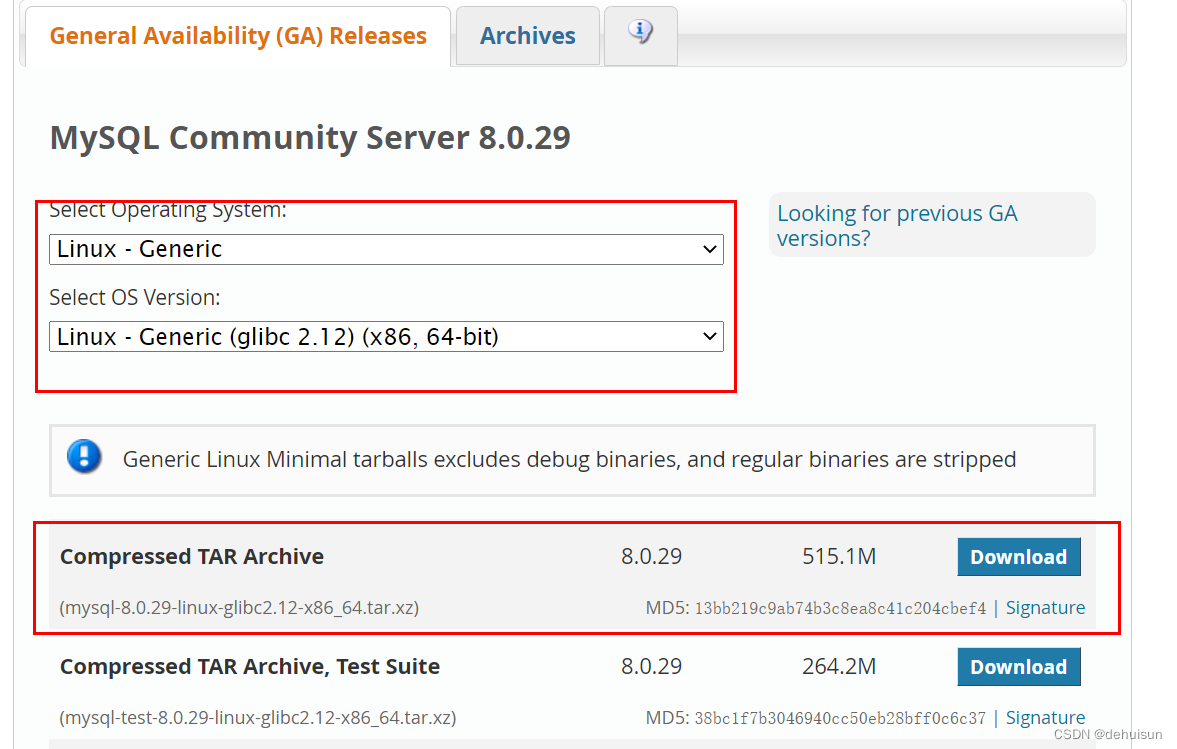
官网下载需要登录,没有账号注册即可。
或者直接下载.
#进入下载目录
cd /usr/local

#下载安装包
wget https://dev.mysql.com/get/Downloads/MySQL-8.0/mysql-8.0.20-linux-glibc2.12-x86_64.tar.xz

#解压缩
tar -Jxvf mysql-8.0.20-linux-glibc2.12-x86_64.tar.xz

#重命名路径
mv mysql-8.0.20-linux-glibc2.12-x86_64 mysql8
2.3 添加环境变量
vi /etc/profile添加配置:PATH=$PATH:/usr/local/mysql8/bin
#刷新
source /etc/profile
2.3 创建用户组
# 创建一个用户组:mysql
groupadd mysql
# 创建一个系统用户:mysql,指定用户组为mysql
useradd -r -g mysql mysql

mkdir /home/mysql
chmod 755 /home/mysql
cp -a /etc/skel/. /home/mysql/
2.4 创建数据目录
#创建目录
mkdir -p /usr/local/mysql8/data
#赋予权限 更改属主和数组
chown -R mysql:mysql /usr/local/mysql8/data
# 更改模式
chmod -R 750 /usr/local/mysql8/data
2.5 初始化配置文件
创建配置文件
vi /usr/local/mysql8/my.cnf文件内容:
[mysql]
# 默认字符集
default-character-set=utf8mb4
[client]
#修改默认端口号
port       = 13306
socket     = /tmp/mysql.sock

[mysqld]
#修改默认端口号
port       = 13306
server-id  = 3306
user       = mysql
socket     = /tmp/mysql.sock
# 安装目录
basedir    = /usr/local/mysql8
# 数据存放目录
datadir    = /usr/local/mysql8/data/mysql
log-bin    = /usr/local/mysql8/data/mysql/mysql-bin
innodb_data_home_dir      =/usr/local/mysql8/data/mysql
innodb_log_group_home_dir =/usr/local/mysql8/data/mysql
#日志及进程数据的存放目录
log-error =/usr/local/mysql8/data/mysql/mysql.log
pid-file  =/usr/local/mysql8/data/mysql/mysql.pid
# 服务端使用的字符集默认为8比特编码
character-set-server=utf8mb4
#不区分大小写
lower_case_table_names=1
autocommit =1

 ##################以上要修改的########################
skip-external-locking
key_buffer_size = 256M
max_allowed_packet = 1M
table_open_cache = 1024
sort_buffer_size = 4M
net_buffer_length = 8K
read_buffer_size = 4M
read_rnd_buffer_size = 512K
myisam_sort_buffer_size = 64M
thread_cache_size = 128

#query_cache_size = 128M
tmp_table_size = 128M
explicit_defaults_for_timestamp = true
max_connections = 500
max_connect_errors = 100
open_files_limit = 65535

binlog_format=mixed

binlog_expire_logs_seconds =864000

# 创建新表时将使用的默认存储引擎
default_storage_engine = InnoDB
innodb_data_file_path = ibdata1:10M:autoextend
innodb_buffer_pool_size = 1024M
innodb_log_file_size = 256M
innodb_log_buffer_size = 8M
innodb_flush_log_at_trx_commit = 1
innodb_lock_wait_timeout = 50
transaction-isolation=READ-COMMITTED

[mysqldump]
quick
max_allowed_packet = 16M

[myisamchk]
key_buffer_size = 256M
sort_buffer_size = 4M
read_buffer = 2M
write_buffer = 2M

[mysqlhotcopy]
interactive-timeout
初始化mysql
mysqld --defaults-file=/usr/local/mysql8/my.cnf --basedir=/usr/local/mysql8/ --datadir=/usr/local/mysql8/data/mysql --user=mysql --initialize-insecure
如果报错,依赖安装
yum install -y libaio三、注册启动服务
临时启动测试脚本
mysqld_safe --defaults-file=/usr/local/mysql8/my.cnf &
#查看是否启动成功
ps -ef|grep mysql
#复制主配置文件
cp /usr/local/mysql8/my.cnf /etc/my.cnf

#复制sysv服务脚本
cp /usr/local/mysql8/support-files/mysql.server /etc/rc.d/init.d/mysqld

#添加开机启动
chkconfig --add mysqld
chkconfig mysqld on

#启动脚本
service mysqld start
四、用户配置
4.1 登录
# 无密码登录方式
/data/software/mysql8/bin/mysql -u root --skip-password
# 有密码登录方式(初始的随机密码在/data/mysql8_data/mysql/mysql.log下)
mysql -u root -p
password:随机密码
4.2 修改密码
# 修改密码
ALTER USER 'root'@'localhost' IDENTIFIED WITH mysql_native_password BY 'password';
# 刷新权限
FLUSH PRIVILEGES;
4.3 授权远程登录
mysql> use mysql
mysql> update user set user.Host='%'where user.User='root';
mysql> flush privileges;
mysql> quit
4.4创建数据库与用户授权
CREATE DATABASE test DEFAULT CHARACTER SET utf8mb4 COLLATE utf8mb4_unicode_ci;
CREATE USER 'test'@'%' IDENTIFIED BY 'a123456';
GRANT ALL PRIVILEGES ON test.* TO 'test'@'%';
FLUSH PRIVILEGES; 
关注公众号”小猿架构“,发送 "前后分离架构" ,下载课程视频+课程源码+课件。
边栏推荐
- Shengteng AI development experience based on target detection and identification of Huawei cloud ECS [Huawei cloud to jianzhiyuan]
- teterttet
- Brief introduction to MySQL lock and transaction isolation level
- Can I buy annuity insurance? Is annuity insurance safe?
- The mystery of number idempotent and perfect square
- UUID quick explanation
- [network planning] 2.2.3 user server interaction: cookies
- QT program plug-in reports an error plugin xcb
- 圖的最短路徑問題 詳細分解版
- Dynamic programming classical topic triangle shortest path
猜你喜欢
Fastdfs quick start

Kubernetes入门介绍与基础搭建

Random points in non overlapping rectangles

动态规划经典题目三角形最短路径
非重叠矩形中的随机点

Synchronized keyword for concurrent programming

市值215亿,这个四川80后会让电视机成为历史?
![[论文阅读] FixMatch: Simplifying Semi-Supervised Learning with Consistency and Confidence](/img/86/72726f933deef6944b62149759b7d5.png)
[论文阅读] FixMatch: Simplifying Semi-Supervised Learning with Consistency and Confidence
![[network planning] 2.2.4 Web cache / proxy server](/img/a8/74a1b44ce4d8b0b1a85043a091a91d.jpg)
[network planning] 2.2.4 Web cache / proxy server
[network planning] 1.3 packet switching and circuit switching in the network core
随机推荐
WIN11卸载小组件
Optimization of startup under SYSTEMd, deleting useless SYSTEMd services
On the quality assurance system of youzan search V2021
The mystery of number idempotent and perfect square
Wechat applet to realize OCR scanning recognition
array_ column() expects parameter 1 to be array, array given
Deep copy and shallow copy in golang
B 树的简单认识
[network planning] 1.3 packet switching and circuit switching in the network core
Can I buy annuity insurance? Is annuity insurance safe?
STM32 cannot download again after downloading the code
Dynamic programming classical topic triangle shortest path
Adapter mode
Locks in sqlserver
Detailed decomposition of the shortest path problem in Figure
[untitled] test
twelve billion three hundred and twenty-four million two hundred and forty-three thousand two hundred and forty-two
C语言实现设置桌面壁纸
Dual wing layout
[network planning] 2.4 DNS: directory service of the Internet