当前位置:网站首页>Unity摄像机画面制作全景图片|截图制作全景图
Unity摄像机画面制作全景图片|截图制作全景图
2022-07-22 18:07:00 【Glunn】
Unity摄像机画面制作全景图片
目录
你好! 这是你第一次使用 Markdown编辑器 所展示的欢迎页。如果你想学习如何使用Markdown编辑器, 可以仔细阅读这篇文章,了解一下Markdown的基本语法知识。
效果展示
unity的场景
生成的图片
Unity编辑器中使用脚本部分
[MenuItem("生成图片/CreatPic")]
    public static void A()
    {

        Camera cam = Camera.main;
		//可修改数值 new RenderTexture(4096, 4096, 32);
        RenderTexture cubemap = new RenderTexture(2048, 2048, 16);
        cubemap.dimension = TextureDimension.Cube;
        cam.RenderToCubemap(cubemap, 63, Camera.MonoOrStereoscopicEye.Mono);
		//可修改数值 new RenderTexture(4096, 4096, 32);
        RenderTexture equirect = new RenderTexture(1920, 1080, 8);
        cubemap.ConvertToEquirect(equirect, Camera.MonoOrStereoscopicEye.Mono);

        RenderTexture.active = equirect;
        Texture2D tex = new Texture2D(equirect.width, equirect.height, TextureFormat.ARGB32, false, true);
        tex.ReadPixels(new Rect(0, 0, tex.width, tex.height), 0, 0);
        RenderTexture.active = null;
        GL.Clear(true, true, Color.black);
        tex.Apply();
        byte[] bytes = tex.EncodeToTGA();
        CreateDirectroryOfFile(System.Environment.GetFolderPath(System.Environment.SpecialFolder.Desktop) + "\\全景图\\)");
        System.IO.File.WriteAllBytes(System.Environment.GetFolderPath(System.Environment.SpecialFolder.Desktop)
            + "\\全景图\\" + System.DateTime.Now.Ticks + ".tga", bytes);

    }

    public static void CreateDirectroryOfFile(string filePath)
    {

        Debug.Log($"CreateDirectrory {
      filePath}[folder_path],");
        if (!string.IsNullOrEmpty(filePath))
        {

            string dir_name = Path.GetDirectoryName(filePath);
            if (!Directory.Exists(dir_name))
            {

                Debug.Log($"No Exists {
      dir_name}[dir_name],");
                Directory.CreateDirectory(dir_name);
            }
            else
            {

                Debug.Log($"Exists {
      dir_name}[dir_name],");
            }
        }
    }
Unity编辑器中使用方法
我们的脚本部分写完左上角的菜单栏中会出现生成图片四个字
打开这个选项我们可以看到CreatPic
然后我们点击后就可以执行完毕
会自动在我们的桌面创建文件夹然后把图片存储进去
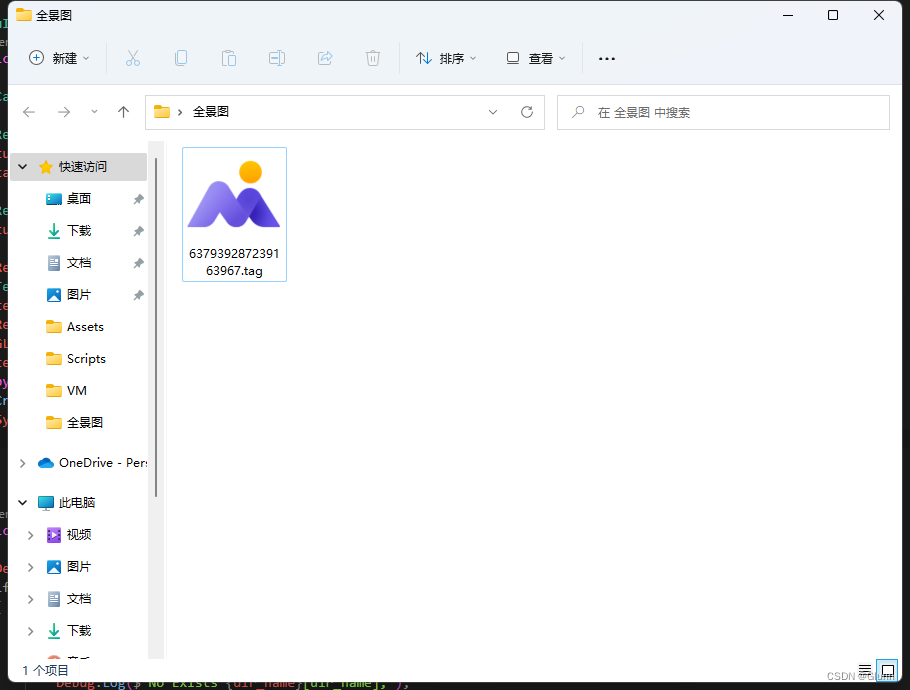
Unity动态存储图片脚本部分
 Camera cam;
    RenderTexture cubemap;
    RenderTexture equirect;
    [Header("生成次数 true为连续生成")][SerializeField] private bool ison;
    void Start()
    {

        cam = Camera.main;
        cubemap = new RenderTexture(4096, 4096, 32);
        cubemap.dimension = TextureDimension.Cube;
        equirect = new RenderTexture(4096, 2048, 32);
        StartCoroutine(B());
    }

    // Update is called once per frame
    void Update()
    {

        if (ison)
        {

            StartCoroutine(B());
        }
    }

    IEnumerator B()
    {

        if (ison)
        {

            while (true)
            {

                Creat();
                yield return new WaitForSecondsRealtime(0.04F);
            }
        }
        else
        {

            Creat();
        }


        yield return null;
    }


    public void Creat()
    {

        cam.RenderToCubemap(cubemap, 63, Camera.MonoOrStereoscopicEye.Mono);
        cubemap.ConvertToEquirect(equirect, Camera.MonoOrStereoscopicEye.Mono);
        RenderTexture.active = equirect;
        Texture2D tex = new Texture2D(equirect.width, equirect.height, TextureFormat.ARGB32, false, true);
        tex.ReadPixels(new Rect(0, 0, tex.width, tex.height), 0, 0);
        RenderTexture.active = null;
        GL.Clear(true, true, Color.black);
        tex.Apply();
        byte[] bytes = tex.EncodeToTGA();
        CreateDirectroryOfFile(System.Environment.GetFolderPath(System.Environment.SpecialFolder.Desktop) + "\\全景图\\)");

        System.IO.File.WriteAllBytes(System.Environment.GetFolderPath(System.Environment.SpecialFolder.Desktop)
            + "\\全景图\\" + System.DateTime.Now.Ticks + ".tga", bytes);
    }
    public static void CreateDirectroryOfFile(string filePath)
    {

        Debug.Log($"CreateDirectrory {
      filePath}[folder_path],");
        if (!string.IsNullOrEmpty(filePath))
        {

            string dir_name = Path.GetDirectoryName(filePath);
            if (!Directory.Exists(dir_name))
            {

                Debug.Log($"No Exists {
      dir_name}[dir_name],");
                Directory.CreateDirectory(dir_name);
            }
            else
            {

                Debug.Log($"Exists {
      dir_name}[dir_name],");
            }
        }
    }
Unity动态存储图片使用方法
动态存储的方法 很简单 随便放置一个空物体然后把我们的脚本放置上去就可以了
其中注意我们的脚本上会有一个bool值 此值的作用为True的时候会连续存储图片
边栏推荐
- Druid source code read the status in 9-druiddatasource and druidconnection
- Code random notes_ Array_ 59 spiral matrix II
- 超详解 - 如何理解C语言中while(scanf(“%d“, &num) != EOF)这一表达式?
- leetcode-312.戳气球
- leetcode-309. 最佳买卖股票时机含冷冻期
- Super detailed - how to understand the expression while (scanf ("%d", & Num)! = EOF) in C language?
- AHB agreement related
- 打印字符串数组中的所有词——指针与字符串的故事
- leetcode-343. 整数拆分
- VSCode 环境配置管理
猜你喜欢

"Dial" out the number on the number of digits - a variety of ideas to achieve reverse output of a four digit number

代码随想录笔记_链表_24两两交换链表中的节点
12月1日作业

Leetcode - the best time to buy and sell stocks, including handling charges
leetcode-583. 两个字符串的删除操作
leetcode-646. 最长数对链

Basic operation of linked list
Leetcode-343. integer splitting

Swap parity bits in binary bits

注解和反射笔记
随机推荐
浏览器插件损坏怎么办,删除|安装插件的方法
Filter interceptors and filters
Leetcode-204. counting prime numbers
Leetcode-172. zero after factorial
Code random notes_ Array_ 977 square of ordered array
Idea usage guide
MySQL
day6_拼图游戏后续——切换界面、随机图片和打包exe
Code random notes_ Linked list_ 160 intersecting linked list
VRTK功能教学(一):手柄传送丨手柄瞬移丨触摸板瞬移丨传送
Bubble sorting in C language
Several simple and understandable methods of finding prime numbers in C language
3步就能制作漫画头像的机器人,想拥有一个吗?
leetcode-932.漂亮数组
C语言求质数的几种简单易懂方法
Code random notes_ Array_ 704 binary search
代码随想录笔记_链表_203移除链表元素
获取电脑硬件信息
PR初始入门
leetcode-384.打乱数组