当前位置:网站首页>Qt官方示例:Fridge Magnets Example(冰箱贴)
Qt官方示例:Fridge Magnets Example(冰箱贴)
2022-07-28 02:15:00 【友善啊,朋友】
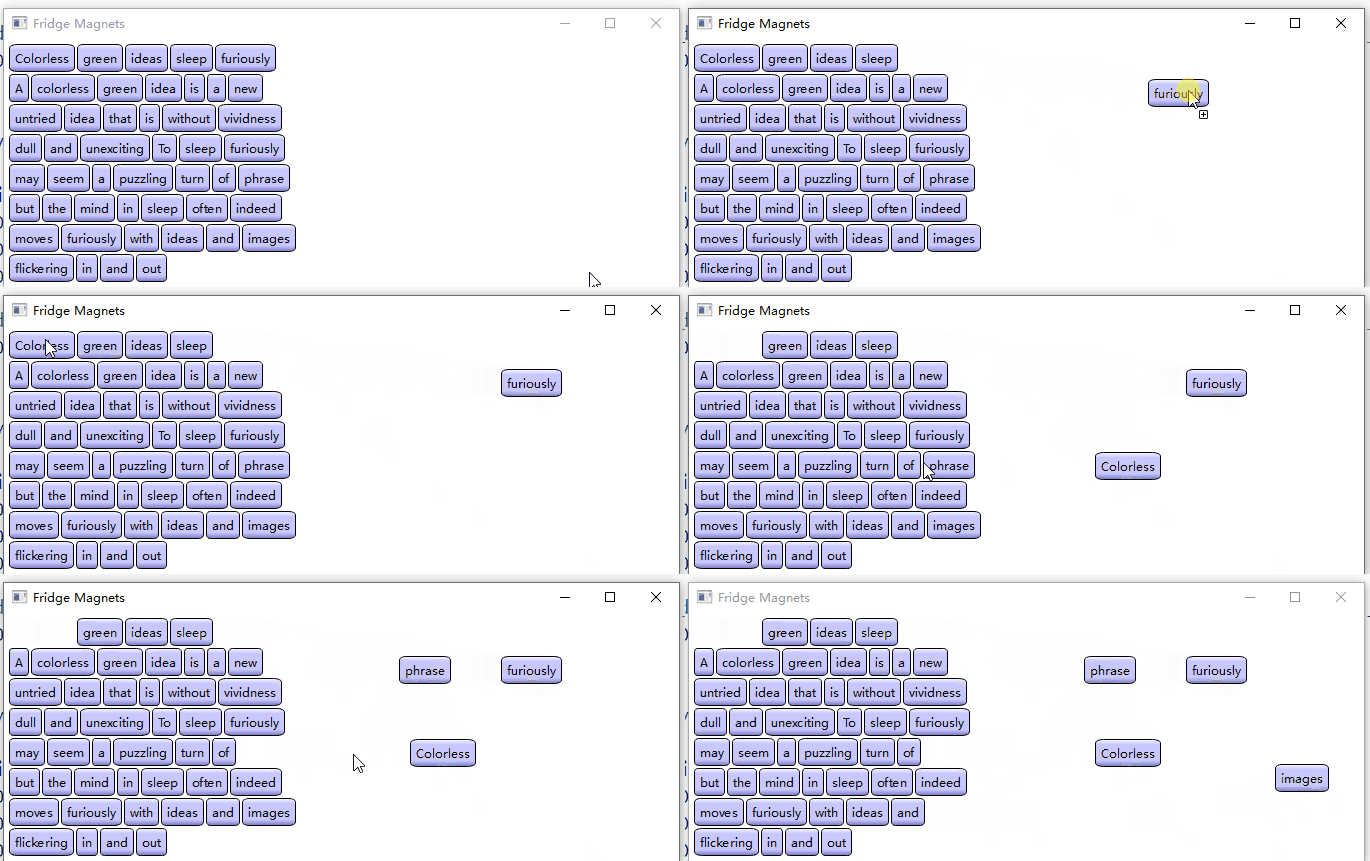
冰箱贴类:
#include "draglabel.h"
#include <QtWidgets>

DragLabel::DragLabel(const QString &text, QWidget *parent)
    : QLabel(parent)
{
    QFontMetrics metric(font());
    QSize size = metric.size(Qt::TextSingleLine, text);

    QImage image(size.width() + 12, size.height() + 12, QImage::Format_ARGB32_Premultiplied);
    image.fill(qRgba(0, 0, 0, 0));

    QLinearGradient gradient(0, 0, 0, image.height()-1);
    gradient.setColorAt(0.0, Qt::white);
    gradient.setColorAt(0.2, QColor(200, 200, 255));
    gradient.setColorAt(0.8, QColor(200, 200, 255));
    gradient.setColorAt(1.0, QColor(127, 127, 200));

    QPainter painter(&image);
    painter.setRenderHint(QPainter::Antialiasing);
    painter.setBrush(gradient);
    painter.drawRoundedRect(QRectF(0.5, 0.5, image.width()-1, image.height()-1),25, 25, Qt::RelativeSize);
    painter.setFont(font());
    painter.setBrush(Qt::black);
    painter.drawText(QRect(QPoint(6, 6), size), Qt::AlignCenter, text);

    setPixmap(QPixmap::fromImage(image));
    m_labelText = text;
}

QString DragLabel::labelText() const
{
    return m_labelText;
}
一个自定义的 QLabel,根据创建时传入的文本设确定一个图片的尺寸,使用渐变的画刷在图片绘制一个圆角矩形和文本,然后设置标签显示此图片。
然后是一个白色的窗口:
DragWidget::DragWidget(QWidget *parent)
    : QWidget(parent)
{
    QFile dictionaryFile(QStringLiteral(":/dictionary/words.txt"));
    dictionaryFile.open(QFile::ReadOnly);
    QTextStream inputStream(&dictionaryFile);

    int x = 5;
    int y = 5;

    while (!inputStream.atEnd())
    {
        QString word;
        inputStream >> word;
        if (!word.isEmpty())
        {
            DragLabel *wordLabel = new DragLabel(word, this);
            wordLabel->move(x, y);
            wordLabel->show();
            wordLabel->setAttribute(Qt::WA_DeleteOnClose);
            x += wordLabel->width() + 2;
            if (x >= 245)
            {
                x = 5;
                y += wordLabel->height() + 2;
            }
        }
    }

    QPalette newPalette = palette();
    newPalette.setColor(QPalette::Window, Qt::white);
    setPalette(newPalette);

    setMinimumSize(400, qMax(200, y));
    setWindowTitle(tr("Fridge Magnets"));

    setAcceptDrops(true);
}
从一个文本文件中读取内容:

每次读取一行,读取一行就创建一个冰箱贴并移动到相应的位置。最后设置窗口支持拖放。
鼠标按下的操作:
void DragWidget::mousePressEvent(QMouseEvent *event)
{
    DragLabel *child = static_cast<DragLabel*>(childAt(event->position().toPoint()));
    if (!child)
        return;

    QPoint hotSpot = event->position().toPoint() - child->pos();//鼠标按在child上的位置

    QByteArray itemData;
    QDataStream dataStream(&itemData, QIODevice::WriteOnly);
    dataStream << child->labelText() << QPoint(hotSpot);

    QMimeData *mimeData = new QMimeData;
    mimeData->setData(fridgetMagnetsMimeType(), itemData);
    mimeData->setText(child->labelText());

    QDrag *drag = new QDrag(this);
    drag->setMimeData(mimeData);
    drag->setPixmap(child->pixmap());
    drag->setHotSpot(hotSpot);

    child->hide();

    if (drag->exec(Qt::MoveAction | Qt::CopyAction, Qt::CopyAction) == Qt::MoveAction)
        child->close();
    else
        child->show();
}
这里定义了一种自定义MIME类型:
static inline QString fridgetMagnetsMimeType() { return QStringLiteral("application/x-fridgemagnet"); }内联的非成员函数,这种写法值得学习。
其中包含了了冰箱贴的文本和鼠标按下的位置。
开始拖放操作后,如果是拖放移到那么冰箱贴就隐藏了,拖动过程中显示的只是 QDrag::pixmap()。
拖动进入事件和拖动移到事件:
void DragWidget::dragEnterEvent(QDragEnterEvent *event)
{
    if (event->mimeData()->hasFormat(fridgetMagnetsMimeType()))
    {
        if (children().contains(event->source()))
        {
            event->setDropAction(Qt::MoveAction);
            event->accept();
        }
        else
        {
            event->acceptProposedAction();
        }
    }
    else if (event->mimeData()->hasText())
    {
        event->acceptProposedAction();
    }
    else
    {
        event->ignore();
    }
}

void DragWidget::dragMoveEvent(QDragMoveEvent *event)
{
    if (event->mimeData()->hasFormat(fridgetMagnetsMimeType()))
    {
        if (children().contains(event->source()))
        {
            event->setDropAction(Qt::MoveAction);
            event->accept();
        }
        else
        {
            event->acceptProposedAction();
        }
    }
    else if (event->mimeData()->hasText())
    {
        event->acceptProposedAction();
    }
    else
    {
        event->ignore();
    }
}
这两个没啥好说的,主要是拖动放下事件:
void DragWidget::dropEvent(QDropEvent *event)
{
    if (event->mimeData()->hasFormat(fridgetMagnetsMimeType()))
    {
        const QMimeData *mime = event->mimeData();
        QByteArray itemData = mime->data(fridgetMagnetsMimeType());
        QDataStream dataStream(&itemData, QIODevice::ReadOnly);

        QString text;
        QPoint offset;
        dataStream >> text >> offset;

        DragLabel *newLabel = new DragLabel(text, this);
        newLabel->move(event->position().toPoint() - offset);
        newLabel->show();
        newLabel->setAttribute(Qt::WA_DeleteOnClose);

        if (event->source() == this)
        {
            event->setDropAction(Qt::MoveAction);
            event->accept();
        }
        else
        {
            event->acceptProposedAction();
        }
    }
    else if (event->mimeData()->hasText())
    {
        QStringList pieces = event->mimeData()->text().split(QRegularExpression(QStringLiteral("\\s+")), Qt::SkipEmptyParts);
        QPoint position = event->position().toPoint();

        for (const QString &piece : pieces)
        {
            DragLabel *newLabel = new DragLabel(piece, this);
            newLabel->move(position);
            newLabel->show();
            newLabel->setAttribute(Qt::WA_DeleteOnClose);

            position += QPoint(newLabel->width(), 0);
        }

        event->acceptProposedAction();
    }
    else
    {
        event->ignore();
    }
}
第一个分支在拖动放下的位置新建冰箱贴,从 QMimeData 取出数据设置其文本和位置。
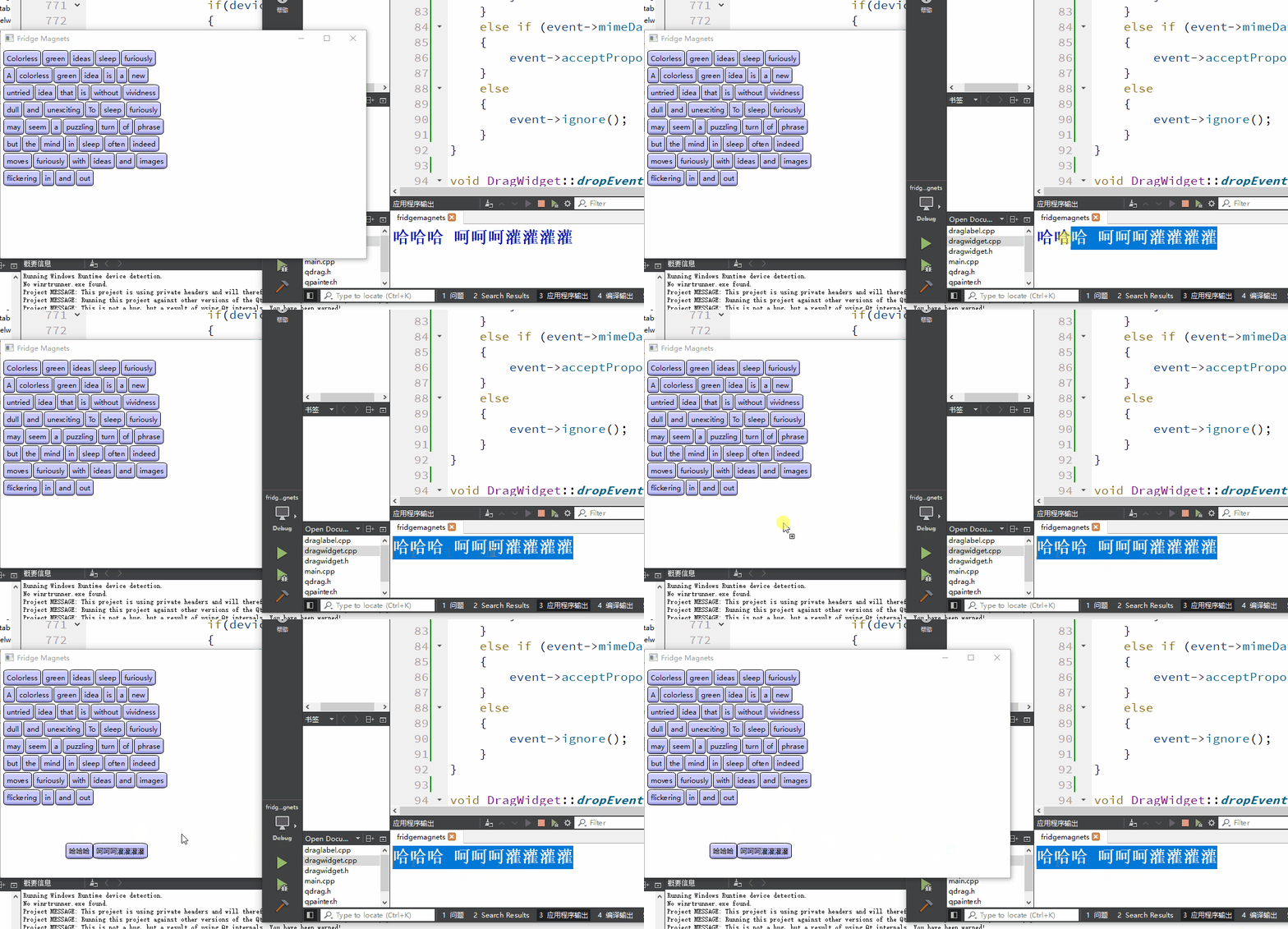
第二个分支指示拖动能用空白符分割的文本到当前窗口,则使用其文本创建冰箱贴。
涉及到的类:
边栏推荐
- [acnoi2022] one step short
- The applet has obtained the total records and user locations in the database collection. How to use aggregate.geonear to arrange the longitude and latitude from near to far?
- Building of APP automation environment (I)
- 数据中台建设(三):数据中台架构介绍
- Consolidate the data foundation in the data center
- [email protected]注解使用
- vscode debug显示多列数据
- Why is there no unified quotation for third-party testing fees of software products?
- 数据湖:海量日志采集引擎Flume
- Unexpected harvest of epic distributed resources, from basic to advanced are full of dry goods, big guys are strong!
猜你喜欢

tfx airflow 使用体验

Redis aof日志持久化

“29岁,普通功能测试,我是如何在一周内拿到5份Offer的?”
![[stream] basic knowledge of stream](/img/33/0bd85f7e029c81d0c20f463ebb972a.png)
[stream] basic knowledge of stream
"29 years old, general function test, how do I get five offers in a week?"

JS event object offsetx/y clientx y pagex y

ROS的调试经验

Distributed transaction Senta (I)

Intelligent industrial design software company Tianfu C round financing of hundreds of millions of yuan
![[signal processing] weak signal detection in communication system based on the characteristics of high-order statistics with matlab code](/img/a7/8f0d929457d285adc8020c7f5d33ea.png)
[signal processing] weak signal detection in communication system based on the characteristics of high-order statistics with matlab code
随机推荐
嵌入式分享合集22
CNN中的混淆矩阵 | PyTorch系列(二十三)
Canvas from getting started to persuading friends to give up (graphic version)
Promise object
els 显示一个随机方块
Eigenvalues and eigenvectors
Superparameter adjustment and experiment - training depth neural network | pytorch series (26)
GBase8s如何在有外键关系的表中删除数据
【stream】并行流与顺序流
Pycharm 快速给整页全部相同名称修改的快捷键
pytest最好的测试框架
Opengauss Developer Day 2022 sincerely invites you to visit the "database kernel SQL Engine sub forum" of Yunhe enmo
JS event object 2 e.charcode character code e.keycode key code box moves up, down, left and right
Chapter III queue
[QNX hypervisor 2.2 user manual]9.10 pass
使用PyTorch的TensorBoard-可视化深度学习指标 | PyTorch系列(二十五)
为什么登录时,明明使用的是数据库里已经有的账号信息,但依旧显示“用户不存在”?
社恐适合什么工作?能做自媒体吗?
数据中台夯实数据基础
P6118 [JOI 2019 Final]珍しい都市 题解