Today, with the rapid development of the Internet , Various App The verification method is more and more convenient for users , Enter the password from the beginning , To the fingerprint unlock later , Evolved into today's face brush certification . Brush your face , You can unlock the device 、 On-line / Offline payment 、 Access control 、 Fast ticket check, etc . At the same time, there are many security problems , The first is how to judge the authenticity of users .
HMS Core Machine learning services (ML Kit) The ability of face comparison and living body detection can quickly capture faces , By recognizing and extracting the face features in the template , It can be judged to be a real face without the cooperation of the user , Or face attack , At the same time, the template portrait and face are compared with high accuracy , Output similarity value , Then judge whether they are the same person .
Based on this , Developers can quickly build face detection capabilities , For example, in Finance App in , Compare the user ID photo with the face detection result , Judge the authenticity of user information , It can provide a fast and secure identity verification process , It is applicable to Internet remote account opening 、 Face brushing payment and other financial services . In the office App in , Can take face brush attendance , Identify whether it is me , Effectively prevent punching cards and other behaviors .
Effect display

From the effect display picture , In vivo detection can be completed in a few seconds to accurately identify the fake photos on the mobile phone .
Development steps
The development of preparation
stay AppGallery Connect Configuration information in , The specific development preparation can Reference documents .
To configure HMS Core SDK Of Maven Warehouse address .
open Android Studio Project level “build.gradle” file .
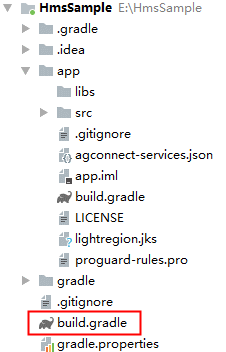
add to AppGallery Connect Plugins and Maven The code base .
stay “allprojects”>“repositories” It's equipped with HMS Core SDK Of Maven Warehouse address .
allprojects {
    repositories {
        google()
        jcenter()
        maven {url 'https://developer.huawei.com/repo/'}
    }
 }
stay “buildscript”>“repositories” It's equipped with HMS Core SDK Of Maven Warehouse address .
buildscript {
    repositories {
        google()
        jcenter()
        maven {url 'https://developer.huawei.com/repo/'}
    }
 }
stay “buildscript”>“dependencies” Add in AppGallery Connect The plug-in configuration .
buildscript{
    dependencies {
         classpath 'com.huawei.agconnect:agcp:1.3.1.300'
    }
 }
Face comparison function development
- Create a face comparison detector instance .
MLFaceVerificationAnalyzer analyzer = MLFaceVerificationAnalyzerFactory.getInstance().getFaceVerificationAnalyzer();
- adopt android.graphics.Bitmap establish MLFrame Object is used to set the template image , Supported image formats include :JPG、JPEG、PNG、BMP.
//  adopt bitmap establish MLFrame
MLFrame templateFrame = MLFrame.fromBitmap(bitmap);
- Set face comparison template image . If there is no face in the template , It means that the template setting failed , Keep the last set template of this instance unchanged .
List<MLFaceTemplateResult> results = analyzer.setTemplateFace(templateFrame);
for (int i = 0; i < results.size(); i++) {
    //  Process template image recognition results
}
- adopt android.graphics.Bitmap establish MLFrame Object is used to set the comparison picture . Supported image formats include :JPG、JPEG、PNG、BMP.
//  adopt bitmap establish MLFrame
MLFrame compareFrame = MLFrame.fromBitmap(bitmap);
- Call synchronous or asynchronous methods for face comparison . The detection results mainly include the face information detected in the comparison picture 、 The confidence that the detected face information is the same as the template face . For more information, see MLFaceVerificationResult.
• Asynchronous method sample code :
Task<List<MLFaceVerificationResult>> task = analyzer.asyncAnalyseFrame(compareFrame);
task.addOnSuccessListener(new OnSuccessListener<List<MLFaceVerificationResult>>() {
    @Override
    public void onSuccess(List<MLFaceVerificationResult> results) {
        //  Test successful
    }
}).addOnFailureListener(new OnFailureListener() {
    @Override
    public void onFailure(Exception e) {
        //  Detection failed
    }
});
• Synchronization method sample code :
SparseArray<MLFaceVerificationResult> results = analyzer.analyseFrame(compareFrame);
for (int i = 0; i < results.size(); i++) {
    //  Test result processing
}
- Test complete , Stop the analyzer , Release detection resources .
if (analyzer != null) {
    analyzer.stop();
}
In vivo detection function development
Default scanning interface
- Create a silent vivisection result callback , Used to obtain test results .
private MLLivenessCapture.Callback callback = new MLLivenessCapture.Callback() {
   @Override
   public void onSuccess(MLLivenessCaptureResult result) {
    // Detect successful processing logic , The test results may be living or non living .
   }


   @Override
   public void onFailure(int errorCode) {
       // The test is not complete , If the camera is abnormal CAMERA_ERROR, Add failed processing logic .
   }
};
- Create a silent vivisection instance , Start detection .
MLLivenessCapture capture = MLLivenessCapture.getInstance();
capture.startDetect(activity, callback);
Learn more >>
visit Official website of Huawei developer Alliance
obtain Development guidance document
Huawei mobile service open source warehouse address :GitHub、Gitee
Pay attention to our , The first time to understand HMS Core Latest technical information ~


![[genius_platform software platform development] lecture 37: network card hybrid mode and raw socket](/img/bf/880fbf4122b66723b6e17c6d9d97c9.jpg)




![[model deployment and business implementation] model transformation of AI framework deployment scheme](/img/ea/8ca6bc6ae16ba1f90f6a5a38be184d.jpg)