当前位置:网站首页>Custom tags - JSP tag enhancements
Custom tags - JSP tag enhancements
2022-06-23 08:57:00 【An Li Jiu Ge】
Catalog
Two 、 Custom drop-down box labels
3、 ... and 、 Custom check box labels
Preface
Last time we shared custom tags --jsp Label Foundation , Today's sharing is about custom tags ——jsp Label enhancements .
One 、 Customize foreach label
1、 Define helper classes ForeachTag
analysis foreach Attributes required for the tag :1. items 2.var
package com.zhw.tag;

import java.util.Iterator;
import java.util.List;

import javax.servlet.jsp.JspException;
import javax.servlet.jsp.tagext.BodyTagSupport;

public class ForeachTag extends BodyTagSupport{
	private List<Object> items;
	private String var;
	public List<Object> getItems() {
		return items;
	}
	public void setItems(List<Object> items) {
		this.items = items;
	}
	public String getVar() {
		return var;
	}
	public void setVar(String var) {
		this.var = var;
	}

	@Override
	public int doStartTag() throws JspException {
		Iterator<Object> it = items.iterator();
		pageContext.setAttribute(var, it.next());
		pageContext.setAttribute("it", it);
		return EVAL_BODY_INCLUDE;
	}

	@Override
	public int doAfterBody() throws JspException {
		Iterator<Object> it = (Iterator<Object>) pageContext.getAttribute("it");
		if(it.hasNext()) {
			pageContext.setAttribute(var, it.next());
			pageContext.setAttribute("it", it);
			return EVAL_BODY_AGAIN;
		}else {
			return EVAL_PAGE;
		}
	}
}
doStartTag():
@Override
	public int doStartTag() throws JspException {
		Iterator<Object> it = items.iterator();
		pageContext.setAttribute(var, it.next());
		pageContext.setAttribute("it", it);
		return EVAL_BODY_INCLUDE;
	}
Because we are going to traverse the data , So we need to output the values in the set one by one , Then assign values one by one . Here we use iterator() That is, iterators . If there is a value in the iterator , Let's assign the value to var, That is, the value of traversal output defined by me . Be careful : Here we can not directly in dostartTag Method to assign the current set , because dostartTag The method is just the beginning , It cannot directly handle the label body . So next we need to use the value of the iterator pageContext Store it , stay doAfterBody Method to be used
doAfterBody():
@Override
	public int doAfterBody() throws JspException {
		Iterator<Object> it = (Iterator<Object>) pageContext.getAttribute("it");
		if(it.hasNext()) {
			pageContext.setAttribute(var, it.next());
			pageContext.setAttribute("it", it);
			return EVAL_BODY_AGAIN;
		}else {
			return EVAL_PAGE;
		}
	}
stay doAfterBody Method, we first need to get our stored iterator , Then you can start to determine whether there is still data in the iterator . If there's data , Just assign the data to var in , If not, end
Next into tld Compilation of documents .
2、 Definition tld file
<?xml version="1.0" encoding="UTF-8"?>
<taglib xmlns="http://java.sun.com/xml/ns/j2ee"
    xmlns:xsi="http://www.w3.org/2001/XMLSchema-instance"
    xsi:schemaLocation="http://java.sun.com/xml/ns/j2ee http://java.sun.com/xml/ns/j2ee/web-jsptaglibrary_2_0.xsd"
    version="2.0">

  <description>JSTL 1.1 core library</description>
  <display-name>JSTL core</display-name>
  <tlib-version>1.1</tlib-version>
  <short-name>z</short-name>
  <uri>http://jsp.zhwLouis</uri>

  <validator>
    <validator-class>
        org.apache.taglibs.standard.tlv.JstlCoreTLV
    </validator-class>
  </validator>

 <tag>
        <name>foreach1</name>
        <tag-class>com.zhw.tag.ForeachTag</tag-class>
        <body-content>JSP</body-content>
        <attribute>
            <!-- Identifies where the collection traversal is the pointer , Point to the current traversal object -->
            <name>items</name>
            <required>true</required>
            <rtexprvalue>true</rtexprvalue>
        </attribute>
        <attribute>
            <!-- Identifies where the collection traversal is the pointer , Point to the current traversal object -->
            <name>var</name>
            <required>true</required>
            <rtexprvalue>false</rtexprvalue>
        </attribute>
    </tag>


</taglib>
3、 Use custom foreach label
<%@page import="com.zhw.tag.Teacher"%>
<%@page import="java.util.ArrayList"%>
<%@page import="java.util.List"%>
<%@ page language="java" contentType="text/html; charset=UTF-8"
    pageEncoding="UTF-8"%>
    <%@taglib prefix="z" uri="http://jsp.zhwLouis" %>
    <%@ taglib prefix="c" uri="http://java.sun.com/jsp/jstl/core"%>
<!DOCTYPE html PUBLIC "-//W3C//DTD HTML 4.01 Transitional//EN" "http://www.w3.org/TR/html4/loose.dtd">
<html>
<head>
<meta http-equiv="Content-Type" content="text/html; charset=UTF-8">
<title>Insert title here</title>
</head>
<body>
	<%
		List<Teacher> t = new ArrayList<>();
		t.add(new Teacher(1," Zhang San "));
		t.add(new Teacher(2," Li Si "));
		t.add(new Teacher(3," Wang Wu "));
		t.add(new Teacher(4," Zhao Liu "));
		request.setAttribute("t", t);
	%>
	<z:foreach1 items="${t }" var="t">
		 Hello, I am  ${t.tname }
	</z:foreach1>
</body>
</html>
The operation results are as follows :

Two 、 Custom drop-down box labels
1、 Define helper classes SelectTag
analysis : Use select The tag is definitely a drop-down button , In the down button, we can set the style , You can set id, You can set name attribute , You can also set the default selected value . So these are our definitions select What needs to be considered in the label .
1、 Background to traverse -------- data source --------items
2、 An object attribute is required to represent the display content corresponding to the drop-down box ---------textVal
3、 An object attribute is required to represent the corresponding... Of the drop-down box Value value ---------textKey
4、 Default header options --------headerTextVal
5、 Default header value ---------headerTextKey
6、 Values stored in data , It is convenient for data echo -----------selectedVal
7、id
8、name
9、cssStyle
package com.zhw.tag;

import java.lang.reflect.Field;
import java.util.ArrayList;
import java.util.List;

import javax.servlet.jsp.JspException;
import javax.servlet.jsp.JspWriter;
import javax.servlet.jsp.tagext.BodyTagSupport;

import org.apache.commons.beanutils.PropertyUtils;

public class SelectTag extends BodyTagSupport{
	private String id;
	private String name;
	private List<Object> items = new ArrayList<>();
	private String textKey;
	private String textVal;
	private String headerTextKey;
	private String headerTextVal;
	private String selectedVal;

	@Override
	public int doStartTag() throws JspException {
		JspWriter out = pageContext.getOut();
		try {
			out.print(toHTML());
		} catch (Exception e) {
			e.printStackTrace();
		}
		return SKIP_BODY;
	}

	private String toHTML() throws Exception {
		StringBuffer sb = new StringBuffer();
		sb.append("<select id='"+id+"' name='"+name+"'>");
		if(headerTextVal != null && !"".equals(headerTextVal)) {
			sb.append("<option value='"+headerTextKey+"'>"+headerTextVal+"</option>");
		}
		if (items.size() > 0) {
			for (Object obj : items) {
				Field f = obj.getClass().getDeclaredField(textKey);
				f.setAccessible(true);
				if(selectedVal != null && !"".equals(selectedVal) && selectedVal.equals(f.get(obj))) {
					sb.append("<option selected value='"+f.get(obj)+"'>"+PropertyUtils.getProperty(obj, textVal)+"</option>");
				}else {
					sb.append("<option value='"+f.get(obj)+"'>"+PropertyUtils.getProperty(obj, textVal)+"</option>");

				}

			}
		}
		sb.append("</select>");
		return sb.toString();
	}

	public String getId() {
		return id;
	}
	public void setId(String id) {
		this.id = id;
	}
	public String getName() {
		return name;
	}
	public void setName(String name) {
		this.name = name;
	}
	public List<Object> getItems() {
		return items;
	}
	public void setItems(List<Object> items) {
		this.items = items;
	}
	public String getTextKey() {
		return textKey;
	}
	public void setTextKey(String textKey) {
		this.textKey = textKey;
	}
	public String getTextVal() {
		return textVal;
	}
	public void setTextVal(String textVal) {
		this.textVal = textVal;
	}
	public String getHeaderTextKey() {
		return headerTextKey;
	}
	public void setHeaderTextKey(String headerTextKey) {
		this.headerTextKey = headerTextKey;
	}
	public String getHeaderTextVal() {
		return headerTextVal;
	}
	public void setHeaderTextVal(String headerTextVal) {
		this.headerTextVal = headerTextVal;
	}
	public String getSelectedVal() {
		return selectedVal;
	}
	public void setSelectedVal(String selectedVal) {
		this.selectedVal = selectedVal;
	}


}
2、 Definition tld file
<?xml version="1.0" encoding="UTF-8"?>
<taglib xmlns="http://java.sun.com/xml/ns/j2ee"
    xmlns:xsi="http://www.w3.org/2001/XMLSchema-instance"
    xsi:schemaLocation="http://java.sun.com/xml/ns/j2ee http://java.sun.com/xml/ns/j2ee/web-jsptaglibrary_2_0.xsd"
    version="2.0">

  <description>JSTL 1.1 core library</description>
  <display-name>JSTL core</display-name>
  <tlib-version>1.1</tlib-version>
  <short-name>z</short-name>
  <uri>http://jsp.zhwLouis</uri>

  <validator>
    <validator-class>
        org.apache.taglibs.standard.tlv.JstlCoreTLV
    </validator-class>
  </validator>

 <tag>
        <name>foreach1</name>
        <tag-class>com.zhw.tag.ForeachTag</tag-class>
        <body-content>JSP</body-content>
        <attribute>
            <!-- Identifies where the collection traversal is the pointer , Point to the current traversal object -->
            <name>items</name>
            <required>true</required>
            <rtexprvalue>true</rtexprvalue>
        </attribute>
        <attribute>
            <!-- Identifies where the collection traversal is the pointer , Point to the current traversal object -->
            <name>var</name>
            <required>true</required>
            <rtexprvalue>false</rtexprvalue>
        </attribute>
    </tag>


 <tag>
        <name>select</name>
        <tag-class>com.zhw.tag.SelectTag</tag-class>
        <body-content>JSP</body-content>
        <attribute>
            <name>id</name>
            <required>false</required>
            <rtexprvalue>true</rtexprvalue>
        </attribute>
        <attribute>
            <name>name</name>
            <required>false</required>
            <rtexprvalue>false</rtexprvalue>
        </attribute>
        <!-- data source -->
        <attribute>
            <name>items</name>
            <required>true</required>
            <rtexprvalue>true</rtexprvalue>
        </attribute>
        <attribute>
            <name>textKey</name>
            <required>true</required>
            <rtexprvalue>false</rtexprvalue>
        </attribute>
        <attribute>
            <name>textVal</name>
            <required>true</required>
            <rtexprvalue>false</rtexprvalue>
        </attribute>
        <!-- Not data loaded from the database , The first option of the drop-down box value value -->
        <attribute>
            <name>headerTextKey</name>
            <required>false</required>
            <rtexprvalue>false</rtexprvalue>
        </attribute>
        <!-- Not data loaded from the database , The display value of the first option in the drop-down box -->
        <attribute>
            <name>headerTextVal</name>
            <required>false</required>
            <rtexprvalue>false</rtexprvalue>
        </attribute>
        <attribute>
            <name>selectedVal</name>
            <required>false</required>
            <rtexprvalue>true</rtexprvalue>
        </attribute>
    </tag>
</taglib>
3、 Use
<%@page import="java.util.List"%>
<%@page import="com.zhw.tag.Teacher"%>
<%@page import="java.util.ArrayList"%>
<%@ page language="java" contentType="text/html; charset=UTF-8"
    pageEncoding="UTF-8"%>
    <%@taglib prefix="z" uri="http://jsp.zhwLouis" %>
    <%@ taglib prefix="c" uri="http://java.sun.com/jsp/jstl/core"%>
<!DOCTYPE html PUBLIC "-//W3C//DTD HTML 4.01 Transitional//EN" "http://www.w3.org/TR/html4/loose.dtd">
<html>
<head>
<meta http-equiv="Content-Type" content="text/html; charset=UTF-8">
<title>Insert title here</title>
</head>
<body>
	<%
		List<Teacher> list = new ArrayList<>();
		list.add(new Teacher("t1"," Zhang San "));
		list.add(new Teacher("t2"," Li Si "));
		list.add(new Teacher("t3"," Wang Wu "));

		request.setAttribute("list", list);
	%>
	<z:foreach1 items="${list}" var="t">
		 Hello, I am  ${t.tname }<br>
	</z:foreach1>
	<z:select selectedVal="t1" id="mySel" headerTextKey="-1" headerTextVal="=== Please select ===" items="${list }" textKey="tid" textVal="tname"></z:select>
</body>
</html>
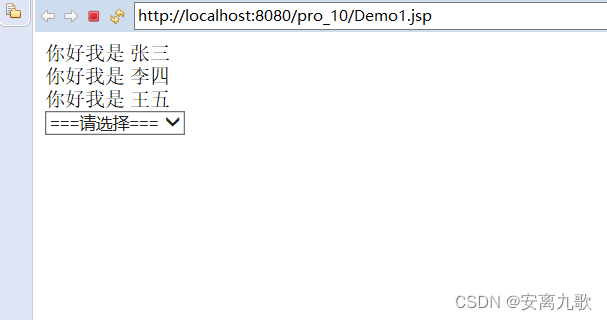
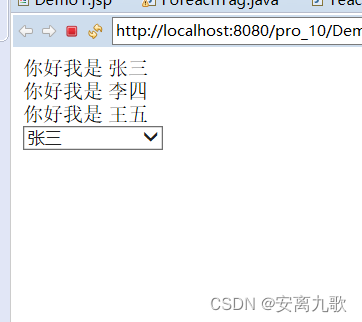
The operation results are as follows :
3、 ... and 、 Custom check box labels
1、 Define helper classes
Ideas and select It's about the same
package com.zhw.tag;

import java.lang.reflect.Field;
import java.util.List;

import javax.servlet.jsp.JspException;
import javax.servlet.jsp.JspWriter;
import javax.servlet.jsp.tagext.BodyTagSupport;

import org.apache.commons.beanutils.PropertyUtils;

public class CheckTag extends BodyTagSupport{
//	<input type="checkbox" value="">
	private String id;
	private String name;
	private String textKey;
	private String textVal;
	private List<Object> items;
	private String selectedVal;

	@Override
	public int doStartTag() throws JspException {
		JspWriter out = pageContext.getOut();
		try {
			out.print(toHTML());
		} catch (Exception e) {
			e.printStackTrace();
		}
		return SKIP_BODY;
	}


	private String toHTML() throws Exception {
		StringBuffer sb = new StringBuffer();
		if (items.size() > 0) {
			for (Object obj : items) {
				Field f = obj.getClass().getDeclaredField(textKey);
				f.setAccessible(true);
				if(selectedVal != null && !"".equals(selectedVal) && selectedVal.contains((CharSequence) f.get(obj))) {
					sb.append("<input type='checkbox' checked value='"+f.get(obj)+"'>"+PropertyUtils.getProperty(obj, textVal)+"");
				}else {
					sb.append("<input type='checkbox' value='"+f.get(obj)+"'>"+PropertyUtils.getProperty(obj, textVal)+"");
				}

			}
		}
		return sb.toString();
	}


	public String getTextKey() {
		return textKey;
	}


	public void setTextKey(String textKey) {
		this.textKey = textKey;
	}


	public String getTextVal() {
		return textVal;
	}


	public void setTextVal(String textVal) {
		this.textVal = textVal;
	}


	public String getId() {
		return id;
	}
	public void setId(String id) {
		this.id = id;
	}
	public String getName() {
		return name;
	}
	public void setName(String name) {
		this.name = name;
	}
	public List<Object> getItems() {
		return items;
	}
	public void setItems(List<Object> items) {
		this.items = items;
	}
	public String getSelectedVal() {
		return selectedVal;
	}
	public void setSelectedVal(String selectedVal) {
		this.selectedVal = selectedVal;
	}


}
2、 Definition tld file
<?xml version="1.0" encoding="UTF-8"?>
<taglib xmlns="http://java.sun.com/xml/ns/j2ee"
    xmlns:xsi="http://www.w3.org/2001/XMLSchema-instance"
    xsi:schemaLocation="http://java.sun.com/xml/ns/j2ee http://java.sun.com/xml/ns/j2ee/web-jsptaglibrary_2_0.xsd"
    version="2.0">

  <description>JSTL 1.1 core library</description>
  <display-name>JSTL core</display-name>
  <tlib-version>1.1</tlib-version>
  <short-name>z</short-name>
  <uri>http://jsp.zhwLouis</uri>

  <validator>
    <validator-class>
        org.apache.taglibs.standard.tlv.JstlCoreTLV
    </validator-class>
  </validator>

 <tag>
        <name>foreach1</name>
        <tag-class>com.zhw.tag.ForeachTag</tag-class>
        <body-content>JSP</body-content>
        <attribute>
            <!-- Identifies where the collection traversal is the pointer , Point to the current traversal object -->
            <name>items</name>
            <required>true</required>
            <rtexprvalue>true</rtexprvalue>
        </attribute>
        <attribute>
            <!-- Identifies where the collection traversal is the pointer , Point to the current traversal object -->
            <name>var</name>
            <required>true</required>
            <rtexprvalue>false</rtexprvalue>
        </attribute>
    </tag>


 <tag>
        <name>select</name>
        <tag-class>com.zhw.tag.SelectTag</tag-class>
        <body-content>JSP</body-content>
        <attribute>
            <name>id</name>
            <required>false</required>
            <rtexprvalue>true</rtexprvalue>
        </attribute>
        <attribute>
            <name>name</name>
            <required>false</required>
            <rtexprvalue>false</rtexprvalue>
        </attribute>
        <!-- data source -->
        <attribute>
            <name>items</name>
            <required>true</required>
            <rtexprvalue>true</rtexprvalue>
        </attribute>
        <attribute>
            <name>textKey</name>
            <required>true</required>
            <rtexprvalue>false</rtexprvalue>
        </attribute>
        <attribute>
            <name>textVal</name>
            <required>true</required>
            <rtexprvalue>false</rtexprvalue>
        </attribute>
        <!-- Not data loaded from the database , The first option of the drop-down box value value -->
        <attribute>
            <name>headerTextKey</name>
            <required>false</required>
            <rtexprvalue>false</rtexprvalue>
        </attribute>
        <!-- Not data loaded from the database , The display value of the first option in the drop-down box -->
        <attribute>
            <name>headerTextVal</name>
            <required>false</required>
            <rtexprvalue>false</rtexprvalue>
        </attribute>
        <attribute>
            <name>selectedVal</name>
            <required>false</required>
            <rtexprvalue>true</rtexprvalue>
        </attribute>
    </tag>


    <tag>
    	<name>check</name>
        <tag-class>com.zhw.tag.CheckTag</tag-class>
        <body-content>JSP</body-content>
        <attribute>
            <name>id</name>
            <required>false</required>
            <rtexprvalue>true</rtexprvalue>
        </attribute>
        <attribute>
            <name>name</name>
            <required>false</required>
            <rtexprvalue>false</rtexprvalue>
        </attribute>
        <attribute>
            <name>items</name>
            <required>true</required>
            <rtexprvalue>true</rtexprvalue>
        </attribute>
        <attribute>
            <name>textKey</name>
            <required>true</required>
            <rtexprvalue>false</rtexprvalue>
        </attribute>
        <attribute>
            <name>textVal</name>
            <required>true</required>
            <rtexprvalue>false</rtexprvalue>
        </attribute>
        <attribute>
       		<name>selectedVal</name>
            <required>false</required>
            <rtexprvalue>true</rtexprvalue>
        </attribute>
    </tag>
</taglib>
3、 Use
<%@page import="com.zhw.tag.Hobby"%>
<%@page import="java.util.List"%>
<%@page import="com.zhw.tag.Teacher"%>
<%@page import="java.util.ArrayList"%>
<%@ page language="java" contentType="text/html; charset=UTF-8"
    pageEncoding="UTF-8"%>
    <%@taglib prefix="z" uri="http://jsp.zhwLouis" %>
    <%@ taglib prefix="c" uri="http://java.sun.com/jsp/jstl/core"%>
<!DOCTYPE html PUBLIC "-//W3C//DTD HTML 4.01 Transitional//EN" "http://www.w3.org/TR/html4/loose.dtd">
<html>
<head>
<meta http-equiv="Content-Type" content="text/html; charset=UTF-8">
<title>Insert title here</title>
</head>
<body>
	<%
		List<Teacher> list = new ArrayList<>();
		list.add(new Teacher("t1"," Zhang San "));
		list.add(new Teacher("t2"," Li Si "));
		list.add(new Teacher("t3"," Wang Wu "));

		List<Hobby> ls = new ArrayList<>();
		ls.add(new Hobby("lq"," Basketball "));
		ls.add(new Hobby("zq"," football "));
		ls.add(new Hobby("ppq"," Table Tennis "));

		request.setAttribute("list", list);
		request.setAttribute("ls", ls);
	%>
	<input type="checkbox" value="">
	<z:foreach1 items="${list}" var="t">
		 Hello, I am  ${t.tname }<br>
	</z:foreach1>
	<z:select selectedVal="t1" id="mySel" headerTextKey="-1" headerTextVal="=== Please select ===" items="${list }" textKey="tid" textVal="tname"></z:select>
	<z:check selectedVal="lq" textVal="hname" items="${ls }" textKey="hid"></z:check>
</body>
</html>
The operation results are as follows :

summary
The content shared this time is the custom tag library enhancement , I hope it can help you , General page for next issue preview .
I'm nine songs , A programmer who likes programming .
If there is any mistake, please correct it , Thank you very much! .
边栏推荐
- How to evaluate code quality
- The fourth online workshop review
- Dongyuhui, the "square face teacher", responded that the popularity was declining: do a good job of live broadcasting of agricultural products to benefit farmers and consider supporting education
- How can I handle the "unable to load" exception when easyplayer plays webrtcs?
- Open source stealing malware mercurial found in the field for "educational purposes"
- Why use growth neural gas network (GNG)?
- Batch generation of code128- C barcode
- 65. Valid Number
- 3. caller service call - dapr
- 125. Valid Palindrome
猜你喜欢

'coach, I want to play basketball!'—— AI Learning Series booklet for system students

The most commonly used 5-stream ETL mode
自定义标签——jsp标签增强

Linux Mysql安装
![[event registration] sofastack × CSDN jointly held the open source series meetup, which was launched on June 24](/img/e1/97c92290a2a5e68f05cdbd5bf525e8.png)
[event registration] sofastack × CSDN jointly held the open source series meetup, which was launched on June 24

Why use growth neural gas network (GNG)?
![Paper reading [quovadis, action recognition? A new model and the dynamics dataset]](/img/3f/449cc91bfa66fcf26bc2cd405fb773.png)
Paper reading [quovadis, action recognition? A new model and the dynamics dataset]

通用分页(1)

The fourth online workshop review

Le rapport d'analyse de l'industrie chinoise des bases de données a été publié en juin. Le vent intelligent se lève, les colonnes se régénèrent
随机推荐
1、 Software architecture evaluation
670. Maximum Swap
MySQL故障案例 | ERROR 1071 (42000): Specified key was too long
Utilisation du cookie du module de demande de noeud
2022-06-22:golang选择题,以下golang代码输出什么?A:3;B:1;C:4;D:编译失败。
4、 Database design
Summary ranges of leetcode topic resolution
On the light application platform finclip and the mobile application development platform mpaas
Subsets II of leetcode topic analysis
测试-- 自动化测试selenium(关于API)
TDesign update weekly report (the first week of January 2022)
Tencent cloud arm server evaluation practice
2022.6.22-----leetcode. five hundred and thirteen
Leetcode topic analysis 3sum closest
When easynvr service is started, video cannot be played due to anti-virus software interception. How to deal with it?
Unique paths for leetcode topic resolution
Leetcode topic analysis spiral matrix II
36氪首发|云原生数据库公司「拓数派」完成新一轮战略融资,估值已达准独角兽级别
528. Random Pick with Weight
Leetcode topic analysis 3sum