当前位置:网站首页>Saltstack advanced
Saltstack advanced
2022-07-28 19:54:00 【Amu 690】
List of articles
1. masterless
1.1 Application scenarios
- master And minion Network failure or communication delay , That is, the network is unstable
- Want to be in minion End direct execution state
Conventional SaltStack It needs to pass master To perform state control minion So as to realize the management of state , But when the network is unstable , When you want to be in minion Local execution status , When there is only one host , What should I do if I want to execute the State ? And that's where it comes in masterless 了 .
With masterless, Even if you have only one host , Can also play saltstack, You don't need to have N Host architecture .
1.2 masterless To configure
1.2.1 Modify the configuration file minion
- notes master That's ok
- uncomment file_client And let the value be local
- Set up file_roots
- Set up pillar_roots
[[email protected] ~]# vim /etc/salt/minion
.... Omit here N That's ok
# resolved, then the minion will fail to start.
# master: salt // Comment on this trip
.... Omit here N That's ok
file_client: local  // Uncomment this line and set the value to local
.... Omit here N That's ok
file_roots:         // Set up file_roots Path and environment , There can be multiple environments
  base:
    - /srv/salt/base
.... Omit here N That's ok
pillar_roots:		//  Set up pillar_root, Available variables
  base:
    - /srv/pillar/base

//  Create directory
[[email protected] ~]# mkdir -p /srv/{salt,pillar}/base
[[email protected] ~]# cd /srv/
[[email protected] srv]# tree
.
|-- pillar
|   `-- base `-- salt
    `-- base
1.2.2 close salt-minion service
Use masterless There is no need to start any service in mode , Include salt-master and salt-minion.
[[email protected] ~]# systemctl stop salt-minion
[[email protected] ~]# systemctl disable salt-minion
Removed symlink /etc/systemd/system/multi-user.target.wants/salt-minion.service.
1.2.3 salt-call
masterless Mode is required to execute a module or state salt-call command , Instead of salt perhaps salt-ssh. It is important to use salt-call Of –local Options .
[[email protected] ~]# salt-call --local cmd.run 'date'
local:
    Mon Nov 29 10:06:12 CST 2021

[[email protected] ~]# salt-call --local cmd.run 'ls -l /root'
local:
    total 4
    -rw-------. 1 root root 1092 Nov  2 10:34 anaconda-ks.cfg

[[email protected] ~]# salt-call --local cmd.run 'echo "hehe" > /root/amu'
local:
[[email protected] ~]# salt-call --local cmd.run 'ls -l /root'
local:
    total 8
    -rw-r--r--  1 root root    5 Nov 29 10:10 amu
    -rw-------. 1 root root 1092 Nov  2 10:34 anaconda-ks.cfg
[[email protected] ~]# tree /srv/salt/
/srv/salt/
`-- base `-- init
        |-- basepkgs
        |   `-- main.sls |-- chrony | |-- files | | `-- chrony.conf
        |   `-- main.sls |-- firewalld | `-- main.sls
        |-- history
        |   `-- main.sls |-- kernel | |-- files | | |-- limits.conf | | `-- sysctl.conf
        |   `-- main.sls |-- main.sls |-- postfix | `-- main.sls
        |-- salt-minion
        |   |-- files
        |   |   `-- minion.j2 | `-- main.sls
        |-- selinux
        |   |-- files
        |   |   `-- config | `-- main.sls
        |-- sshd
        |   |-- files
        |   |   `-- sshd_config | `-- main.sls
        |-- sudo
        |   `-- main.sls |-- timeout | `-- main.sls
        `-- yum |-- files | |-- Centos-7.repo | |-- Centos-8.repo | |-- epel.repo | |-- salt-7.repo | `-- salt-8.repo
            `-- main.sls 20 directories, 24 files //  Use salt-call Execution status file  [[email protected] ~]# salt-call --local state.sls init.history.main local: ---------- ID: /etc/profile Function: file.line Result: True Comment: Changes were made Started: 18:10:15.018518 Duration: 17.753 ms Changes: ---------- diff: --- +++ @@ -1,5 +1,6 @@ # /etc/profile +export HISTTIMEFORMAT="%F %T `whoami` "
                   # System wide environment and startup programs, for login setup
                   # Functions and aliases go in /etc/bashrc


Summary for local
------------
Succeeded: 1 (changed=1)
Failed:    0
------------
Total states run:     1
Total run time:  17.753 ms
2. salt-master High availability
2.1 salt-master High availability configuration
We need to use salt To manage all the machines in the company , that salt Of master You can't go down , Or you'll be paralyzed , So we have to be right salt High availability .salt The highly available configuration of is very simple , I just need to change it minion The configuration file , take master Just list it in the form of a list .
[[email protected] ~]# vim /etc/salt/minion
.... Omit here N That's ok
master:
  - 192.168.91.135
  - 192.168.91.137
.... Omit here N That's ok
This example lists 192.168.91.135 and 192.168.91.137 Must be installed on salt-master And ensure that the service is in normal state .
2.2 salt-master Highly available data synchronization
When it comes to high availability , Data synchronization is an eternal topic , We must ensure high availability 2 individual master The data used between are consistent , Include :
- /etc/salt/master The configuration file
- /etc/salt/pki All under directory key
- /srv/ Under the salt and pillar All the files in the directory
The schemes to ensure these data synchronization are :
- nfs mount
- rsync Sync
- Use gitlab Version control
Safety related :
To ensure data synchronization and prevent data loss , The status file can be passed through gitlab Perform version control management .
preparation :
| Host name | ip | duty | Installation services |
|---|---|---|---|
| master | 192.168.91.135 | Lord master | salt-master |
| master2 | 192.168.91.137 | To prepare master | salt-master |
| minion | 192.168.91.138 | minion | salt-minion |
Example :
//  Sync master The configuration file
[[email protected] ~]# scp /etc/salt/master 192.168.91.137:/etc/salt/
[email protected]'s password:
master                     100%   52KB  12.9MB/s   00:00

//  Create directory
[[email protected] ~]# mkdir -p /srv/{salt/{base,test,prod,dev},pillar/{base,prod}}
[[email protected] ~]# tree /srv
/srv
|-- pillar
|   |-- base
|   `-- prod `-- salt
    |-- base
    |-- dev
    |-- prod
    `-- test

8 directories, 0 files

//  Synchronize all status files
[[email protected] ~]# scp -r /srv/* 192.168.91.137:/srv/


//  Sync pki Catalog
[[email protected] ~]# scp -r /etc/salt/pki/* 192.168.91.137:/etc/salt/pki/

//  restart
[[email protected] ~]# systemctl restart salt-master
[[email protected] ~]# systemctl restart salt-master

//  Modify the configuration file , restart salt-minion service
[[email protected] ~]# vim /etc/salt/minion
.... Omit here N That's ok
master:
  - 192.168.91.135 //  Designated master master IP
  - 192.168.91.137 //  Specify standby master IP
[[email protected] minion]# systemctl restart salt-minion
Actual operation :
Wait for the certificate to be generated , Start after the authorization certificate ping Pass verification
[[email protected] ~]# salt-key -L
Accepted Keys:
Denied Keys:
Unaccepted Keys:
192.168.91.138
Rejected Keys:

[[email protected] ~]# salt-key -ya192.168.91.138
The following keys are going to be accepted:
Unaccepted Keys:
192.168.91.138
Key for minion 192.168.91.138 accepted.

[[email protected] ~]# salt-key -L
Accepted Keys:
192.168.91.138
Denied Keys:
Unaccepted Keys:
Rejected Keys:

[[email protected] ~]# salt '192.168.91.138' test.ping
192.168.91.138:
    True
When the Lord master And minion End ping After communication , then master Host computer /etc/salt/pki/master Public and private keys in the directory master.pem、master.pub Transfer to the standby machine master The host /etc/salt/pki/master Directory .
[[email protected] ~]# cd /etc/salt/pki/master/
[[email protected] master]# ls
master.pem  master.pub  minions  minions_autosign  minions_denied  minions_pre  minions_rejected

[[email protected] master]# scp /etc/salt/pki/master/master.pem 192.168.91.137:/etc/salt/pki/master
[email protected]'s password: [[email protected] master]# scp /etc/salt/pki/master/master.pub 192.168.91.137:/etc/salt/pki/master [email protected]'s password:
Transmission complete , Go again minion Modify the configuration file on the host
[[email protected] minion]# vim /etc/salt/minion
#master: salt
master: 192.168.58.30    // Specify standby masterip

//  Modify the restart configuration file
[[email protected] minion]# systemctl restart salt-minion
Wait for the certificate to be generated , Certificate of Authorization , Go to master2 The main engine is running test.ping testing
[[email protected] ~]# salt-key -L
Accepted Keys:
Denied Keys:
Unaccepted Keys:
192.168.91.138
Rejected Keys:

[[email protected] ~]# salt-key -ya192.168.91.138
The following keys are going to be accepted:
Unaccepted Keys:
192.168.91.138
Key for minion 192.168.91.138 accepted.

[[email protected] ~]# salt-key -L
Accepted Keys:
192.168.91.138
Denied Keys:
Unaccepted Keys:
Rejected Keys:

[[email protected] ~]# salt '192.168.91.138' test.ping
192.168.91.138:
    True
Lord 、 To prepare master all ping After communication , High availability configuration
[[email protected] minion]# vim /etc/salt/minion
#master: salt
master:
  - 192.168.91.135  //  Designated master master IP
  - 192.168.91.137	//  Specify standby master IP
Start failover configuration
[[email protected] minion]# vim /etc/salt/minion
master_type: failover    //  High availability ( Fail over )
----------
# connection events.
#
master_alive_interval: 15       //  Time interval for the host to wait

//  Restart after configuration salt-minion service
[[email protected] minion]# systemctl restart salt-minion
Check two master Host port number
//  Lord
[[email protected] ~]# ss -antl
State  Recv-Q Send-Q  Local Address:Port   Peer Address:Port Process
LISTEN 0      128           0.0.0.0:22          0.0.0.0:*
LISTEN 0      128           0.0.0.0:4505        0.0.0.0:*
LISTEN 0      128           0.0.0.0:4506        0.0.0.0:*
LISTEN 0      128                 *:80                *:*
LISTEN 0      128              [::]:22             [::]:*

//  To prepare
[[email protected] ~]# ss -antl
State  Recv-Q Send-Q  Local Address:Port   Peer Address:Port Process
LISTEN 0      128           0.0.0.0:22          0.0.0.0:*
LISTEN 0      128           0.0.0.0:4505        0.0.0.0:*
LISTEN 0      128           0.0.0.0:4506        0.0.0.0:*
LISTEN 0      128              [::]:22             [::]:*
Start the experiment :
- Lord master Connect minion When , To prepare master2 Can I connect minion
//  Lord
[r[email protected] ~]# salt '192.168.91.138' test.ping
192.168.91.138:
    True

//  To prepare
[[email protected] master]# salt '192.168.91.138' test.ping
192.168.91.138:
    Minion did not return. [No response]
    The minions may not have all finished running and any remaining minions will return upon completion. To look up the return data for this job later, run the following command:

    salt-run jobs.lookup_jid 20211129105915662209
ERROR: Minions returned with non-zero exit code 	//  The standby machine here master2 Can't connect properly minion, Because the Lord master Still connected minion

//  see salt-minion state
[[email protected] minion]# systemctl status salt-minion
● salt-minion.service - The Salt Minion
   Loaded: loaded (/usr/lib/systemd/system/salt-minion.servi>
   Active: active (running) since Mon 2021-11-29 19:58:53 CS>
     Docs: man:salt-minion(1)
           file:///usr/share/doc/salt/html/contents.html
           https://docs.saltproject.io/en/latest/contents.ht>
 Main PID: 409603 (salt-minion)
    Tasks: 15 (limit: 11201)
   Memory: 81.8M
   CGroup: /system.slice/salt-minion.service
           ├─409603 /usr/bin/python3.6 /usr/bin/salt-minion
           ├─409646 /usr/bin/python3.6 /usr/bin/salt-minion
           └─409648 /usr/bin/python3.6 /usr/bin/salt-minion

Nov 29 19:58:53 minion systemd[1]: Starting The Salt Minion.>
Nov 29 19:58:53 minion systemd[1]: Started The Salt Minion.
Nov 29 19:58:53 minion salt-minion[181440]: [CRITICAL] 'master_type' set to 'failover' but 'retry_dns' is
- When the Lord master Connect minion To break off , To prepare master2 Conduct ping Pass test
//  Lord
[[email protected] master]# systemctl stop salt-master
[[email protected] ~]# ss -antl
State  Recv-Q Send-Q  Local Address:Port   Peer Address:Port
Process
LISTEN 0      128           0.0.0.0:22          0.0.0.0:*

LISTEN 0      128                 *:80                *:*

LISTEN 0      128              [::]:22             [::]:*


//  To prepare
[[email protected] master]# salt '192.168.91.138' test.ping
192.168.91.138:
    True	//  When the Lord master disconnect , To prepare master2 The host can be connected minion

//  see salt-minion state
[[email protected] minion]# systemctl status salt-minion
● salt-minion.service - The Salt Minion
   Loaded: loaded (/usr/lib/systemd/system/salt-minion.servi>
   Active: active (running) since Mon 2021-11-29 19:58:53 CS>
     Docs: man:salt-minion(1)
           file:///usr/share/doc/salt/html/contents.html
           https://docs.saltproject.io/en/latest/contents.ht>
 Main PID: 409603 (salt-minion)
    Tasks: 15 (limit: 11201)
   Memory: 81.8M
   CGroup: /system.slice/salt-minion.service
           ├─409603 /usr/bin/python3.6 /usr/bin/salt-minion
           ├─409646 /usr/bin/python3.6 /usr/bin/salt-minion
           └─409648 /usr/bin/python3.6 /usr/bin/salt-minion

Nov 29 19:58:53 minion systemd[1]: Starting The Salt Minion.>
Nov 29 19:58:53 minion systemd[1]: Started The Salt Minion.
Nov 29 19:58:53 minion salt-minion[181440]: [CRITICAL] 'master_type' set to 'failover' but 'retry_dns' is
Nov 29 19:58:53 minion salt-minion[181440]: [WARNING ] Master ip address changed from 192.168.91.135 to 192.168.91.137>
Nov 29 19:58:53 minion salt-minion[181440]: [WARNING ] Master ip address changed from 192.168.91.135 to 192.168.91.137>
- Finally, in order to ensure the normal business of the standby server , Will the Lord master Of /srv/ Catalog copy To To prepare master Service , The experiment is over
[[email protected] ~]# scp -r /srv/ 192.168.91.137:/srv/
3. salt-syndic Distributed architecture
3.1 salt-syndic Architecture diagram
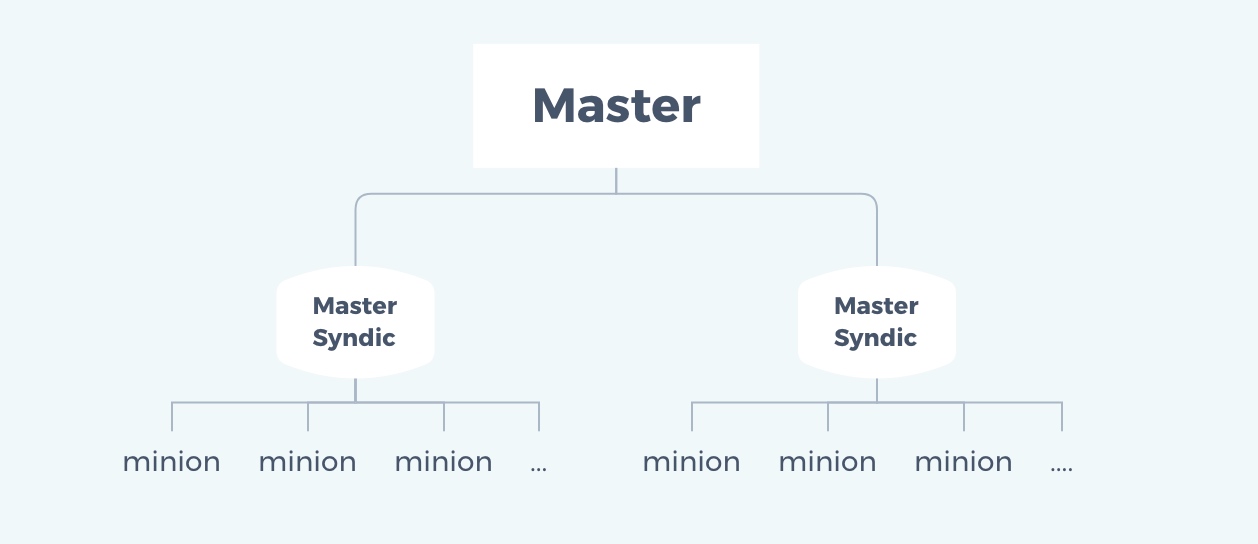
3.2 salt-syndic Advantages and disadvantages of
advantage :
- Can pass syndic Implement more complex salt framework
- reduce master The burden of
Inferiority :
- syndic Of /srv In the catalog salt and pillar The contents of the directory should be the same as the top level master Consistency under , So we need to synchronize data , The synchronization scheme is the same as salt-master High availability
- Topmost master I don't know how many I have syndic, It only knows how many it has minion, I don't know that minion By whom syndic To manage
3.3 salt-syndic Deploy
Environmental statement
| Host name | IP | service |
|---|---|---|
| master | 192.168.91.135 | salt-master |
| syndic | 192.168.91.137 | salt-master、salt-syndic |
| minion | 192.168.91.138 | salt-minion |
install salt-master、salt-syndic
[[email protected] ~]# yum -y install salt-master salt-syndic
modify master host /etc/salt/master The configuration file
[[email protected] ~]# vim /etc/salt/master
order_masters: True  //  Uncomment the line , Change the value here to True

//  Restart the service
[[email protected] ~]# systemctl restart salt-master
modify syndic Of the host /etc/saltmaster The configuration file
[[email protected] ~]# vim /etc/salt/master
syndic_master: 192.168.91.135	//  Uncomment the line , Change the value here to master The host  IP  Address

//  Restart the service
[[email protected] ~]# systemctl restart salt-master
[[email protected] ~]# systemctl restart salt-syndic
To configure minion, take master Point to syndic Host
[[email protected] ~]# vim /etc/salt/minion
master: 192.168.91.137

//  Restart service
[[email protected] ~]# systemctl restart salt-minion
In all minion Do the same thing
Be careful , To set up minion In the configuration file id Parameters , Point to minion Self ip Address or host name , Must be able to uniquely identify minion This machine .
First in syndic Accept on the host minion The host key
[[email protected] ~]# salt-key -L
Accepted Keys:
Denied Keys:
Unaccepted Keys:
minion
Rejected Keys:

[[email protected] ~]# salt-key -yA
The following keys are going to be accepted:
Unaccepted Keys:
minion
Key for minion minion accepted.

[[email protected] ~]# salt-key -L
Accepted Keys:
minion
Denied Keys:
Unaccepted Keys:
Rejected Keys:
stay master Accept on syndic The host key
[[email protected] ~]# salt-key -L
Accepted Keys:
Denied Keys:
Unaccepted Keys:
Syndic
master
Rejected Keys:

[[email protected] ~]# salt-key -ya Syndic
The following keys are going to be accepted:
Unaccepted Keys:
Syndic
Key for minion Syndic accepted.

[[email protected] ~]# salt-key -L
Accepted Keys:
Syndic
Denied Keys:
Unaccepted Keys:
master
Rejected Keys:
Last in master Verification and minion The connectivity of
[[email protected] ~]# salt 'minion' test.ping
minion:
    True
Execute the status file to test
//  Sync first master The host and syndic Host Directory , also file_roots、pillar_roots file
[[email protected] ~]# scp -r /srv/ 192.168.91.137:/srv/

[[email protected] ~]# salt 'minion' state.sls init.firewalld.main
minion:
----------
          ID: /etc/profile
    Function: file.line
      Result: True
     Comment: Changes were made
     Started: 20:50:16.018518
    Duration: 19.753 ms
     Changes:
              ----------
              diff:
                  ---
                  +++
                  @@ -1,5 +1,6 @@
                   # /etc/profile

                  +export HISTTIMEFORMAT="%F %T `whoami` "
                   # System wide environment and startup programs, for login setup
                   # Functions and aliases go in /etc/bashrc


Summary for minion
------------
Succeeded: 1 (changed=1)
Failed:    0
------------
Total states run:     1
Total run time:  22.753 ms
边栏推荐
- MIR专题征稿 | 常识知识与推理:表示、获取与应用 (10月31日截稿)
- My second blog - C language
- 数字图像理论知识(一)(个人浅析)
- 德国、葡萄牙均宣布不会禁用华为5G设备,但德国会设定严格限制条件!
- MATLAB实现的图像分割之边缘检测和连接
- [network] communication across regional networks learn how routing tables work
- There is a 'single quotation mark' problem in the string when Oracle inserts data
- npm安装和卸载全局包
- How does app automated testing achieve H5 testing
- redis 主从架构(sizeof函数怎么计算)
猜你喜欢

Information management system and games based on C language
冲刺金九银十丨熬夜半个月汇集大厂Android岗1600道面试真题

2022年下半年系统集成项目管理工程师认证8月20日开班

你知道雨的类型有几种?

Convertible bond concept table x notation gives you a convenient and fast experience!

克服“看牙恐惧”,我们用技术改变行业

云原生编程挑战赛火热开赛,51 万奖金等你来挑战!

【NPP安装插件】

时间转日期的sql语句应该怎么写?

How does app automated testing achieve H5 testing
随机推荐
English translation Portuguese - batch English conversion Portuguese - free translation and conversion of various languages
【经验之谈】关于维修电子设备的几点建议和经验
How does app automated testing achieve H5 testing
这个客制化键盘,秀翻我了~
Investment of 3.545 billion yuan! Gree Group participates in Xiaomi industry fund
你知道雨的类型有几种?
BeanFactory not initialized or already closed - call ‘refresh‘ before accessing beans via the Applic
投资35.45亿元!格力集团参与小米产业基金
Oracle insert数据时字符串中有‘单引号问题
With the help of panel industry innovation, will FPGA become the best choice for TCON?
The opening price soared by 215%! Domestic signal chain chip enterprise Xinhai Technology landed on the scientific innovation board
Amazon launched Amazon one palm payment system, and the contactless palm vein recognition market is expected to explode
Business visualization - let your flowchart "run" (4. Actual business scenario test)
shared_ptr 和 make_shared 的使用
时间转日期的sql语句应该怎么写?
Cell review: single cell methods in human microbiome research
String中常用的API
Implementation of markdown editor in editor.md
11、 学习MySQL UNION 操作符
毕马威中国:证券基金经营机构信息技术审计项目发现洞察