当前位置:网站首页>C# Winform 相册功能,图片缩放,拖拽,预览图分页
C# Winform 相册功能,图片缩放,拖拽,预览图分页
2022-06-22 13:10:00 【熊思宇】
效果
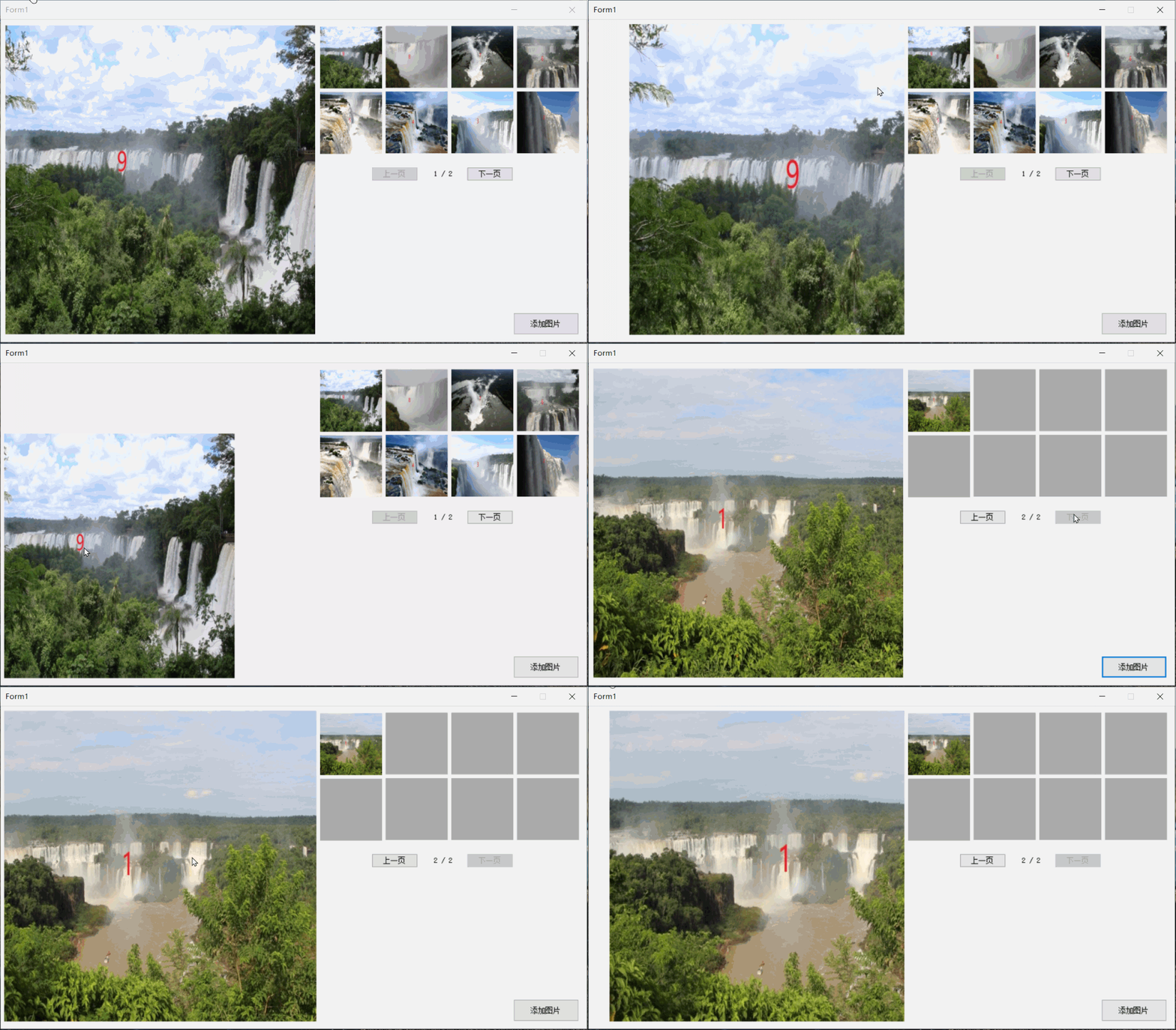
1.图片放大,缩小,拖拽功能
2.添加图片,分页功能
一、前言
在很多项目中也需要用到预览图片的功能,至于为什么加一个添加图片的功能,是因为有些项目,比如视觉相关的工作,会需要摄像机采集图片,然后显示在界面上,所以,图片也是一张一张的添加的,另外,就是分页功能,当预览图位置不够用时就会用到,所以我也加了进来。
当前软件的功能
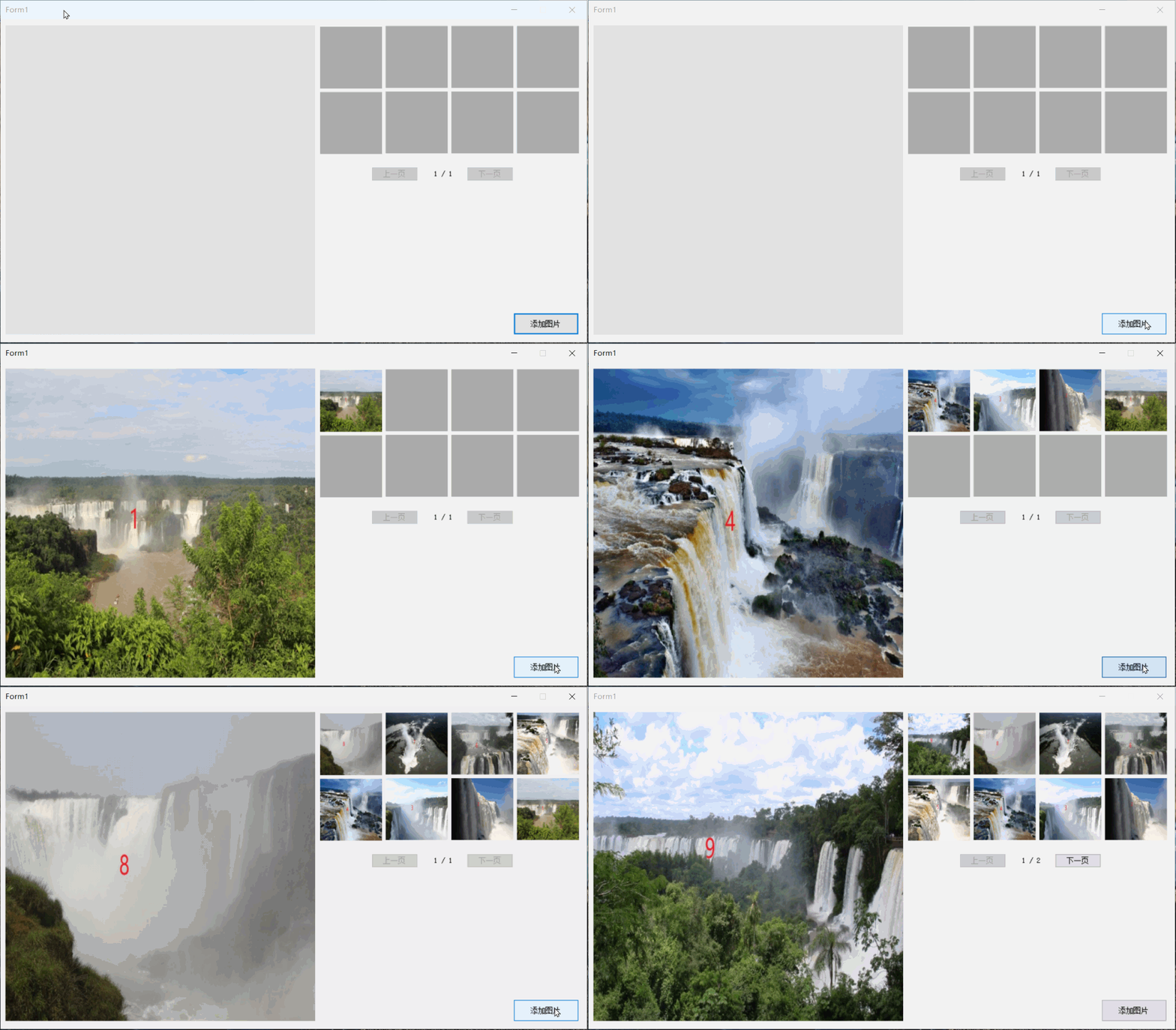
1.添加图片
如果8个预览图都满了,会自动分页,就可以点击上一页,或者下一页了。
2.点击预览图显示大图
点击预览图,之前的拖拽和放大会自动复位
3.大图可以拖拽,放大,缩小
如果图片比较小,有这个功能就看到图片的更多细节了。
4.图片倒序排列
最后添加的图片,始终显示在最前面,这也就在分页上和常规的有点区别了,如图

如果你用的正序排列,可以看看这个帖子:
C# 分页计算 总页数、当前页数据集合_熊思宇的博客-CSDN博客
二、代码
新建一个winform项目,界面如下:
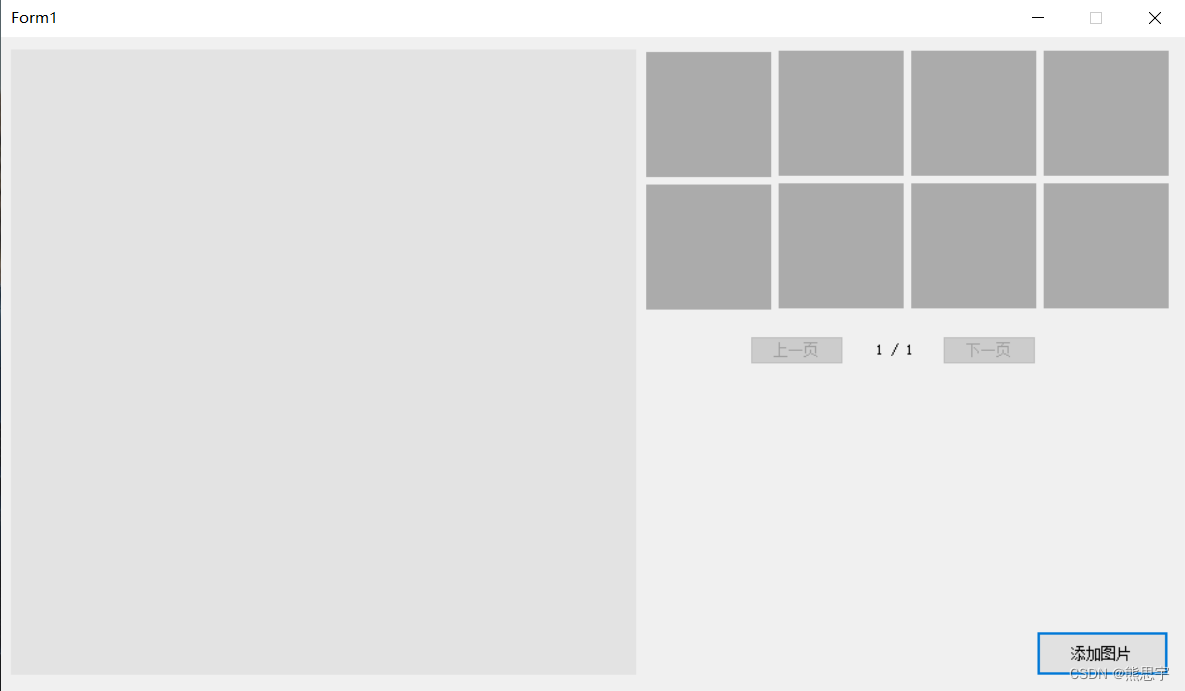
没有太复杂的界面,大图和预览图都是用的 PictureBox 控件 ,控件的名字,可以看下面的代码,在文章的最下面,我会附上这个Demo源码,有兴趣的可以下载。
using System;
using System.Collections.Generic;
using System.ComponentModel;
using System.Data;
using System.Drawing;
using System.IO;
using System.Linq;
using System.Reflection;
using System.Text;
using System.Threading.Tasks;
using System.Windows.Forms;

namespace 相册功能
{
    public partial class Form1 : Form
    {
        public Form1()
        {
            InitializeComponent();
        }

        //本地的相册列表
        private string AlbumPath = Application.StartupPath + "\\Album";
        //相册列表
        private List<PictureBox> PictureBoxList = new List<PictureBox>();
        //图片路径列表
        private List<string> FilesinfoList = new List<string>();
        //相册显示的图片列表
        private List<Bitmap> BitmapList = new List<Bitmap>();
        //pictureBox1的初始位置
        private Point PicStartPos;
        //pictureBox1的初始大小
        private Size PicSize;

        //测试用
        int index = -1;
        //当前页数
        private int NowPage = 1;
        //总页数
        private int TotalPage = 1;
        //鼠标滚轮缩放图片的增量值
        private int ZoomStep = 20;
        //鼠标是否在拖拽中
        private bool IsMove = false;
        //鼠标点击的位置
        private Point MouseDownPoint;

        private void Form1_Load(object sender, EventArgs e)
        {
            PicStartPos = pictureBox1.Location;
            PicSize = pictureBox1.Size;
            this.pictureBox1.MouseWheel += new MouseEventHandler(this.pictureBox1_MouseWheel);

            PictureBoxList.Add(PictureBox_ImgList1);
            PictureBoxList.Add(PictureBox_ImgList2);
            PictureBoxList.Add(PictureBox_ImgList3);
            PictureBoxList.Add(PictureBox_ImgList4);
            PictureBoxList.Add(PictureBox_ImgList5);
            PictureBoxList.Add(PictureBox_ImgList6);
            PictureBoxList.Add(PictureBox_ImgList7);
            PictureBoxList.Add(PictureBox_ImgList8);

            //添加图片的点击事件
            for (int i = 0; i < PictureBoxList.Count; i++)
            {
                PictureBoxList[i].Click += new System.EventHandler(PictureBoxClick);
            }

            DirectoryInfo directory = new DirectoryInfo(AlbumPath);
            FileSystemInfo[] filesArray = directory.GetFileSystemInfos();
            foreach (var item in filesArray)
            {
                if (item.Attributes != FileAttributes.Directory)
                {
                    FilesinfoList.Add(item.FullName);
                }
            }
        }

        /// <summary>
        /// 上一页
        /// </summary>
        /// <param name="sender"></param>
        /// <param name="e"></param>
        private void Button_Back_Click(object sender, EventArgs e)
        {
            if (NowPage <= 1) return;

            NowPage--;
            for (int i = 0; i < PictureBoxList.Count; i++)
            {
                PictureBoxList[i].Image = null;
            }

            List<Bitmap> list = GetPagesBitmap(NowPage);
            for (int i = 0; i < list.Count; i++)
            {
                PictureBoxList[i].Image = list[i];
            }

            pictureBox1.Image = list[0];
            //设置坐标
            pictureBox1.Location = PicStartPos;
            //设置控件宽高
            pictureBox1.Size = PicSize;

            Label_NumberOfPages.Text = string.Format("{0} / {1}", NowPage, TotalPage);
            BackNextButtonType();
        }

        /// <summary>
        /// 下一页
        /// </summary>
        /// <param name="sender"></param>
        /// <param name="e"></param>
        private void Button_Next_Click(object sender, EventArgs e)
        {
            if (NowPage >= TotalPage) return;

            NowPage++;
            for (int i = 0; i < PictureBoxList.Count; i++)
            {
                PictureBoxList[i].Image = null;
            }

            List<Bitmap> list = GetPagesBitmap(NowPage);
            for (int i = 0; i < list.Count; i++)
            {
                PictureBoxList[i].Image = list[i];
            }

            pictureBox1.Image = list[0];
            //设置坐标
            pictureBox1.Location = PicStartPos;
            //设置控件宽高
            pictureBox1.Size = PicSize;

            Label_NumberOfPages.Text = string.Format("{0} / {1}", NowPage, TotalPage);
            BackNextButtonType();
        }

        /// <summary>
        /// 添加图片
        /// </summary>
        /// <param name="sender"></param>
        /// <param name="e"></param>
        private void Button_Add_Click(object sender, EventArgs e)
        {
            index++;
            AddPicture(new Bitmap(FilesinfoList[index]));
            if (index >= FilesinfoList.Count - 1)
                index = -1;
        }

        /// <summary>
        /// 添加图片
        /// </summary>
        /// <param name="bitmap"></param>
        private void AddPicture(Bitmap bitmap)
        {
            if (bitmap == null) return;

            //添加到图片列表
            BitmapList.Add(bitmap);
            //界面预留图中显示
            pictureBox1.Image = bitmap;
            //设置坐标
            pictureBox1.Location = PicStartPos;
            //设置控件宽高
            pictureBox1.Size = PicSize;

            //计算当前总页数
            int page = BitmapList.Count / PictureBoxList.Count;
            int remainder = BitmapList.Count % PictureBoxList.Count;
            TotalPage = remainder > 0 ? page + 1 : page;
            Label_NumberOfPages.Text = string.Format("{0} / {1}", NowPage, TotalPage);

            BackNextButtonType();

            //让图片按逆向顺序显示
            List<Bitmap> reverseSort = new List<Bitmap>();
            for (int i = BitmapList.Count - 1; i >= 0; i--)
            {
                reverseSort.Add(BitmapList[i]);
            }
            for (int i = 0; i < reverseSort.Count; i++)
            {
                if (i <= 7)
                    PictureBoxList[i].Image = reverseSort[i];
            }
        }

        /// <summary>
        /// 8张预览图片的点击事件
        /// </summary>
        /// <param name="sender"></param>
        /// <param name="e"></param>
        private void PictureBoxClick(Object sender, System.EventArgs e)
        {
            PictureBox pictureBox = (PictureBox)sender;
            if (pictureBox != null && pictureBox.Image != null)
            {
                pictureBox1.Image = pictureBox.Image;
                //设置坐标
                pictureBox1.Location = PicStartPos;
            }
        }

        /// <summary>
        /// 获取索引对应的图片
        /// </summary>
        /// <param name="index"></param>
        /// <returns></returns>
        private List<Bitmap> GetPagesBitmap(int index)
        {
            if (BitmapList.Count <= 0) return null;

            //页数
            int page = BitmapList.Count / PictureBoxList.Count;
            //余数
            int remainder = BitmapList.Count % PictureBoxList.Count;
            //总页数
            int allPage = remainder > 0 ? page + 1 : page;

            if (index > allPage) return null;

            //索引起点
            int start = (index * PictureBoxList.Count) - PictureBoxList.Count;
            //索引结束点
            int end = (index * PictureBoxList.Count) - 1;
            if (end > BitmapList.Count) end = BitmapList.Count - 1;

            List<Bitmap> reverseSort = new List<Bitmap>();
            for (int i = BitmapList.Count - 1; i >= 0; i--)
            {
                reverseSort.Add(BitmapList[i]);
            }

            List<Bitmap> list = new List<Bitmap>();
            for (int i = start; i <= end; i++)
            {
                list.Add(reverseSort[i]);
            }

            if (list.Count > 0)
                return list;
            return null;
        }

        /// <summary>
        /// 上一页,下一页按钮状态
        /// </summary>
        private void BackNextButtonType()
        {
            Button_Next.Enabled = true;
            Button_Back.Enabled = true;

            //现在页 = 总页数
            if (NowPage == TotalPage)
                Button_Next.Enabled = false;
            //现在页 小于等于 1
            if (NowPage <= 1)
                Button_Back.Enabled = false;
        }


        private void pictureBox1_MouseDown(object sender, MouseEventArgs e)
        {
            if (pictureBox1.Image == null) return;

            if (e.Button == MouseButtons.Left)
            {
                MouseDownPoint.X = Cursor.Position.X; //记录鼠标左键按下时位置
                MouseDownPoint.Y = Cursor.Position.Y;
                IsMove = true;
                pictureBox1.Focus(); //鼠标滚轮事件(缩放时)需要picturebox有焦点
            }
        }

        private void pictureBox1_MouseUp(object sender, MouseEventArgs e)
        {
            if (e.Button == MouseButtons.Left)
            {
                IsMove = false;
            }
        }

        private void pictureBox1_MouseMove(object sender, MouseEventArgs e)
        {
            if (pictureBox1.Image == null) return;
            pictureBox1.Focus(); //鼠标在picturebox上时才有焦点,此时可以缩放
            if (IsMove)
            {
                int x, y;   //新的pictureBox1.Location(x,y)
                int moveX, moveY; //X方向,Y方向移动大小。
                moveX = Cursor.Position.X - MouseDownPoint.X;
                moveY = Cursor.Position.Y - MouseDownPoint.Y;
                x = pictureBox1.Location.X + moveX;
                y = pictureBox1.Location.Y + moveY;
                pictureBox1.Location = new Point(x, y);
                MouseDownPoint.X = Cursor.Position.X;
                MouseDownPoint.Y = Cursor.Position.Y;
            }
        }

        private void pictureBox1_MouseWheel(object sender, MouseEventArgs e)
        {
            if (pictureBox1.Image == null) return;

            PictureBox pbox = pictureBox1;
            int x = e.Location.X;
            int y = e.Location.Y;
            int ow = pbox.Width;
            int oh = pbox.Height;
            int VX, VY;  //因缩放产生的位移矢量
            if (e.Delta > 0) //放大
            {
                //第1步
                pbox.Width += ZoomStep;
                pbox.Height += ZoomStep;
                //第2步
                PropertyInfo pInfo = pbox.GetType().GetProperty("ImageRectangle", BindingFlags.Instance | BindingFlags.NonPublic);
                Rectangle rect = (Rectangle)pInfo.GetValue(pbox, null);
                //第3步
                pbox.Width = rect.Width;
                pbox.Height = rect.Height;

                //Console.WriteLine(string.Format("宽:{0},高:{1}",pbox.Width,pbox.Height));
            }
            if (e.Delta < 0) //缩小
            {
                //防止一直缩成负值
                if (pbox.Width < 300)
                    return;

                pbox.Width -= ZoomStep;
                pbox.Height -= ZoomStep;
                PropertyInfo pInfo = pbox.GetType().GetProperty("ImageRectangle", BindingFlags.Instance |
                 BindingFlags.NonPublic);
                Rectangle rect = (Rectangle)pInfo.GetValue(pbox, null);
                pbox.Width = rect.Width;
                pbox.Height = rect.Height;
            }

            //第4步,求因缩放产生的位移,进行补偿,实现锚点缩放的效果
            VX = (int)((double)x * (ow - pbox.Width) / ow);
            VY = (int)((double)y * (oh - pbox.Height) / oh);
            pbox.Location = new Point(pbox.Location.X + VX, pbox.Location.Y + VY);
        }


    }
}
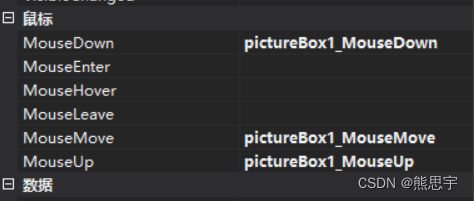
代码中,鼠标缩放,拖拽功能,需要在控件里添加对应的事件,否则就没有效果了
运行后,效果就如文章开头所示,这个位置还是先不加图片了
源码:点击下载
结束
如果这个帖子对你有用,欢迎 关注 + 点赞 + 留言,谢谢
end
边栏推荐
- Run sqoop1.4.5 to report warning: does not exist! HCatalog jobs will fail.
- Flink status management
- Talk about row storage and column storage of database
- S7-200SMART与FANUC机器人进行Profinet通信的具体方法和步骤
- Shan Zhiguang, chairman of BSN Development Alliance: DDC can provide the underlying support for the development of China's meta universe industry
- Kukai TV ADB
- 如何实现接口异常场景测试?测试方法探索与测试工具实现
- Some common SQL (version 05 and above) database maintenance scripts
- 如何理解fold change?倍数分析?
- 坚持了 10 年的 9 个编程好习惯
猜你喜欢

程序员要不要选择软件人才外包公司?

Istio服务网格中的流量复制

Flink状态管理

史蒂芬·柯维写给年轻人的高效工作秘笈

Oceanbase database helps the ideal automobile intelligent production line to realize automatic recovery within 30 seconds

Talk about row storage and column storage of database
MySQL如何让一个表中可以有多个自增列

《Kubernetes监控篇:Grafana通过自动化方式添加datasource和dashboard》

JS advanced programming version 4: learning iterators

Simple integration of client go gin IX create

随机推荐
In 5g era, how to create an amazing live VR activity?
transformers VIT图像模型向量获取
12306 ticket grabbing tutorial
JasperReport报表生成工具的基本使用和常见问题
Chapter 1 overview of naturallanguageprocessing and deep learning
VR panoramic shooting breaks the deadlock of traditional propaganda that wild geese pass without leaving traces
坚持了 10 年的 9 个编程好习惯
SQL Server 常用函数
Record of problems encountered in dual network card binding
数据库中如何使用SQL进行修改&amp;删除
Traffic replication in istio Service Grid
Transformers vit image model vector acquisition
谈谈人生风控
力扣每日一练之双指针2Day9
BSN发展联盟理事长单志广:DDC可为中国元宇宙产业发展提供底层支撑
C#泛型_泛型类
Istio服务网格中的流量复制
Some common SQL (version 05 and above) database maintenance scripts
STM32F1与STM32CubeIDE编程实例-光断续传感器驱动
Run sqoop1.4.5 to report warning: does not exist! HCatalog jobs will fail.