当前位置:网站首页>Actual case of ROS communication
Actual case of ROS communication
2022-07-28 02:55:00 【2021 Nqq】
List of articles
ROS Built in turtlesim Case study
difference
/turtle1/cmd_vel: The node that controls the movement of the little turtle
Release :rostopic info /turtle1/cmd_vel(turtle1/cmd_vel Is the node )
Type: geometry_msgs/Twist
Publishers: /teleop_turtle (http://rosnoetic-VirtualBox:33275/)
Subscribers: /turtlesim (http://rosnoetic-VirtualBox:40025/)
subscribe :rostopic info /turtle1/pose
Type: turtlesim/Pose
Publishers: /turtle1 (http://rosnoetic-VirtualBox:46159/)
Subscribers: None
Topic Publishing
1. Get the topic /turtle1/cmd_vel
rqt_graph: Start the calculation chart
The left and right ends are node information 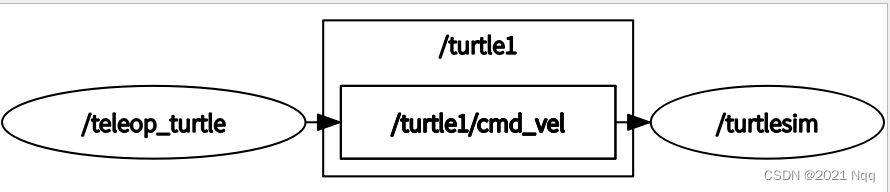
2. Get message type
rostopic info /turtle1/cmd_vel(turtle/cmd_vel It's a topic )
Type: geometry_msgs/Twist
Publishers: /teleop_turtle (http://rosnoetic-VirtualBox:33275/)
Subscribers: /turtlesim (http://rosnoetic-VirtualBox:40025/)
perhaps rostopic type /turtle1/cmd_vel
geometry_msgs/Twist
3. Get message format
- rosmsg show geometry_msgs/Twist( Be similar to plumbing_pub_sub/Person) Get internal parameters
- rosmsg info geometry_msgs/Twist
geometry_msgs/Vector3 linear( Linear velocity )
float64 x
float64 y
float64 z
geometry_msgs/Vector3 angular( angular velocity )
float64 x
float64 y
float64 z
- linear( Linear velocity ) Under the xyz Corresponding to x、y and z Speed in direction ( The unit is m/s), The data type is floating point double
- angular( angular velocity ) Under the xyz They correspond to each other x Roll on the shaft 、y On axis pitch and z Yaw speed on axis ( The unit is rad/s)

radian : The unit radian is defined as the center angle when the arc length is equal to the radius . That is... In the picture radian
The perimeter of 2pir, turn 1 Radius is 1 radian , turn 1 The circle is equivalent to 6.28 Radius , Namely 6.28 A radian ,1 Second turn 1 Circle is 6.28rad/s.
With 10Hz The way to subscribe :rostopic pub -r 10 /turtle1/cmd_vel geometry_msgs/Twist
4. Control tortoise movement
4.1 C++ Realization :test01_pub_twist
function
step :
- roscore
- rosrun turtlesim turtlesim_node
- cd demo02_ws
- source ./devel/setup.bash
- rosrun plumbing_test test01_pub_twist
#include"ros/ros.h"
#include"geometry_msgs/Twist.h"

/*  demand : Post topic news   topic of conversation : /turtle1/cmd_vel  news : geometry_msgs/Twist 1. Include header file  2. initialization ROS node  3. Create node handle  4. Create a publishing object  5. Release logic implementation  6.spinOnce()  Circular Publishing  */

int main(int argc, char *argv[])
{

    //  Solve the mess
    setlocale(LC_ALL,"");

    // 2. Initialize node
    ros::init(argc,argv,"my_control");

    // 3. Create node handle
    ros::NodeHandle nh;

    // 4. Create a publishing object
    ros::Publisher pub = nh.advertise<geometry_msgs::Twist>("/turtle1/cmd_vel",10);//  Topic name /tur...

    // 5. Release logic implementation  10Hz 1 second 10 Time
    // 5.1  Set the release frequency
    ros::Rate rate(10);

    // 5.2  Organize the messages that are published
    geometry_msgs::Twist twist;
    twist.linear.x = 1.0;// The data type is floating point double
    twist.linear.y = 0.0;
    twist.linear.z = 0.0;
    twist.angular.z = 1.0;// Only yaw angle
    twist.angular.x = 0.0;
    twist.angular.y = 0.0;

    // 5.3  Circular Publishing
    while(ros::ok())
    {

        pub.publish(twist);

        //  Sleep
        rate.sleep();

        // 6.spinOnce()  Circular Publishing
        ros::spinOnce();
    }

    return 0;
}
4.2 Python Realization : test01_pub_twist_p.py
function
step
- Add executable rights
chmod +x *.py
ll - compile ——catkin Part of the modified
- perform
roscore
rosrun turtlesim turtlesim_node
rosrun plumbing_test test01_pub_twist_p.py
#! /usr/bin/eny python

"""  Issued by : Release speed news   topic of conversation : /turtle1/cmd_vel  news : geometry_msgs/Twist 1.  Guide pack  2.  initialization ROS node  3.  Create publisher object  4.  Organization data , Release data  """

import rospy
from geometry_msgs.msg import Twist

if __name__ == "__main__":

    # 2.  initialization ROS node
    rospy.init_node("my_control_p")

    # 3.  Create publisher object
    pub = rospy.Publisher("/turtle/cmd_vel",Twist,queue_size = 10)

    # 4.  Organization data , Release data
    # 4.1  Set the release frequency
    rate = rospy.Rate(10)

    # 4.2  Message creation speed
    twist = Twist()
    twist.linear.x = 0.5
    twist.linear.y = 0.0
    twist.linear.z = 0.0

    twist.angular.x = 0.0
    twist.angular.y = 0.0
    twist.angular.z = 1.0

    # 4.3  Circular Publishing
    while not rospy.is_shutdown():
        pub.publish(twist)
        rate.sleep()
Topic subscription
1. Get the topic /turtle1/pose
rostopic list
/rosout
/rosout_agg
/turtle1/cmd_vel
/turtle1/color_sensor
/turtle1/pose
2. Get message type
rostopic info /turtle1/pose
Type: turtlesim/Pose
Publishers: /turtle1 (http://rosnoetic-VirtualBox:46159/)
Subscribers: None
3. Get message format
rosmsg info turtlesim/Pose
float32 x( coordinate )
float32 y
float32 theta( toward )
float32 linear_velocity( Linear velocity )
float32 angular_velocity( angular velocity )
rostopic echo /turtle1/pose: Print information
4. Code implementation
4.1 C++ Realization :test02_sub_pose
function
- window 1:vscode terminal
source ./devel/setup.bash
roslaunch plumbing_test start_turtle.launch - window 2:ctrl+alt+t
cd demo02_ws
source ./devel/setup.bash
rosrun plumbing_test test02_sub_pose
You can control the tortoise movement according to the keyboard , Print out the turtle's movement information in real time .
#include"ros/ros.h"
#include"turtlesim/Pose.h"

/*  demand : Subscribe to tortoise pose information  1.  Include header file  2.  initialization ROS node  3.  Create node handle  4.  Create subscription object  5.  Process subscribed data ( Callback function ) 6. spin() come back  */
void doPose(const turtlesim::Pose::ConstPtr &pose)
{

    ROS_INFO(" Turtle pose information : coordinate (%.2f,%.2f), toward (%.2f), Linear velocity :%.2f, angular velocity :%.2f",
            pose->x,pose->y,pose->theta,pose->linear_velocity,pose->angular_velocity);
}

int main(int argc, char *argv[])
{

    //  Chinese garbled
    setlocale(LC_ALL,"");

    // 2.  initialization ROS node
    ros::init(argc,argv,"sub_pose");

    // 3.  Create node handle
    ros::NodeHandle nh;

    // 4.  Create subscription object
    ros::Subscriber sub = nh.subscribe("/turtle1/pose",100,doPose); //doPose It's a callback function

    // 5.  Process subscribed data ( Callback function )
    // 6. spin() come back
    ros::spin();
    return 0;
}
4.2 Python Realization :test02_sub_pose_p.py
function
- Add executable rights
chmod +x *.py
ll - compile ——catkin Part of the modified
- perform
window 1:vscode terminal
source ./devel/setup.bash
roslaunch plumbing_test start_turtle.launch
window 2:ctrl+alt+t
cd demo02_ws
source ./devel/setup.bash
rosrun plumbing_test test02_sub_pose_p.py
#! /usr/bin/env python

"""  demand : Subscribe and output tortoise's position information  1.  Guide pack  2.  initialization ROS node  3.  Create subscription object  4.  Use the callback function to process the subscribed information  5. spin() """
import  rospy
from turtlesim.msg import Pose

def doPose(pose):
    rospy.loginfo("p-> Turtle pose information : coordinate (%.2f,%.2f), toward (%.2f), Linear velocity :%.2f, angular velocity :%.2f",
                pose.x,pose.y,pose.theta,pose.linear_velocity,pose.angular_velocity)

if __name__ == "__main__":

    # 2.  initialization ROS node
    rospy.init_node("sub_pose_p")

    # 3.  Create subscription object
    sub = rospy.Subscriber("/turtle1/pose",Pose,doPose,queue_size=100)#  The message type is Pose
    # 4.  Use the callback function to process the subscribed information
    # 5. spin()
    rospy.spin()
The service call
1. Get the topic /spawn( lay eggs )
rosservice list
/clear
/key/get_loggers
/key/set_logger_level
/kill
/reset
/rosout/get_loggers
/rosout/set_logger_level
/spawn
/turtle1/get_loggers
/turtle1/set_logger_level
/turtle1/set_pen
/turtle1/teleport_absolute
/turtle1/teleport_relative
2. Get message type
rosservice info /spawn: obtain turtlesim/Spawn
Node: /turtle1
URI: rosrpc://rosnoetic-VirtualBox:60831
Type: turtlesim/Spawn
Args: x y theta name
3. Get message format
rossrv info turtlesim/Spawn
float32 x ( The first half is the request )
float32 y
float32 theta
string name
string name( The second half is the response )
theta It's the radian system , The scope is 3.14rad——(-3.14)rad, Counter clockwise is positive , Clockwise is negative
4. Code implementation
4.1 C++ Realization test03_server_client.cpp
- window 1:vscode terminal
source ./devel/setup.bash
roslaunch plumbing_test start_turtle.launch - window 2:ctrl+alt+t
cd demo02_ws
source ./devel/setup.bash
rosrun plumbing_test test03_service_client
function
#include"ros/ros.h"
#include"turtlesim/Spawn.h"

/*  demand : Send request to server , Generate a new tortoise   topic of conversation :/spawn  news :turtlesim/Spawn 1. Include header file  2. initialization ROS node  3. Create node handle  4. Create client objects  5. Organize data and send  6. Process response  */

int main(int argc, char *argv[])
{

    setlocale(LC_ALL,"");

    // 2. initialization ROS node
    ros::init(argc,argv,"service_call");

    // 3. Create node handle
    ros::NodeHandle nh;

    // 4. Create client objects
    ros::ServiceClient client = nh.serviceClient<turtlesim::Spawn>("/spawn"); // /spawn It's the topic name

    // 5. Organize data and send
    // 5.1  Organization request data
    turtlesim::Spawn spawn;
    spawn.request.x = 1.0;
    spawn.request.y = 4.0;
    spawn.request.theta = 4.0;
    spawn.request.name = "turtle2";

    // 5.2  Send a request
    // Determine the server status
    // ros::service::waitForService("/spawn");
    client.waitForExistence();
    bool flag = client.call(spawn);//flag  Accept response status , The response result will also be set into spawn object

    // 6. Process response
    if(flag) //  Response successful
    {

        ROS_INFO(" Tortoise generation succeeded , The new turtle is called :%s",spawn.response.name.c_str());
    }
    else
    {

        ROS_INFO(" request was aborted !!!");
    }

    return 0;
}
4.2 Python Realization test03_server_client_p.py
function
- Add executable rights
chmod +x *.py
ll - compile ——catkin Part of the modified
- perform
window 1:vscode terminal
source ./devel/setup.bash
roslaunch plumbing_test start_turtle.launch
window 2:ctrl+alt+t
cd demo02_ws
source ./devel/setup.bash
rosrun plumbing_test test03_service_client_p.py
#! /usr/bin/env python


"""  demand : Send a request to the server to generate a turtle   topic of conversation :/spawn  Message type :turtlesim/Spawn 1.  Guide pack  2.  initialization ROS node  3.  Create the client object of the service  4.  Organize data and send requests  5.  Process response results  """

import rospy
from turtlesim.srv import Spawn,SpawnRequest,SpawnResponse

if __name__ == "__main__":
    # 2.  initialization ROS node
    rospy.init_node("service_call")
    # 3.  Create the client object of the service
    client = rospy.ServiceProxy("/spawn",Spawn) # /spawn It's the topic name
    # 4.  Organize data and send requests
    # 4.1  Organization data
    request = SpawnRequest()
    request.x = 4.5
    request.y = 2.0
    request.theta = -3 #  turn right 3 individual rad
    request.name = "turtle3"
    # 4.2  Determine the server status and send
    client.wait_for_service() #  When the server is turned on, execute , Otherwise hang
    #  Prevent throwing exceptions
    try:
        response = client.call(request)
        # 5.  Process response results
        rospy.loginfo(" The name of the tortoise is :%s",response.name)
    except Exception as e:
        rospy.logerr(" Request handling exception ")
Parameter setting
1. Get parameter name
Get parameter list rosparam list
/rosdistro
/roslaunch/uris/host_rosnoetic_virtualbox__43129
/rosversion
/run_id
/turtlesim/background_b
/turtlesim/background_g
/turtlesim/background_r
Get parameter value rosparam get /turtlesim/background_r
2. Code implementation
2.1 C++ Realization test04_param
function
rescore
cd demo02_ws
source ./devel/setup.bash
rosrun plumbing_test test04_param
rosrun turtlesim turtlesim_node( Finally start )
#include"ros/ros.h"

/*
     demand : Modify parameters in the server turtlesim Background color related parameters

    1. initialization ROS node
    2. It is not necessary to create a node handle ( And the subsequent API of )
    3. Modify the parameters
*/


int main(int argc, char *argv[])
{

    // 1. initialization ROS node
    ros::init(argc,argv,"change_bgcolor");
    // 2. It is not necessary to create a node handle ( And the subsequent API of )
    // ros::NodeHandle nh("turtlesim");// Set namespace
    // nh.setParam("background_r",255);
    // nh.setParam("background_g",255);
    // nh.setParam("background_b",255);

    ros::NodeHandle nh;
    nh.setParam("/turtlesim/background_r",0);
    nh.setParam("/turtlesim/background_g",50);
    nh.setParam("/turtlesim/background_b",100);

    // 3. Modify the parameters
    //  The way 1: If the ros::param  There is no need to create a node handle
    // ros::param::set("/turtlesim/background_r",0);
    // ros::param::set("/turtlesim/background_g",0);
    // ros::param::set("/turtlesim/background_b",0);

    //  The way 2: Use nodehandle
    return 0;
}
2.2 Python Realization test04_param_p.py
function
- Add executable rights
chmod +x *.py
ll - compile ——catkin Part of the modified
- perform
rescore
cd demo02_ws
source ./devel/setup.bash
rosrun plumbing_test test04_param_p.py
rosrun turtlesim turtlesim_node( Finally start )
#! /usr/bin/env python
"""  demand : Modify tortoise GUI Background color of  1. initialization ros node  2. Set parameters  """

import rospy

if __name__ == "__main__":
    rospy.init_node("change_bgcolor")

    #  Modify background color
    rospy.set_param("/turtlesim/background_r",100)
    rospy.set_param("/turtlesim/background_g",50)
    rospy.set_param("/turtlesim/background_b",200)
边栏推荐
- 入职华为od一个月的感受
- TFX airflow experience
- How to simply realize the function of menu dragging and sorting
- app 自动化 环境搭建(一)
- [tutorial of using idea] shortcut key of idea
- 【OpenGL】GLES20.glClear
- mysql 如图所示,现有表a,表b,需求为 通过projectcode关联a、b表,查出address不同的 idcardnum。
- From prediction to decision-making, Chapter 9 Yunji datacanvas launched the ylearn causal learning open source project
- 初识C语言 -- 操作符和关键字,#define,指针
- LoRaWAN中的网关和chirpstack到底如何通信的?UDP?GRPC?MQTT?
猜你喜欢

【 图像去雾】基于暗通道和非均值滤波实现图像去雾附matlab代码

【信号处理】基于高阶统计量特征的通信系统中微弱信号检测附matlab代码

LETV responded that employees live an immortal life without internal problems and bosses; Apple refuses to store user icloud data in Russia; Dapr 1.8.0 release | geek headlines
![[leetcode] 13. linked list cycle · circular linked list](/img/58/c8796bb5ed96d09325b8f2fa6a709e.png)
[leetcode] 13. linked list cycle · circular linked list

How do gateways and chirpstacks in lorawan communicate? UDP? GRPC? MQTT?
![Trivy [1] tool scanning application](/img/b1/c05949f9379fcde658da64f3a0157a.png)
Trivy [1] tool scanning application

Opengauss Developer Day 2022 sincerely invites you to visit the "database kernel SQL Engine sub forum" of Yunhe enmo

Design of edit memory path of edit box in Gui

Usage of delegate

第二季度邮件安全报告:邮件攻击暴增4倍,利用知名品牌获取信任
随机推荐
[TA frost wolf \u may hundred people plan] Figure 3.5 early-z and z-prepass
Red hat official announced the new president and CEO! Paul Cormier, a key figure in transformation, is "retiring"
Job 7.27 IO process
Usage of delegate
CNN训练循环重构——超参数测试 | PyTorch系列(二十八)
CNN循环训练的解释 | PyTorch系列(二十二)
POC simulation attack weapon - Introduction to nucleus (I)
Is it you who are not suitable for learning programming?
Explanation of CNN circular training | pytorch series (XXII)
【信号去噪】基于卡尔曼滤波实现信号去噪附matlab代码
[signal denoising] signal denoising based on Kalman filter with matlab code
IO流:节点流和处理流详细归纳。
【LeetCode】13. Linked List Cycle·环形链表
1313_ Pyserial installation and document generation
Skills in writing English IEEE papers
Newline required at end of file but not found.
How do you use the jar package sent by others (how to use the jar package sent by others)
unordered_map的hash function及hash bucket存储方式探索
Cesium3Dtilesets 使用customShader的解读以及泛光效果示例
Flutter God operation learning (full level introduction)