当前位置:网站首页>From the establishment to the actual combat of the robotframework framework, I won't just read this learning note
From the establishment to the actual combat of the robotframework framework, I won't just read this learning note
2022-06-23 14:10:00 【Software testing】
Robot Framework from Robot Framework Foundation Support . Many industry-leading companies use... In their software development This tool .
Robot Framework It's open and scalable .Robot Framework It can be integrated with almost any other tool , To create powerful and flexible automation solutions .Robot Framework Free to use , No license fee .
Robot Framework With simple grammar , Use human readable keywords . Its function can be realized by using Python、Java or Many other programming languages implement libraries for extension .Robot Framework There is a rich ecosystem , Including libraries and tools developed as independent projects .
01 robotframework Environment building
install python3.6 above , And ensure that the environment variables are configured correctly
install robotframework library
pip install robotframework
install robotframework ride Script graphical interface editor
pip install robotframwork-ride

Click is , A shortcut icon will be created on the desktop 
02 Built in key word library
robotframwork After installation, it will appear in python Installation directory Lib/site-packages Under the table of contents

Among them libraries The directory is the keyword source code we will use when writing scripts in the future

These key word libraries are classified according to certain categories
Builtln
Variable definitions 、 Cycle control 、 Data calculation 、 Hexadecimal conversion 、 Assertion judgement 、 Log, etc.
Collections
Handle python List and dictionary related operations
DateTime
Handling date and time conversion related operations
Dialogs
Provides methods for pausing execution and obtaining user input
OperatingSystem
Provide operating system related keywords
Process
Keywords related to the operation process
Remote
Special library acts as Robot Framework Agents with libraries elsewhere . The actual library can run on different machines , And you can use any support XML-RPC A programming language
Screenshot
Provide keywords for capturing desktop screenshots
String
Used to generate 、 Modify and validate the library of strings
Telnet
Can be connected to Telnet Server and execute commands on the open connection
XML
Used to generate 、 Modification and validation XML Document library
03 ride Basic explanation
Double click on the desktop ride Icon to open ride Interface
01 Project creation
Click on File->New Project, choice directory as a result of , stay directory Test suite can be created under the project of , If it is tpye by fifile, Only test cases can be created , This is not good for use case management

02 Create a test suite
A test suite is a collection used to manage multiple test cases
Right click to select the project name ,New Suite, choice fifile as a result of , stay fifile Test cases can be created under the test suite of , If it is tpye by directory, It's going to have to be rebuilt fifile Test suite for , To create test cases , Because test cases can only be used in fifile Create pictures under type
03 Create test cases
Right click to select test suite , Click on New Test Case

04 Test suite workspace description
1、 test suite Edit District It is divided into 4 part
Setting area
The setting area is hidden by default , Click to appear
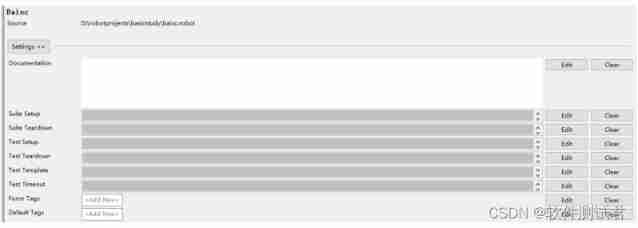
Documentation:
file , Every item has . You can add a document description to the current object
Suite Setup:
It refers to the execution of a keyword when the test suite starts .
( example : I am here Suite Setup Set up Sleep | 5sec, Said wait 5 second , Pay attention to the keyword parameters to use | Separate )
Suite Teardown:
It refers to the execution of a keyword at the end of the test suite
Test Setup:
It refers to the execution of a keyword when the case is started
Test Teardown:
It refers to the execution of a keyword at the end of the case
Test Template:
Test template , This is to specify a keyword for all of the test suite TestCase The mold edition , So all of TestCase You just need to set the incoming parameter of this keyword
Test Timeout:
Set the timeout for each test case , If you go beyond that time, you will fail , And stop the case function . This is to prevent certain circumstances from causing the case to stick , Neither stop nor fail
Force Tags:
In the file type Suite Here you can continue to add to the sub elements Force Tags, But he can't delete the parent Element set tags
Default Tags:
Default tag , Actually sum Force Tags It doesn't make any difference
Reference area
It is mainly used to load external files

Library: Load the test library , Mainly [PYTHON Catalog ]\Lib\site-packages The test library in
Resource: load resources , Mainly your project related resource files
Variables: Load variable file
Parameter area
It is mainly used to define the internal variables of the suite

Add Scalar: Define common variables
Add List: Define list variables
Add Dict: Definition dictionary
Data area
Mainly in the report and log Show the defined content in , Format and document equally
2、 test suite Text Edit District
Test suite test case text information
3、 test suite Run District
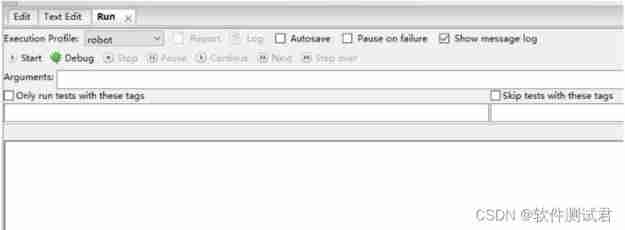
Execution Profifile:
Choose the mode of operation , There are pybot、jybot and custom script. Default pybot that will do .
Start:
Running cases . If there is no check in front of the test case under the test suite , All use cases under the test suite will be executed by default . If the test case is checked , Then execute the test. See the case checked below .
Stop:
Stop the case .
Report and Log:
Reports and logs , You need to run it before you can click . Their differences , The report is more a display of the results , journal More records of the process , It's more about logs .
Autosave:
Save automatically , If I don't check it , After modifying the case, if it is not saved , You will be prompted whether to run the case preservation . Check to save automatically at run time .
Arguments:
pybot Parameters of ( perhaps jybot etc. ). The full version of the parameters can be found in doc Command line input pybot.bat --help
Only Run Tests with these Tags:
Run only test cases for these tags . stay case Of setting You can add tag
Skip Tests with these Tags:
Skip the test cases for these tags . stay case Of setting You can add tag
05 Test case workspace description
1、 The test case Edit District It is mainly divided into 2 part
Setting area
Documentation:
file , Every item has . You can add a document description to the current object .
Setup:
It refers to the execution of a keyword when the case is started .
Teardown:
It refers to the execution of a keyword at the end of the case .
Tags:
Mark a test case . stay Run In the area Only Run Tests with these Tags and Skip Tests with these Tags, This flag bit will be used to identify whether to run or skip the use case .
Timeout:
Set the timeout for each test case , If you go beyond that time, you will fail , And stop the case running . This is to prevent certain circumstances from causing the case to stick , Neither stop nor fail .
Template:
Test template , This is to specify a keyword for all of the test suite TestCase Template , So all of TestCase You just need to set the incoming parameter of this keyword
Table area
This is where test cases are written
2、Text Edit and Run There is no difference between the test area and the test suite
04 robotframwork Basic grammar
01 Log Chinese garbled code processing
Find yourself python Install under directory Lib\site-packages\robotide\contrib\testrunner\testrunnerplugin.py Open the above file , find 565 The line is copied first , Re annotation , Paste and modify from another line

Restart after modification ride
02 Use case internal variables
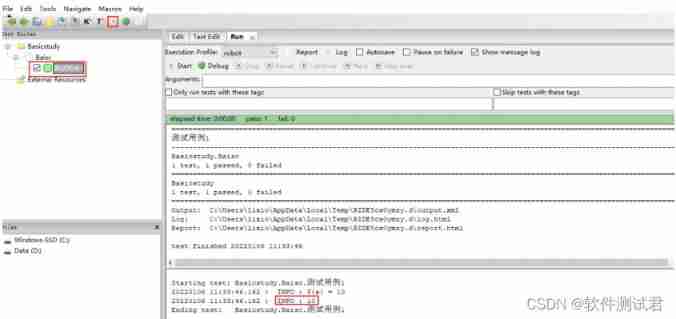
1、 Common variables
Common variable definitions need to use Set Variable keyword , The first cell refers to the variable name , The last cell 10, Refers to the 10 Assign a value to a This variable
Log Is the log keyword , Output a Value

Run it
2、 List variables
The list variable definition needs to use Create List keyword
There are two ways to define a list :
${xxx}
@{xxx}

3、 Dictionary variables
Dictionary variable definitions need to use Create Dictionary
Dictionary definitions can be defined in two ways :
${xxx}
&{xxx}

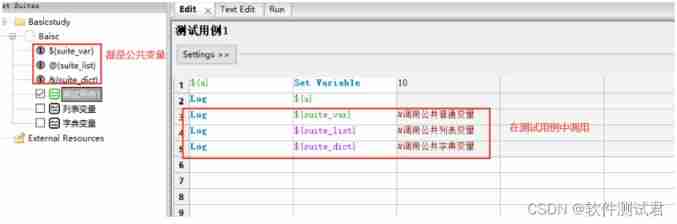
03 Set public variables
There are some common variables that will be used in the same test set , Then it can be defined in the set
Add a normal variable

Add a list variable

Add a dictionary variable

Public variables use
The public variable of the collection can be used in each test case below it
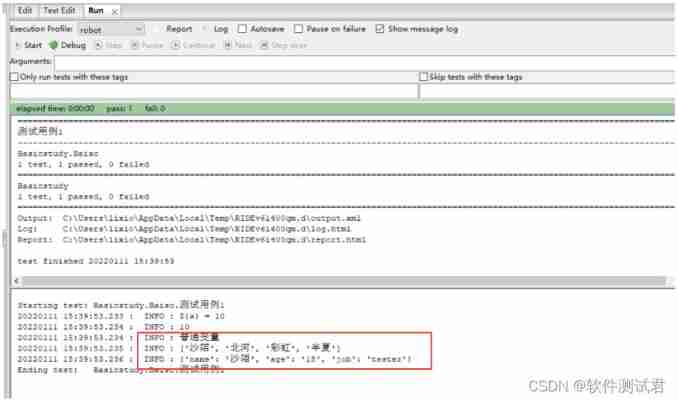
Results after operation :
04 Judge
Case study : Given a score value , Greater than 90 Sub output excellent 、 Greater than 80 Is good 、 Greater than 70 It's average 、 Greater than 60 It's passing , Others are failing
Run Keyword If Use

05 loop
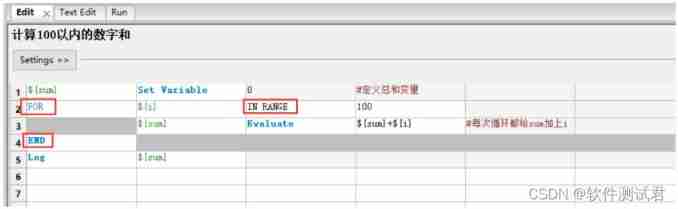
Case study 1: Calculation 100 Numbers within and
FOR…IN RANGE xxx … END structure
${i} Equivalent to a loop variable
Evaluate It means that you will s u m + {sum}+ sum+{i} The result of the calculation is assigned to ${sum}
Case study 2: Even numbers in the output list
FOR … IN xxx … END structure
${i} Equivalent to a loop variable
Run Keyword If Is to judge that the current loop variable is 2 Multiple , Then output

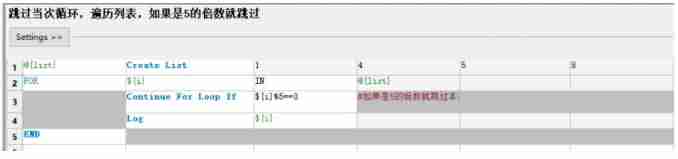
Case study 3: Skip this cycle , Traverse the list , If it is 5 The multiple of is skipped
Continue For Loop If It means that if the conditions are met, this cycle will be skipped
Case study 4: Traverse the list , If you come across 5 Just stop the cycle
Exit For Loop If Indicates that if the condition is met, the loop is terminated

06 Key word library import
When you need to use some extended keywords , You need to import the corresponding library first , For example, the library for list and dictionary operations is Collections
Import Collections
Select test set , Note that if you explicitly red after importing , Description: incorrect import

Use Collections Keywords in

07 User keywords
User keyword is a kind of customized keyword , It is equivalent to encapsulating a function when writing code
1、 Ordinary variables as input parameters
Case study : Encapsulates the sum of all numbers within a specified number , such as 100 within ,1000 And so on
Create keywords


Call the keyword
You want to call a custom keyword in a test set , You need to import
Import custom keywords

After importing, the explicit green description is correct , Explicit red indicates imported resource The path is not right
Call the keyword
Invoke the keywords you wrote in test cases.

2、 List variables as input parameters
Case study : Encapsulates an even number that returns a given list
Create keywords

Call the keyword

3、 Dictionary variables as input parameters
Case study : Define the students' scores in each language subject as a dictionary {‘python’:95,‘java’:58,‘c’:70}, Encapsulating a keyword will be less than The scores in the grid are changed to 60
Create keywords

Call the keyword

4、 Multivariable input parameter
Case study : Encapsulates a keyword that calculates the sum of three numbers , The default value of the third number is 10
Create keywords


Call the keyword

For parameters with default values , When calling, you can pass or not pass
The technology industry should continue to learn , Don't fight alone in your study , It's best to keep warm , Achieve each other and grow together , The effect of mass effect is very powerful , Let's learn together , Punch in together , Will be more motivated to learn , And you can stick to it . You can join our testing technology exchange group :914172719( There are various software testing resources and technical discussions )
Here's a message for you , Mutual encouragement : When our abilities are insufficient , The first thing to do is internal practice ! When we are strong enough , You can look outside !
Finally, we also prepared a supporting learning resource for you , You can scan the QR code below via wechat , Get one for free 216 Page software testing engineer interview guide document information . And the corresponding video learning tutorial is free to share !, The information includes basic knowledge 、Linux necessary 、Shell、 The principles of the Internet 、Mysql database 、 Special topic of bag capturing tools 、 Interface testing tool 、 Test advanced -Python Programming 、Web automated testing 、APP automated testing 、 Interface automation testing 、 Testing advanced continuous integration 、 Test architecture development test framework 、 Performance testing 、 Safety test, etc. .

Friends who like software testing , If my blog helps you 、 If you like my blog content , please “ give the thumbs-up ” “ Comment on ” “ Collection ” One button, three links !
Good article recommends
Why is the test post a giant pit ?10 The tester told you not to be fooled
Interview must ask Linux The order will help you tidy up …

边栏推荐
- Web technology sharing | [Gaode map] to realize customized track playback
- 爱思唯尔-Elsevier期刊的校稿流程记录(Proofs)(海王星Neptune)(遇到问题:latex去掉章节序号)
- Building Intel devcloud
- 实战 | 如何制作一个SLAM轨迹真值获取装置?
- ExpressionChangedAfterItHasBeenCheckedError: Expression has changed after it was checked.
- 边缘和物联网学术资源
- OpenVINOTM 2022.1中AUTO插件和自动批处理的最佳实践
- How to use sed -i command
- 实战监听Eureka client的缓存更新
- The way out after the development of Internet technology -- the birth of IVX
猜你喜欢
Binding events of wechat applet in wx:for

微信小程序之flex属性
How to solve the task cache compilation problem caused by gradle build cache

【深入理解TcaplusDB技术】 Tmonitor模块架构
如何打开/关闭chrome控制台调试时的时间戳?

How deci and Intel can achieve up to 16.8x throughput improvement and +1.74% accuracy improvement on mlperf

Simplify deployment with openvino model server and tensorflow serving

前AMD芯片架构师吐槽,取消 K12 处理器项目是因为 AMD 怂了!

微信小程序之input前加图标

OpenVINOTM 2022.1中AUTO插件和自动批处理的最佳实践
随机推荐
KS008基于SSM的新闻发布系统
腾讯云TDSQL-C重磅升级,性能全面领跑云原生数据库市场
Input adjustment of wechat applet
微信小程序之input调整
利用XtraDiagram.DiagramControl进行流程图形的绘制和控制
Tencent cloud tdsql-c heavy upgrade, leading the cloud native database market in terms of performance
Ks007 realizes personal blog system based on JSP
AI reference kit
渗透测试-提权专题
Modelsim 安装步骤详解
Flutter Clip剪裁组件
连续2年夺冠!Zabbix在2022年多款监控软件排名第一
[Yunzhou said live room] - digital security special session will be officially launched tomorrow afternoon
AGCO AI frontier promotion (6.23)
如何正确计算导入Excel的行数(POI/NPOI)
MIT 6.031 Reading5 : Version Control学习心得
Shell process control - 39. Special process control statements
ExpressionChangedAfterItHasBeenCheckedError: Expression has changed after it was checked.
DBMS in Oracle_ output. put_ How to use line
Ks008 SSM based press release system