当前位置:网站首页>山东大学项目实训(八)设计轮播图进入页面
山东大学项目实训(八)设计轮播图进入页面
2022-06-29 18:07:00 【MeditationRain】
这次我为我们的项目设计了一个进入页面,是一个全屏的动态轮播图,以及在页面中间有两个用于进入实际项目页面的按钮。
一、Swiper介绍:
Swiper 是一款免费以及轻量级的移动设备触控滑块的js框架,使用硬件加速过渡(如果该设备支持的话)。主要使用于移动端的网站、移动web apps,native apps和hybrid apps。主要是为IOS而设计的,同时,在Android、WP8系统也有着良好的用户体验,Swiper从3.0开始不再全面支持PC端。因此,如需在PC上兼容更多的浏览器,可以选择Swiper2.x。
二、Swiper引入
Swiper下载:
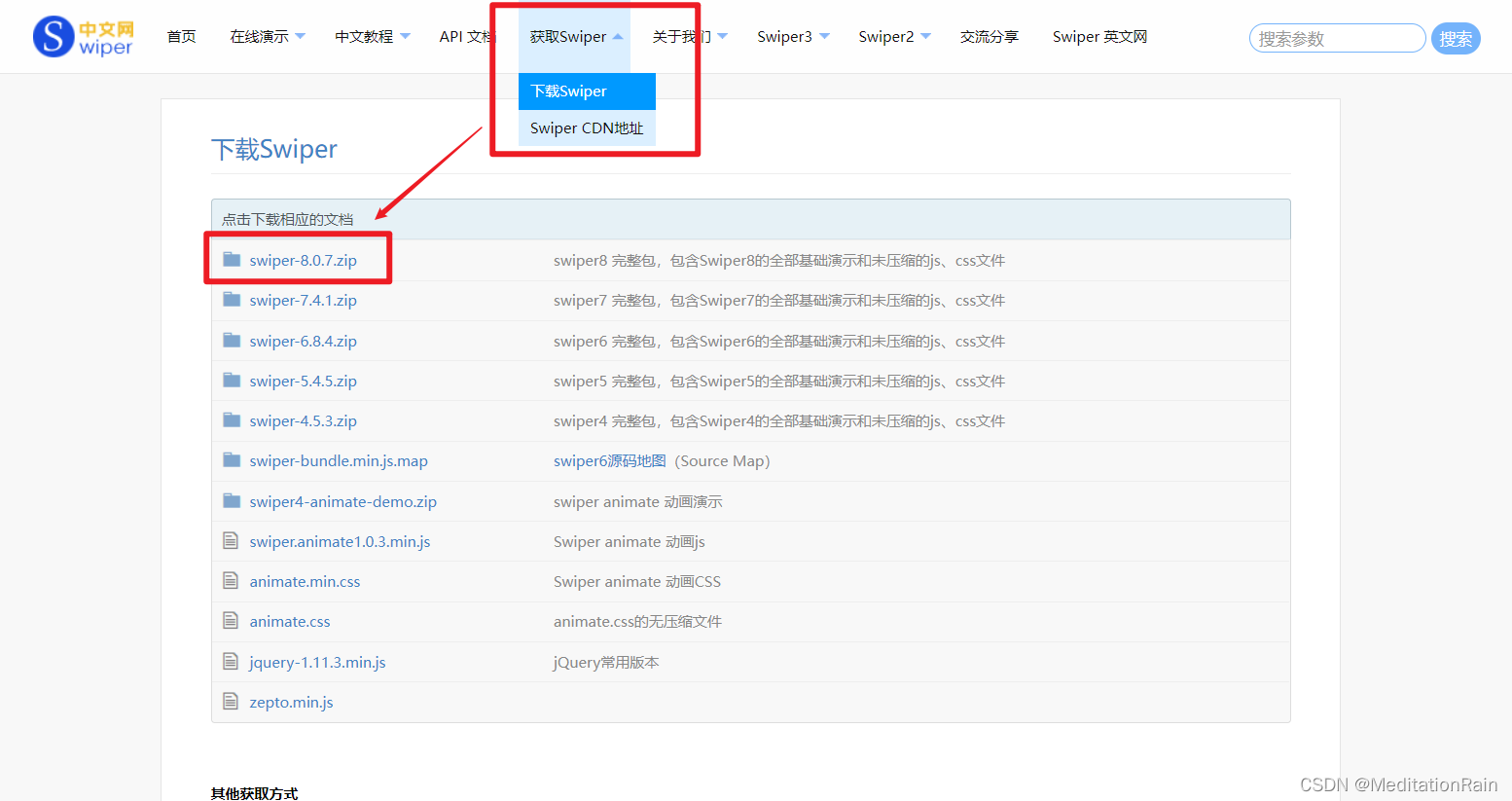
将使用的文件引入项目文件夹下:

加载插件:
<!DOCTYPE html>
<html>
<head>
    ...
    <link rel="stylesheet" href="dist/css/swiper-bundle.min.css">
</head>
<body>
    ...
    <script src="dist/js/swiper-bundle.min.js"></script>
    ...
</body>
</html>
添加HTML内容:
<div class="swiper">
    <div class="swiper-wrapper">
        <div class="swiper-slide">Slide 1</div>
        <div class="swiper-slide">Slide 2</div>
        <div class="swiper-slide">Slide 3</div>
    </div>
    <!-- 如果需要分页器 -->
    <div class="swiper-pagination"></div>

    <!-- 如果需要导航按钮 -->
    <div class="swiper-button-prev"></div>
    <div class="swiper-button-next"></div>

    <!-- 如果需要滚动条 -->
    <div class="swiper-scrollbar"></div>
</div>
导航等组件可以放在Swiper容器之外
三、Swiper使用
我在项目中使用的是一个全屏的轮播图,下方有动态指示点,以及是循环播放的。

HTML文件:
    <div class="swiper mySwiper">
        <!--加载图片-->
      <div class="swiper-wrapper">
        <div class="swiper-slide"><img src="images/1.jpg" alt=""></div>
        <div class="swiper-slide"><img src="images/2.jpg" alt=""></div>
        <div class="swiper-slide"><img src="images/3.jpg" alt=""></div>
        <div class="swiper-slide"><img src="images/4.jpg" alt=""></div>
        <div class="swiper-slide"><img src="images/5.jpg" alt=""></div>
      </div>
		<!--动态指示点-->
      <div class="swiper-pagination"></div>
        <!--页面切换按钮-->
	  <div class="middle">
		  <a class="btn btn3" href="./check.html">查看城市站点空气质量</a>
		  <a class="btn btn4">查看城市污染程度</a>
	  </div>
    </div>
样式设计:
.swiper {

width: 100%;
height: 100%;
}

.swiper-slide {

text-align: center;
font-size: 18px;
background: #fff;

/* Center slide text vertically */
display: -webkit-box;
display: -ms-flexbox;
display: -webkit-flex;
display: flex;
-webkit-box-pack: center;
-ms-flex-pack: center;
-webkit-justify-content: center;
justify-content: center;
-webkit-box-align: center;
-ms-flex-align: center;
-webkit-align-items: center;
align-items: center;
}

.swiper-slide img {

display: block;
width: 100%;
height: 100%;
object-fit: cover;
}
.middle {

	  position: absolute;
	  top: 50%;
	  left: 50%;
	  z-index: 2;
	  transform: translate(-50%,-50%);
}
.btn{

	z-index: 2;
	display: inline-block;
	position: relative;
	color: white;
	font-size: 14px;
	font-family: "montserrat";
	text-decoration: none;
	margin: 30px 10px;
	background: rgba(0, 0, 0, 0.8);
	border: 2px solid #ff7675;
	padding: 14px 60px;
	text-transform: uppercase;
	overflow: hidden;
	transition: 1s all ease;
}
.btn::before{

	background: #ff7675;
	content: "";
	position: absolute;
	top: 50%;
	left: 50%;
	transform: translate(-50%,-50%);
	z-index: -1;
	transition: all 0.6s ease;
}

.btn3::before{

  width: 100%;
  height: 0%;
  transform: translate(-50%,-50%) rotate(45deg);
}
.btn3:hover::before{

  height: 480%;
}

.btn4::before{

  width: 100%;
  height: 0%;
  transform: translate(-50%,-50%) rotate(-45deg);
}
.btn4:hover::before{

  height: 450%;
}
js代码:
      var swiper = new Swiper(".mySwiper", {

        pagination: {

          el: ".swiper-pagination",
        },
		loop: true,
		speed:2000,
		autoplay: {

			delay: 3000,
			disableOnInteraction: false,
			waitForTransition: false,
		},
	    effect : 'fade',
	    fadeEffect: {

		    crossFade: true,
	    }
      });
边栏推荐
- Adobe Premiere foundation - time remapping (10)
- Jar package background startup and log output
- markdown知识轻轻来袭
- SD6.22集训总结
- Programmer Resource Recommendation Guide
- Source code installation mavros
- Adobe Premiere基础-常用的视频特效(边角定位,马赛克,模糊,锐化,手写工具,效果控件层级顺序)(十六)
- Adobe Premiere基础-时间重映射(十)
- JDBC Codes connexes
- RocketMQ的tag过滤和sql过滤
猜你喜欢

Adobe Premiere基础-时间重映射(十)

Adobe Premiere Basics - common video effects (cropping, black and white, clip speed, mirroring, lens halo) (XV)

Adobe Premiere foundation - material nesting (animation of Tiktok ending avatar) (IX)
![[target tracking] |stark configuration win OTB](/img/29/a6b3b99b7d2349499aede9e76ab29a.png)
[target tracking] |stark configuration win OTB

牛客小Bai月赛52 D 环上食虫(尺取+st表)

Automatic software test - read SMS verification code using SMS transponder and selenium
Adobe Premiere foundation - time remapping (10)

通过 hosts文件配置本地域名

kubekey2.2.1 kubernetes1.23.7离线包制作+harbor部暑并上传镜像

Adobe Premiere基础-常用的视频特效(边角定位,马赛克,模糊,锐化,手写工具,效果控件层级顺序)(十六)
随机推荐
Configure the local domain name through the hosts file
Adobe Premiere Basics - common video effects (cropping, black and white, clip speed, mirroring, lens halo) (XV)
JS merge two one-dimensional arrays and remove the same items (collation)
Detailed analysis on the use of MySQL stored procedure loop
SD6.22集训总结
VMware安装ESXI
3H proficient in opencv (V) - perspective transformation
Goldfish rhca memoirs: do447 build advanced job workflow -- create job template survey to set work variables
【TcaplusDB知识库】TcaplusDB单据受理-建表审批介绍
3H proficient in opencv (VII) - color detection
/usr/bin/ld: warning: **libmysqlclient. so. 20**, needed by //usr/
Adobe Premiere基础-编辑素材文件常规操作(脱机文件,替换素材,素材标签和编组,素材启用,便捷调节不透明度,项目打包)(十七)
Error building sqlsession problem
Automatic software test - read SMS verification code using SMS transponder and selenium
SD6.23集训总结
JDBC knowledge
jdbc_相关代码
等保测评结论为差,是不是表示等保工作白做了?
Fluent's MSH grid learning
Mysql database daily backup and scheduled cleanup script