当前位置:网站首页>Blazor University (30)表单 —— 从 InputBase 派生
Blazor University (30)表单 —— 从 InputBase 派生
2022-06-22 15:36:00 【dotNET跨平台】
原文链接:https://blazor-university.com/forms/descending-from-inputbase/
从 InputBase 派生
源代码[1]
InputBase<T> 组件是各种 Blazor 输入控件所继承的抽象类。这个类在标准 HTML <input> 元素的基础上增加了额外的功能,比如验证——我们稍后会介绍。因此,如果我们打算将它们用作用户输入,建议我们从这个基类中继承组件。
实现 InputBase<T> 仅需要实现一个抽象方法和一个可选的虚拟方法。
InputBase<T> 是一个泛型类,它具有名为 Value 的 T 类型属性。由于 Web 浏览器使用字符串值,因此该组件需要一种将 T 类型的值与字符串相互转换的方法。
protected abstract bool TryParseValueFromString(string value, out T result, out string validationErrorMessage);TryParseValueFromString 是一个抽象方法,为了将字符串值从 HTML <input> 元素(或其他使用字符串的源)转换为目标类型 T,应重写该方法。如果无法转换,则应设置 validationErrorMessage 为合适的消息以指示转换失败。这用于提供验证错误消息以及视觉无效状态,以便用户知道设置值的尝试失败。
protected virtual string FormatValueAsString(T value)FormatValueAsString 是与 TryParseValueFromString 相对的。如果简单的 Value.ToString() 不足以将 T 的值转换回浏览器 UI 层,则应重写此方法以正确执行任务。
创建 InputColor 组件
首先我们需要创建一个 InputColor.razor 文件。在该文件中,我们需要将 InputBase<Color> 指定为基类,并添加我们希望在 HTML 中呈现的标记。
@using System.Drawing
@using System.Text.RegularExpressions
@inherits InputBase<Color>

<input type="color" @attributes=AdditionalAttributes [email protected] @bind=CurrentValueAsString/>
为 Color 类添加了 System.Drawing,并添加了 System.Text.RegularExpressions 用于将十六进制代码的输入解析为 Color 值。
我们要做的第一件事是实现 FormatValueAsString。为此,我们只需将 R、G 和 B 值格式化为 2 位十六进制值。
protected override string FormatValueAsString(Color value)
  => $"#{value.R:x2}{value.G:x2}{value.B:x2}";
要将十六进制字符串转换回颜色,我们首先需要将 2 个字符的十六进制值转换为字节。
byte HexStringToByte(string hex)
{
  const string HexChars = "0123456789abcdef";

  hex = hex.ToLowerInvariant();
  int result = (HexChars.IndexOf(hex[0]) * 16) + HexChars.IndexOf(hex[1]);
  return (byte)result;
}
接下来我们需要实现 TryParseValueAsString。
static Regex Regex = new Regex("^#([0-9a-f]{2}){3}$", RegexOptions.Compiled | RegexOptions.IgnoreCase);

protected override bool TryParseValueFromString(string value, out Color result, out string validationErrorMessage)
{
  Match match = Regex.Match(value);
  if (!match.Success)
  {
    validationErrorMessage = "Not a valid color code";
    result = Color.Red;
    return false;
  }

  byte r = HexStringToByte(match.Groups[1].Captures[0].Value);
  byte g = HexStringToByte(match.Groups[1].Captures[1].Value);
  byte b = HexStringToByte(match.Groups[1].Captures[2].Value);

  validationErrorMessage = null;
  result = Color.FromArgb(r, g, b);
  return true;
}
该代码使用正则表达式来确保该值是 6 个十六进制字符格式的字符串,前面有一个 # 字符。它捕获三组 2 位十六进制字符,并使用我们的 HexStringToByte 方法将它们转换为字节。最后,使用这些 RGB 值创建颜色。
我们应该给组件添加一个参数,允许它的使用者指定一个自定义错误消息,以便在传递的值无效时使用。添加 [Parameter] 属性。我们可以随意调用它,但 ParsingErrorMessage 是 Blazor 中使用的标准名称。
[Parameter]
public string ParsingErrorMessage { get; set; }
然后更改在 TryParseValueFromString 方法中设置 validationErrorMessage 的代码,以使用该参数而不是硬编码的错误消息。
if (!match.Success)
{
  validationErrorMessage = ParsingErrorMessage;
  result = Color.Red;
  return false;
}
为了便于将颜色显示为文本,让我们重构 FormatValueAsString 方法以使用静态方法,这样我们就可以独立于 InputColor 的任何实例使用该静态方法。
public static string ColorToString(Color value)
  => $"#{value.R:x2}{value.G:x2}{value.B:x2}";

protected override string FormatValueAsString(Color value)
  => ColorToString(value);
我们的整个组件现在应该如下所示:
@using System.Drawing
@using System.Text.RegularExpressions
@inherits InputBase<Color>

<input type="color" @attributes=AdditionalAttributes [email protected] @bind=CurrentValueAsString/>

@code {
  [Parameter] public string ParsingErrorMessage { get; set; }

  public static string ColorToString(Color value)
    => $"#{value.R:x2}{value.G:x2}{value.B:x2}";

  protected override string FormatValueAsString(Color value)
    => ColorToString(value);

  static Regex Regex = new Regex("^#([0-9a-f]{2}){3}$", RegexOptions.Compiled | RegexOptions.IgnoreCase);
  protected override bool TryParseValueFromString(string value, out Color result, out string validationErrorMessage)
  {
    Match match = Regex.Match(value);
    if (!match.Success)
    {
      validationErrorMessage = ParsingErrorMessage;
      result = Color.Red;
      return false;
    }

    byte r = HexStringToByte(match.Groups[1].Captures[0].Value);
    byte g = HexStringToByte(match.Groups[1].Captures[1].Value);
    byte b = HexStringToByte(match.Groups[1].Captures[2].Value);

    validationErrorMessage = null;
    result = Color.FromArgb(r, g, b);
    return true;
  }

  byte HexStringToByte(string hex)
  {
    const string HexChars = "0123456789abcdef";

    hex = hex.ToLowerInvariant();
    int result = (HexChars.IndexOf(hex[0]) * 16) + HexChars.IndexOf(hex[1]);
    return (byte)result;
  }
}
InputColor 示例
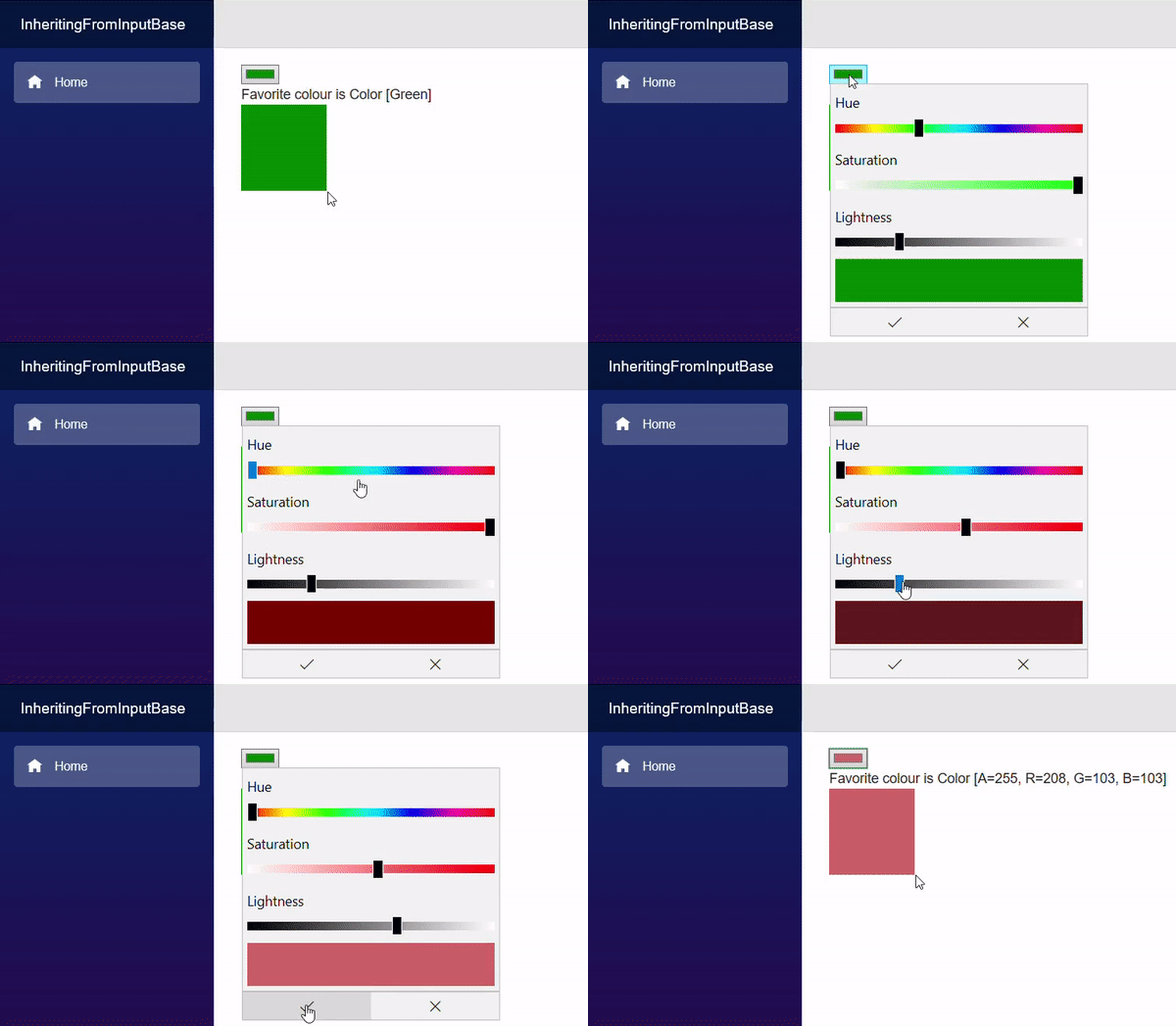
我们将制作一个简单的页面,让用户选择个人最喜欢的颜色。
@page "/"
@using System.Drawing

<EditForm Model=CurrentPerson>
  <InputColor @bind-Value=CurrentPerson.FavoriteColor/>
</EditForm>

Favorite colour is @CurrentPerson.FavoriteColor
<div style="width:100px;height:100px;background-color:@ColorAsHex"/>

@code {
  Person CurrentPerson = new Person
  {
    FavoriteColor = Color.Green
  };

  string ColorAsHex => InputColor.ColorToString(CurrentPerson.FavoriteColor);

  class Person
  {
    public Color FavoriteColor { get; set; }
  }
}
第 19-22 行
创建一个我们的
EditForm将绑定到的类。第 12-15 行
创建此类的一个实例。
第 17 行
使用我们的静态
InputColor.ColorToString将所选颜色转换为 Web 十六进制颜色字符串。第 9 行
创建具有内联样式的
<div>元素,该元素将所选颜色显示为实心框。第 4 行
创建
EditForm,其模型绑定到我们页面的Person。第 5 行
使用我们的
InputColor组件,该组件将呈现一个带有type=color的HTML <input>元素,供用户交互。
参考资料
[1]
源代码: https://github.com/mrpmorris/blazor-university/tree/master/src/Forms/InheritingFromInputBase
边栏推荐
猜你喜欢
![[deep anatomy of C language] keywords if & else & bool type](/img/cf/a0533b7d3a597368aefe6ce7fd6dbb.png)
[deep anatomy of C language] keywords if & else & bool type
新手必会的静态站点生成器——Gridsome

JSP learning (2) -- JSP script elements and instructions

洞见科技牵头的全球「首个」IEEE隐私计算「互联互通」国际标准正式启动

Team management | how to improve the thinking skills of technical leaders?
![[C language] deeply analyze the relationship between pointer and array](/img/f3/432eeee17034033361e05dde67aac3.jpg)
[C language] deeply analyze the relationship between pointer and array

图计算Hama-BSP模型的运行流程

Make the code elegant (learn debugging + code style)

每秒處理10萬高並發訂單的樂視集團支付系統架構分享

快速掌握 ASP.NET 身份认证框架 Identity - 用户注册
随机推荐
【微信小程序封装底部弹出框】一
mysql指令执行sql文件
系统吞吐量、TPS(QPS)、用户并发量、性能测试概念和公式
Short video source code development, high-quality short video source code need to do what?
variable
Figure operation flow of HAMA BSP Model
Linux system maintenance: mysql8.0.13 source code download and installation "fool" operation steps (Linux centos6.8) test available series
[MYSQL]一台windows电脑安装多个mysql-不同版本
spark关于数据倾斜问题
Review the executor from the perspective of application submission
Bidirectional data binding V-model and v-decorator
Windows8.1 64 installed by mysql5.7.27
招行23型号UKey在win7上无法识别
NLog自定义Target之MQTT
【微信小程序自定义底部tabbar】
scala之闭包函数浅知
Interview knowledge points
How to open an account in flush? Is it safe to open an account online?
scala-for推导:能够在for表达式中的最初部分定义值,并在(外面)后面的表达式中使用该值
Task scheduling design of collection system