当前位置:网站首页>Basic syntax of MySQL DDL and DML and DQL
Basic syntax of MySQL DDL and DML and DQL
2022-07-23 21:11:00 【Working hard】
SQL The concept of
(1)SQL(Structured Query Language): Structured query language ; In fact, it defines the rules for operating all relational databases . Is a special purpose programming language , Is a database query and programming language , For data access and query 、 Update and manage relational database system , It is also the extension of database script file .
(2)SQL General grammar
① SQL Statements can be written in one or more lines , It ends with a semicolon .
② You can use spaces and indents to enhance the readability of statements .
③ MySQL Database SQL Statement is case insensitive , It is recommended to use uppercase .
④ 3 Species notes
* Single-line comments : -- The comment or # The comment (mysql specific )
* Multiline comment : /* notes */
DDL: Operating the database 、 surface
1. Operating the database
① C(Create): establish
Create database :
create database Database name ;
② R(Retrieve): Inquire about
Query all database names :
show databases;
Query the character set of a database : Query the creation statement of a database
show create database Database name ;
③ U(Update): modify
Modify the character set of the database
alter database Database name character set Character set name ;
④ D(Delete): Delete
Delete database
drop database Database name ;
Determine that the database exists , Exist and delete
drop database if exists Database name ;
⑤ Using a database
Query the database name currently in use
select database();
Using a database
use Database name ;

- Operation table
① C(Create): establish
grammar :
create table Table name (
-- Field name type attribute ,
-- Field name type attribute ,
-- ....
-- Field name type attribute
-- );
Be careful :
a. The last column , There is no need to add comma (,)
b.[] Part can be omitted
c.`` The quotation marks ( Invalidate keywords ) It can be omitted , Mainly to distinguish between keywords and ordinary words
Table name naming convention :
a. Table and field names : The table name is the unique identifier in the database , The field name is the unique identifier in the table
b. use 26 English letters ( Case sensitive ) and 0-9 The natural number of ( Often you don't need ) Underline '_' form , The naming is concise and clear , Underline multiple words '_' Separate .
c. All lowercase names , Uppercase is prohibited
d. The field name should not be too long ( Generally no more than three English words )
② Database type ( Commonly used ):
String type :
- char[(M)]: Fixed long string , Retrieval is fast, but it takes space (0<= M <=255)
- varchar[(M)]: Variable string (0 <= M <=65535)
- text: Text string (4 individual G Size left and right )
value type :
- tinyint: Very small data (1 byte )
- int: Standard integers (4 byte )
- bigint: A large integer , amount to long(8 byte )
- Decimal( money ): Floating point numbers in string form (m,d),m Bytes , After the decimal point d position
Date and time type
datetime: date , Including month, day, hour, minute, second yyyy-MM-dd HH:mm:ss
If you don't assign a value to this field in the future , Or assign the value to null, The current system time is used by default , To automatically assign
Null type :
• Understood as a “ No value ” or “ Unknown value ”;
• Do not use NULL Perform arithmetic operations , The result is still the NULL;
• MySQL in ,0 or NULL All means false ,1 It's true .
Applicable scenarios of the two tables :
Use MyISAM: Save space and speed ;
Use InnoDB: Security , Transaction processing and multi-user operation data table .
Create table
create table student(
id int,
name varchar(32),
age int ,
score double(4,1),
birthday date,
insert_time timestamp
);
Copy table :create table Table name like The name of the copied table ;
2. R(Retrieve): Inquire about
Query all table names in a database
show tables;
Query table structure
desc Table name ;
View the SQL sentence
show creat table Table name ;
3. U(Update): modify
1>. Modify the name of the table
alter table used Table name rename as The new name of the table ;
2>. Modify table structure
a. Change the properties of the field
alter table Table name modify Field name Properties to modify ;
b. Modify fields
alter tale Table name change Old field name New field name Properties to modify ;
3>. Add fields
alter table Table name add Field name type attribute ;
4>. Delete field
alter table Table name drop Field name ;
4. D(Delete): Delete
drop table Table name ;
drop table if exists Table name ;

DML: Add, delete and modify the data in the table
1. newly added :
insert into Table name ( Field name 1, Field name 2,... Field name n) values( value 1, value 2,... value n);
insert into Table name values( value 1, value 2,... value n);
Be careful :
① Column name and value should correspond one by one .
② The date is expressed as a string
③ Except for the number type , Other types require quotation marks ( Single and double can ) Lead up
eg:
Let the primary key increase ( Full field statement )
- Write default
- Write null
Insert multiple pieces of data at once
insert into Table name ( Field 1, Field 2...) value( value 1),( value 2)...;
Unusual new methods :
- Copy table ( Tables must exist )
insert into Table name to copy select Field name ... from The table name of the copied data
- Insert data when creating a new table ( The new table does not exist )
create table The new name of the table select Field name ... from The table name of the copied data
insert into Table name value( value 1, value 2...);[ The following value must be full field ]

2. Delete data :
delete from Table name ;( Delete entire table )
delete from Table name where Clause ;
Clear the table :truncate Table name ;
Be careful :
① If there is no condition , Then delete all records in the table .
② If you want to delete all records
(1). delete from Table name ; -- It is not recommended to use . How many records will be deleted
(2). truncate table Table name ; -- Recommended , More efficient Delete the table first , Then create the same table .
3. Modifying data :
grammar :
update Table name set Field name 1= value 1, Field name 2= value 2,... Field name n= value n... where Clause
modify where The following field name corresponds to where The value of the previous field name
Be careful :
- Without any conditions , All records in the table will be modified .
- -- Change the data in a range (>= and <=) Equivalent to between Little data and big data
DQL: Look up the records in the table
1 Basic query
(1) Query the data of all rows and columns of the table ( What you get is a virtual table )
select * from Table name
select Full field from Table name ;
(2) Query the specified field
select Field name 1, Field name 2... from Table name ;
Be careful : If you query all fields , You can use * To replace the field list .
(3) Alias fields :
a.select Old field name as ' new field name ';
b.select Old field name ' new field name ';
c.select Old field name new field name ;
Table reasons for using aliases : Used for multi table query .
- Remove duplication (distinct), Only those identical in the query field name will be removed , As long as there is a repetition, it will stay
select distinct Field name ... from Table name ;
- Conditional inquiry where Clause ;
eg: Query the student table sid stay 3-7 Students in the range
select * from student where sid between 3 and 7;

2 Conditions of the query
Conditions of the query : If there are no query conditions , Then all rows are queried each time . Practical application , Generally, you need to specify the query criteria . Filter records .
select Field name from Table name where Clause ;
*: Birthday in the query table ( The older the birthday , The younger you are )
technological process : Take out each data in the table , The records that meet the conditions return , Records that do not meet the conditions will not be returned
(1) where Clause followed by condition
(2) Operator
> 、< 、<= 、>= 、= 、<>/!=( It's not equal to )
between...and ( Baotou and Baowei )
Fuzzy query :
a.like keyword
Fuzzy symbols %: Any number of any characters 、_: An arbitrary character
b.in keyword : Find in a specific range
c.is keyword ( Query empty data :where Field name is null/ Query non empty data :where Field name is not null)

Aggregate functions :
grammar : Before we do the query is horizontal query , They are judged line by line according to the conditions , The aggregate function query is vertical query , It calculates the values of a column , And then return a result value . Aggregate functions will Ignore the null value NULL.
-- Number of Statistics count( Field )/ Fields can be written *、 Constant 、 Any field name /count The statistical data is null The number of
-- Statistical average avg( Field )
-- Statistical maximum max( Field )
-- Statistical minimum min( Field )
-- Statistical sum sum( Field )
eg:select count(*) Total number , sum(score) Total score , avg(score) average , max(score) The highest , min(score) Lowest score from sc;

Group query :
For group query group by Statement to group query information , The same data as a group , The purpose of grouping is to make statistics , Grouping is usually used with aggregate functions .
select Grouping field name , Aggregate functions from Table name group by Grouping field name ;
eg:select classid,count(*) from student group by classid;
where It's about aggregation ( grouping ) Filter every piece of data before
having It's about aggregation ( grouping ) After each piece of data filtering
having Not alone , It has to go with group by appear
eg: The average score obtained is greater than 80 The above students
select sid,avg(score) from sc group by sid having avg(score) > 80;
Sort order by( Descending desc、 Ascending asc( Default ascending order ))
You can write multiple conditions , Separated by commas , First write the data that needs to be sorted , And so on
limit( Pagination )m,n m Indicates when to start ,n Indicating step size , Take some data
In the query table 5,6,7 Student data ( The formula : Page number -1* step , step )
select * from student limit 4,3;

3 Multiple tables associated query
- Equivalent joint query ( Inline data ), It is applicable to less tables or more tables with less data
select * from surface 1, surface 2 where surface 1. Field 1 = surface 2. Field 2...
Non equivalent associated query
The cartesian product , List all the data in the query table to form a large data table
select * from Table name 1, Table name 2,...
2. Link query ( Outreach query )
select * from Table name 1 inner join Table name 2 on Conditions ,inner join on,..., It is recommended to use
left join on( Left outreach )
From the left table ( surface 1) Return all records in , Even on the right ( surface 2) There are no matching lines in
right join on( Right outreach )
From the right table ( surface 2) Return all records in , Even on the left ( surface 1) There are no matching lines in
- Link query union
union Is to find the union of two queries
union What is merged is the result set , It doesn't distinguish from which table , So you can merge the data queried from multiple tables
select * from Table name 1 inner join Table name 2 on Conditions ,inner join on,... union select * from Table name 1 inner join Table name 2 on Conditions ,inner join on,...
union characteristic :
- When the field names are inconsistent , The header of the first table will prevail , And
- Duplicate rows will be filtered out , And distinct similar
- If the number of table columns queried is not equal , Will report a mistake
- The order in each sentence is meaningless ,mysql It will be ignored when merging
- You can sort the consolidated whole table
- You can check your watch 1 Alias the field name of , Is the final header
union all, You can query all the information in the linked table
union all, You can query all the information of all tables , Find the union of two queries , But it will not filter out the repetition

4 Subquery
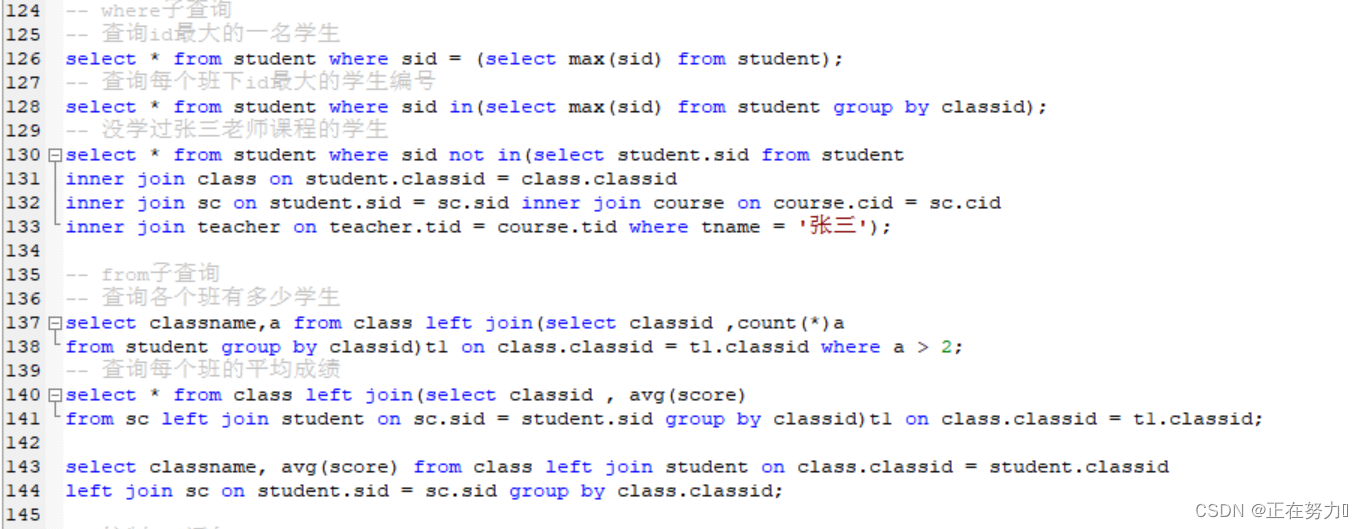
- where Subquery
Inquire about id The largest student
select * from student where sid = (select max(sid) from student);
2. from Subquery
Take the query results of the inner layer as a temporary table , For the outer layer sql Query again , The query result set can be treated as a table , The temporary table should use an alias .
3. exists Subquery
Put the outer layer sql Result , Get the inner layer sql To test , If the inner layer sql establish , Then the line takes out , The inner query is exists After the query .
- any,some,all Subquery
- any Subquery
- It means that any one of the conditions is satisfied , hypothesis any The number of results returned by the internal query statement is three result1...
- Select...from... where a > any(...);
- any Subquery
amount to :
Select...from... where a > result1 or a > result2 or a > result3;
- any and some Use consistent , interchangeable
- all Subquery
- All conditions are met , hypothesis any The number of results returned by the internal query statement is three result1...
- Select...from... where a > all(...);
amount to :
Select...from... where a > result1 and a > result2 and a > result3;
- case when then end sentence
- Simple case function
Case ssex
When 1 then ‘ male ’
When 2 then ‘ Woman ’
End,
2. Case The search function
Case
When ssex = 1 then ‘ male ’
When ssex = 2 then ‘ Woman ’
Else‘ Unknown ’
End,
That's all MySQLDDL and DML and DQL Basic syntax .
边栏推荐
- 2022-7-23 12点 程序爱生活 小时线顶背离出现,保持下跌趋势,等待反弹信号出现。
- The third slam Technology Forum - Professor wuyihong
- 最小生成树:Prim
- Proof of green Tao theorem (1): preparation, notation and Gowers norm
- TCP half connection queue and full connection queue (the most complete in History)
- Unity—3D数学-Vector3
- STM32c8t6驱动激光雷达(一)
- Visual slam learning | basic chapter 01
- Network learning infrared module, 8-way emission independent control
- MySQL(3)
猜你喜欢

SQLite database

Ssm+mysql to realize snack mall system (e-commerce shopping)

1309_ Add GPIO flip on STM32F103 and schedule test with FreeRTOS

Addon plug-in 002 of CDR plug-in development - write an EXE program that can be run by double clicking in 1 minute

手机测试相关基础知识
2022.7.11 MySQL job

High numbers | calculation of double integral 2 | high numbers | handwritten notes
Now I don't know how to synchronize at all

第3章业务功能开发(创建线索)

高数下|二重积分的计算4|高数叔|手写笔记

随机推荐
Qt桌面白板工具其一(解决曲线不平滑的问题——贝塞尔曲线)
Opencv image processing Laplace pyramid
1061 Dating
【复数 重载运算符】
WinDbg实践--入门篇
Understanding of signals
221. 最大正方形 ●● & 1277. 统计全为 1 的正方形子矩阵 ●●
Tropomi (sentinel 5p) data introduction and download method
LeetCode热题 HOT52-100
UnauthorizedAccessException:Access to the path “/xx/xx.xx“ is denied
Typescript Basics
STM32c8t6驱动激光雷达(一)
初识js(适合新手的编程)
LU_ASR01语音模块使用
[attack and defense world web] difficulty four-star 12 point advanced question: flatscience
MySQL(3)
If the order is not paid within 30 minutes, it will be automatically cancelled
prime_series_level-1
High numbers | calculation of triple integral 1 | high numbers | handwritten notes
最小生成树:Prim