当前位置:网站首页>手把手教你前后分离架构(五) 系统身份验证实现
手把手教你前后分离架构(五) 系统身份验证实现
2022-06-10 23:51:00 【dehuisun】
前面我们实现了前后分离项目基础的数据交互以及前端数据展示。用户登录部分一直是模拟登录,今天我们实现系统的身份认证部分让系统不在裸奔。
系统认证授权
认证就是要核验用户的身份,比如说通过用户名和密码来检验用户的身份。说简单一些,认证就是登陆。登陆之后Shiro要记录用户成功登陆的凭证。
授权是比认证更加精细度的划分用户的行为。比如说一个教务管理系统中,学生登陆之后只能查看信息,不能修改信息。而班主任就可以修改学生的信息。这就是利用授权来限定不同身份用户的行为。
安全是应用中不可缺少的功能,相较于其他认证与授权框架,Shiro设计的非常简单,所以广受好评。任意JavaWeb项目都可以使用Shiro框架。
我们采用shiro + JWT架构来实现系统安全认证。只使用jwt只能实现基础验证功能,所以我们把token存储再redis中,利用redis我们可以实现token踢出、token刷新等功能。
Shiro可以利用HttpSession或者Redis存储用户的登陆凭证,以及角色或者身份信息。然后利用过滤器(Filter),对每个Http请求过滤,检查请求对应的HttpSession或者Redis中的认证与授权信息。如果用户没有登陆,或者权限不够,那么Shiro会向客户端返回错误信息。
JWT(Json Web Token), 是为了在网络应用环境间传递声明而执行的一种基于JSON的开放标准。JWT一般被用来在身份提供者和服务提供者间传递被认证的用户身份信息,以便于从资源服务器获取资源,也可以增加一些额外的其它业务逻辑所必须的声明信息,该token也可直接被用于认证,也可被加密。
如果用户的登陆凭证经过加密(Token)保存在客户端,客户端每次提交请求的时候,把Token上传给后端服务器节点。即便后端项目使用了负载均衡,每个后端节点接收到客户端上传的Token之后,经过检测,是有效的Token,于是就断定用户已经成功登陆,接下来就可以提供后端服务了。
传统的HttpSession依靠浏览器的Cookie存放SessionId,所以要求客户端必须是浏览器。现在的JavaWeb系统,客户端可以是浏览器、APP、小程序,以及物联网设备。为了让这些设备都能访问到JavaWeb项目,就必须要引入JWT技术。JWT的Token是纯字符串,至于客户端怎么保存,没有具体要求。只要客户端发起请求的时候,附带上Token即可。所以像物联网设备,我们可以用SQLite存储Token数据。
认证流程

1、SpringBoot整合shiro+jwt+redis
1.1、添加pom依赖
<shiro.version>1.2.4</shiro.version>

<dependency>
            <groupId>org.apache.shiro</groupId>
            <artifactId>shiro-core</artifactId>
            <version>${shiro.version}</version>
        </dependency>

        <dependency>
            <groupId>org.apache.shiro</groupId>
            <artifactId>shiro-ehcache</artifactId>
            <version>${shiro.version}</version>
        </dependency>

        <dependency>
            <groupId>org.apache.shiro</groupId>
            <artifactId>shiro-spring</artifactId>
            <version>${shiro.version}</version>
        </dependency>

        <dependency>
            <groupId>org.apache.shiro</groupId>
            <artifactId>shiro-web</artifactId>
            <version>${shiro.version}</version>
        </dependency>

        <dependency>
            <groupId>io.jsonwebtoken</groupId>
            <artifactId>jjwt</artifactId>
            <version>0.7.0</version>
        </dependency>


        <dependency>
            <groupId>commons-io</groupId>
            <artifactId>commons-io</artifactId>
            <version>1.3.2</version>
        </dependency>

        <dependency>
            <groupId>org.apache.commons</groupId>
            <artifactId>commons-lang3</artifactId>
            <version>3.8</version>
        </dependency>

         <dependency>
            <groupId>com.alibaba</groupId>
            <artifactId>fastjson</artifactId>
            <version>1.2.58</version>
        </dependency>

        <dependency>
            <groupId>org.springframework.boot</groupId>
            <artifactId>spring-boot-starter-data-redis</artifactId>
            <exclusions>
                <exclusion>
                    <groupId>io.lettuce</groupId>
                    <artifactId>lettuce-core</artifactId>
                </exclusion>
            </exclusions>
        </dependency>

        <dependency>
            <groupId>redis.clients</groupId>
            <artifactId>jedis</artifactId>
        </dependency>
1.2、配置shiro
@Configuration
public class ShiroConfig {

    @Bean("shiroFilter")
    public ShiroFilterFactoryBean shiroFilter(SecurityManager securityManager) {
        ShiroFilterFactoryBean shiroFilterFactoryBean = new ShiroFilterFactoryBean();
        shiroFilterFactoryBean.setSecurityManager(securityManager);
        //拦截器
        Map<String, String> filterChainDefinitionMap = new LinkedHashMap<String, String>();
        // 配置不会被拦截的链接 顺序判断
        filterChainDefinitionMap.put("/druid/**", "anon");
        filterChainDefinitionMap.put("/swagger**/**", "anon");
        filterChainDefinitionMap.put("/webjars/**", "anon");
        filterChainDefinitionMap.put("/v2/**", "anon");
        filterChainDefinitionMap.put("/doc.html", "anon");
        filterChainDefinitionMap.put("/document.html", "anon");
        filterChainDefinitionMap.put("/configuration/ui", "anon");
        filterChainDefinitionMap.put("/swagger-resources", "anon");
        filterChainDefinitionMap.put("/authentication/**", "anon");
        filterChainDefinitionMap.put("/js/**", "anon");
        filterChainDefinitionMap.put("/css/**", "anon");
        filterChainDefinitionMap.put("/actuator/**", "anon");
        filterChainDefinitionMap.put("/sys/login/login", "anon");

        Map<String, Filter> filterMap = new HashMap<String, Filter>(1);
        filterMap.put("authc", new JwtFilter());
        shiroFilterFactoryBean.setFilters(filterMap);
        //<!-- 过滤链定义,从上向下顺序执行,一般将/**放在最为下边
        filterChainDefinitionMap.put("/**", "authc");
        shiroFilterFactoryBean.setFilterChainDefinitionMap(filterChainDefinitionMap);
        return shiroFilterFactoryBean;
    }

    @Bean("securityManager")
    public SecurityManager securityManager(MyRealm myRealm) {
        DefaultWebSecurityManager securityManager = new DefaultWebSecurityManager();
        securityManager.setRealm(myRealm);

        DefaultSubjectDAO subjectDAO = new DefaultSubjectDAO();
        DefaultSessionStorageEvaluator defaultSessionStorageEvaluator = new DefaultSessionStorageEvaluator();
        defaultSessionStorageEvaluator.setSessionStorageEnabled(false);
        subjectDAO.setSessionStorageEvaluator(defaultSessionStorageEvaluator);
        securityManager.setSubjectDAO(subjectDAO);

        return securityManager;
    }
}
1.3配置redis
@Configuration
public class RedisConfig {

    @Bean
    public RedisTemplate<String, Object> redisTemplate(RedisConnectionFactory factory) {
        RedisTemplate<String, Object> template = new RedisTemplate<String, Object>();
        template.setConnectionFactory(factory);
        // key采用String的序列化方式
        template.setKeySerializer(new StringRedisSerializer());
        // hash的key也采用String的序列化方式
        template.setHashKeySerializer(new StringRedisSerializer());
        // value序列化方式采用jackson
        template.setValueSerializer(new GenericJackson2JsonRedisSerializer());
        // hash的value序列化方式采用jackson
        template.setHashValueSerializer(new GenericJackson2JsonRedisSerializer());
        template.afterPropertiesSet();
        return template;
    }

}
配置redis
spring.redis.host=127.0.0.1
spring.redis.port=6379
spring.redis.timeout=1000
spring.redis.database=0
1.4 创建用户表并生成代码
CREATE TABLE `sys_user` (
  `id` BIGINT UNSIGNED NOT NULL,
  `account` VARCHAR(50) NOT NULL COMMENT '账号名',
  `username` VARCHAR(240)  NOT NULL COMMENT '用户名',
  `password` VARCHAR(100)  DEFAULT NULL COMMENT '密码',
  `salt` VARCHAR(64)  DEFAULT NULL COMMENT '盐',
  `email` VARCHAR(100)  DEFAULT NULL COMMENT '邮箱',
  `mobile` VARCHAR(100)  DEFAULT NULL COMMENT '手机号',
  `status` CHAR(6)  DEFAULT '0' COMMENT '状态  0:正常   1:停用',
  `err_num` TINYINT DEFAULT NULL COMMENT '登录错误次数',
  `lock_time` TIMESTAMP NULL DEFAULT NULL COMMENT '锁定时间',
  `oid` INT DEFAULT NULL COMMENT '机构id',
  `create_by` BIGINT UNSIGNED DEFAULT NULL COMMENT '创建者ID',
  `create_time`  DATETIME NULL DEFAULT NULL COMMENT '创建时间',
  `update_by` BIGINT UNSIGNED DEFAULT NULL COMMENT '修改人ID',
  `update_time` DATETIME DEFAULT NULL COMMENT '修改时间',
  `deleted` INT DEFAULT '0' COMMENT '是否被删除(0:未删除;1:已删除)',
  PRIMARY KEY (`id`)
) ENGINE=INNODB DEFAULT CHARSET=utf8mb4 ROW_FORMAT=DYNAMIC COMMENT='菜单管理'
1.5 shiro实现
@Component
public class MyRealm extends AuthorizingRealm {

    @Autowired
    private ISysUserService sysUserService;

    @Autowired
    private RedisTemplate redisTemplate;

    /**
     * 必须重写此方法,不然Shiro会报错
     */
    @Override
    public boolean supports(AuthenticationToken token) {
        return token instanceof JwtToken;
    }

    /**
     * 只有当需要检测用户权限的时候才会调用此方法,例如checkRole,checkPermission之类的
     */
    @Override
    protected AuthorizationInfo doGetAuthorizationInfo(PrincipalCollection principals) {
        return new SimpleAuthorizationInfo();
    }

    /**
     * 默认使用此方法进行用户名正确与否验证,错误抛出异常即可
     */
    @Override
    protected AuthenticationInfo doGetAuthenticationInfo(AuthenticationToken auth) throws AuthenticationException {
        String token = (String) auth.getCredentials();

        if (token == null) {
            throw new AuthenticationException("token为空!");
        }
        // 校验token有效性
        Object user = this.checkToken(token);
        return new SimpleAuthenticationInfo(user, token, getName());
    }

    /**
     * 校验token的有效性
     */
    public Object checkToken(String token) throws AuthenticationException {
        // 解密获得username,用于和数据库进行对比
        String userId = JwtUtil.getUserId(token);
        if (StringUtils.isBlank(userId)) {
            throw new AuthenticationException("token无效");
        }

        SysUser sysUser = sysUserService.getById(userId);
        if (sysUser == null) {
            throw new AuthenticationException("用户不存在!");
        }
       //  判断用户状态
        if (Constant.no.equals(sysUser.getStatus())) {
            throw new AuthenticationException("账号已被锁定,请联系管理员!");
        }
        // 校验token是否超时失效 & 或者账号密码是否错误
        if (!jwtTokenRefresh(token, String.valueOf(sysUser.getId()))) {
            throw new AuthenticationException("Token失效,请重新登录!");
        }
        return sysUser;

    }

    /**
     * 刷新token
     */
    public boolean jwtTokenRefresh(String token, String userId) {
        String cacheToken = (String) redisTemplate.opsForValue().get(Constant.CATCHE_TOKEN + token);
        if (StringUtils.isNotEmpty(cacheToken)) {
            // 校验token有效性
            if (!JwtUtil.verify(cacheToken)) {
                String newToken = JwtUtil.sign(userId);
                // 设置超时时间
                redisTemplate.opsForValue().set(Constant.CATCHE_TOKEN + token, newToken, JwtUtil.expire * 2, TimeUnit.SECONDS);
            }
            return true;
        }
        return false;
    }

}
JwtFilter.java
public class JwtFilter extends BasicHttpAuthenticationFilter {
    /**
     * 执行登录认证
     */
    @Override
    protected boolean isAccessAllowed(ServletRequest request, ServletResponse response, Object mappedValue) {
    	 if(((HttpServletRequest) request).getMethod().equals(RequestMethod.OPTIONS.name())){
             return true;
         }
         return super.isAccessAllowed(request, response, mappedValue);
    }

    /**
     *认证失败回调方法
     */
    @Override
    protected boolean onLoginFailure(AuthenticationToken token, AuthenticationException e, ServletRequest request, ServletResponse response) {
        HttpServletResponse httpResponse = (HttpServletResponse) response;
        httpResponse.setContentType("application/json;charset=utf-8");
        httpResponse.setHeader("Access-Control-Allow-Credentials", "true");

        try {
            //处理登录失败的异常
            Throwable throwable = e.getCause() == null ? e : e.getCause();
            String json = JSONObject.toJSONString(Result.noAccess().info(throwable.getMessage()));
            httpResponse.getWriter().print(json);
        } catch (Exception exp) {
        	exp.printStackTrace();
        }

        return false;
    }

	@Override
	protected AuthenticationToken createToken(ServletRequest request,
			ServletResponse response)  {
		  //获取请求token
        String token = getRequestToken((HttpServletRequest) request);
        if(StringUtils.isBlank(token)){
            return null;
        }
        return new JwtToken(token);
	}

    /**
     * 处理未经身份验证的请求
     */
	@Override
	protected boolean onAccessDenied(ServletRequest request,
			ServletResponse response) throws Exception {
		 //获取请求token,如果token不存在,直接返回401
        String token = getRequestToken((HttpServletRequest) request);
        if(StringUtils.isBlank(token)){
            HttpServletResponse httpResponse = (HttpServletResponse) response;
            httpResponse.setHeader("Access-Control-Allow-Credentials", "true");
            httpResponse.setContentType("application/json;charset=utf-8");
            String json = JSONObject.toJSONString(Result.noAccess());
            httpResponse.getWriter().print(json);
            return false;
        }
        return executeLogin(request, response);
	}

	 /**
     * 获取请求中的token
     */
    private String getRequestToken(HttpServletRequest httpRequest){
        //从header中获取token
        String token = httpRequest.getHeader(Constant.token);
        //如果header中不存在token,则从参数中获取token
        if(StringUtils.isBlank(token)||("null").equals(token)){
            token = httpRequest.getParameter(Constant.token);
        }
        //如果header中不存在token,则从参数中获取token
        if(StringUtils.isBlank(token)||("null").equals(token)){
            Cookie[] cookies =  httpRequest.getCookies();
            if(cookies != null){
                for(Cookie cookie : cookies){
                    if(cookie.getName().equals(Constant.token)){
                        token =  cookie.getValue();
                    }
                }
            }
        }
        return token;
    }
}
JwtUtil工具类
@Slf4j
@ConfigurationProperties(prefix = "mir.jwt")
@Component
@Data
public class JwtUtil {

    private static String secret;
    public static long expire;

    /**
     * 生成jwt token
     */
    public static String sign(String userId) {
        //过期时间
        Date expireDate = new Date(System.currentTimeMillis() + expire * 1000);

        return Jwts.builder()
                .setHeaderParam("typ", "JWT")
                .setSubject(userId)
                .setIssuedAt(new Date())
                .setExpiration(expireDate)
                .signWith(SignatureAlgorithm.HS512, secret)
                .compact();
    }

    /**
     * 校验token
     */
    public static boolean verify(String token) {
        try {
            Jwts.parser()
                .setSigningKey(secret)
                .parseClaimsJws(token)
                .getBody();
            return true;
        }catch (Exception e){
            return false;
        }
    }

    /**
     * 获取userId
     */
    public static String getUserId(String token) {
        try {
            Claims claims=Jwts.parser().setSigningKey(secret).parseClaimsJws(token).getBody();
            return claims.getSubject();
        }catch (ExpiredJwtException e){
            Claims claims = e.getClaims();
            return claims.getSubject();
        }catch (Exception e){
            return null;
        }
    }

    public String getSecret() {
        return secret;
    }

    public void setSecret(String secret) {
        JwtUtil.secret = secret;
    }

    public long getExpire() {
        return expire;
    }

    public void setExpire(long expire) {
        JwtUtil.expire = expire;
    }

}
配置文件
mir.jwt.secret = 123456
mir.jwt.expire = 900
JwtToken
public class JwtToken implements AuthenticationToken {

	//密钥
    private String token;

    public JwtToken(String token) {
        this.token = token;
    }

    @Override
    public Object getPrincipal() {
        return token;
    }

    @Override
    public Object getCredentials() {
        return token;
    }
}
2、账号密码登录
2.1 后端实现
@ApiOperation(value = "登录", notes="账号密码方式登录")
    @ApiImplicitParams({
            @ApiImplicitParam(name="account",value="账号",dataType="string",required = true, paramType = "query"),
            @ApiImplicitParam(name="password",value="密码",dataType="string", required = true,paramType = "query"),
    })
    @PostMapping("/login")
    public Result login(String account, String password, HttpServletRequest request, HttpServletResponse response)throws Exception {
        try {
            SysUser sysUser=new SysUser();
            sysUser.setAccount(account);
            List<SysUser> list = sysUserService.list(new QueryWrapper<>(sysUser));
            if(list!=null&&list.size()>0){
                SysUser user=list.get(0);
                if(Constant.yes.equals(user.getStatus())){//状态
                    if(password.equals(user.getPassword())){//密码匹配
                        String token= JwtUtil.sign(String.valueOf(user.getId()));
                        redisTemplate.opsForValue().set(Constant.CATCHE_TOKEN + token,token,JwtUtil.expire * 2, TimeUnit.SECONDS);
                        Cookie cookie = new Cookie(Constant.token, token);
                        cookie.setMaxAge(604800);
                        cookie.setHttpOnly(true);
                        cookie.setPath("/");
                        response.addCookie(cookie);
                        return Result.ok().info(token);//生成token
                    }else{
                        return Result.error().message("账号或密码错误");//密码错误
                    }
                }else {
                    return Result.error().message("用户已经被锁定");//用户已经被锁定,不能登录
                }
            }else{
                return Result.error().message("账号或密码错误");//用户未找到
            }
        } catch (Exception e){
            log.error("登录失败", e);
            return Result.error().message("登录失败");//未知异常
        }
    }
测试

2.2 axios请求方法封装
创建http工具类
添加cookie依赖
"vue-cookie": "^1.1.4",
import VueCookie from 'vue-cookie'
Vue.use(VueCookie)
http工具类
import Vue from 'vue'
import axios from 'axios'
import router from '@/router'
import qs from 'qs'
import merge from 'lodash/merge'
import { clearLoginInfo } from '@/utils'

const http = axios.create({
  timeout: 1000 * 3,
  withCredentials: true,
  headers: {
    'Content-Type': 'application/json; charset=utf-8'
  }
})

/**
 * 请求拦截
 */
http.interceptors.request.use(config => {
  config.headers['token'] = Vue.cookie.get('token') // 请求头带上token
  return config
}, error => {
  return Promise.reject(error)
})


/**
 *
 * 响应拦截
 */
http.interceptors.response.use(response => {
  alert()
  if (response.data.code === 401) { // 401, token失效
    clearLoginInfo()
    router.push({ name: 'login' ,params: { data: response.data.messages }})
  }
  return response
}, error => {
  return Promise.reject(error)
})

/**
 * 请求地址处理
 * @param {*} actionName action方法名称
 */
http.adornUrl = (actionName) => {
  // 非生产环境 && 开启代理, 接口前缀统一使用[/proxyApi/]前缀做代理拦截!
  return (process.env.OPEN_PROXY  ? '/proxyApi' : window.SITE_CONFIG.baseUrl) + actionName
}

/**
 * 请求方法处理
 * @param methodName
 * @returns {*}
 */
http.adornMethod = (methodName) =>{
  return methodName;
}

/**
 * get请求参数处理
 * @param {*} params 参数对象
 * @param {*} openDefultParams 是否开启默认参数?
 */
http.adornParams = (params = {}, openDefultParams = true) => {
  var defaults = {
    't': new Date().getTime()
  }
  return openDefultParams ? merge(defaults, params) : params
}

/**
 * post请求数据处理
 * @param {*} data 数据对象
 * @param {*} openDefultdata 是否开启默认数据?
 * @param {*} contentType 数据格式
 *  json: 'application/json; charset=utf-8'
 *  form: 'application/x-www-form-urlencoded; charset=utf-8'
 */
http.adornData = (data = {}, openDefultdata = true, contentType = 'json') => {
  var defaults = {
    't': new Date().getTime()
  }
  data = openDefultdata ? merge(defaults, data) : data
  return contentType === 'json' ? JSON.stringify(data) : qs.stringify(data)
}

export default http
2.3 proxyTable代理转发后端接口
 proxyTable: devEnv.OPEN_PROXY === false ? {} : {
      '/proxyApi': {
        target: 'http://127.0.0.1:8888/',
        changeOrigin: true,
        pathRewrite: {
          '^/proxyApi': '/'
        }
      }
    },
登录页面实现
<template>
  <div class="login1">
    <el-form ref="dataForm" :model="dataForm" :rules="loginRules" size="mini" class="login-form" status-icon>
      <h2 class="title">欢迎登录后台管理系统</h2>
      <el-form-item prop="username">
        <el-input
          v-model="dataForm.username"
          type="text"
          auto-complete="off"
          placeholder="账号"
        >
          <i slot="prefix" class="el-input__icon el-icon-s-custom svg-external-icon"></i>
        </el-input>
      </el-form-item>
      <el-form-item prop="password">
        <el-input
          v-model="dataForm.password"
          type="password"
          auto-complete="off"
          placeholder="密码"
          @keyup.enter.native="dataFormSubmit"
        >
          <i slot="prefix" class="el-input__icon el-icon-s-goods svg-external-icon"></i>
        </el-input>
      </el-form-item>
<!--      <el-form-item prop="captcha" v-if="captchaOnOff">
        <el-input
          v-model="dataForm.captcha"
          auto-complete="off"
          placeholder="验证码"
          style="width: 63%"
          @keyup.enter.native="dataFormSubmit"
        >
          <i slot="prefix" class="el-input__icon el-icon-menu svg-external-icon"></i>
        </el-input>
        <div class="login-code">
          <img :src="captchaPath" @click="getCaptcha()" style="width: 100%"  class="login-code-img"/>
        </div>
      </el-form-item>-->
      <!--      <el-checkbox v-model="loginForm.rememberMe" style="margin:0px 0px 25px 0px;">记住密码</el-checkbox>-->
      <el-form-item style="width:100%;">
        <el-button
          :loading="loading"
          size="medium"
          type="primary"
          style="width:100%;"
          @click.native.prevent="dataFormSubmit"
        >
          <span v-if="!loading">登 录</span>
          <span v-else>登 录 中...</span>
        </el-button>
        <div style="float: right;" v-if="register">
          <router-link class="link-type" :to="'/register'">立即注册</router-link>
        </div>
      </el-form-item>
    </el-form>
    <!--  底部  -->
    <div class="el-login-footer">
      <span>Copyright  2021-2022 All Rights Reserved.</span>
    </div>
  </div>
</template>

<script>
import { encrypt } from '@/utils/jsencrypt'
export default {
  name: "Login",
  data() {
    return {
      codeUrl: "",
      dataForm: {
        username: '',
        password: '',
        uid: '',
        captcha: '',
        client_id:'webApp',
        client_secret:'webApp',
        grant_type:'password'
      },
      loginRules: {
        username: [
          { required: true, trigger: "blur", message: "请输入您的账号" }
        ],
        password: [
          { required: true, trigger: "blur", message: "请输入您的密码" }
        ],
      },
      captchaPath: '',
      loading: false,
      // 验证码开关
      captchaOnOff: true,
      // 注册开关
      register: false,
    };
  },
  created() {
    // var info=this.$route.params.data
    // if(info!=null)
    //   this.$message({
    //     showClose: true,
    //     message: info,
    //     type: 'error',
    //     duration:1000
    //   });
  },
  methods: {
    // 提交表单
    dataFormSubmit () {
      this.$refs['dataForm'].validate((valid) => {
        if (valid) {
          this.dataForm.password=encrypt(this.dataForm.password)
          this.loading = true;
          this.$http({
            url: this.$http.adornUrl("/sys/login"),
            method: 'post',
            params: this.$http.adornParams(this.dataForm)
          }).then(({data}) => {
            if (data && data.success == true) {
              this.$router.replace({ name: 'home' })
            }else{
              this.dataForm.password="";
              this.$message.error(data.message)
              this.loading = false;
            }
          }).catch(data => {
              this.loading = false;
              this.dataForm.password="";
              console.log(data)
              this.$message.error("系统异常,请联系管理员");
            }
          )
        }
      })
    },
  }
};
</script>

<style rel="stylesheet/scss" lang="scss">
.login1 {
  display: flex;
  justify-content: center;
  align-items: center;
  height: 100%;
  /*background-image: url("../assets/images/login-background.jpg");*/
  background: #3a8ee6;
  background-size: cover;
}
.title {
  margin: 0px auto 20px auto;
  text-align: center;
  color: #707070;
}

.login-form {
  border-radius: 6px;
  background: #ffffff;
  width: 450px;

  padding: 25px 25px 5px 25px;
  .el-input {
    height: 38px;
    input {
      height: 38px;
    }
  }
  .input-icon {
    height: 39px;
    width: 14px;
    margin-left: 2px;
  }
}
.login-tip {
  font-size: 13px;
  text-align: center;
  color: #bfbfbf;
}
.login-code {
  width: 33%;
  height: 36px;
  float: right;
  img {
    cursor: pointer;
    vertical-align: middle;
  }
}
.el-login-footer {
  height: 40px;
  line-height: 40px;
  position: fixed;
  bottom: 0;
  width: 100%;
  text-align: center;
  color: #fff;
  font-family: Arial;
  font-size: 12px;
  letter-spacing: 1px;
}
.login-code-img {
  height: 38px;
}
.svg-external-icon{
  font-size: 12px;
  //margin-right: 18px;
  margin-left: 3px;
  display: flex;
  align-items: center;
}
body {
  height: 100%;
  -moz-osx-font-smoothing: grayscale;
  -webkit-font-smoothing: antialiased;
  text-rendering: optimizeLegibility;
  font-family: Helvetica Neue, Helvetica, PingFang SC, Hiragino Sans GB, Microsoft YaHei, Arial, sans-serif;
}

html {
  height: 100%;
  box-sizing: border-box;
}

#app {
  height: 100%;
}
.h1, .h2, .h3, .h4, .h5, .h6, h1, h2, h3, h4, h5, h6 {
  font-family: inherit;
  font-weight: 500;
  line-height: 1.1;
  color: inherit;
}
</style>
2.4 密码加密传输
前台加密
npm install jsencrypt --dimport JSEncrypt from 'jsencrypt/bin/jsencrypt.min'
const publicKey = 'MFwwDQYJKoZIhvcNAQEBBQADSwAwSAJBAKoR8mX0rGKLqzcWmOzbfj64K8ZIgOdH\n' +
'nzkXSOVOZbFu/TJhZ7rFAN+eaGkl3C4buccQd/EjEsj9ir7ijT7h96MCAwEAAQ=='
// 加密
export function encrypt(txt) {
const encryptor = new JSEncrypt()
encryptor.setPublicKey(publicKey) // 设置公钥
return encryptor.encrypt(txt) // 对数据进行加密
}import { encrypt } from '@/utils/jsencrypt'
this.dataForm.password=encrypt(this.dataForm.password)后台解密
 <dependency>
     <groupId>commons-codec</groupId>
     <artifactId>commons-codec</artifactId>
     <version>1.10</version>
</dependency>
package com.sq.auth.utils;
import lombok.extern.slf4j.Slf4j;
import org.apache.commons.codec.binary.Base64;
import javax.crypto.Cipher;
import java.security.KeyFactory;
import java.security.interfaces.RSAPrivateKey;
import java.security.interfaces.RSAPublicKey;
import java.security.spec.PKCS8EncodedKeySpec;
import java.security.spec.X509EncodedKeySpec;
@Slf4j
public class RSAEncrypt {
// 密钥对生成 http://web.chacuo.net/netrsakeypair
private static String publicKey = "MFwwDQYJKoZIhvcNAQEBBQADSwAwSAJBAKoR8mX0rGKLqzcWmOzbfj64K8ZIgOdH\n" +
"nzkXSOVOZbFu/TJhZ7rFAN+eaGkl3C4buccQd/EjEsj9ir7ijT7h96MCAwEAAQ==";
private static String privateKey = "MIIBVAIBADANBgkqhkiG9w0BAQEFAASCAT4wggE6AgEAAkEAqhHyZfSsYourNxaY\n" +
"7Nt+PrgrxkiA50efORdI5U5lsW79MmFnusUA355oaSXcLhu5xxB38SMSyP2KvuKN\n" +
"PuH3owIDAQABAkAfoiLyL+Z4lf4Myxk6xUDgLaWGximj20CUf+5BKKnlrK+Ed8gA\n" +
"kM0HqoTt2UZwA5E2MzS4EI2gjfQhz5X28uqxAiEA3wNFxfrCZlSZHb0gn2zDpWow\n" +
"cSxQAgiCstxGUoOqlW8CIQDDOerGKH5OmCJ4Z21v+F25WaHYPxCFMvwxpcw99Ecv\n" +
"DQIgIdhDTIqD2jfYjPTY8Jj3EDGPbH2HHuffvflECt3Ek60CIQCFRlCkHpi7hthh\n" +
"YhovyloRYsM+IS9h/0BzlEAuO0ktMQIgSPT3aFAgJYwKpqRYKlLDVcflZFCKY7u3\n" +
"UP8iWi1Qw0Y=";
/**
* RSA公钥加密
* @param str 加密字符串
* @param publicKey 公钥
* @return 密文
* @throws Exception 加密过程中的异常信息
*/
public static String encrypt( String str, String publicKey ) throws Exception{
//base64编码的公钥
byte[] decoded = Base64.decodeBase64(publicKey);
RSAPublicKey pubKey = (RSAPublicKey) KeyFactory.getInstance("RSA").generatePublic(new X509EncodedKeySpec(decoded));
//RSA加密
Cipher cipher = Cipher.getInstance("RSA");
cipher.init(Cipher.ENCRYPT_MODE, pubKey);
String outStr = Base64.encodeBase64String(cipher.doFinal(str.getBytes("UTF-8")));
return outStr;
}
/**
* RSA私钥解密
* @param str 加密字符串
* @return 铭文
* @throws Exception 解密过程中的异常信息
*/
public static String decrypt(String str) throws Exception{
String outStr="";
try {
//64位解码加密后的字符串
byte[] inputByte = Base64.decodeBase64(str.getBytes("UTF-8"));
//base64编码的私钥
byte[] decoded = Base64.decodeBase64(privateKey);
RSAPrivateKey priKey = (RSAPrivateKey) KeyFactory.getInstance("RSA").generatePrivate(new PKCS8EncodedKeySpec(decoded));
//RSA解密
Cipher cipher = Cipher.getInstance("RSA");
cipher.init(Cipher.DECRYPT_MODE, priKey);
outStr = new String(cipher.doFinal(inputByte));
}catch (Exception e){
log.error("RSA解密失败",e);
}finally {
return outStr;
}
}
}
2.5 公共常量
常量文件
const loading = "拼命加载中..."
const error = "系统异常,请稍后重试"

export default{
  loading,
  error,
}
import tips from "@/constants/tips.constants.js"
Vue.prototype.tips = tips
使用常量类
this.tips.error测试一下关闭后台服务,点击登录
启动服务继续测试
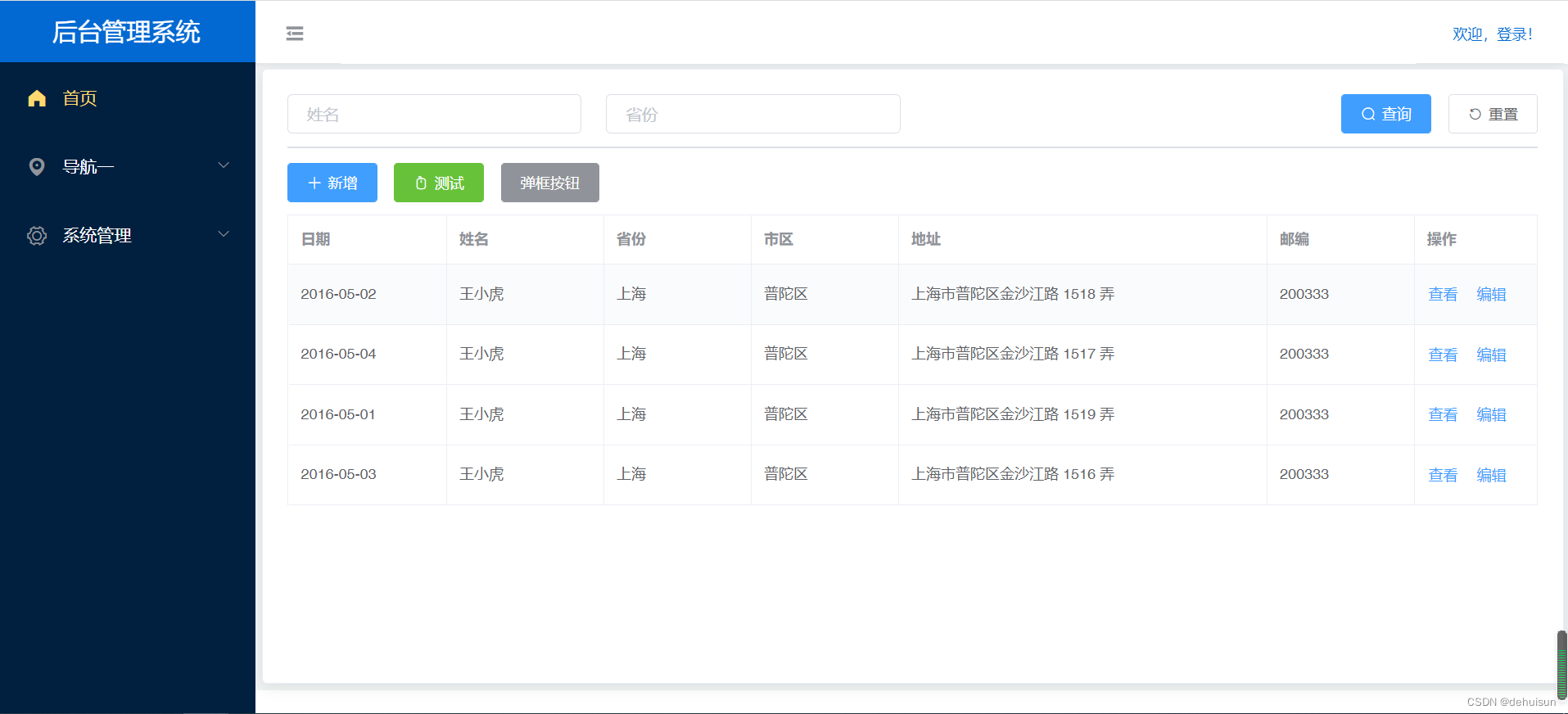

关注公众号”小猿架构“,发送 "前后分离架构" ,下载课程视频+课程源码+课件。
边栏推荐
- Review of software architecture in Harbin Institute of technology -- LSP principle, covariance and inversion
- Deploy netron services through kubernetes and specify model files at startup
- Volatile keyword for concurrent programming
- [network planning] 2.1.2 transport layer services that can be selected by the application
- The principle and source code interpretation of executor thread pool in concurrent programming
- Idea setting background picture (simple)
- [untitled] test
- systemd 下开机启动的优化,删除无用的systemd服务
- QT program plug-in reports an error plugin xcb
- compiler explorer
猜你喜欢
Philips coo will be assigned to solve the dual crisis of "supply chain and product recall" in the face of crisis due to personnel change

What is the difference between hubs, switches and routers?

compiler explorer

How to solve the deep paging problem in large factories (easy to understand)
![[no title] 66666](/img/6c/df2ebb3e39d1e47b8dd74cfdddbb06.gif)
[no title] 66666

Word删除页眉横线的方法

Kubernetes入门介绍与基础搭建
Introduction and basic construction of kubernetes

Unable to return to the default page after page Jump
阻塞队列 — DelayedWorkQueue源码分析
随机推荐
DevOps到底是什么意思?
年金险还能买吗?年金险安不安全?
Kubernetes入门介绍与基础搭建
BGP基础概念及IBGP基本配置
Introduction and basic construction of kubernetes
f‘s‘f‘s‘f‘s‘d
招聘 | 南京 | TRIOSTUDIO 三厘社 – 室内设计师 / 施工图深化设计师 / 装置/产品设计师 / 实习生等
Pirate OJ 146 character string
[network planning] 3.2 transport layer - UDP: connectionless service
MySQL
day01
微信小程序实现OCR扫描识别
Download Google gcr IO image
自动化测试系列
The JVM determines whether an object can be recycled
Rich text activity test 1
How word removes the header line
Room first use
Kubeflow 1.2.0 installation
What is the difference between hubs, switches and routers?